1. పరిచయం మరియు భద్రతా మార్గదర్శకాలు
This manual provides essential information for the safe operation and maintenance of your Walkera QR X350 Quadcopter. Please read it thoroughly before operating the aircraft.
1.1 సాధారణ భద్రతా జాగ్రత్తలు
- Operate the quadcopter in open areas, away from people, buildings, and obstacles.
- Maintain a safe distance from the rotating propellers.
- బలమైన గాలులు లేదా ప్రతికూల వాతావరణ పరిస్థితుల్లో పనిచేయవద్దు.
- ప్రతి విమాన ప్రయాణానికి ముందు అన్ని బ్యాటరీలు పూర్తిగా ఛార్జ్ అయ్యాయని మరియు సరిగ్గా ఇన్స్టాల్ చేయబడ్డాయని నిర్ధారించుకోండి.
- Regularly inspect the quadcopter for any damage or loose parts.
- Recommended age for operation is 14 years and up, with adult supervision.
2. ప్యాకేజీ విషయాలు
క్రింద జాబితా చేయబడిన అన్ని భాగాలు మీ ప్యాకేజీలో ఉన్నాయని ధృవీకరించండి:
- Walkera QR X350 Quadcopter
- Walkera Devo7 2.4Ghz Transmitter/Receiver
- 25C 3S 2200mAh 11.1v LiPO Battery
- GA-005 2-3 Cell LiPO Balance Charger (Input: 110-240V AC / 5V DC)
- ప్రొపెల్లర్లు (సెట్)
- వినియోగదారు మాన్యువల్ మరియు త్వరిత ప్రారంభ గైడ్

Figure 2.1: Contents of the Walkera QR X350 Quadcopter package.
3. Setup and Pre-Flight Preparation
3.1 Quadcopter Assembly
- ల్యాండింగ్ గేర్ను అటాచ్ చేయండి: Securely attach the landing gear to the main body of the quadcopter.
- ప్రొపెల్లర్లను ఇన్స్టాల్ చేయండి: Carefully attach the propellers to the motor shafts. Ensure correct orientation (clockwise and counter-clockwise) as indicated in the quick start guide or on the propellers themselves.
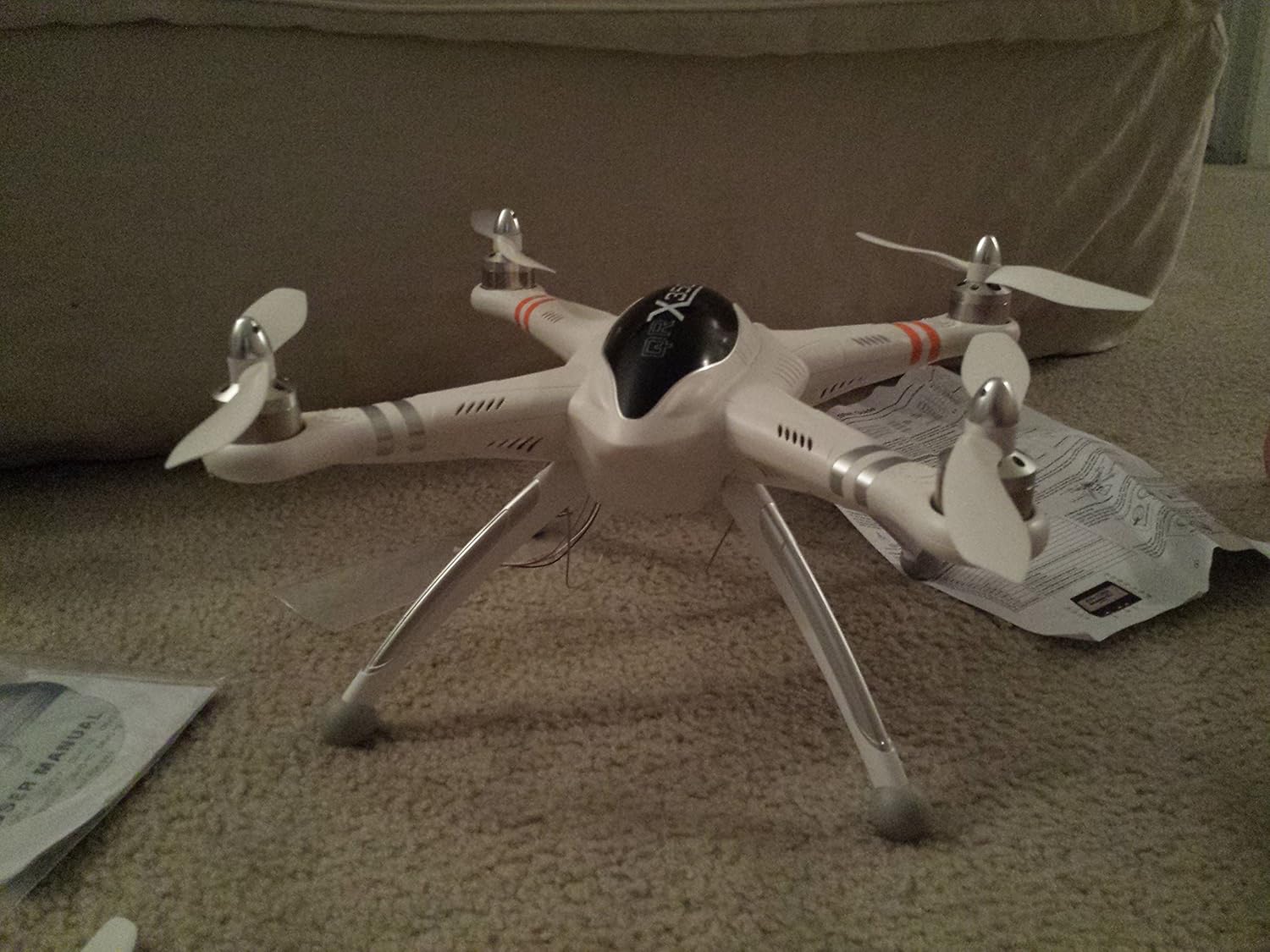
Figure 3.1: Assembled Walkera QR X350 Quadcopter.
3.2 బ్యాటరీ ఛార్జింగ్
The quadcopter uses a 25C 3S 2200mAh 11.1v LiPO battery. Use the provided GA-005 balance charger.
- Connect the GA-005 charger to a 110-240V AC power source or a 5V DC source.
- Connect the LiPO battery to the balance charger. Ensure correct polarity.
- Monitor the charging process. Disconnect the battery once fully charged to prevent overcharging.
- Always charge batteries on a fire-resistant surface and never leave charging batteries unattended.
3.3 Transmitter (Devo7) Preparation
The Walkera Devo7 transmitter requires 8 Lithium Ion batteries (included). Install them according to the polarity markings in the battery compartment.
3.4 క్రమాంకనం
Before the first flight and periodically thereafter, perform the following calibrations:
- కంపాస్ క్రమాంకనం: Follow the instructions in the quick start guide to calibrate the compass. This is crucial for accurate GPS functions.
- Gyro and Accelerometer Calibration: Ensure the quadcopter is on a level surface during this calibration to maintain stable flight.
4. ఆపరేటింగ్ సూచనలు
4.1 ప్రాథమిక విమాన నియంత్రణలు
Familiarize yourself with the Devo7 transmitter controls. Practice slowly in a safe, open environment until you are comfortable with the quadcopter's response.
4.2 అధునాతన ఫీచర్లు
- GPS Altitude Hold System: This feature allows the quadcopter to maintain a stable altitude and position using GPS signals.
- One Key Return Home: Activates an automatic return-to-home function, guiding the quadcopter back to its takeoff point. Ensure GPS signal is strong before using.
- ఆల్టిట్యూడ్ సెన్సార్: Assists in maintaining a consistent flight height.
- FPV Capability: The quadcopter supports First Person View (FPV) systems for real-time video transmission (additional equipment may be required).
- Wi-Fi నియంత్రణ: Optional Wi-Fi control allows for operation via a mobile device (additional modules may be required).

Figure 4.1: The Walkera QR X350 Quadcopter in hand.
5. నిర్వహణ
Regular maintenance ensures the longevity and safe operation of your QR X350.
- శుభ్రపరచడం: After each flight, gently clean the quadcopter body and motors to remove dust, dirt, or debris.
- ప్రొపెల్లర్ తనిఖీ: Check propellers for cracks, bends, or damage before and after each flight. Replace damaged propellers immediately.
- మోటార్ తనిఖీ: Ensure motors spin freely and are free from obstructions.
- బ్యాటరీ సంరక్షణ: Store LiPO batteries at a storage voltage (around 3.8V per cell) if not used for extended periods. Do not fully discharge or overcharge.
- వైరింగ్: Periodically check all wiring connections for looseness or damage. Secure any loose wires, especially antenna and compass cables.
6. ట్రబుల్షూటింగ్
ఈ విభాగం మీరు ఎదుర్కొనే సాధారణ సమస్యలను పరిష్కరిస్తుంది.
- Quadcopter flies erratically or drifts:
- Ensure proper compass, gyro, and accelerometer calibration.
- Check for damaged propellers or motors.
- Verify strong GPS signal if using GPS-assisted flight modes.
- Loss of signal or control:
- Ensure the transmitter batteries are charged.
- Operate within the specified range of the Devo7 transmitter.
- అధిక విద్యుదయస్కాంత జోక్యం ఉన్న ప్రాంతాలను నివారించండి.
- Battery not charging or short flight time:
- Verify the charger is correctly connected and functioning.
- Inspect the battery for physical damage or swelling.
- LiPO batteries have a limited cycle life; consider replacing old batteries.
- Quadcopter does not return home accurately:
- Ensure GPS signal was strong and locked at the takeoff point.
- Perform compass calibration before flight.
7. స్పెసిఫికేషన్లు
| ఫీచర్ | వివరాలు |
|---|---|
| బ్రాండ్ | వాకేరా |
| మోడల్ పేరు | QR X350 (WK-QRX350-Devo7) |
| కొలతలు (L x W x H) | 11.4" x 11.4" x 7.1" (290మిమీ x 290మిమీ x 180మిమీ) |
| వస్తువు బరువు | 6.2 పౌండ్లు |
| బ్యాటరీ | 25C 3S 2200mAh 11.1v LiPO (24.42 Watt Hours) |
| ఛార్జర్ | GA-005 2-3 Cell LiPO Balance Charger |
| మోటార్ రకం | WK-WS-28-008A Brushless Outrunner |
| ట్రాన్స్మిటర్ | Walkera Devo7 2.4Ghz |
| ప్రత్యేక లక్షణాలు | GPS Altitude Hold, One Key Return Home, Altitude Sensor, FPV Capability, Wi-Fi Control |
| వయస్సు రేటింగ్ | 14+ With Adult Supervision |
| కనెక్టివిటీ టెక్నాలజీ | Wi-Fi |
| వీడియో క్యాప్చర్ రిజల్యూషన్ | 720p (with optional camera) |
8. వారంటీ మరియు మద్దతు
For warranty information and technical support, please refer to the official Walkera webసైట్లో లేదా మీ అధీకృత డీలర్ను సంప్రదించండి. కొనుగోలు రుజువుగా మీ కొనుగోలు రసీదును ఉంచండి.
తయారీదారు: Venom Group International
సంప్రదించండి: Refer to official Walkera support channels for assistance.


