పరిచయం
This manual provides instructions for the HCDZ replacement remote control, model HCDZ-X00351. This remote is designed as an infrared (IR) replacement for various Toshiba LCD HDTV TV models, including 46XV640UZ, 46XV645U, 46XV648U, 52RV530, 52RV535U, 52RV53CU, and 52XV645U.
The remote control requires no programming and will function immediately upon battery insertion. Please note that batteries and instructions are not included in the product package.

మూర్తి 1: ముందు view of the HCDZ replacement remote control.
సెటప్
1. బ్యాటరీ ఇన్స్టాలేషన్
రిమోట్ కంట్రోల్కు రెండు AAA బ్యాటరీలు అవసరం (చేర్చబడలేదు). వాటిని ఇన్స్టాల్ చేయడానికి ఈ దశలను అనుసరించండి:
- రిమోట్ కంట్రోల్ వెనుక బ్యాటరీ కంపార్ట్మెంట్ను గుర్తించండి.
- Slide the battery compartment cover downwards or press the latch to open it.
- రెండు AAA బ్యాటరీలను చొప్పించండి, పాజిటివ్ (+) మరియు నెగటివ్ (-) టెర్మినల్స్ కంపార్ట్మెంట్ లోపల ఉన్న గుర్తులతో సరిగ్గా సమలేఖనం చేయబడ్డాయని నిర్ధారించుకోండి.
- బ్యాటరీ కంపార్ట్మెంట్ కవర్ను మార్చండి, అది సురక్షితంగా క్లిక్ అయ్యేలా చూసుకోండి.
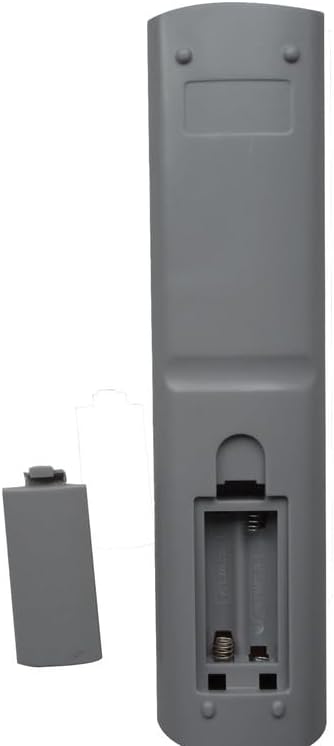
చిత్రం 2: కవర్ తీసివేయబడిన బ్యాటరీ కంపార్ట్మెంట్, బ్యాటరీ ప్లేస్మెంట్ను చూపుతుంది.
2. ప్రారంభ ఉపయోగం
Once batteries are correctly installed, the remote control is ready for use. No additional programming or setup is required. Point the remote control towards your Toshiba LCD HDTV TV and begin operation.
ఆపరేటింగ్ సూచనలు
This remote control functions as a direct replacement for your original Toshiba TV remote. It utilizes infrared (IR) technology to communicate with your television. Simply point the remote at the TV's IR sensor and press the desired function button.
Common functions typically include:
- పవర్ ఆన్/ఆఫ్: To turn the TV on or off.
- వాల్యూమ్ నియంత్రణ: ధ్వని స్థాయిని సర్దుబాటు చేయడానికి.
- ఛానెల్ ఎంపిక: To change TV channels.
- ఇన్పుట్/మూలం: To switch between different video inputs (e.g., HDMI, AV).
- మెను నావిగేషన్: To access and navigate the TV's on-screen menu.
Refer to your Toshiba TV's original manual for specific button functions if needed, as this remote is designed to replicate the original functionality.
నిర్వహణ మరియు సంరక్షణ
To ensure the longevity and proper functioning of your remote control, observe the following guidelines:
- పర్యావరణ పరిస్థితులు: Do not expose the remote control to extremely hot or humid environments. High temperatures or moisture can damage internal components.
- బ్యాటరీ వినియోగం: Avoid mixing new batteries with old ones. Always replace all batteries simultaneously with new ones of the same type.
- ప్రత్యక్ష సూర్యకాంతి: Do not expose the remote control's IR sensor to direct sunlight or strong lighting apparatuses. This can interfere with its operation and cause malfunctions.
- దీర్ఘ-కాల నిల్వ: If the remote control will not be used for an extended period, remove the batteries. This prevents potential damage from battery leakage and corrosion.
- శుభ్రపరచడం: Clean the remote control with a soft, dry cloth. Do not use liquid cleaners or abrasive materials.
ట్రబుల్షూటింగ్
మీ రిమోట్ కంట్రోల్తో మీకు సమస్యలు ఎదురైతే, ఈ క్రింది ట్రబుల్షూటింగ్ దశలను ప్రయత్నించండి:
- రిమోట్ కంట్రోల్ లోపాలు:
- బ్యాటరీలను భర్తీ చేయండి: The most common cause of remote control issues is depleted batteries. Replace both AAA batteries with fresh ones.
- బ్యాటరీ టెర్మినల్స్ తనిఖీ చేయండి: Ensure the battery terminals inside the compartment are clean and making proper contact with the batteries.
- Remote is Unresponsive or Out of Range:
- దగ్గరగా తరలించు: Ensure you are within a reasonable range of the television.
- అడ్డంకులను తొలగించండి: Make sure there are no objects blocking the line of sight between the remote control and the IR sensor on your TV.
- TV Not Responding:
- టీవీ పవర్: Verify that your television's power cord is securely plugged in and the TV is turned on or in standby mode.
- టీవీ సెన్సార్: Ensure the TV's IR sensor is not covered or obstructed.
If problems persist after attempting these steps, consult your television's original user manual or contact the TV manufacturer for further assistance.
స్పెసిఫికేషన్లు
| ఫీచర్ | వివరాలు |
|---|---|
| మోడల్ సంఖ్య | HCDZ-X00351 |
| బ్రాండ్ | HCDZ |
| అనుకూల పరికరాలు | Toshiba LCD HDTV Televisions (Specific models listed in Introduction) |
| కనెక్టివిటీ టెక్నాలజీ | ఇన్ఫ్రారెడ్ (IR) |
| శక్తి మూలం | 2 x AAA బ్యాటరీలు (చేర్చబడలేదు) |
| ప్రత్యేక ఫీచర్ | No programming needed, works out of package |
| మద్దతు ఉన్న పరికరాల గరిష్ట సంఖ్య | 1 |
| వస్తువు బరువు | 1 పౌండ్ (సుమారు 0.45 కిలోలు) |
| ప్యాకేజీ కొలతలు | 11.02 x 5.91 x 0.79 అంగుళాలు (సుమారు 28 x 15 x 2 సెం.మీ) |
వారంటీ సమాచారం
This product is a replacement remote control. For specific warranty details, please refer to the terms and conditions provided by the seller at the time of purchase. General consumer rights apply.
మద్దతు
For technical assistance or inquiries regarding this product, please contact the seller directly through the platform where the purchase was made. Please have your order number and product model (HCDZ-X00351) available when seeking support.