Takstar PCM-5550

Takstar PCM-5550 కండెన్సర్ KTV మైక్రోఫోన్ యూజర్ మాన్యువల్

Model: PCM-5550

పరిచయం

This manual provides comprehensive instructions for the proper use and maintenance of your Takstar PCM-5550 Condenser KTV Microphone. Please read this manual thoroughly before operating the microphone to ensure optimal performance and longevity.

కీ ఫీచర్లు

  • Excellent audio processing circuitry for natural and smooth sound reproduction.
  • High sensitivity and low output impedance for clear recording performance.
  • Integrated windscreen to minimize plosives and wind noise.
  • Operates on 1.5V AA batteries, providing extended playtime.
  • Stylish ivory design.
  • Suitable for internet karaoke and PC recording applications.

ప్యాకేజీ విషయాలు

అన్ప్యాక్ చేసిన తర్వాత, దయచేసి ఈ క్రింది అన్ని అంశాలు చేర్చబడ్డాయో లేదో ధృవీకరించండి:

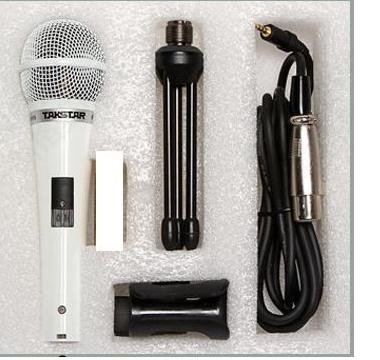
  • Takstar PCM-5550 Condenser Microphone
  • Microphone Stand (mini tripod)
  • మైక్రోఫోన్ కేబుల్
  • Microphone Clip/Holder
Takstar PCM-5550 microphone and accessories laid out
Image: The Takstar PCM-5550 microphone shown with its included accessories, which typically comprise a mini tripod stand, a microphone cable, and a microphone clip. Please note that AA batteries are generally not included.

సెటప్ సూచనలు

  1. బ్యాటరీని ఇన్‌స్టాల్ చేయండి: Locate the battery compartment on the microphone handle. Insert one 1.5V AA battery, ensuring correct polarity (+/-).
  2. మైక్రోఫోన్ క్లిప్‌ను అటాచ్ చేయండి: Secure the microphone clip to the included mini tripod stand or a compatible microphone stand.
  3. మైక్రోఫోన్‌ను మౌంట్ చేయండి: Carefully place the Takstar PCM-5550 microphone into the clip.
  4. కేబుల్ కనెక్ట్ చేయండి: Plug one end of the microphone cable into the microphone's output port (usually at the bottom). Connect the other end to your audio interface, mixer, or computer's microphone input.
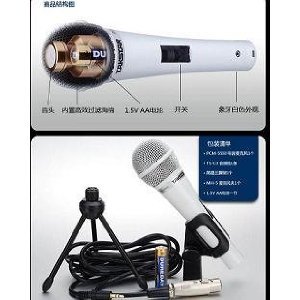
Diagram showing internal components and battery installation for Takstar PCM-5550
Image: An internal diagram illustrating the microphone's components, including the battery compartment for a 1.5V AA battery and the power switch. This helps visualize battery installation.
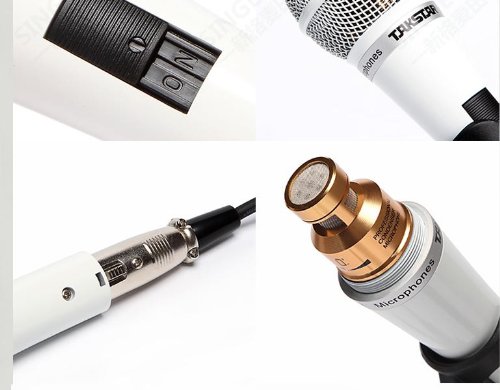
Close-up of Takstar PCM-5550 microphone switch and cable connection
చిత్రం: వివరణాత్మకం view of the microphone's power switch and the XLR output connector, demonstrating where the audio cable should be attached.

ఆపరేటింగ్ సూచనలు

  1. పవర్ ఆన్: Locate the ON/OFF switch on the microphone handle and slide it to the "ON" position.
  2. స్థానం: For optimal sound quality, position the microphone approximately 5-15 cm (2-6 inches) from the sound source (e.g., your mouth for vocals).
  3. స్థాయిలను సర్దుబాటు చేయండి: Adjust the input gain on your connected audio device (mixer, computer) to achieve a clear signal without distortion. Avoid setting the gain too high, which can lead to clipping.
  4. పవర్ ఆఫ్: When not in use, slide the ON/OFF switch to the "OFF" position to conserve battery life.
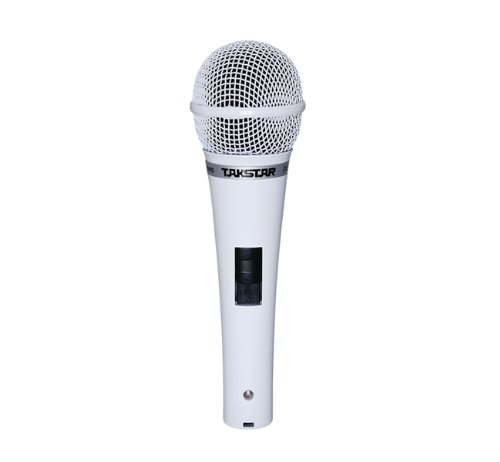
ముందు view of the Takstar PCM-5550 Condenser KTV Microphone
చిత్రం: స్పష్టమైన ముందు భాగం view of the Takstar PCM-5550 microphone, highlighting the grille and the power switch on the handle.
Takstar PCM-5550 microphone on a stand, angled view
Image: The Takstar PCM-5550 microphone mounted on a stand, illustrating a typical setup for use in KTV or recording environments.

నిర్వహణ

  • శుభ్రపరచడం: Use a soft, dry cloth to wipe the microphone body. Do not use liquid cleaners or solvents, as they may damage the finish or internal components.
  • నిల్వ: Store the microphone in a dry, cool place, away from direct sunlight and extreme temperatures. If storing for an extended period, remove the AA battery to prevent leakage.
  • నిర్వహణ: Avoid dropping the microphone or subjecting it to strong impacts, which can damage the sensitive condenser capsule.

ట్రబుల్షూటింగ్

సమస్యసాధ్యమైన కారణంపరిష్కారం
సౌండ్ అవుట్‌పుట్ లేదు
  • Microphone switch is OFF.
  • బ్యాటరీ డెడ్ లేదా తప్పుగా ఇన్‌స్టాల్ చేయబడింది.
  • Cable is loose or faulty.
  • Input device (PC, mixer) volume is too low or muted.
  • ఆన్‌కి స్లయిడ్ స్విచ్.
  • Replace battery or check polarity.
  • Ensure cable is securely connected; try a different cable.
  • Check volume and mute settings on your device.
తక్కువ లేదా వక్రీకరించిన ధ్వని
  • బ్యాటరీ తక్కువగా ఉంది.
  • మైక్రోఫోన్ ధ్వని మూలం నుండి చాలా దూరంలో ఉంది.
  • Input gain on device is too high (distortion) or too low (low volume).
  • బ్యాటరీని భర్తీ చేయండి.
  • మైక్రోఫోన్‌ను ధ్వని మూలానికి దగ్గరగా తరలించండి.
  • Adjust input gain on your device.
విపరీతమైన నేపథ్య శబ్దం
  • పర్యావరణ శబ్దం.
  • తప్పు కేబుల్ లేదా కనెక్షన్.
  • రికార్డింగ్ వాతావరణంలో పరిసర శబ్దాన్ని తగ్గించండి.
  • Check cable connections; try a different cable.

స్పెసిఫికేషన్లు

మోడల్PCM-5550
టైప్ చేయండికండెన్సర్ మైక్రోఫోన్
ధ్రువ నమూనాఓమ్నిడైరెక్షనల్
ఫ్రీక్వెన్సీ రెస్పాన్స్30Hz-20kHz
సున్నితత్వం-38 ± 3 డిబి
అవుట్‌పుట్ ఇంపెడెన్స్350Ω±30%
లోడ్ ఇంపెడెన్స్>1000Ω
శక్తి అవసరాలు1.5V AA బ్యాటరీ
నికర బరువు300గ్రా
రంగుతెలుపు
అనుకూల పరికరాలుKaraoke Machine, Personal Computer

వారంటీ మరియు మద్దతు

For warranty information and technical support, please refer to the official Takstar webసైట్ లేదా మీ స్థానిక పంపిణీదారుని సంప్రదించండి. ఏవైనా వారంటీ క్లెయిమ్‌లకు కొనుగోలు రుజువుగా మీ కొనుగోలు రసీదును ఉంచండి.

మరిన్ని సహాయం కోసం, మీరు సందర్శించవచ్చు Takstar Store on Amazon.

సంబంధిత పత్రాలు - PCM-5550

ముందుగాview Takstar PCM-5600(GEN 2) Handheld Condenser Microphone User Manual
Comprehensive user manual for the Takstar PCM-5600(GEN 2) handheld condenser microphone, detailing its features, technical specifications, operation, and safety guidelines for optimal performance.
ముందుగాview Takstar PCM-5600(GEN 2) Handheld Condenser Microphone User Manual
Comprehensive user manual for the Takstar PCM-5600(GEN 2) handheld condenser microphone, detailing features, specifications, operation, safety guidelines, and environmental compliance.
ముందుగాview Takstar SGC-598 మైక్రోఫోన్ యూజర్ మాన్యువల్ మరియు స్పెసిఫికేషన్స్
Takstar SGC-598 షాట్‌గన్ మైక్రోఫోన్ కోసం సమగ్ర వినియోగదారు గైడ్ మరియు సాంకేతిక వివరణలు, ఇందులో లక్షణాలు, ఆపరేషన్, భద్రతా జాగ్రత్తలు మరియు EU అనుగుణ్యత ప్రకటన ఉన్నాయి.
ముందుగాview Takstar DM-2300 డైనమిక్ మైక్రోఫోన్ - యూజర్ మాన్యువల్ మరియు స్పెసిఫికేషన్స్
KTV మరియు కరోకే కోసం రూపొందించబడిన Takstar DM-2300 డైనమిక్ మైక్రోఫోన్ కోసం వివరణాత్మక యూజర్ మాన్యువల్ మరియు స్పెసిఫికేషన్లు. దాని లక్షణాలు, సెటప్, వినియోగం మరియు నిర్వహణ గురించి తెలుసుకోండి.
ముందుగాview Takstar MS-189D Conference Microphone User Manual and Specifications
Comprehensive guide to the Takstar MS-189D conference microphone, covering its features, technical specifications, usage instructions, safety precautions, and warranty information.
ముందుగాview TAKSTAR PC-K750 ప్రొఫెషనల్ రికార్డింగ్ మైక్రోఫోన్ యూజర్ మాన్యువల్
Comprehensive user manual for the TAKSTAR PC-K750 side-address condenser microphone, covering its features, technical specifications, assembly and operation instructions, safety precautions, and warranty information.