1. పరిచయం
The Ematic AT103B Digital TV Converter Box is designed to enable your television without a built-in digital tuner to receive new digital broadcasts. This device enhances your viewing experience by offering features such as an electronic program guide, parental controls, real-time and scheduled recording capabilities, and multimedia playback via a USB connection. This manual provides detailed instructions to help you set up and operate your converter box effectively.
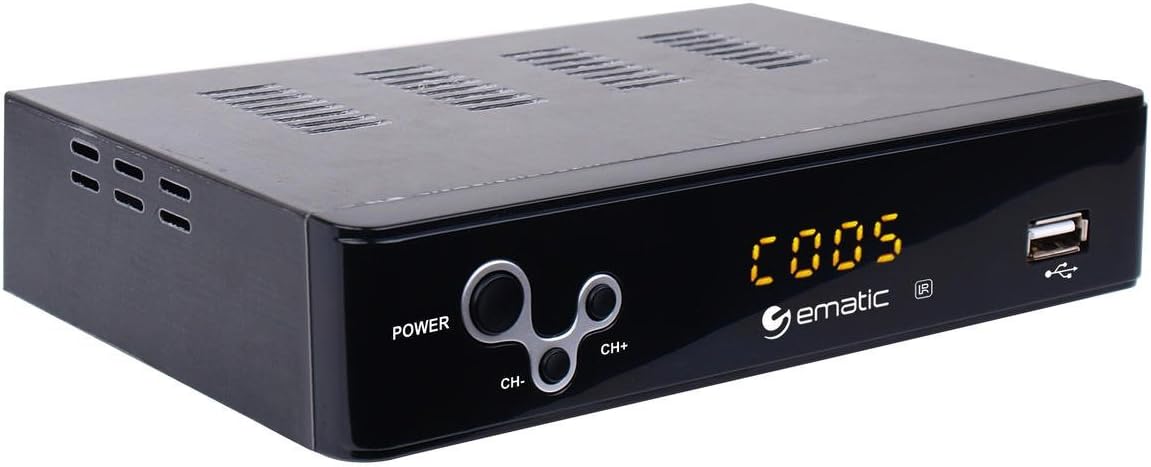
Figure 1: Ematic AT103B Digital TV Converter Box, front view.
2. పెట్టెలో ఏముంది
క్రింద జాబితా చేయబడిన అన్ని వస్తువులు మీ ప్యాకేజీలో చేర్చబడ్డాయని దయచేసి ధృవీకరించండి:
- Ematic AT103B Digital TV Converter Box
- Full Function Remote Control (requires 2 AA batteries, not included)
- HDMI కేబుల్
- AV Cable (RCA)
- IR రిసీవర్ కేబుల్
- USB-C Cable (for power)
- పవర్ అడాప్టర్
- యూజర్ మాన్యువల్ (ఈ పత్రం)
- త్వరిత సెటప్ గైడ్
- వారంటీ కార్డ్

Figure 2: Ematic AT103B Digital TV Converter Box with remote control, HDMI cable, AV cable, IR receiver, USB-C cable, and power adapter.
అన్బాక్సింగ్ వీడియో
Video 1: Unboxing of a similar digital converter box, demonstrating typical package contents and initial presentation.
3. సెటప్ గైడ్
3.1 Connecting the Converter Box
Follow these steps to connect your Ematic AT103B Digital TV Converter Box to your television and antenna:
- యాంటెన్నాను కనెక్ట్ చేయండి: Connect your outdoor or indoor antenna to the 'RF IN' port on the back of the converter box.
- టీవీకి కనెక్ట్ అవ్వండి:
- HDMI (Recommended for HD): Use the provided HDMI cable to connect the 'HDMI' port on the converter box to an available HDMI input on your TV.
- AV (RCA for Standard Definition): Use the provided AV cable (red, white, yellow) to connect the 'L-AUDIO-R' and 'VIDEO' ports on the converter box to the corresponding AV input ports on your TV.
- IR రిసీవర్ను కనెక్ట్ చేయండి: Plug the IR receiver cable into the 'IR' port on the converter box. Position the IR receiver in a location where it has a clear line of sight to your remote control.
- పవర్ కనెక్ట్ చేయండి: Connect the USB-C power cable to the converter box and then plug the power adapter into a wall outlet.
- పవర్ ఆన్: Turn on your TV and the converter box. Select the correct input source (HDMI or AV) on your TV that corresponds to the connection you made.

చిత్రం 3: వెనుక view of the converter box with various input/output ports.
3.2 Initial Channel Scan
After connecting your converter box, you need to scan for available digital channels:
- Ensure your TV is on the correct input source for the converter box.
- On the converter box remote, press the మెనూ బటన్.
- Navigate to the 'Channel Search' or 'Program' menu using the arrow keys on the remote.
- Select 'Auto Search' or 'Auto Tune' and press OK. The converter box will now scan for all available digital channels in your area. This process may take several minutes.
- Once the scan is complete, the converter box will automatically tune to the first available channel.
Setup and Channel Search Video
Video 2: Demonstrates wiring connections, manual search, and automated search functions for a digital converter box.
4. ఆపరేటింగ్ సూచనలు
4.1 Basic TV Viewing
- ఛానల్ పైకి/క్రిందికి: ఉపయోగించండి CH+ మరియు CH- ఛానెల్లను మార్చడానికి రిమోట్లోని బటన్లు.
- వాల్యూమ్ నియంత్రణ: ఉపయోగించండి VOL+ మరియు VOL- వాల్యూమ్ సర్దుబాటు చేయడానికి బటన్లు.
- ఎలక్ట్రానిక్ ప్రోగ్రామ్ గైడ్ (EPG): నొక్కండి EPG బటన్ view program information for upcoming broadcasts.
- సమాచారం: నొక్కండి సమాచారం button to display current channel and program details.

Figure 4: Remote control for the Ematic AT103B Digital TV Converter Box.
4.2 Recording Features (PVR/DVR)
The converter box supports recording TV programs to a USB storage device (not included).
- రియల్ టైమ్ రికార్డింగ్: ఒక కార్యక్రమాన్ని చూస్తున్నప్పుడు, REC button on the remote to start recording immediately. Press ఆపు ఆపై OK రికార్డింగ్ను ముగించడానికి మరియు సేవ్ చేయడానికి.
- షెడ్యూల్డ్ రికార్డింగ్: నొక్కండి EPG button, select the program you wish to record, and press OK. Follow the on-screen prompts to set the recording schedule (date, time, repeat options).
- ప్లేబ్యాక్ రికార్డింగ్లు: నొక్కండి PVR or USB button on the remote, navigate to the 'PVR' section, and select your desired recording from the list.
4.3 మల్టీమీడియా ప్లేబ్యాక్
You can play various media fileUSB నిల్వ పరికరం నుండి:
- Insert a USB flash drive or external hard drive into the USB port on the front of the converter box.
- నొక్కండి USB రిమోట్లోని బటన్.
- Select the media type (Music, Photo, Movie) and navigate to your fileలు. నొక్కండి OK ఆడటానికి.
4.4 తల్లిదండ్రుల నియంత్రణలు
To restrict access to certain channels or programs:
- నొక్కండి మెనూ button and navigate to 'Program Edit'.
- Enter the default password (usually '000000' or '888888').
- Select the channel you wish to lock and press the లాక్ button (often a colored button on the remote).
4.5 Favorite Channel List
Create a personalized list of your preferred channels:
- నొక్కండి మెనూ button and navigate to 'Program Edit'.
- పాస్వర్డ్ను నమోదు చేయండి.
- Select the channel you want to add to favorites and press the FAV button (often a colored button). Choose a favorite type (e.g., Movie, News, Sport).
- To access your favorite channels, press the FAV button during normal viewing and select your desired category.
4.6 Timeshift Function
The timeshift function allows you to pause live television broadcasts. A USB storage device is required for this feature.
- ప్రత్యక్ష ప్రసార టీవీ చూస్తున్నప్పుడు, నొక్కండి పాజ్ చేయండి button on the remote. The program will pause and begin recording to the connected USB device.
- నొక్కండి ఆడండి తిరిగి ప్రారంభించడానికి viewing from where you paused.
- మీరు ఉపయోగించవచ్చు రివైండ్ మరియు ఫాస్ట్ ఫార్వర్డ్ buttons to navigate within the buffered content.

Figure 5: The timeshift function allows pausing live TV.
5. నిర్వహణ
- శుభ్రపరచడం: Use a soft, dry cloth to clean the exterior of the converter box. Do not use liquid cleaners or aerosols.
- వెంటిలేషన్: Ensure the converter box has adequate ventilation. Do not block any ventilation openings.
- శక్తి: పరికరాన్ని ఎక్కువ కాలం ఉపయోగించకపోతే వాల్ అవుట్లెట్ నుండి పవర్ అడాప్టర్ను డిస్కనెక్ట్ చేయండి.
- సాఫ్ట్వేర్ అప్డేట్లు: తయారీదారుని కాలానుగుణంగా తనిఖీ చేయండి website for any available firmware updates to ensure optimal performance and access to the latest features.
6. ట్రబుల్షూటింగ్
| సమస్య | సాధ్యమైన కారణం | పరిష్కారం |
|---|---|---|
| No picture/No signal | Incorrect TV input selected; Loose cable connections; Antenna not connected or positioned correctly. | Verify TV input source; Check all cable connections (HDMI/AV, antenna, power); Adjust antenna position and rescan channels. |
| Poor picture quality/Pixelation | Weak antenna signal; Antenna interference. | Reposition antenna for better signal reception; Consider a stronger antenna or signal amplifier; Check for nearby electronic interference. |
| రిమోట్ కంట్రోల్ పనిచేయడం లేదు | Dead batteries; Obstruction between remote and IR receiver; IR receiver not properly connected. | Replace remote batteries; Ensure clear line of sight to IR receiver; Check IR receiver cable connection. |
| USB కి రికార్డ్ చేయడం సాధ్యం కాదు | USB device not formatted correctly; USB device full; USB device not compatible. | Ensure USB device is formatted to FAT32 or NTFS; Delete old recordings to free space; Try a different USB device. |
| శబ్దం లేదు | TV or converter box volume muted; Incorrect audio settings. | Check volume levels on both TV and converter box; Ensure TV is not muted; Verify audio settings in the converter box menu. |
7. సాంకేతిక లక్షణాలు
| ఫీచర్ | స్పెసిఫికేషన్ |
|---|---|
| మోడల్ సంఖ్య | AT103B |
| బ్రాండ్ | ఎమాటిక్ |
| అవుట్పుట్ రిజల్యూషన్ | 1080P వరకు |
| వీడియో అవుట్పుట్ | HDMI, CVBS (RCA) |
| ఆడియో అవుట్పుట్ | Stereo L/R (RCA) |
| USB మద్దతు | USB 2.0 for PVR, multimedia playback (MP3, AAC, AVI, MPG, DAT, VOB, MKV, MJPEG, JPEG, BMP, PNG) |
| ట్యూనర్ రకం | Digital ATSC |
| ఫీచర్లు | Electronic Program Guide (EPG), Parental Control, Real-time Recording, Scheduled Recording, Timeshift, Favorite Channel List, Closed Captioning, EAS (Emergency Alert System) |
| విద్యుత్ సరఫరా | DC 5V/3A (via USB-C) |
| కొలతలు | 16.6 x 16 x 14.4 inches (Product Dimensions, likely packaging) |
| వస్తువు బరువు | 1.6 ఔన్సులు |
8. వారంటీ & సపోర్ట్
The Ematic AT103B Digital TV Converter Box comes with a limited manufacturer's warranty. Please refer to the included Warranty Card in your package for specific terms, conditions, and duration of coverage. For technical support, product registration, or to inquire about replacement parts, please visit the official Ematic webసైట్ లేదా వారి కస్టమర్ సేవా విభాగాన్ని సంప్రదించండి.
మీరు కూడా సందర్శించవచ్చు Ematic Store on Amazon మరిన్ని ఉత్పత్తి సమాచారం మరియు మద్దతు వనరుల కోసం.


