Boxlight ACTG042

బాక్స్‌లైట్ రీప్లేస్‌మెంట్ Lamp మాడ్యూల్ యూజర్ మాన్యువల్

Models: LC-XG110, LC-XG210, LX32 (Part Number: ACTG042)

పరిచయం

This manual provides essential information for the safe and effective installation, operation, and maintenance of your Boxlight replacement lamp module. This module is designed for use with Boxlight LC-XG110, LC-XG210, and LX32 projector models. Please read these instructions carefully before proceeding with installation.

బాక్స్‌లైట్ రీప్లేస్‌మెంట్ Lamp మాడ్యూల్

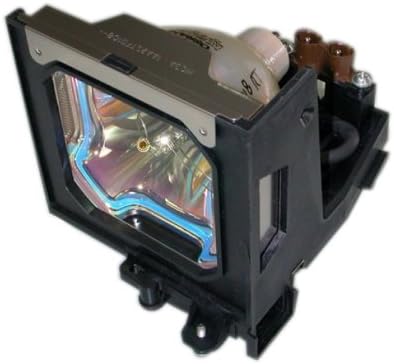
Image: Boxlight replacement lamp module, showing the bulb encased in its housing with electrical connectors.

The Boxlight replacement lamp module (Part Number: ACTG042) includes an original bulb and housing, ensuring compatibility and optimal performance with your projector. It features a 250-watt bulb with an average lamp life of 2000 hours under normal operating conditions.

ముఖ్యమైన భద్రతా సమాచారం

ఇందులో బల్బ్ ఎల్amp contains Mercury (Hg). Please dispose of in accordance with local, state, or federal laws. Do not dispose of with regular household waste.

ఇన్స్టాలేషన్ సూచనలు

  1. పవర్ ఆఫ్ మరియు డిస్‌కనెక్ట్: Ensure your Boxlight projector is turned off and completely unplugged from the power source.
  2. కూల్ డౌన్: ప్రొజెక్టర్‌ను కనీసం 30 నిమిషాలు చల్లబరచడానికి అనుమతించండి.amp operates at high temperatures and can cause burns if handled while hot.
  3. L ని గుర్తించండిamp కవర్: Refer to your projector's user manual to locate the lamp compartment cover. This is typically secured by one or more screws.
  4. ఎల్ తొలగించండిamp కవర్: Using a suitable screwdriver, carefully remove the screw(s) securing the lamp cover and then remove the cover.
  5. Unscrew Old Lamp: పాత ఎల్amp module will be secured by one or more screws. Unscrew these fasteners.
  6. పాత L ని తీసివేయండిamp: Gently pull the handle on the old lamp module to slide it out of the projector. Be careful not to drop it.
  7. కొత్త L చొప్పించండిamp: Carefully insert the new Boxlight replacement lamp module into the projector, ensuring it slides smoothly into place. Do not force it.
  8. Secure New Lamp: Fasten the new lamp module with the screw(s) you removed earlier. Ensure it is securely seated.
  9. L ని భర్తీ చేయండిamp కవర్: L ని మళ్లీ కలపండిamp compartment cover and secure it with its screw(s).
  10. పవర్‌ని మళ్లీ కనెక్ట్ చేయండి: Plug the projector back into the power outlet.
  11. రీసెట్ Lamp టైమర్: Consult your projector's user manual for instructions on how to reset the lamp timer. This is crucial for accurate lamp life tracking.

ఆపరేటింగ్ మార్గదర్శకాలు

నిర్వహణ

ట్రబుల్షూటింగ్

If you encounter issues after installing the new lamp, ఈ క్రింది వాటిని పరిగణించండి:

For further assistance, refer to your projector's original user manual or contact Boxlight customer support.

ఉత్పత్తి లక్షణాలు

బ్రాండ్బాక్స్లైట్
మోడల్ సంఖ్యACTG042
అనుకూల ప్రొజెక్టర్ నమూనాలుLC-XG110, LC-XG210, LX32
Lamp పార్ట్ నంబర్లు03-000712-01P; 610 305 5602; MP56T-930; POA-LMP59
వాట్tage250 వాట్స్
Lamp Life (Normal)2000 గంటలు
కాంతి రకంజినాన్
Lamp సాంకేతికతLCD
వస్తువు బరువు13.3 ఔన్సులు (0.83 పౌండ్లు)
ఉత్పత్తి కొలతలు5.32 x 4.53 x 4.13 అంగుళాలు
UPC840398106805

వారంటీ సమాచారం

This Boxlight replacement lamp module is covered by a 180-రోజుల వారంటీ కొనుగోలు చేసిన తేదీ నుండి. ఈ వారంటీ సాధారణ ఉపయోగంలో మెటీరియల్స్ మరియు పనితనంలో లోపాలను కవర్ చేస్తుంది. వారంటీ క్లెయిమ్‌ల కోసం దయచేసి మీ కొనుగోలు రుజువును ఉంచుకోండి.

For warranty service or inquiries, please contact the seller or manufacturer directly.

కస్టమర్ మద్దతు

If you require further assistance, have questions about installation, or need to report an issue, please contact the retailer where you purchased this product or the manufacturer, Arclyte Tech. (Boxlight's manufacturer).

When contacting support, please have your product model number (ACTG042) and proof of purchase readily available.

సంబంధిత పత్రాలు - ACTG042

ముందుగాview మైక్రో పోర్టబుల్ LCD ప్రొజెక్టర్ యూజర్ మాన్యువల్
మైక్రో పోర్టబుల్ LCD ప్రొజెక్టర్ కోసం సమగ్ర యూజర్ మాన్యువల్, లక్షణాలు, సెటప్, కనెక్షన్లు, OSD మెనూ ఆపరేషన్లు, నిర్వహణ మరియు ట్రబుల్షూటింగ్‌లను కవర్ చేస్తుంది.
ముందుగాview బాక్స్‌లైట్ బోస్టన్ సిరీస్ ప్రొజెక్టర్ యూజర్ మాన్యువల్ - సెటప్, ఫీచర్లు మరియు ఆపరేషన్ గైడ్
BOXLIGHT బోస్టన్ సిరీస్ ప్రొజెక్టర్ కోసం సమగ్ర వినియోగదారు మాన్యువల్. లక్షణాలు, భద్రతా మార్గదర్శకాలు, సెటప్ విధానాలు, ఆపరేషన్, నిర్వహణ మరియు ట్రబుల్షూటింగ్ గురించి తెలుసుకోండి. మద్దతు కోసం BOXLIGHT.com ని సందర్శించండి.
ముందుగాview బాక్స్‌లైట్ మిమియోప్రో జి ఇంటరాక్టివ్ ఫ్లాట్ ప్యానెల్ డిస్ప్లే: అన్‌బాక్సింగ్ మరియు ఇన్‌స్టాలేషన్ గైడ్
బాక్స్‌లైట్ మిమియోప్రో జి ఇంటరాక్టివ్ ఫ్లాట్ ప్యానెల్ డిస్‌ప్లేను అన్‌బాక్సింగ్ మరియు ఇన్‌స్టాల్ చేయడానికి సమగ్ర గైడ్. హార్డ్‌వేర్ సెటప్, వై-ఫై మాడ్యూల్, ఫర్మ్‌వేర్ అప్‌డేట్‌లు మరియు ప్రారంభ Google కాన్ఫిగరేషన్‌ను కవర్ చేస్తుంది.
ముందుగాview బాక్స్‌లైట్ ప్రొజెక్టోరైట్5|6 యూజర్ మాన్యువల్
BOXLIGHT ProjectoWrite5 మరియు ProjectoWrite6 ప్రొజెక్టర్ల కోసం సమగ్ర వినియోగదారు మాన్యువల్, మెరుగైన ప్రెజెంటేషన్ల కోసం సెటప్, లక్షణాలు, ఆపరేషన్, నిర్వహణ మరియు ట్రబుల్షూటింగ్ వివరాలను అందిస్తుంది.
ముందుగాview మిమియోప్రో జి ఇంటరాక్టివ్ డిస్ప్లే యూజర్ మాన్యువల్ | బాక్స్ లైట్
బాక్స్‌లైట్ మిమియోప్రో జి ఇంటరాక్టివ్ డిస్ప్లే కోసం సమగ్ర వినియోగదారు మాన్యువల్, భద్రత, సెటప్, ఆపరేషన్, నిర్వహణ మరియు ట్రబుల్షూటింగ్‌ను కవర్ చేస్తుంది. పరికరాలను ఎలా కనెక్ట్ చేయాలో, రిమోట్ కంట్రోల్‌ను ఎలా ఉపయోగించాలో మరియు సాధారణ సమస్యలను ఎలా పరిష్కరించాలో తెలుసుకోండి.
ముందుగాview బాక్స్‌లైట్ ప్రోకలర్ సిరీస్ టూ IFPD ఫర్మ్‌వేర్ అప్‌గ్రేడ్ గైడ్
ఈ గైడ్ బాక్స్‌లైట్ ప్రోకలర్ సిరీస్ టూ ఇంటరాక్టివ్ ఫ్లాట్ ప్యానెల్ డిస్ప్లేల (IFPD) ఫర్మ్‌వేర్ అప్‌గ్రేడ్ ప్రక్రియను వివరిస్తుంది, కొత్త ఫీచర్లు, అమలు దశలు మరియు అవసరమైన సాధనాలను కవర్ చేస్తుంది. ఇది అన్‌ప్లగ్డ్ మరియు క్రోమ్ వంటి యాప్‌లు, NDMS వంటి యుటిలిటీలు మరియు మాన్యువల్ అప్‌గ్రేడ్ విధానం గురించి సమాచారాన్ని కలిగి ఉంటుంది.