1. పరిచయం
This manual provides detailed instructions for the installation, operation, and maintenance of your ASUS Z97-A ATX DDR3 LGA 1150 Motherboard. Please read this manual thoroughly before proceeding with installation to ensure proper setup and optimal performance.
కీ ఫీచర్లు
- 5-Way Optimization by Dual Intelligent Processors 5: Integrated system tuning for performance, efficiency, digital power, fan control, and networking.
- SATA Express & M.2 Support: High-speed data transfer interfaces up to 10Gb/s for modern storage devices.
- Turbo App: Application-specific optimization for enhanced performance.
- రిమోట్ గో!: Remote control and media streaming capabilities.
- Crystal Sound 2: Enhanced audio solution for clear sound reproduction.
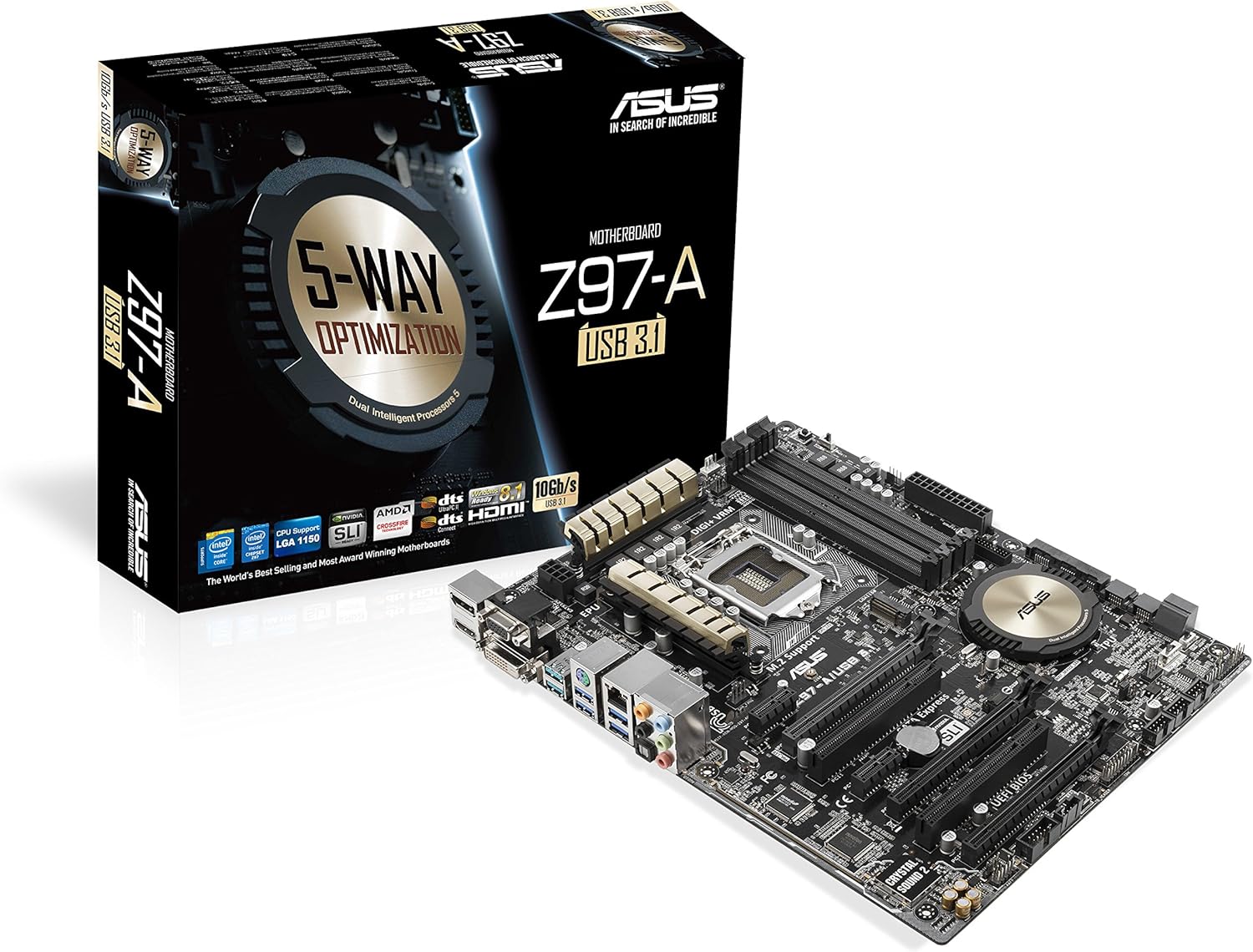
Figure 1: ASUS Z97-A Motherboard and its retail packaging.
2. సెటప్ మరియు ఇన్స్టాలేషన్
2.1 మీరు ప్రారంభించడానికి ముందు
- భద్రతా జాగ్రత్తలు: ఏదైనా భాగాలను ఇన్స్టాల్ చేసే లేదా తొలగించే ముందు ఎల్లప్పుడూ విద్యుత్ సరఫరాను డిస్కనెక్ట్ చేయండి. ఎలక్ట్రోస్టాటిక్ డిశ్చార్జ్ (ESD) నష్టాన్ని నివారించడానికి యాంటీ-స్టాటిక్ రిస్ట్ స్ట్రాప్ ధరించండి.
- భాగం అనుకూలత: Ensure all components (CPU, RAM, GPU, power supply) are compatible with the ASUS Z97-A motherboard. Refer to the specifications section for details.
2.2 కాంపోనెంట్ ఇన్స్టాలేషన్ దశలు
- CPU ని ఇన్స్టాల్ చేయండి: Carefully open the CPU socket lever, align the CPU with the socket (matching the golden triangle on the CPU to the triangle on the socket), gently place the CPU into the socket, and close the lever.
- CPU కూలర్ను ఇన్స్టాల్ చేయండి: Attach the CPU cooler according to its manufacturer's instructions. Ensure proper thermal paste application and secure mounting.
- మెమరీ మాడ్యూల్స్ (RAM) ఇన్స్టాల్ చేయండి: Open the clips on the DIMM slots. Align the RAM module with the slot key, press down firmly on both ends until the clips snap into place. For dual-channel operation, install modules in matching color slots.
- నిల్వ పరికరాలను ఇన్స్టాల్ చేయండి: Connect SATA drives to the SATA 6Gb/s ports using SATA data cables. If using an M.2 SSD, install it into the M.2 slot and secure it with the provided screw.
- విస్తరణ కార్డులను ఇన్స్టాల్ చేయండి: Insert graphics cards or other PCIe cards into the appropriate PCIe slots. Ensure they are seated firmly and secured with a screw to the chassis.
- విద్యుత్ సరఫరాను కనెక్ట్ చేయండి: Connect the 24-pin ATX power connector and the 8-pin CPU power connector from your power supply to the motherboard. Connect power to all other components (graphics card, storage drives).
- కేసులో మదర్బోర్డ్ను మౌంట్ చేయండి: Carefully place the motherboard into your PC case, aligning it with the standoffs. Secure the motherboard with screws.
- ఫ్రంట్ ప్యానెల్ కేబుల్లను కనెక్ట్ చేయండి: Connect the power button, reset button, HDD LED, power LED, and USB/audio headers from your case to the corresponding pins on the motherboard. Refer to the motherboard layout diagram for exact locations.

చిత్రం 2: పై నుండి క్రిందికి view of the ASUS Z97-A Motherboard, showing component layout.

Figure 3: Rear I/O panel of the ASUS Z97-A Motherboard, featuring various connectivity options.

Figure 4: Included accessories for the ASUS Z97-A Motherboard, such as the I/O shield and cables.
3. మీ సిస్టమ్ను ఆపరేట్ చేయడం
3.1 మొదటి బూట్ మరియు BIOS/UEFI సెటప్
Upon the first power-on, your system will typically enter the BIOS (Basic Input/Output System) or UEFI (Unified Extensible Firmware Interface) setup utility. This interface allows you to configure fundamental system settings.
- BIOS/UEFI ని యాక్సెస్ చేస్తోంది: నొక్కండి DEL కీ లేదా F2 key during the Power-On Self-Test (POST) to enter the BIOS/UEFI setup.
- ప్రాథమిక సెట్టింగ్లు: Configure boot order, date/time, and enable/disable integrated peripherals. Save changes before exiting.
3.2 సాఫ్ట్వేర్ యుటిలిటీస్
ASUS provides a suite of software tools to enhance your motherboard's functionality and performance. The primary utility is AI సూట్ 3.
- 5-Way Optimization: Automatically tunes your system for optimal performance, energy efficiency, digital power control, fan settings, and network prioritization.
- ఫ్యాన్ ఎక్స్పర్ట్ 3: Advanced fan control for precise cooling and reduced noise.
- USB 3.0 బూస్ట్: Accelerates USB 3.0 transfer speeds.
4. నిర్వహణ
4.1 Driver and BIOS Updates
Regularly updating your motherboard's drivers and BIOS/UEFI firmware is crucial for system stability, performance, and compatibility with new hardware or software.
- డ్రైవర్లు: Download the latest drivers for your chipset, audio, LAN, and other integrated components from the official ASUS support webసైట్.
- బయోస్/యుఇఎఫ్ఐ: ASUS మద్దతును తనిఖీ చేయండి website for the latest BIOS/UEFI versions. Follow the provided instructions carefully for updating to avoid system instability.
4.2 భౌతిక శుభ్రపరచడం
Dust accumulation can lead to overheating and reduced component lifespan. Regular cleaning is recommended.
- ఫ్రీక్వెన్సీ: Clean your system every 3-6 months, or more frequently in dusty environments.
- పద్ధతి: Use compressed air to remove dust from fans, heatsinks, and other components. Ensure the system is powered off and unplugged before cleaning.
5. ట్రబుల్షూటింగ్
ఈ విభాగం సెటప్ లేదా ఆపరేషన్ సమయంలో మీరు ఎదుర్కొనే సాధారణ సమస్యలను పరిష్కరిస్తుంది.
- శక్తి లేదు: Verify all power cables are securely connected to the motherboard and components. Check the power supply unit (PSU) switch.
- ప్రదర్శన లేదు: Ensure the monitor is connected to the correct video output (either integrated graphics or a dedicated graphics card). Reseat the graphics card and RAM modules.
- సిస్టమ్ బూట్ అవ్వడంలో విఫలమైంది: Check for any diagnostic LEDs or POST codes on the motherboard that might indicate a specific component failure. Reseat CPU, RAM, and expansion cards.
- భాగం గుర్తించబడలేదు: Verify that the component is correctly installed and its drivers are up-to-date. Check BIOS/UEFI settings to ensure the component is enabled.
- వేడెక్కడం: Ensure CPU cooler is properly installed, fans are spinning, and case airflow is adequate. Clean dust from heatsinks and fans.
If issues persist, consult the detailed troubleshooting guide on the ASUS support webసైట్ లేదా సాంకేతిక మద్దతును సంప్రదించండి.
6. స్పెసిఫికేషన్లు
| ఫీచర్ | స్పెసిఫికేషన్ |
|---|---|
| బ్రాండ్ | ASUS |
| సిరీస్ | Z97-A |
| CPU సాకెట్ | LGA 1150 |
| అనుకూల ప్రాసెసర్లు | Intel Core i3-4xxx, Intel Core i5-4xxx, Intel Core i7-4xxx, Intel Core i3-5xxx, Intel Core i5-5xxx, Intel Core i7-5xxx |
| చిప్సెట్ రకం | ఇంటెల్ Z97 |
| RAM మెమరీ టెక్నాలజీ | DDR3 SDRAM |
| మెమరీ వేగం | 1600 MHz (up to 3200 MHz OC) |
| మెమరీ నిల్వ సామర్థ్యం (గరిష్టంగా) | 32 GB |
| ఉత్పత్తి కొలతలు (LxWxH) | 10.4 x 2.7 x 12.9 అంగుళాలు |
| వస్తువు బరువు | 3.2 ఔన్సులు |
| USB 2.0 పోర్ట్లు | 2 (rear) + internal headers |
| USB 3.0 పోర్ట్లు | 6 (4 rear, 2 via internal header) |
| వీడియో అవుట్పుట్లు | DisplayPort, HDMI, DVI, VGA |
| LAN | Intel Gigabit LAN |
| ఆడియో | రియల్టెక్ ALC892 8-ఛానల్ హై డెఫినిషన్ ఆడియో కోడెక్ |
| నిల్వ ఇంటర్ఫేస్లు | SATA 6Gb/s, SATA Express, M.2 |
7. వారంటీ మరియు మద్దతు
ASUS products are manufactured to the highest quality standards. For specific warranty terms and conditions applicable to your region, please refer to the warranty card included with your product or visit the official ASUS webసైట్.
సాంకేతిక సహాయం, డ్రైవర్ డౌన్లోడ్లు, BIOS నవీకరణలు మరియు మరిన్ని ఉత్పత్తి సమాచారం కోసం, దయచేసి అధికారిక ASUS మద్దతును సందర్శించండి. webసైట్:
8. అదనపు వనరులు
వీడియో 1: ఒక ఓవర్view of the ASUS Z97-A Motherboard, highlighting its features and capabilities.


