1. పరిచయం
This manual provides detailed instructions for the installation, operation, and maintenance of your JL Audio M800/8 V2 8-Channel Marine Ampప్రాణాలను బలిగొంటాడు. ఈ amplifier is designed to deliver high-quality audio performance in marine environments, powering component speakers and subwoofers.
Please read this manual thoroughly before attempting installation or operation to ensure proper use and to prevent damage to the unit or your vessel's electrical system.
2. భద్రతా సమాచారం
కింది భద్రతా జాగ్రత్తలను ఎల్లప్పుడూ గమనించండి:
- శక్తి మూలం: కనెక్ట్ చేయండి amplifier only to a 12-volt DC negative-ground electrical system.
- వైరింగ్: Ensure all wiring is properly routed and secured to prevent pinching or abrasion. Use appropriate gauge wire for power and ground connections as specified in the installation section.
- ఫ్యూజింగ్: Install an appropriate fuse or circuit breaker on the main power wire within 18 inches (45 cm) of the battery.
- వెంటిలేషన్: చుట్టూ తగినంత వెంటిలేషన్ ఉండేలా చూసుకోండి ampవేడెక్కకుండా నిరోధించడానికి లైఫైయర్. గాలి ప్రవాహం లేకుండా మూసివున్న ప్రదేశాలలో అమర్చవద్దు.
- నీటి బహిర్గతం: While designed for marine use, avoid direct exposure to high-pressure water sprays or submersion.
- వృత్తిపరమైన సంస్థాపన: If you are unsure about any aspect of the installation, consult a qualified marine audio professional.
3. ప్యాకేజీ విషయాలు
ప్యాకేజీలో అన్ని అంశాలు ఉన్నాయని నిర్ధారించుకోండి:
- JL ఆడియో M800/8 V2 మెరైన్ Ampజీవితకాలం
- మౌంటింగ్ హార్డ్వేర్ (స్క్రూలు, వాషర్లు)
- యజమాని మాన్యువల్ (ఈ పత్రం)
- Connector Plugs for Power/Speaker Terminals
4. సెటప్ మరియు ఇన్స్టాలేషన్
మీ సరైన పనితీరు మరియు దీర్ఘాయువు కోసం సరైన సంస్థాపన చాలా ముఖ్యమైనది. ampఈ దశలను జాగ్రత్తగా అనుసరించండి:
4.1 మౌంటు స్థానం
Choose a mounting location that is dry, well-ventilated, and protected from direct sunlight and excessive heat. Ensure there is sufficient space around the amplifier for air circulation and access to connections.

చిత్రం 4.1: కోణీయ view of the JL Audio M800/8 V2 marine ampజీవితకాలం.
4.2 విద్యుత్ మరియు గ్రౌండ్ కనెక్షన్లు
కనెక్ట్ చేయండి amplifier to the vessel's electrical system as follows:
- +12V (పవర్): Connect a heavy-gauge power wire (refer to specifications for recommended gauge) from the positive terminal of the battery to the +12V input on the amplifier. Install an appropriate fuse or circuit breaker near the battery.
- GND (గ్రౌండ్): Connect a heavy-gauge ground wire from the GND input on the amplifier to a clean, solid metal point on the vessel's chassis or a dedicated ground bus bar. Ensure a low-resistance connection.
- REM (రిమోట్ టర్న్-ఆన్): మీ హెడ్ యూనిట్ యొక్క రిమోట్ అవుట్పుట్ నుండి రిమోట్ టర్న్-ఆన్ వైర్ను REM ఇన్పుట్కు కనెక్ట్ చేయండి ampలైఫైయర్. ఈ వైర్ సిగ్నల్స్ ampహెడ్ యూనిట్ యాక్టివ్గా ఉన్నప్పుడు ఆన్ చేయడానికి లైఫైయర్.

Figure 4.2: Rear panel connections for power, ground, remote, and audio inputs/outputs.
4.3 ఆడియో ఇన్పుట్ కనెక్షన్లు
Connect your audio source (e.g., marine head unit) to the amplifier's RCA input jacks. The M800/8 V2 features 8 channels, allowing for flexible input configurations.
- RCA ఇన్పుట్లు: Connect RCA cables from your head unit's pre-outs to the corresponding input channels (CH. 1&2, CH. 3&4, CH. 5&6, CH. 7&8) on the ampజీవితకాలం.
- ఇన్పుట్ మోడ్: Use the Input Mode switches on the control panel to select between 2-channel, 4-channel, or 8-channel input configurations, depending on your source unit's outputs.
4.4 స్పీకర్ అవుట్పుట్ కనెక్షన్లు
Connect your marine speakers and subwoofers to the amplifier's speaker output terminals. The M800/8 V2 supports both stereo and bridged configurations.
- స్పీకర్ టెర్మినల్స్: Connect speaker wires to the appropriate channel outputs (CH. 1-8). Observe correct polarity (+ to + and - to -).
- వంతెన మోడ్: For higher power output to subwoofers, channels can be bridged. Refer to the markings on the amplifier for correct bridged wiring (e.g., CH. 1&2 Bridged).
4.5 Control Panel Settings
ది amplifier's control panel allows for fine-tuning of audio settings:
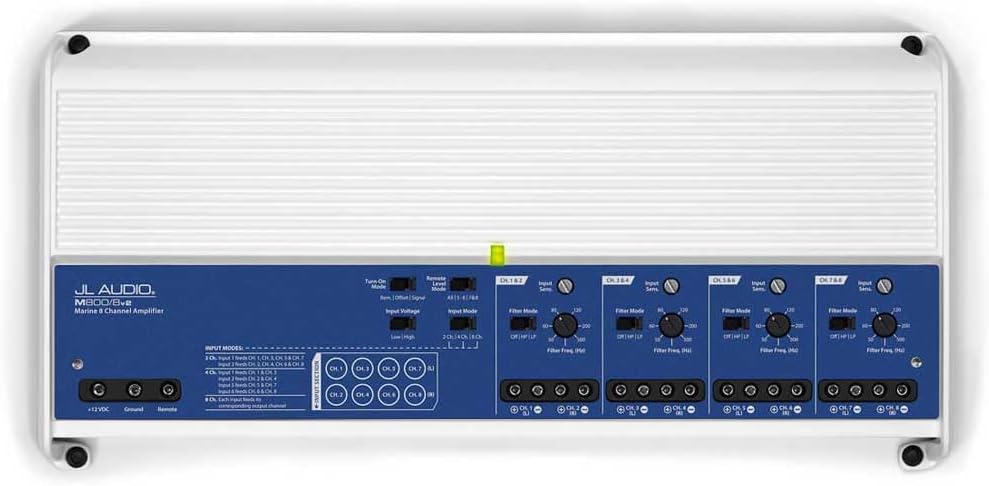
మూర్తి 4.3: Amplifier control panel with various settings.

మూర్తి 4.4: వివరంగా view of the control panel settings.
- Input Sens (Input Sensitivity/Gain): Adjust this control to match the output voltage of your source unit. Start with the control at minimum and slowly increase until desired volume is achieved without distortion.
- ఫిల్టర్ మోడ్: Select between OFF (full range), HP (High-Pass), or LP (Low-Pass) for each channel pair.
- HP (హై-పాస్): Allows frequencies above the set point to pass, typically used for component speakers.
- LP (లో-పాస్): సెట్ పాయింట్ కంటే తక్కువ ఫ్రీక్వెన్సీలను పాస్ చేయడానికి అనుమతిస్తుంది, సాధారణంగా సబ్ వూఫర్ల కోసం ఉపయోగిస్తారు.
- Filter Freq (Filter Frequency): Adjust this dial to set the cutoff frequency for the selected filter mode.
- రిమోట్ స్థాయి నియంత్రణ: An optional wired remote level control can be connected to the RJ45 port for convenient bass level adjustment from the listening position.
5. ఆపరేటింగ్ సూచనలు
Once properly installed, operating the M800/8 V2 amplifier is straightforward:
- పవర్ ఆన్/ఆఫ్: ది amplifier will automatically turn on when your head unit is powered on (via the remote turn-on wire) and turn off when the head unit is off.
- ఆడియో ప్లేబ్యాక్: Play audio through your head unit. Adjust the volume on your head unit and fine-tune the amplifier's gain settings for optimal sound quality without distortion.
- సూచిక లైట్లు: Observe the status indicator light on the amplifier. A solid green light indicates normal operation. Refer to the troubleshooting section if the light indicates an issue.
6. నిర్వహణ
The JL Audio M800/8 V2 is designed for durability in marine environments, but regular maintenance can extend its lifespan:
- శుభ్రపరచడం: కాలానుగుణంగా తుడవండి ampలైఫైయర్ యొక్క బాహ్య భాగం మృదువైన, d తోamp cloth to remove dust and salt residue. Do not use harsh chemicals or abrasive cleaners.
- కనెక్షన్లు: Annually inspect all power, ground, and speaker connections for corrosion or looseness. Clean and re-tighten as necessary.
- వెంటిలేషన్: Ensure that the cooling fins are free from obstructions to allow proper heat dissipation.
7. ట్రబుల్షూటింగ్
మీరు మీతో సమస్యలను ఎదుర్కొంటే ampలిఫైయర్ కోసం, ఈ క్రింది సాధారణ సమస్యలు మరియు పరిష్కారాలను చూడండి:
| సమస్య | సాధ్యమైన కారణం | పరిష్కారం |
|---|---|---|
| శక్తి లేదు / Ampలైఫైయర్ ఆన్ చేయదు | ఎగిరిన ఫ్యూజ్, వదులుగా ఉన్న పవర్/గ్రౌండ్/రిమోట్ వైర్, తప్పు రిమోట్ టర్న్-ఆన్ సిగ్నల్. | Check fuse near battery. Verify all power, ground, and remote connections are secure and have proper voltage. Test remote wire for 12V when head unit is on. |
| ఆడియో అవుట్పుట్ లేదు | ఇన్పుట్ సిగ్నల్ లేదు, తప్పు గెయిన్ సెట్టింగ్, స్పీకర్ వైర్లు డిస్కనెక్ట్ చేయబడ్డాయి, ampరక్షణ మోడ్లో లైఫైయర్. | Check RCA input connections. Adjust input sensitivity. Verify speaker wire connections. Check amplifier status light for protect mode indication. |
| వక్రీకరించిన ధ్వని | Gain set too high, incorrect filter settings, poor ground connection, damaged speakers. | Reduce input sensitivity (gain). Adjust filter settings (HP/LP) appropriately for speakers/subwoofers. Inspect ground connection. Test speakers with another ampవీలైతే లైఫైయర్. |
| Ampలైఫైయర్ వేడెక్కడం | Insufficient ventilation, impedance too low, prolonged high-volume use. | చుట్టూ తగినంత గాలి ప్రసరణ ఉండేలా చూసుకోండి ampలైఫైయర్. స్పీకర్ ఇంపెడెన్స్ను అది కలిసేలా చూసుకోవడానికి తనిఖీ చేయండి ampలైఫైయర్ స్పెసిఫికేషన్లు. వాల్యూమ్ తగ్గించండి లేదా అనుమతించండి ampచల్లబరుస్తుంది. |
If the problem persists after attempting these solutions, contact JL Audio customer support or a qualified service technician.
8. స్పెసిఫికేషన్లు
Key specifications for the JL Audio M800/8 V2 Marine Ampజీవితకాలం:
- మోడల్: M800/8v2
- ఛానెల్లు: 8-ఛానల్
- RMS పవర్ అవుట్పుట్: 800 W RMS (Total)
- అప్లికేషన్: Marine Audio (Component Speakers, Subwoofers)
- ఫీచర్లు: Waterproof design, Car Audio marine audio compatibility
- ఇన్పుట్ రకం: RCA
- ఫిల్టర్ రకాలు: High-Pass (HP), Low-Pass (LP)
- కొలతలు: (Refer to product images for visual scale, specific dimensions not provided in source data)

మూర్తి 8.1: టాప్ view of the JL Audio M800/8 V2 ampజీవితకాలం.
9. వారంటీ మరియు మద్దతు
JL Audio products are designed and manufactured to the highest quality standards. For specific warranty information, please refer to the warranty card included with your product or visit the official JL Audio webసైట్.
For technical support, troubleshooting assistance, or service inquiries, please contact JL Audio customer service through their official website or authorized dealer network. Keep your purchase receipt as proof of purchase for warranty claims.
అధికారిక Webసైట్: www.jlaudio.com


