1. పరిచయం
This manual provides instructions for the proper setup, operation, and maintenance of your Amazon Basics Large Portable Bluetooth Speaker (Model BTV3_2). Please read this manual thoroughly before using the product to ensure optimal performance and safety.
2. భద్రతా సమాచారం
- స్పీకర్ను నీరు లేదా అధిక తేమకు గురిచేయవద్దు.
- స్పీకర్ను వేడి వనరుల దగ్గర లేదా ప్రత్యక్ష సూర్యకాంతిలో ఉంచకుండా ఉండండి.
- స్పీకర్ను విడదీయడానికి లేదా సవరించడానికి ప్రయత్నించవద్దు. ఇది వారంటీని రద్దు చేస్తుంది.
- Use only the provided AC power adapter for charging.
- స్పీకర్ను పిల్లలకు దూరంగా ఉంచండి.
3. ప్యాకేజీ విషయాలు
ప్యాకేజీలో అన్ని అంశాలు ఉన్నాయని నిర్ధారించుకోండి:
- Amazon Basics Large Portable Bluetooth Speaker
- ఎసి పవర్ అడాప్టర్

వివరణ: This image shows the Amazon Basics Large Portable Bluetooth Speaker securely placed within its brown cardboard packaging, indicating how the product is received.
4. ఉత్పత్తి ముగిసిందిview
4.1 ముందు View

వివరణ: This image displays the front of the Amazon Basics Large Portable Bluetooth Speaker, featuring a black mesh grille that covers the speaker drivers.
4.2. టాప్ ప్యానెల్ నియంత్రణలు

వివరణ: This image shows the top panel of the speaker with four circular buttons and a small LED indicator. From left to right, the buttons are: Volume Down (-), Play/Pause, Volume Up (+), and Bluetooth Pairing/Call Answer. Below the buttons, a small Bluetooth logo and an LED indicator are visible.
- - (Volume Down): ఆడియో వాల్యూమ్ను తగ్గిస్తుంది.
- ప్లే/పాజ్: ఆడియో ప్లేబ్యాక్ను ప్లే చేస్తుంది లేదా పాజ్ చేస్తుంది.
- + (Volume Up): ఆడియో వాల్యూమ్ని పెంచుతుంది.
- Bluetooth/Call: Initiates Bluetooth pairing mode or answers/ends phone calls.
- LED సూచిక: Displays power and Bluetooth status.
4.3. సైడ్ ప్యానెల్ పోర్ట్లు

వివరణ: This image shows the right side panel of the speaker, featuring a power switch, a DC input port for charging, and an AUX input port for wired audio connections.
- స్విచ్ ఆన్/ఆఫ్: స్పీకర్ను ఆన్ లేదా ఆఫ్ చేస్తుంది.
- పోర్ట్ లో DC: Connects to the AC power adapter for charging.
- ఆక్స్ పోర్ట్: Connects to audio devices using a 3.5mm stereo cable (not included).
5. సెటప్
5.1. స్పీకర్ను ఛార్జింగ్
- Connect the provided AC power adapter to the DC IN port on the side of the speaker.
- AC పవర్ అడాప్టర్ను వాల్ అవుట్లెట్లోకి ప్లగ్ చేయండి.
- The LED indicator will illuminate to show charging status. A full charge provides up to 8 hours of playback.
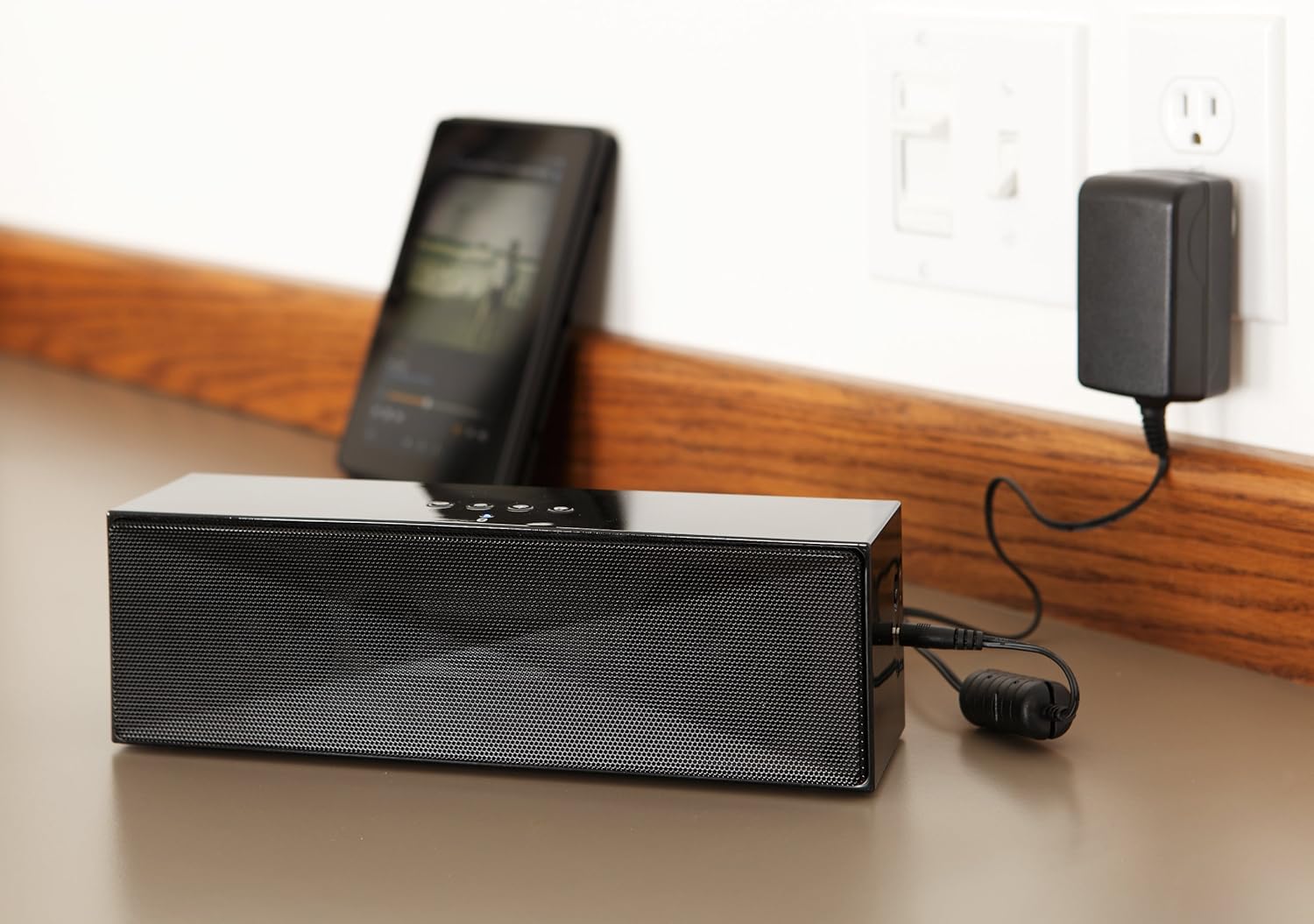
వివరణ: This image shows the speaker placed on a surface, with its AC power adapter plugged into a wall outlet, illustrating the charging process.
5.2. పవర్ చేయడం ఆన్/ఆఫ్
Slide the ON/OFF switch located on the side panel to the "ON" position to power on the speaker. Slide it to the "OFF" position to power off.
6. ఆపరేటింగ్ సూచనలు
6.1. బ్లూటూత్ పెయిరింగ్
- Ensure the speaker is powered on. The LED indicator will flash, indicating it is in pairing mode.
- మీ బ్లూటూత్-ప్రారంభించబడిన పరికరంలో (స్మార్ట్ఫోన్, టాబ్లెట్, ల్యాప్టాప్), బ్లూటూత్ను ప్రారంభించి, అందుబాటులో ఉన్న పరికరాల కోసం శోధించండి.
- Select "Amazon Basics BTV3_2" from the list of devices.
- Once paired, the LED indicator on the speaker will glow solid blue.
- The speaker can connect to devices up to 30 feet (10 meters) away.

వివరణ: This image shows the speaker positioned next to a tablet displaying a music playback interface, demonstrating a typical Bluetooth connection scenario.
6.2. Connecting via AUX Cable
- Connect one end of a 3.5mm stereo audio cable (not included) to the AUX port on the speaker.
- కేబుల్ యొక్క మరొక చివరను మీ పరికరం యొక్క ఆడియో అవుట్పుట్ జాక్కి కనెక్ట్ చేయండి.
- స్పీకర్ స్వయంచాలకంగా AUX ఇన్పుట్ మోడ్కి మారుతుంది.
6.3. హ్యాండ్స్-ఫ్రీ కాలింగ్
బ్లూటూత్ ద్వారా కనెక్ట్ అయినప్పుడు హ్యాండ్స్-ఫ్రీ కాల్స్ కోసం స్పీకర్ అంతర్నిర్మిత మైక్రోఫోన్ను కలిగి ఉంది.
- కాల్కు సమాధానం ఇవ్వడం: Press the Bluetooth/Call button once.
- కాల్ని ముగించడం: Press the Bluetooth/Call button once during a call.
- కాల్ను తిరస్కరించడం: Press and hold the Bluetooth/Call button.
7. నిర్వహణ
- స్పీకర్ను మృదువైన, పొడి గుడ్డతో శుభ్రం చేయండి. లిక్విడ్ క్లీనర్లు లేదా ఏరోసోల్లను ఉపయోగించవద్దు.
- ఎక్కువసేపు ఉపయోగంలో లేనప్పుడు స్పీకర్ను చల్లని, పొడి ప్రదేశంలో నిల్వ చేయండి.
- స్పీకర్ను వదలడం లేదా బలమైన ప్రభావాలకు గురిచేయడం మానుకోండి.
8. ట్రబుల్షూటింగ్
| సమస్య | సాధ్యమైన కారణం | పరిష్కారం |
|---|---|---|
| స్పీకర్ పవర్ ఆన్ చేయదు. | బ్యాటరీ క్షీణించింది. | Connect the speaker to the AC power adapter and charge it. |
| బ్లూటూత్ ద్వారా జత చేయడం సాధ్యం కాదు. | Speaker is not in pairing mode; device Bluetooth is off; device is out of range. | Ensure speaker LED is flashing; enable Bluetooth on your device; move device closer to the speaker (within 30 feet/10 meters). |
| శబ్దం లేదు లేదా తక్కువ వాల్యూమ్ ఉంది. | Volume on speaker or connected device is too low; incorrect input source. | Increase volume on both the speaker and your connected device. Ensure correct connection (Bluetooth or AUX). |
| Speaker turns off automatically when using AUX. | Automatic power-off feature activated due to prolonged silence. | This model may have an automatic power-off feature after a period of inactivity or silence, even when connected via AUX. To resume playback, power the speaker off and then on again using the side switch. |
| ధ్వని వక్రీకరణ. | Volume too high; weak battery; interference. | Reduce volume; charge the speaker; move away from other electronic devices. |
9. స్పెసిఫికేషన్లు
| ఫీచర్ | వివరాలు |
|---|---|
| మోడల్ సంఖ్య | BTV3_2 |
| కొలతలు (L x W x H) | 10.2 x 2.9 x 3.1 అంగుళాలు (25.9 x 7.4 x 7.9 సెం.మీ.) |
| బరువు | 1.61 పౌండ్లు (0.73 కిలోలు) |
| స్పీకర్ అవుట్పుట్ | 2 x 5W (మొత్తం 10W) |
| కనెక్టివిటీ | బ్లూటూత్, 3.5mm AUX |
| బ్లూటూత్ రేంజ్ | 30 అడుగుల (10 మీటర్లు) వరకు |
| బ్యాటరీ లైఫ్ | 8 గంటల వరకు |
| బ్యాటరీ కెపాసిటీ | 8000 mAh |
| అంతర్నిర్మిత మైక్రోఫోన్ | అవును |
| శక్తి మూలం | Battery Powered, AC Adapter |
| మెటీరియల్ | ప్లాస్టిక్ |

వివరణ: This image provides a visual representation of the speaker's dimensions, showing its length (10.2"), width (2.9"), and height (3.1").
10. వారంటీ మరియు మద్దతు
For warranty information and customer support, please refer to the documentation included with your purchase or visit the official Amazon Basics webవారంటీ క్లెయిమ్ల కోసం మీ కొనుగోలు రుజువును ఉంచండి.
ఆన్లైన్ మద్దతు: Amazon Basics Store


