
పరిచయం
This manual provides comprehensive instructions for the proper installation, operation, and maintenance of your LAMAX DRIVE C7 Dashcam. Please read this manual thoroughly before using the device to ensure optimal performance and longevity. The LAMAX DRIVE C7 is designed to record your journeys in Full HD 1080p, offering crucial evidence in case of incidents and enhancing your driving safety.
ప్యాకేజీ విషయాలు
- LAMAX DRIVE C7 Dashcam
- కారు ఛార్జర్
- చూషణ కప్పు మౌంట్
- అంటుకునే మౌంట్
- USB కేబుల్
- Memory Card (as per product specifications)
- వినియోగదారు మాన్యువల్ (ఈ పత్రం)
పరికరం ముగిసిందిview
Familiarize yourself with the various components and controls of your LAMAX DRIVE C7 Dashcam.
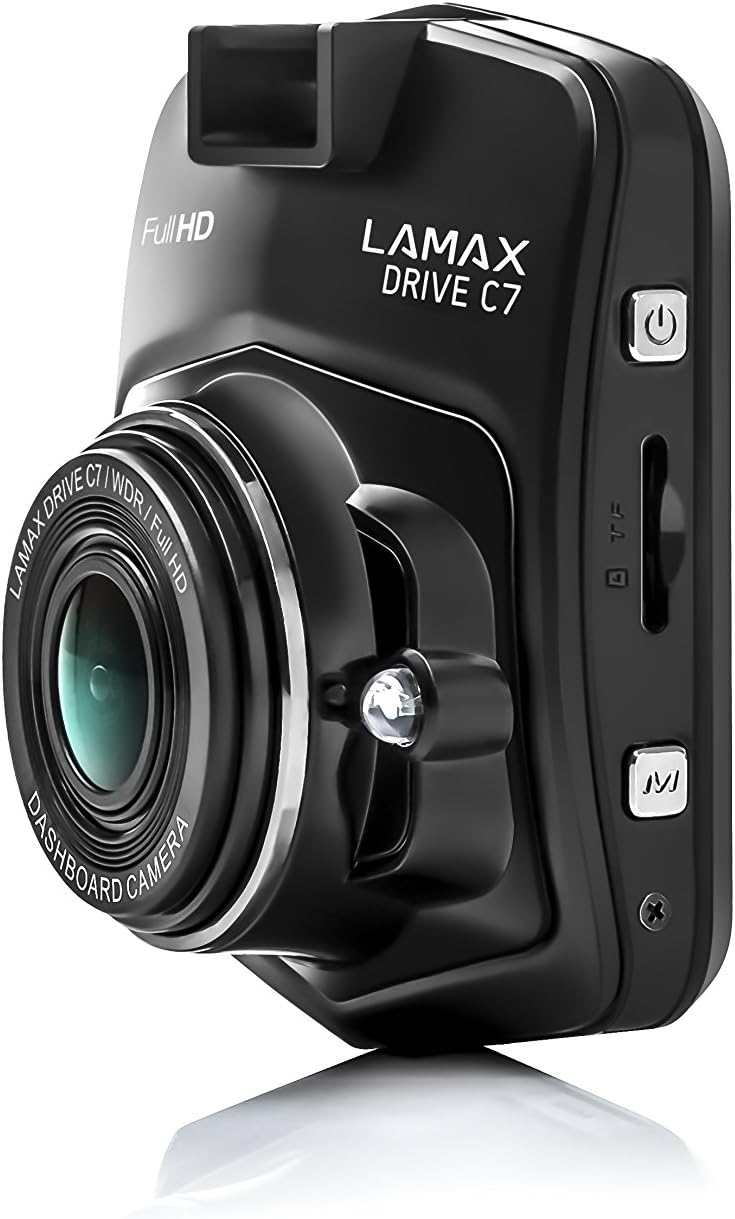
చిత్రం: వైపు view of the dashcam, highlighting the power button, memory card slot, and USB port.

చిత్రం: ముందు భాగం view of the dashcam with the 2.4-inch LCD display and control buttons below.
- లెన్స్: High-resolution camera lens.
- ప్రదర్శన: కోసం 2.4-అంగుళాల LCD స్క్రీన్ viewing recordings and menu.
- పవర్ బటన్: పరికరాన్ని ఆన్/ఆఫ్ చేస్తుంది.
- మెనూ బటన్: సెట్టింగ్లు మరియు ఎంపికలను యాక్సెస్ చేస్తుంది.
- అప్/డౌన్ బటన్లు: మెను ఎంపికల ద్వారా నావిగేట్ చేయండి.
- సరే బటన్: ఎంపికలను నిర్ధారిస్తుంది.
- మైక్రో SD కార్డ్ స్లాట్: Insert memory card here.
- USB పోర్ట్: విద్యుత్ సరఫరా మరియు డేటా బదిలీ కోసం.
- రీసెట్ బటన్: Resets the device (use a thin object).
సెటప్
1. మెమరీ కార్డ్ని చొప్పించడం
Ensure the dashcam is powered off before inserting or removing the microSD card. Insert the card into the slot until it clicks into place. Use a Class 10 or higher microSD card, up to 32GB capacity, for optimal performance. It is recommended to format the memory card within the dashcam settings before first use and periodically thereafter.
2. డాష్క్యామ్ను మౌంట్ చేయడం
మీ విండ్షీల్డ్పై మీకు ఆటంకం కలిగించని ప్రదేశాన్ని ఎంచుకోండి view of the road. Clean the windshield surface thoroughly before applying the mount.

Image: The dashcam attached to its suction cup mount, ready for windshield installation.

చిత్రం: వెనుక view of the dashcam with the suction cup mount attached, showing the screen and buttons.
- Attach the chosen mount (suction cup or adhesive) to the dashcam.
- Press the mount firmly against the windshield and secure it.
- స్పష్టంగా ఉండేలా కెమెరా కోణాన్ని సర్దుబాటు చేయండి view ముందున్న రహదారి.
3 పవర్కి కనెక్ట్ అవుతోంది
Connect the car charger to the dashcam's USB port and plug the other end into your vehicle's 12V power outlet (cigarette lighter socket). The dashcam will automatically power on and begin recording when the vehicle's ignition is turned on.
ఆపరేటింగ్ సూచనలు
పవర్ ఆన్/ఆఫ్
- స్వయంచాలక: The dashcam powers on/off automatically with the vehicle's ignition.
- మాన్యువల్: పరికరాన్ని మాన్యువల్గా ఆన్ లేదా ఆఫ్ చేయడానికి పవర్ బటన్ను నొక్కి పట్టుకోండి.
రికార్డింగ్ మోడ్లు
- లూప్ రికార్డింగ్: The dashcam records video in continuous loops (e.g., 1, 3, or 5 minutes). When the memory card is full, the oldest unlocked fileలు ఓవర్రైట్ చేయబడ్డాయి.
- G-సెన్సార్: In the event of a sudden impact or collision, the G-Sensor automatically locks the current recording, preventing it from being overwritten. The sensitivity of the G-Sensor can be adjusted in the settings.
- పార్కింగ్ మోడ్: When enabled, the dashcam will automatically start recording if it detects motion or an impact while the vehicle is parked. This feature provides 24-hour surveillance for your vehicle.
- టైమ్-లాప్స్ వీడియో: This feature allows the camera to record at a lower frame rate (e.g., 1 frame per second), compressing long periods of time into short videos. This can significantly extend the recording capacity of your memory card.
మెనూ నావిగేషన్
నొక్కండి మెనూ button to access the settings. Use the పైకి/క్రిందికి ఎంపికల ద్వారా నావిగేట్ చేయడానికి బటన్లు మరియు OK ఎంపికలను నిర్ధారించడానికి బటన్. నొక్కండి మెనూ again to exit the settings.
ప్లేబ్యాక్
కు view recorded videos, stop recording (if active), then press the మోడ్ button to switch to playback mode. Use the పైకి/క్రిందికి a ని ఎంచుకోవడానికి బటన్లు file మరియు OK to play it. You can also connect the dashcam to a computer via USB to access fileనేరుగా లు.
నిర్వహణ
మెమరీ కార్డ్ నిర్వహణ
- ఫార్మాటింగ్: Regularly format your microSD card (at least once a month) using the dashcam's format function to prevent data corruption and ensure smooth recording.
- సామర్థ్యం: Ensure sufficient free space on the memory card. Locked files from G-Sensor events can accumulate and fill the card. Periodically review and delete unnecessary locked files.
క్లీనింగ్
Wipe the camera lens with a soft, lint-free cloth to ensure clear video quality. Use a slightly damp cloth to clean the body of the dashcam. Do not use harsh chemicals or abrasive cleaners.
ఫర్మ్వేర్ నవీకరణలు
Check the official LAMAX website periodically for available firmware updates. Updates can improve performance, add new features, or fix bugs. Follow the instructions provided with the firmware update carefully.
ట్రబుల్షూటింగ్
| సమస్య | సాధ్యమైన కారణం / పరిష్కారం |
|---|---|
| డాష్క్యామ్ పవర్ ఆన్ అవ్వదు. |
|
| రికార్డింగ్ అనుకోకుండా ఆగిపోతుంది. |
|
| వీడియో నాణ్యత పేలవంగా లేదా అస్పష్టంగా ఉంది. |
|
| Dashcam freezes or becomes unresponsive. |
|
స్పెసిఫికేషన్లు
| ఫీచర్ | వివరాలు |
|---|---|
| వీడియో రిజల్యూషన్ | పూర్తి HD 1080p |
| Viewing యాంగిల్ | 150° |
| ప్రదర్శన పరిమాణం | 2.4 inches (6.1 cm) LCD |
| లూప్ రికార్డింగ్ | అవును |
| G-సెన్సార్ | అవును |
| పార్కింగ్ మోడ్ | Yes (24h) |
| నైట్ విజన్ | అవును |
| అంతర్నిర్మిత GPS | Optional (via external module) |
| నిల్వ | MicroSD card (Class 10+, up to 32GB recommended) |
| కొలతలు | 3.3 x 6.1 x 7.2 సెం.మీ |
| బరువు | 60 గ్రా |
| చేర్చబడిన భాగాలు | Memory Card (as per product details) |
వారంటీ మరియు మద్దతు
వారంటీ సమాచారం
The LAMAX DRIVE C7 Dashcam comes with a standard manufacturer's warranty. Please refer to the warranty card included in your package or visit the official LAMAX webమీ ప్రాంతానికి సంబంధించిన వివరణాత్మక వారంటీ నిబంధనలు మరియు షరతుల కోసం సైట్ను చూడండి. వారంటీ క్లెయిమ్ల కోసం మీ కొనుగోలు రుజువును ఉంచండి.
కస్టమర్ మద్దతు
For technical assistance, troubleshooting, or product inquiries, please visit the official LAMAX support website or contact their customer service department. Contact details can typically be found on the brand's official webసైట్ లేదా ఉత్పత్తి ప్యాకేజింగ్లో.
Official LAMAX Store: Visit LAMAX Store on Amazon


