పరిచయం
The Ultimate Ears ROLL is a powerful, portable wireless Bluetooth speaker designed for robust use in various environments. It delivers 360-degree sound with deep bass and features a waterproof and shockproof design, making it suitable for outdoor adventures and poolside enjoyment. This manual provides essential information for setting up, operating, maintaining, and troubleshooting your UE ROLL speaker.

చిత్రం: ముందు భాగం view of the Ultimate Ears ROLL speaker in Sugarplum color, featuring prominent yellow plus and minus symbols for volume control.
సెటప్
1. స్పీకర్ను ఛార్జింగ్
Before initial use, fully charge your UE ROLL speaker. The charging port is located on the back of the speaker, protected by a waterproof flap.
- Locate the waterproof flap on the back of the speaker.
- Carefully open the flap to reveal the micro USB charging port.
- Connect the provided micro USB cable to the speaker and a compatible USB power source.
- Allow the speaker to charge until the charging indicator light shows a full charge. A full charge typically takes less than an hour with a 2A charger.
- Ensure the waterproof flap is securely closed after charging to maintain water resistance.
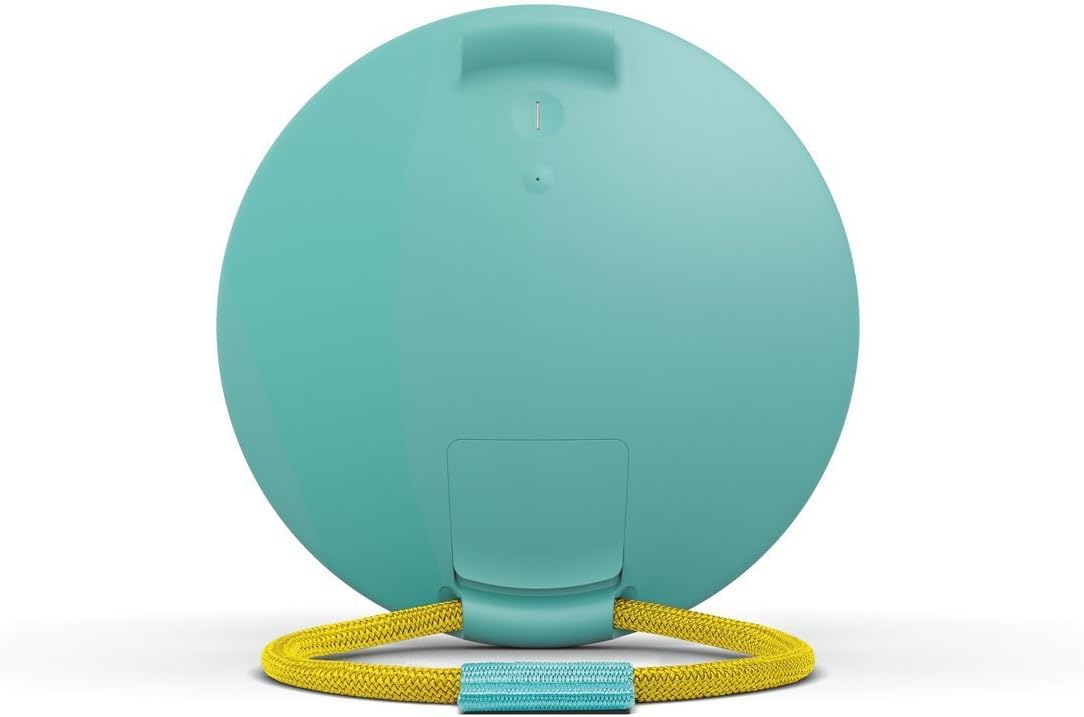
చిత్రం: వెనుక view of the UE ROLL speaker with the protective flap opened, revealing the micro USB charging port and auxiliary input.
2. బ్లూటూత్ పెయిరింగ్
The UE ROLL can pair with up to 8 Bluetooth devices.
- Press the power button on the back of the speaker to turn it on.
- Press and hold the Bluetooth button (located near the power button) until you hear an audible tone, indicating the speaker is in pairing mode.
- On your mobile device (smartphone, tablet, or computer), navigate to the Bluetooth settings.
- Select "UE ROLL" from the list of available devices to complete the pairing process.
3. UE ROLL Companion App
Enhance your speaker experience by downloading the UE ROLL companion app, available for Apple and Android mobile devices. The app allows for equalizer adjustments, volume control, power management, pairing with a second UE speaker for stereo or dual sound, and firmware updates.
ఆపరేటింగ్ సూచనలు
నియంత్రణలు
The UE ROLL features simple, intuitive controls:
- వాల్యూమ్ అప్/డౌన్: Large '+' and '-' symbols on the front of the speaker control the volume.
- పవర్ బటన్: Located on the back of the speaker.
- బ్లూటూత్ జత చేసే బటన్: Located on the back, near the power button.

Image: Diagram illustrating the power button, one-touch Bluetooth connection button, and the large volume up/down controls on the speaker's surface.
ప్రత్యేక లక్షణాలు
- Waterproof (IPX7 Rated): The speaker is designed to withstand immersion in water up to 1 meter for 30 minutes. Ensure all ports are securely sealed by the waterproof flap before exposing the speaker to water. The speaker also floats, allowing for music playback in water.
- బంగీ త్రాడు: The integrated marine-grade bungee cord allows you to attach the speaker to various objects like bikes, backpacks, or shower rods.
- Double Up: Use the UE ROLL app to pair your speaker with another Ultimate Ears speaker for enhanced sound, either in stereo or dual mode.
- Multi-Host: Two different devices can be paired to the speaker simultaneously, allowing for seamless music control between users.
- బ్యాటరీ స్థాయి తనిఖీ: Press the '+' and '-' volume buttons simultaneously to hear an audible announcement of the current battery charge level in 10% increments.
- అలారం ఫంక్షన్: Set an alarm through the UE ROLL app to play your favorite music from a streaming service.

Image: Infographic highlighting the UE ROLL's features, including IPX7 waterproofing, 9-hour battery life, app integration, and 360-degree sound from two drivers and two tweeters.
అధికారిక ఉత్పత్తి వీడియో
వీడియో: అధికారిక ఉత్పత్తి వీడియో ప్రదర్శనasing the Ultimate Ears ROLL speaker's durability and versatility in various outdoor and water-based activities, highlighting its waterproof and portable design.
నిర్వహణ
- శుభ్రపరచడం: The speaker can be cleaned with warm, soapy water. Ensure the waterproof flap covering the ports is securely closed before cleaning.
- Waterproof Flap: Regularly inspect the waterproof flap for any signs of wear or damage. Ensure it forms a tight seal when closed to maintain the speaker's water resistance. Avoid excessive force when opening or closing the flap to prevent damage.
- ఫర్మ్వేర్ నవీకరణలు: Keep your speaker updated with the latest firmware via the UE ROLL companion app to ensure optimal performance and access to new features.
ట్రబుల్షూటింగ్
- శక్తి లేదు: స్పీకర్ పూర్తిగా ఛార్జ్ అయ్యిందని నిర్ధారించుకోండి. దాన్ని పవర్ సోర్స్కి కనెక్ట్ చేసి, మళ్లీ పవర్ ఆన్ చేయడానికి ప్రయత్నించే ముందు కనీసం 30 నిమిషాలు ఛార్జ్ చేయడానికి అనుమతించండి.
- బ్లూటూత్ కనెక్టివిటీ సమస్యలు:
- Ensure the speaker is in pairing mode (audible tone after pressing the Bluetooth button).
- మీ మొబైల్ పరికరంలో బ్లూటూత్ ప్రారంభించబడిందో లేదో తనిఖీ చేయండి.
- Move the speaker closer to your device; the maximum wireless range is 65 feet.
- Forget the device from your phone's Bluetooth settings and attempt to re-pair.
- Restart both the speaker and your mobile device.
- Sound Distortion at High Volume: While the speaker is designed for clear sound, some distortion may occur at maximum volume levels, especially with certain audio tracks. Try reducing the volume slightly.
- తగ్గిన బ్యాటరీ లైఫ్: Battery performance can degrade over time with extensive use. Ensure the speaker is fully charged before each use. Environmental conditions and usage patterns can also affect battery life.
స్పెసిఫికేషన్లు
| ఫీచర్ | వివరాలు |
|---|---|
| మోడల్ పేరు | రోల్ చేయండి |
| అంశం మోడల్ సంఖ్య | 984-000517 |
| బ్రాండ్ | అల్టిమేట్ చెవులు |
| స్పీకర్ రకం | అవుట్డోర్ |
| ప్రత్యేక ఫీచర్ | జలనిరోధిత |
| సిఫార్సు చేసిన ఉపయోగాలు | సంగీతం |
| అనుకూల పరికరాలు | ఐఫోన్, ఆండ్రాయిడ్ |
| సరౌండ్ సౌండ్ ఛానెల్ కాన్ఫిగరేషన్ | 1.0 |
| రంగు | Sugarplum |
| చేర్చబడిన భాగాలు | Speaker, Battery, Bungee Cord |
| వస్తువు బరువు | 11.7 ఔన్సులు (331.7 గ్రా) |
| నీటి నిరోధక స్థాయి | జలనిరోధిత (IPX7) |
| గరిష్ట పరిధి | 65 అడుగులు (బ్లూటూత్) |
| నియంత్రణ పద్ధతి | యాప్ |
| వైర్లెస్ కమ్యూనికేషన్ టెక్నాలజీ | బ్లూటూత్ |
| స్పీకర్ పరిమాణం | 14.1 Centimeters (Diameter) |
| శక్తి మూలం | బ్యాటరీతో నడిచేది (1 A బ్యాటరీ చేర్చబడింది) |
| ఆడియో డ్రైవర్ రకం | డైనమిక్ డ్రైవర్ |
| స్పీకర్ గరిష్ట అవుట్పుట్ పవర్ | 25 వాట్స్ |
| ఉత్పత్తి కొలతలు | 5.3 x 5.3 x 1.6 అంగుళాలు |
| మొదటి తేదీ అందుబాటులో ఉంది | జూన్ 16, 2015 |
వారంటీ సమాచారం
The Ultimate Ears ROLL speaker comes with a Limited Warranty. For specific terms and conditions, please refer to the warranty documentation included with your product or visit the official Ultimate Ears support webసైట్.
మద్దతు
For further assistance, technical support, or product inquiries, please contact Ultimate Ears customer service:
- ఫోన్: 646-454-3200
- ఆన్లైన్ మద్దతు: సందర్శించండి Ultimate Ears Store on Amazon ఉత్పత్తి సమాచారం మరియు మద్దతు వనరుల కోసం.


