1. పరిచయం
The Apple iPod Shuffle is a compact and portable music player designed for ease of use. It features a clickable control pad for simple navigation and a VoiceOver function to announce song titles. With up to 15 hours of battery life, it provides ample music for workouts or daily commutes. This manual provides essential information for setting up, operating, and maintaining your iPod Shuffle.
2. పెట్టెలో ఏముంది
Carefully unpack your iPod Shuffle and ensure all components are present:
- Apple iPod Shuffle device
- EarPods with 3.5 mm Headphone Plug
- USB ఛార్జింగ్/సింక్ కేబుల్
This image displays the Apple iPod Shuffle in Space Gray, its dedicated USB charging and sync cable, and a pair of white Apple EarPods. These are the primary components included with the device.
3. సెటప్
3.1. Charging Your iPod Shuffle
Before first use, fully charge your iPod Shuffle. Connect the small end of the USB Charging/Sync Cable to the headphone jack of your iPod Shuffle and the larger USB-A end to a USB port on your computer or a compatible USB power adapter (sold separately). The status light will indicate charging progress.
3.2. సంగీతాన్ని జోడించడం
To add music to your iPod Shuffle, you will need a computer with iTunes (or the Apple Music app on macOS Catalina and later) installed.
- Connect your iPod Shuffle to your computer using the USB Charging/Sync Cable.
- Open iTunes or the Apple Music app. Your iPod Shuffle should appear in the sidebar or device list.
- Select your iPod Shuffle. You can then drag and drop songs, albums, or playlists from your library to the iPod Shuffle.
- Eject your iPod Shuffle from iTunes/Apple Music before disconnecting it from your computer.
4. ఆపరేటింగ్ సూచనలు
4.1. నియంత్రణలు
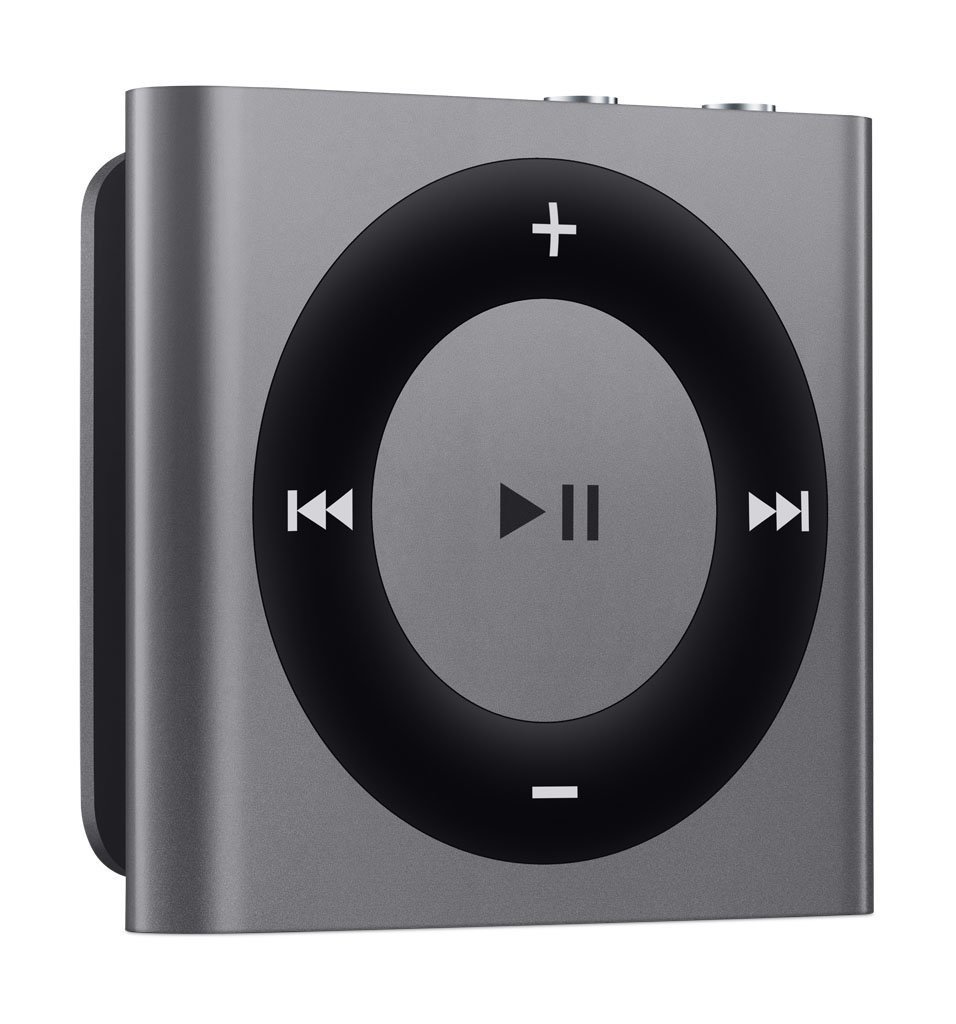
The iPod Shuffle features a circular control pad and a three-position switch.
- మధ్య బటన్: సంగీతాన్ని ప్లే చేయడానికి లేదా పాజ్ చేయడానికి నొక్కండి.
- Outer Ring Buttons:
- Top (+): వాల్యూమ్ పెంచండి.
- Bottom (-): వాల్యూమ్ తగ్గించండి.
- Right (Forward): Press once for next track. Press and hold to fast-forward.
- Left (Backward): Press once for previous track. Press twice for beginning of current track. Press and hold to rewind.
- మూడు స్థానాల స్విచ్: ఎగువ అంచున ఉంది.
- Left Position (Shuffle): Plays songs in a random order.
- Middle Position (Play in Order): Plays songs in the order they were synced.
- Right Position (Off): Turns the iPod Shuffle off.
- VoiceOver Button: Located on the top edge. Press to hear the current song title and artist. Press and hold to hear the names of your playlists, then press the center button to select a playlist.
4.2. బ్యాటరీ లైఫ్
The iPod Shuffle provides up to 15 hours of audio playback on a full charge. Actual battery life may vary based on usage and settings.
5. నిర్వహణ
To ensure the longevity and optimal performance of your iPod Shuffle, follow these maintenance guidelines:
- శుభ్రపరచడం: Use a soft, lint-free cloth to clean the device. Avoid abrasive materials or harsh chemicals.
- తేమ: Keep the iPod Shuffle dry. Avoid exposure to liquids, humidity, or extreme temperatures.
- నిల్వ: ఉపయోగంలో లేనప్పుడు పరికరాన్ని చల్లని, పొడి ప్రదేశంలో నిల్వ చేయండి.
- కేబుల్ కేర్: Handle the USB Charging/Sync Cable gently. Avoid bending or crimping the cable excessively.
6. ట్రబుల్షూటింగ్
If you encounter issues with your iPod Shuffle, try the following steps:
- పరికరం స్పందించడం లేదు: Ensure the three-position switch is not in the 'Off' position. If the device is unresponsive, try connecting it to a computer to see if it powers on or charges.
- Cannot Sync Music: Verify that your USB Charging/Sync Cable is securely connected to both the iPod Shuffle and your computer. Ensure iTunes or the Apple Music app is updated to the latest version. Try restarting your computer and the music application.
- బ్యాటరీ ఛార్జింగ్ లేదు: Check the USB cable for damage. Try a different USB port on your computer or a different compatible USB power adapter. Ensure the connections are firm.
- ఆడియో లేదు: Ensure your EarPods or headphones are fully plugged into the headphone jack. Check the volume level using the '+' button.
7. స్పెసిఫికేషన్లు
| మోడల్ సంఖ్య | MKMJ2LL/A |
| బ్రాండ్ | ఆపిల్ |
| ఉత్పత్తి కొలతలు | 1.9 x 1.6 x 1.9 అంగుళాలు |
| వస్తువు బరువు | 0.8 ఔన్సులు |
| మెమరీ స్టోరేజ్ కెపాసిటీ | 2 GB |
| బ్యాటరీ | 1 లిథియం మెటల్ బ్యాటరీ (చేర్చబడింది) |
| కనెక్టివిటీ టెక్నాలజీ | ఆక్స్ |
| మీడియా రకం | MP3 |
| మద్దతు ప్రమాణాలు | MP3 |
| రంగు | స్పేస్ గ్రే |
| తయారీదారు | ఆపిల్ |
| మొదటి తేదీ అందుబాటులో ఉంది | జూలై 17, 2015 |
8. వారంటీ మరియు మద్దతు
For detailed warranty information, technical assistance, and customer support, please visit the official Apple support webసైట్ (support.apple.com) or contact Apple customer service directly. Keep your proof of purchase for warranty claims.


