1. పరిచయం
This manual provides essential information for the safe and efficient operation, installation, and maintenance of your Daitsu ADDH10 Digital Dehumidifier. Please read these instructions thoroughly before using the appliance and retain them for future reference.
The Daitsu ADDH10 is designed to reduce humidity levels in indoor environments, helping to prevent mold, mildew, and other moisture-related issues. It features a digital display and automatic functions for user convenience.
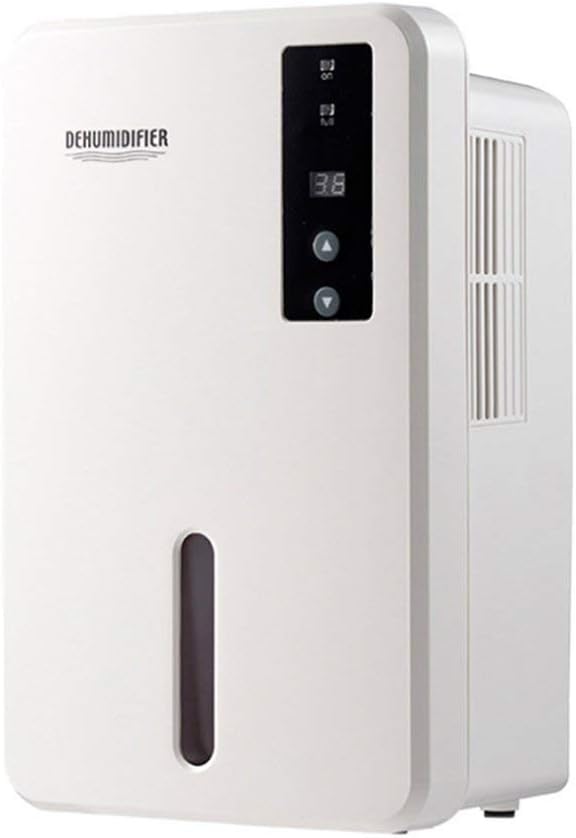
చిత్రం 1.1: ముందు view of the Daitsu ADDH10 Digital Dehumidifier, showing the control panel and water tank window.
2. భద్రతా సమాచారం
అగ్ని ప్రమాదాలు, విద్యుత్ షాక్ మరియు గాయాల ప్రమాదాన్ని తగ్గించడానికి విద్యుత్ ఉపకరణాలను ఉపయోగిస్తున్నప్పుడు ఎల్లప్పుడూ ప్రాథమిక భద్రతా జాగ్రత్తలను అనుసరించండి.
- Read all instructions before using the dehumidifier.
- విద్యుత్ సరఫరా వాల్యూమ్తో సరిపోలుతుందని నిర్ధారించుకోండిtagఇ రేటింగ్ లేబుల్పై పేర్కొనబడింది.
- దెబ్బతిన్న త్రాడు లేదా ప్లగ్తో డీహ్యూమిడిఫైయర్ను ఆపరేట్ చేయవద్దు.
- ఉపకరణాన్ని వేడి వనరులు, ప్రత్యక్ష సూర్యకాంతి మరియు మండే పదార్థాల నుండి దూరంగా ఉంచండి.
- Do not block the air inlet or outlet. Ensure adequate air circulation around the unit.
- డీహ్యూమిడిఫైయర్ను ఎల్లప్పుడూ స్థిరమైన, స్థాయి ఉపరితలంపై ఉంచండి.
- Unplug the unit before cleaning, maintenance, or when not in use for extended periods.
- ఈ ఉపకరణం వారి భద్రతకు బాధ్యత వహించే వ్యక్తి ద్వారా ఉపకరణాన్ని ఉపయోగించడం గురించి పర్యవేక్షణ లేదా సూచనలను అందిస్తే తప్ప, శారీరక, ఇంద్రియ లేదా మానసిక సామర్థ్యాలు తగ్గిన వ్యక్తులు (పిల్లలతో సహా) లేదా అనుభవం మరియు జ్ఞానం లేకపోవడం కోసం ఉద్దేశించబడలేదు.

Image 2.1: Illustration of the dehumidifier's double security protection, including automatic shut-off when the water tank is full and over-temperature protection (auto-stop if heat sink exceeds 80°C).
3. ఉత్పత్తి భాగాలు మరియు లక్షణాలు
మీ డీహ్యూమిడిఫైయర్ యొక్క ప్రధాన భాగాలతో మిమ్మల్ని మీరు పరిచయం చేసుకోండి:
- నియంత్రణ ప్యానెల్: డిజిటల్ డిస్ప్లే మరియు ఆపరేషన్ కోసం బటన్లు.
- గాలి ప్రవేశద్వారం: Where humid air is drawn into the unit.
- ఎయిర్ అవుట్లెట్: పొడి గాలి ఎక్కడ బహిష్కరించబడుతుంది.
- నీటి ట్యాంక్: Collects condensed water. Features a transparent window to monitor water level.
- Water Tank Handle/Lid: For easy removal and emptying.

Image 3.1: Diagram showing the key components: Air outlet, Control panel, Air inlet, and the 1.5L water tank capacity.
The dehumidifier has a 1.5-liter water tank capacity and features automatic shut-off when the tank is full, indicated by a float sensor. It also includes over-temperature protection.
4. సెటప్ మరియు ఇన్స్టాలేషన్
4.1 అన్ప్యాకింగ్
- దాని ప్యాకేజింగ్ నుండి డీహ్యూమిడిఫైయర్ను జాగ్రత్తగా తొలగించండి.
- అన్ని ప్యాకింగ్ మెటీరియల్స్, టేపులు మరియు రక్షణ ఫిల్మ్లను తీసివేయండి.
- Inspect the unit for any signs of damage. If damaged, do not operate and contact your retailer.
4.2 ప్లేస్మెంట్
- వాటర్ ట్యాంక్ నిండినప్పుడు దాని బరువును సమర్ధించగల గట్టి, సమతల ఉపరితలంపై డీహ్యూమిడిఫైయర్ను ఉంచండి.
- Ensure there is at least 20 cm (8 inches) of space around the air inlet and outlet for proper air circulation.
- Avoid placing the unit near walls, furniture, or curtains that could obstruct airflow.
- Do not place the unit in direct sunlight or near heat-generating appliances.
- For optimal performance, operate the dehumidifier in an enclosed area. Close all doors and windows in the room.
4.3 పవర్ కనెక్షన్
- Ensure your hands are dry before plugging in the unit.
- సరిగ్గా గ్రౌన్దేడ్ ఎలక్ట్రికల్ అవుట్లెట్లో పవర్ కార్డ్ని ప్లగ్ చేయండి.
5. ఆపరేటింగ్ సూచనలు
5.1 కంట్రోల్ ప్యానెల్ ఓవర్view
The control panel features a digital display and control buttons:
- డిజిటల్ ప్రదర్శన: Shows current humidity level or settings.
- పవర్ బటన్: యూనిట్ని ఆన్ లేదా ఆఫ్ చేస్తుంది.
- అప్/డౌన్ బటన్లు: Adjust desired humidity level or other settings.

Image 5.1: Various angles of the dehumidifier, highlighting the digital control panel with up/down buttons and the transparent water tank.
5.2 ప్రాథమిక ఆపరేషన్
- ఆన్ చేయండి: Press the Power button to turn on the dehumidifier. The digital display will light up, showing the current room humidity.
- కావలసిన తేమను సెట్ చేయండి: Use the Up and Down buttons to set your desired humidity level. The unit will operate until the room humidity reaches the set level, then cycle on and off to maintain it.
- ఆఫ్ చేయండి: Press the Power button again to turn off the dehumidifier.
5.3 వాటర్ ట్యాంక్ను ఖాళీ చేయడం
When the water tank is full, the dehumidifier will automatically stop operating, and an indicator light (if available) may illuminate. The unit will not resume operation until the tank is emptied and reinserted correctly.
- యూనిట్ ముందు నుండి వాటర్ ట్యాంక్ను సున్నితంగా బయటకు తీయండి.
- ట్యాంక్ను జాగ్రత్తగా సింక్ లేదా డ్రెయిన్కి తీసుకెళ్లండి.
- Remove the tank lid (if applicable) and pour out the collected water.
- Replace the lid securely and slide the empty water tank back into the dehumidifier until it clicks into place.
- The unit will resume operation automatically if the power is on and the desired humidity level has not been reached.

Image 5.2: The transparent water tank, designed for easy removal and emptying.
6. నిర్వహణ
క్రమం తప్పకుండా నిర్వహణ చేయడం వల్ల మీ డీహ్యూమిడిఫైయర్ యొక్క ఉత్తమ పనితీరు లభిస్తుంది మరియు జీవితకాలం పెరుగుతుంది. ఏదైనా నిర్వహణ చేసే ముందు ఎల్లప్పుడూ యూనిట్ను అన్ప్లగ్ చేయండి.
6.1 వాటర్ ట్యాంక్ శుభ్రపరచడం
- Clean the water tank regularly (e.g., every few weeks) to prevent mold and bacteria growth.
- Remove the water tank as described in Section 5.3.
- ట్యాంక్ను తేలికపాటి డిటర్జెంట్ మరియు గోరువెచ్చని నీటితో కడగాలి. బాగా కడగాలి.
- Dry the tank completely before reinserting it into the unit.
6.2 బాహ్యాన్ని శుభ్రపరచడం
- డీహ్యూమిడిఫైయర్ యొక్క బాహ్య భాగాన్ని మృదువైన, డితో తుడవండిamp గుడ్డ.
- రాపిడి క్లీనర్లు, ద్రావకాలు లేదా కఠినమైన రసాయనాలను ఉపయోగించవద్దు, ఎందుకంటే ఇవి ఉపరితలాన్ని దెబ్బతీస్తాయి.
- లోపలి భాగాలలోకి నీరు రాకుండా చూసుకోండి.
6.3 నిల్వ
- If storing the dehumidifier for an extended period, ensure the water tank is empty and clean.
- యూనిట్ వెలుపలి భాగాన్ని శుభ్రం చేయండి.
- ప్రత్యక్ష సూర్యకాంతి మరియు విపరీతమైన ఉష్ణోగ్రతలకు దూరంగా, చల్లని, పొడి ప్రదేశంలో యూనిట్ను నిటారుగా ఉంచండి.
7. ట్రబుల్షూటింగ్
కస్టమర్ సపోర్ట్ను సంప్రదించే ముందు, సాధారణ సమస్యల కోసం దయచేసి కింది ట్రబుల్షూటింగ్ గైడ్ను చూడండి:
| సమస్య | సాధ్యమైన కారణం | పరిష్కారం |
|---|---|---|
| డీహ్యూమిడిఫైయర్ ఆన్ చేయదు. | విద్యుత్ సరఫరా లేదు. పవర్ కార్డ్ సురక్షితంగా ప్లగ్ ఇన్ చేయబడలేదు. |
పవర్ అవుట్లెట్ పనిచేస్తుందో లేదో తనిఖీ చేయండి. పవర్ కార్డ్ యూనిట్ మరియు వాల్ అవుట్లెట్లోకి గట్టిగా ప్లగ్ చేయబడిందని నిర్ధారించుకోండి. |
| యూనిట్ నడుస్తోంది కానీ నీటిని సేకరించడం లేదు. | Room humidity is already low. ఉష్ణోగ్రత చాలా తక్కువగా ఉంది. గాలి ప్రవాహం నిరోధించబడింది. |
Check the current humidity level on the display. If it's below your set point, the unit will not collect water. చాలా చల్లని వాతావరణాలలో డీహ్యూమిడిఫైయర్లు తక్కువ ప్రభావవంతంగా ఉంటాయి. ఎయిర్ ఇన్లెట్ మరియు అవుట్లెట్కు అడ్డుపడకుండా చూసుకోండి. |
| యూనిట్ పనిచేయడం ఆగిపోతుంది మరియు సూచిక దీపం వెలుగుతుంది. | వాటర్ ట్యాంక్ నిండిపోయింది. నీటి ట్యాంక్ సరిగ్గా అమర్చబడలేదు. |
వాటర్ ట్యాంక్ ఖాళీ చేయండి. Reinsert the water tank correctly until it clicks into place. |
| ఆపరేషన్ సమయంలో అసాధారణ శబ్దం. | యూనిట్ సమతల ఉపరితలంపై లేదు. అంతర్గత భాగాల సమస్య. |
యూనిట్ స్థిరమైన, స్థాయి ఉపరితలంపై ఉంచబడిందని నిర్ధారించుకోండి. శబ్దం కొనసాగితే, వాడకాన్ని ఆపివేసి, కస్టమర్ సపోర్ట్ను సంప్రదించండి. |
8. స్పెసిఫికేషన్లు
| ఫీచర్ | స్పెసిఫికేషన్ |
|---|---|
| బ్రాండ్ | దైట్సు |
| మోడల్ సంఖ్య | ADDH10 (Technical Model: bb_S0403263) |
| రంగు | తెలుపు |
| వస్తువు బరువు | 10 కిలోలు |
| ఉత్పత్తి కొలతలు (సుమారుగా) | 286mm (ఎత్తు) x 180mm (వెడల్పు) x 134mm (లోతు) |
| నీటి ట్యాంక్ సామర్థ్యం | 1.5 లీటర్లు |
| ఆపరేటింగ్ మోడ్ | ఆటోమేటిక్ |
| చేర్చబడిన భాగాలు | డీహ్యూమిడిఫైయర్ |
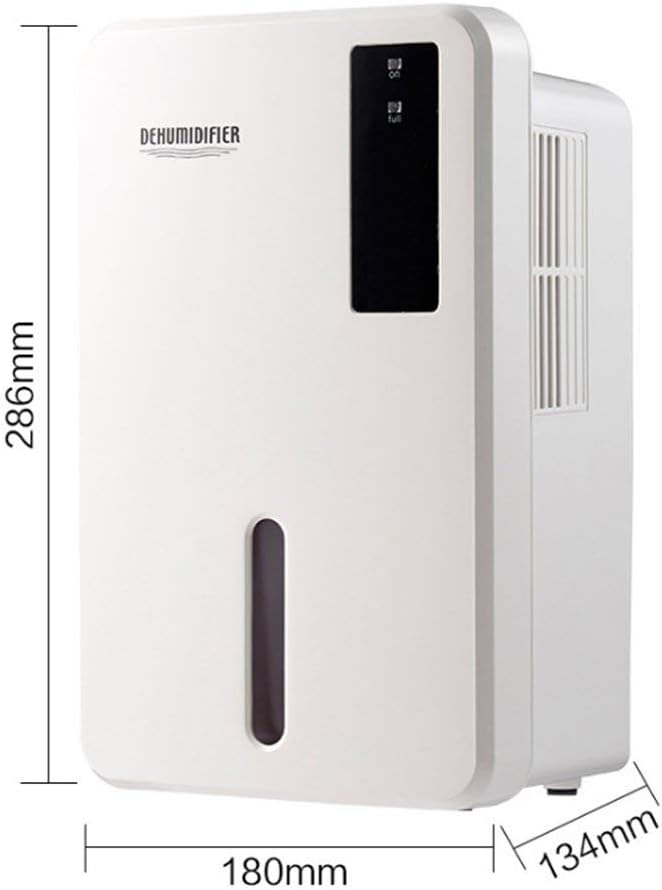
Image 8.1: Diagram illustrating the dimensions of the dehumidifier: 286mm height, 180mm width, and 134mm depth.
9. వారంటీ మరియు మద్దతు
For warranty information, please refer to the documentation included with your product packaging or visit the official Daitsu webసైట్. వారంటీ నిబంధనలు మరియు షరతులు ప్రాంతం మరియు రిటైలర్ను బట్టి మారవచ్చు.
If you encounter issues not covered in the troubleshooting section or require further assistance, please contact your retailer or the manufacturer's customer support. Have your model number (ADDH10) and purchase details ready when contacting support.


