పరిచయం
The Amcrest HDSeries 720p Wi-Fi Security Camera (model IPM-721W) provides comprehensive indoor surveillance, allowing you to monitor your home, children, pets, or business remotely. This camera features a quick mobile setup process, ensuring secure access to your video stream. Key functionalities include two-way audio communication, infrared night vision, remote pan/tilt control, and smart motion alerts.
పెట్టెలో ఏముంది
మీ ఉత్పత్తి ప్యాకేజింగ్లో కింది అంశాలన్నీ చేర్చబడ్డాయని నిర్ధారించుకోండి:
- Amcrest IPM-721W Camera Unit
- Power Adapter (AC to USB Type-A)
- USB to Micro USB Power Cable (approximately 10 feet)
- ఈథర్నెట్ ప్యాచ్ కేబుల్
- మౌంటు బ్రాకెట్
- మౌంటు హార్డ్వేర్ (స్క్రూలు మరియు యాంకర్లు)
- త్వరిత ప్రారంభ గైడ్
- Amcrest Cloud Subscription Offer (1 month free)
- Important Security Notice

చిత్ర వివరణ: ఒక టాప్-డౌన్ view of the Amcrest IPM-721W camera unit along with its included accessories: power adapter, USB cable, Ethernet cable, mounting bracket, and documentation.
సెటప్
1. భౌతిక సెటప్
- పవర్ కనెక్షన్: Connect the provided USB cable to the camera's Micro USB port and the power adapter. Plug the adapter into a standard electrical outlet.
- ప్రారంభ బూట్-అప్: The camera will perform an initial rotation as it initializes. Wait for the LED indicator on the back of the camera to start blinking green, indicating it's ready for app setup.
- మైక్రో SD కార్డ్ ఇన్స్టాలేషన్: To install a MicroSD card (up to 256GB, not included) for local storage, tilt the camera lens upwards until the MicroSD card slot is revealed. Carefully insert the card.
- మౌంటు ఎంపికలు: The camera can be placed on a flat surface (desk, shelf) or mounted on a wall or ceiling using the included mounting bracket and hardware. The bracket allows for flexible positioning.
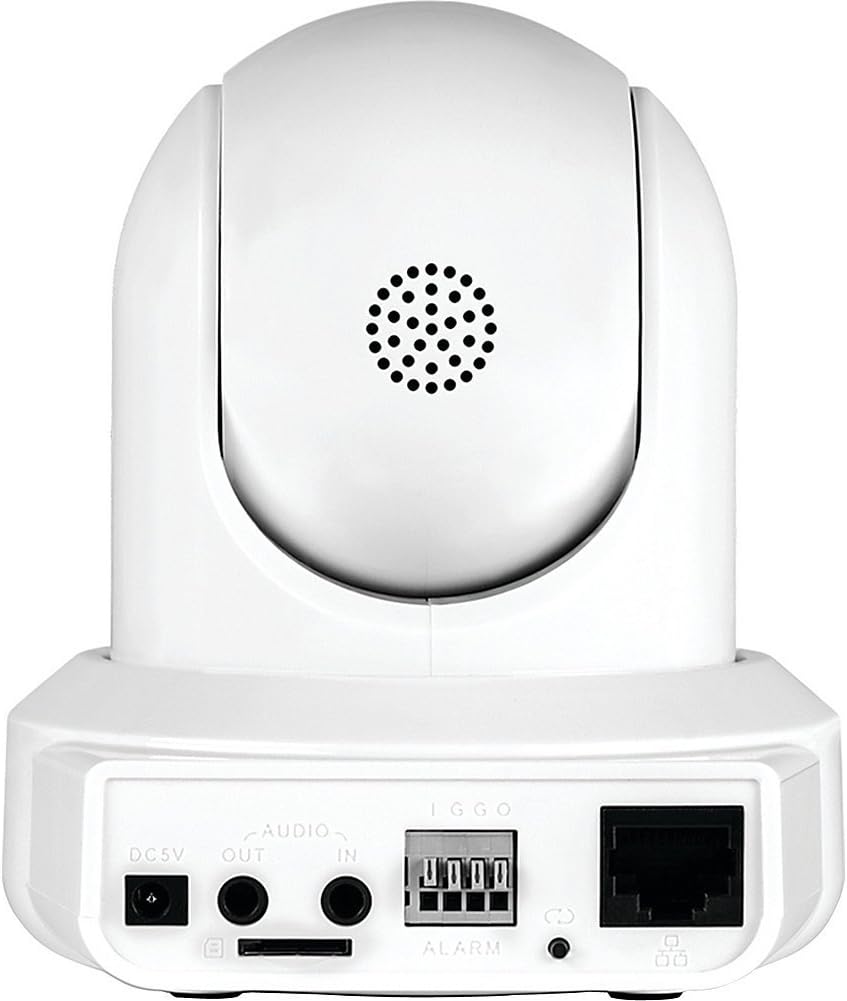
చిత్ర వివరణ: ఒక వెనుక view of the Amcrest IPM-721W camera showing the DC 5V power input, audio in/out ports, alarm terminal, MicroSD card slot, Ethernet port, and LED indicator.
2. App Installation & Initial Configuration
- Download Amcrest View Pro App: Download the "Amcrest View Pro" app from the Apple App Store (for iOS devices) or Google Play Store (for Android devices).
- 2.4GHz వైఫైకి కనెక్ట్ అవ్వండి: Ensure your smartphone or tablet is connected to a 2.4GHz WiFi network. Amcrest cameras primarily connect to 2.4GHz networks.
- పరికరాన్ని జోడించండి: Open the Amcrest View Pro app. Tap the "+" icon or "Add Device" button. Select "WiFi Camera" as the device type.
- QR కోడ్ని స్కాన్ చేయండి: The app will prompt you to scan the QR code located on the bottom of your camera. Position your phone's camera to capture the entire QR code. If scanning fails, you can manually enter the serial number (S/N).
- Camera Login: Enter a descriptive name for your camera (e.g., "Kitchen", "Office"). The default username is "admin" and the default password is "admin". It is highly recommended to change the default password immediately for security.
- WiFi కాన్ఫిగరేషన్: The app will guide you through connecting the camera to your WiFi network. This typically involves the app emitting a sound to transmit WiFi credentials to the camera. Ensure your phone's volume is high.
- కనెక్షన్ నిర్ధారణ: Once successfully connected, the app will display a confirmation message. You can then tap "Start Live View" to access your camera's feed.

చిత్ర వివరణ: A three-step diagram illustrating the Amcrest View Pro app setup: 1) Power on the camera, 2) Get the app, 3) Watch live view మీ మొబైల్ పరికరంలో.
3. అధికారిక సెటప్ వీడియో
వీడియో వివరణ: An official Amcrest video demonstrating the setup process for the Amcrest HDSeries 720P Wi-Fi IP Video Security Surveillance Camera, including plug-and-play features, pan/tilt, and two-way audio.
కెమెరాను ఆపరేట్ చేస్తోంది
1. లైవ్ View ఇంటర్ఫేస్
ఆమ్క్రెస్ట్ View Pro app provides a comprehensive interface for controlling and monitoring your camera:
- పాన్/టిల్ట్/జూమ్ (PTZ): Swipe left/right on the live view to pan the camera horizontally. Swipe up/down to tilt the camera vertically. Pinch to zoom digitally.
- రిజల్యూషన్: Switch between HD (High Definition) and SD (Standard Definition) resolution for live viewing.
- Snapshot & Recording: Capture still images or record video clips directly from the live view. These are saved to your mobile device.
- Mirror & Flip: Adjust the image orientation if the camera is mounted upside down or in an unusual position.
- రాత్రి దృష్టి: Toggle infrared night vision on or off. The camera provides clear visibility up to 32 feet in low-light conditions.
- చిత్ర సర్దుబాట్లు: Fine-tune brightness, contrast, and hue settings for optimal image quality.
- గోప్యతా మోడ్: Activate privacy mode to automatically point the camera lens downwards, preventing any viewing లేదా రికార్డింగ్.
- ఆటో ట్రాకింగ్: Enable auto-tracking for the camera to automatically follow moving objects within its field of view.
- ద్విముఖ చర్చ: Use the microphone icon to speak through your mobile device, and your voice will be projected through the camera's speaker. The speaker icon allows you to hear audio from the camera's environment.
- విభజించండి View: If you have multiple Amcrest cameras, you can view up to four live feeds simultaneously on a single screen.
2. Push Notifications
Configure push notifications to receive alerts on your mobile device for various events:
- మోషన్ గుర్తించి: Receive alerts when general motion is detected.
- Smart Motion (Human/Vehicle): Filter alerts to only trigger when human or vehicle motion is detected, reducing false alarms.
- Audio Detected: Get alerts when sound is detected in the camera's vicinity.
- ఇతర హెచ్చరికలు: The app also supports IVS Detect, Cam Masking, Face Detection, and HDD Alarm notifications, depending on camera capabilities.
నిర్వహణ
- ఫర్మ్వేర్ నవీకరణలు: Regularly check the Amcrest website (www.amcrest.com/firmware) for the latest firmware updates to ensure optimal performance and security.
- శుభ్రపరచడం: కెమెరా లెన్స్ మరియు బాడీని శుభ్రం చేయడానికి మృదువైన, పొడి వస్త్రాన్ని ఉపయోగించండి. కఠినమైన రసాయనాలు లేదా రాపిడి పదార్థాలను నివారించండి.
ట్రబుల్షూటింగ్
- వైఫై కనెక్టివిటీ సమస్యలు: Ensure your mobile device is connected to a 2.4GHz WiFi network during setup. If issues persist, try using the Ethernet WiFi setup option in the app.
- పాస్వర్డ్ మర్చిపోయారా: If you forget your camera's password, you can reset it by pressing the reset button on the back of the camera. Refer to the Quick Start Guide for exact location and procedure.
- యాప్ సమస్యలు: If the Amcrest View Pro app crashes or experiences glitches, try restarting the app or reinstalling it.
- సాధారణ మద్దతు: For further assistance, refer to the Quick Start Guide, visit the Amcrest support website, or contact Amcrest customer service.
స్పెసిఫికేషన్లు
| ఫీచర్ | స్పెసిఫికేషన్ |
|---|---|
| మోడల్ సంఖ్య | IPM-721W |
| వీడియో క్యాప్చర్ రిజల్యూషన్ | 720p (1280TVL) at 30fps |
| Viewing యాంగిల్ | 85 డిగ్రీలు |
| నైట్ విజన్ రేంజ్ | 32 అడుగుల వరకు |
| కనెక్టివిటీ | Wi-Fi (2.4GHz), Ethernet |
| నిల్వ ఎంపికలు | MicroSD Card (up to 256GB), Amcrest Cloud, NVR, FTP |
| ఆడియో | టూ-వే టాక్ (బిల్ట్-ఇన్ మైక్ & స్పీకర్) |
| పాన్/టిల్ట్ | Yes (360° pan, 90° tilt) |
| శక్తి మూలం | కార్డెడ్ ఎలక్ట్రిక్ (DC 5V) |
| కొలతలు | 8 x 10 x 12 అంగుళాలు |
| బరువు | 0.01 ఔన్సులు |
వారంటీ & మద్దతు
The Amcrest IPM-721W camera comes with a full 1-Year US Warranty and Lifetime Support directly from Amcrest. For technical assistance, product registration, or to access user forums, please visit the official Amcrest webసైట్లో లేదా మీ త్వరిత ప్రారంభ మార్గదర్శినిలో అందించిన సంప్రదింపు సమాచారాన్ని చూడండి.


