పరిచయం
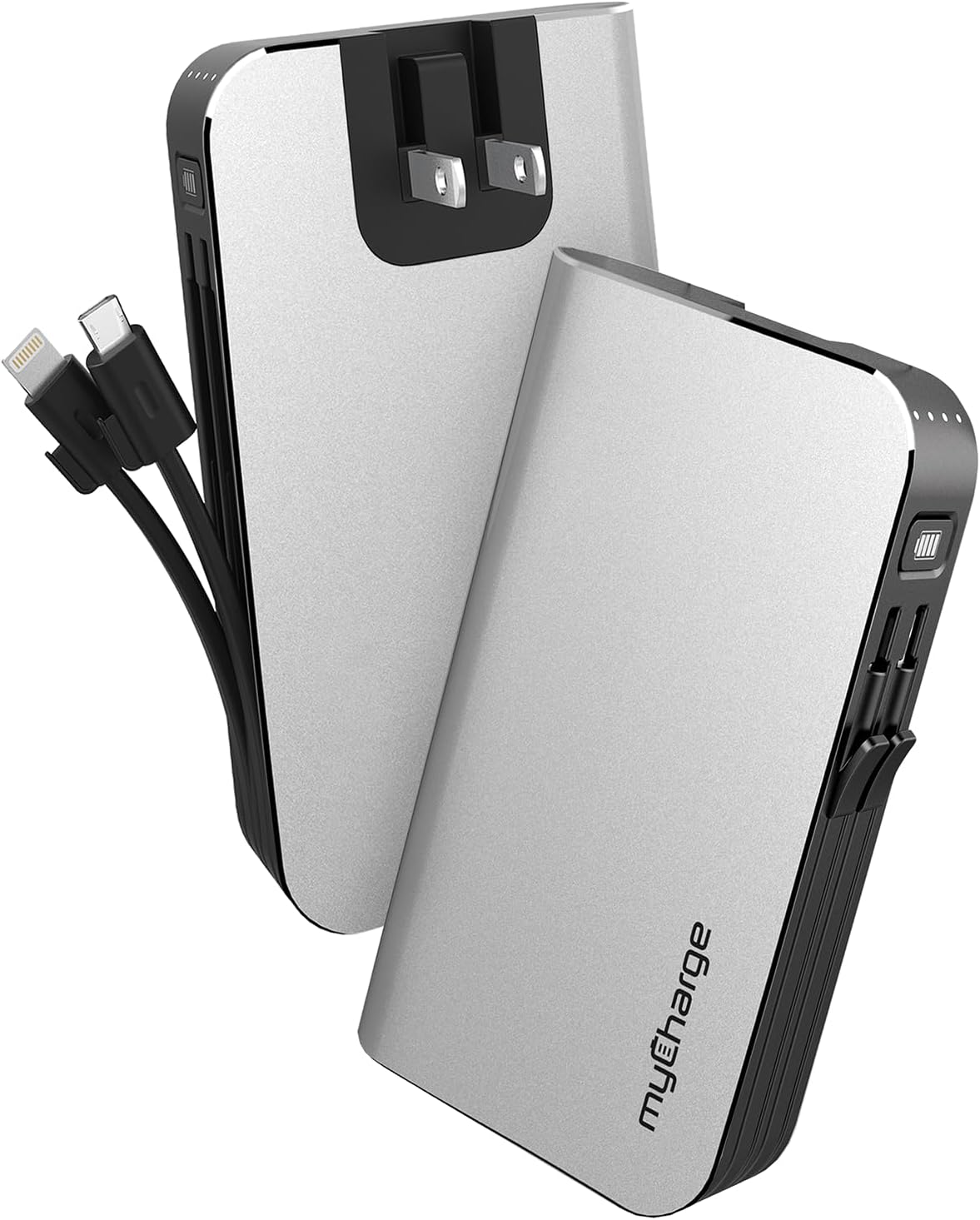
The myCharge HubMax portable charger, model HB10V, is a versatile power bank designed to provide on-the-go power for your mobile devices. It features a 10050mAh internal battery, integrated Lightning and Micro USB charging cables, and a built-in wall plug for convenient recharging of the power bank itself. This manual provides instructions for the proper use and care of your HubMax charger.
సెటప్
Initial Charging of the HubMax
Before first use, fully charge your myCharge HubMax. The device features a foldable wall plug for direct connection to a standard AC outlet.
- Locate the foldable wall prongs on the side of the HubMax.
- Flip out the prongs and plug the HubMax directly into a wall outlet.
- The LED indicators on the device will illuminate to show the charging status. A full recharge typically takes approximately 4.6 hours.
- Once fully charged, unplug the device and fold the prongs back into the unit for storage.
ఆపరేటింగ్ సూచనలు
మొబైల్ పరికరాలను ఛార్జింగ్ చేస్తోంది
The HubMax allows you to charge up to three devices simultaneously using its built-in cables and USB-A port.
- అంతర్నిర్మిత కేబుల్లను ఉపయోగించడం: Extend the integrated Lightning cable for Apple devices or the Micro USB cable for compatible Android and other devices. Connect the appropriate cable to your device's charging port.
- USB-A పోర్ట్ ఉపయోగించి: For devices requiring a different cable type (e.g., USB-C), connect your device's standard USB charging cable to the USB-A output port on the HubMax.
- The HubMax will automatically begin charging your connected device(s). The LED indicators will show the remaining battery capacity of the HubMax.
- For optimal charging speed, ensure your device is compatible with Power Delivery or Quick Charge 3.0 standards, which the HubMax supports for faster charging (up to 2.4x faster than standard chargers).


నిర్వహణ
Proper maintenance ensures the longevity and optimal performance of your myCharge HubMax.
- శుభ్రపరచడం: పరికరం యొక్క వెలుపలి భాగాన్ని శుభ్రం చేయడానికి మృదువైన, పొడి వస్త్రాన్ని ఉపయోగించండి. కఠినమైన రసాయనాలు లేదా రాపిడి పదార్థాలను ఉపయోగించడం మానుకోండి.
- నిల్వ: Store the HubMax in a cool, dry place away from direct sunlight and extreme temperatures.
- బ్యాటరీ సంరక్షణ: For best battery health, avoid fully discharging the power bank frequently. Recharge it when the battery level is low.
- కేబుల్ కేర్: అంతర్నిర్మిత కేబుల్లను సున్నితంగా నిర్వహించండి. నష్టాన్ని నివారించడానికి ఎక్కువగా వంగడం లేదా లాగడం మానుకోండి.
ట్రబుల్షూటింగ్
If you encounter issues with your myCharge HubMax, refer to the following common solutions:
- HubMax Not Charging:
- Ensure the wall plug is fully extended and securely inserted into a working AC outlet.
- మరొక పరికరాన్ని ప్లగ్ చేయడం ద్వారా అవుట్లెట్ పనిచేస్తుందో లేదో తనిఖీ చేయండి.
- Device Not Charging from HubMax:
- Verify that the HubMax itself has sufficient charge (check LED indicators).
- Ensure the built-in cables or your external USB cable are securely connected to both the HubMax and your device.
- Try a different cable or device to isolate the issue.
- నెమ్మదిగా ఛార్జింగ్:
- Ensure your device is compatible with fast charging protocols supported by the HubMax.
- Avoid using your device extensively while it is charging, as this can slow down the charging process.
స్పెసిఫికేషన్లు
| ఫీచర్ | వివరాలు |
|---|---|
| మోడల్ సంఖ్య | HB10V |
| బ్రాండ్ | myCharge |
| బ్యాటరీ కెపాసిటీ | 10050mAh (లిథియం పాలిమర్) |
| ఉత్పత్తి కొలతలు | 0.9 x 2.8 x 4.6 అంగుళాలు |
| వస్తువు బరువు | 3.53 ఔన్సులు |
| కనెక్టర్ రకాలు | Built-in Lightning Cable, Built-in Micro USB, USB-A Output Port |
| ప్రత్యేక లక్షణాలు | Built-in Wall Plug, Integrated Cables |
| రీఛార్జ్ సమయం | Approximately 4.6 hours (via wall plug) |
వారంటీ మరియు మద్దతు
For warranty information and customer support, please refer to the official myCharge webసైట్ లేదా వారి కస్టమర్ సర్వీస్ను నేరుగా సంప్రదించండి. ఏవైనా వారంటీ క్లెయిమ్ల కోసం మీ కొనుగోలు రుజువును ఉంచండి.
తయారీదారు: myCharge
మరింత సహాయం కోసం, సందర్శించండి: www.mycharge.com


