1. పరిచయం
The Alpine SWE-1080 is a compact 20 cm (8-inch) powered subwoofer designed to enhance the bass response of your vehicle's audio system. Featuring an integrated amplifier, this unit simplifies installation while delivering powerful and clear low-frequency sound. Its robust aluminum die-cast chassis ensures durability and optimal sound performance. This manual provides essential information for the safe and effective use of your SWE-1080 subwoofer.

Figure 1.1: Alpine SWE-1080 Compact Powered Subwoofer. This image shows the top-down view of the compact subwoofer unit, highlighting its protective grille and the Alpine logo.
2. భద్రతా సమాచారం
Please read all safety instructions carefully before installing and operating the SWE-1080. Failure to follow these instructions may result in serious injury or damage to the product or vehicle.
- ప్రొఫెషనల్ ఇన్స్టాలేషన్ సిఫార్సు చేయబడింది: For optimal performance and safety, it is highly recommended to have this product installed by a qualified professional.
- శక్తి మూలం: Connect the unit only to a 12V DC negative ground vehicle electrical system.
- వైరింగ్: షార్ట్ సర్క్యూట్లను నివారించడానికి అన్ని వైరింగ్లు సురక్షితంగా కనెక్ట్ చేయబడి, సరిగ్గా ఇన్సులేట్ చేయబడిందని నిర్ధారించుకోండి. ఇన్స్టాలేషన్ విభాగంలో పేర్కొన్న విధంగా తగిన గేజ్ వైర్లను ఉపయోగించండి.
- మౌంటు స్థానం: Mount the subwoofer in a location that does not obstruct driving, interfere with airbags, or impede vehicle controls. Ensure it is securely fastened to prevent movement during driving.
- ఉష్ణోగ్రత మరియు తేమ: యూనిట్ను తీవ్రమైన ఉష్ణోగ్రతలు, ప్రత్యక్ష సూర్యకాంతి లేదా అధిక తేమకు గురికాకుండా ఉండండి.
- వెంటిలేషన్: వేడెక్కకుండా నిరోధించడానికి యూనిట్ చుట్టూ తగినంత వెంటిలేషన్ ఉండేలా చూసుకోండి. వెంటిలేషన్ ఓపెనింగ్లను నిరోధించవద్దు.
3. ప్యాకేజీ విషయాలు
క్రింద జాబితా చేయబడిన అన్ని వస్తువులు మీ ప్యాకేజీలో చేర్చబడ్డాయని ధృవీకరించండి:
- Alpine SWE-1080 Powered Subwoofer Unit
- Wired Remote Control with Cable
- Power Wiring Harness (with fuse holder)
- RCA ఇన్పుట్ కేబుల్
- Speaker Level Input Harness
- Mounting Brackets (4 pcs)
- మౌంటు స్క్రూలు (వివిధ పరిమాణాలు)

Figure 3.1: Included Accessories. This image displays all the components typically included with the Alpine SWE-1080, such as the wiring harnesses, remote control, RCA cable, and mounting hardware.
4. సెటప్ మరియు ఇన్స్టాలేషన్
Proper installation is crucial for the performance and longevity of your subwoofer. Refer to the diagrams for connection details.
4.1 వైరింగ్ కనెక్షన్లు
- పవర్ (BATT+): Connect the yellow wire from the power harness directly to the vehicle's positive battery terminal. Ensure an inline fuse (provided) is installed close to the battery.
- గ్రౌండ్ (GND): Connect the black wire from the power harness to a clean, unpainted metal surface of the vehicle chassis. Ensure a good electrical connection.
- రిమోట్ టర్న్-ఆన్ (REM): Connect the blue wire from the power harness to the remote turn-on output of your head unit. This wire signals the subwoofer to turn on and off with your audio system.
- ఆడియో ఇన్పుట్:
- RCA ఇన్పుట్: If your head unit has RCA pre-outs, connect the supplied RCA cable from the head unit's subwoofer or full-range outputs to the RCA input jacks on the SWE-1080.
- స్పీకర్ స్థాయి ఇన్పుట్: If your head unit does not have RCA pre-outs, use the supplied speaker level input harness. Connect the speaker wires from your head unit's speaker outputs to the corresponding wires on the harness, then plug the harness into the SWE-1080.
- రిమోట్ కంట్రోల్: Plug the wired remote control cable into the dedicated port on the subwoofer unit.

Figure 4.1: Wiring and Control Connections. This diagram illustrates the various input and output ports on the Alpine SWE-1080, including power, ground, remote, RCA inputs, and the remote control connection.

Figure 4.2: Integrated Amplifier Advantage. This image compares the SWE-1080's integrated amplifier design with a traditional setup requiring a separate amplifier, highlighting the simplified wiring and space-saving benefits.
4.2 మౌంటు
The compact design of the SWE-1080 allows for flexible mounting options, such as under a seat or in the trunk. Use the provided mounting brackets and screws to secure the unit firmly to a stable surface in your vehicle.

Figure 4.3: Under-Seat Installation Example. This image shows the Alpine SWE-1080 installed discreetly under a car seat, demonstrating its compact size and suitable placement for optimal sound dispersion.
5. ఆపరేటింగ్ సూచనలు
The wired remote control provides convenient access to key settings for optimizing your subwoofer's performance.

Figure 5.1: Wired Remote Control. This image displays the wired remote control unit, showing its various adjustment knobs and buttons for gain, low-pass filter, and phase.
5.1 రిమోట్ కంట్రోల్ విధులు
- GAIN (MIN/MAX): This knob adjusts the overall output level of the subwoofer. Start with the gain at minimum and slowly increase it until the bass blends well with your main speakers without distortion.
- LP FILTER (50Hz/100Hz): This knob controls the low-pass crossover frequency. It filters out frequencies above the set point, ensuring only low frequencies are sent to the subwoofer. Adjust this to blend smoothly with your main speakers. A common starting point is around 80Hz.
- PHASE (NORMAL/REV): This switch allows you to change the phase of the subwoofer's output (0° or 180°). Adjust this setting to achieve the best bass impact and integration with your main speakers. Listen to your system and select the phase that provides the most impactful and cohesive bass.
6. నిర్వహణ
The Alpine SWE-1080 is designed for durability and requires minimal maintenance.
- శుభ్రపరచడం: Use a soft, dry cloth to wipe down the unit. Do not use abrasive cleaners, solvents, or excessive moisture.
- వెంటిలేషన్: Periodically check that the ventilation openings are clear of dust and debris to ensure proper heat dissipation.
- కనెక్షన్లు: Ensure all wiring connections remain secure. Loose connections can lead to poor performance or damage.
7. ట్రబుల్షూటింగ్
If you experience issues with your SWE-1080, refer to the following common problems and solutions:
| సమస్య | సాధ్యమైన కారణం | పరిష్కారం |
|---|---|---|
| విద్యుత్ లేదు / యూనిట్ ఆన్ కావడం లేదు |
|
|
| సౌండ్ లేదు |
|
|
| వక్రీకరించిన ధ్వని |
|
|
If the problem persists after trying these solutions, please contact Alpine customer support or your authorized dealer.
8. స్పెసిఫికేషన్లు
Detailed technical specifications for the Alpine SWE-1080:
| ఫీచర్ | స్పెసిఫికేషన్ |
|---|---|
| మోడల్ పేరు | SWE-1080 |
| స్పీకర్ రకం | సబ్ వూఫర్ |
| స్పీకర్ పరిమాణం | 20 సెం.మీ (8 అంగుళాలు) |
| రేట్ చేయబడిన ఇన్పుట్ పవర్ | 100 వాట్స్ |
| స్పీకర్ గరిష్ట అవుట్పుట్ పవర్ | 160 వాట్స్ |
| ఫ్రీక్వెన్సీ బ్యాండ్ | 30Hz - 160Hz |
| ప్రత్యేక ఫీచర్ | Amplifier integrated, Bass Boost |
| వస్తువు బరువు | 6.09 కిలోలు (13.4 పౌండ్లు) |
| ఉత్పత్తి కొలతలు (L x W x H) | 9.06 x 13.39 x 3.07 అంగుళాలు |
| నియంత్రణ పద్ధతి | వైర్డ్ రిమోట్ కంట్రోల్ |
| శక్తి మూలం | కార్డ్డ్ ఎలక్ట్రిక్ (12V DC) |
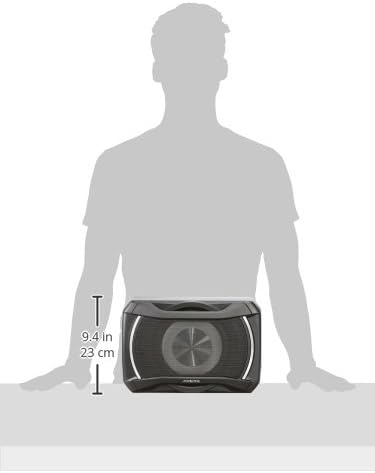
Figure 8.1: Product Dimensions. This image provides a visual representation of the Alpine SWE-1080's dimensions, indicating its length and width for installation planning.
9. వారంటీ మరియు మద్దతు
For warranty information and customer support, please refer to the warranty card included with your product or visit the official Alpine webసైట్. ఏవైనా వారంటీ క్లెయిమ్ల కోసం మీ కొనుగోలు రుజువును ఉంచుకోండి.
You can also visit the Alpine Store on Amazon for more product information and support: ఆల్పైన్ స్టోర్


