పరిచయం
This manual provides essential information for the safe and efficient operation of your Amazon Basics 15-Sheet Cross-Cut Paper, CD, and Credit Card Shredder. Please read all instructions carefully before use and retain this manual for future reference.
భద్రతా సమాచారం
సురక్షితమైన ఆపరేషన్ను నిర్ధారించడానికి, ఎల్లప్పుడూ ఈ క్రింది మార్గదర్శకాలకు కట్టుబడి ఉండండి:
- చేతులు, జుట్టు మరియు వదులుగా ఉండే దుస్తులను పేపర్ ఎంట్రీ స్లాట్ నుండి దూరంగా ఉంచండి.
- ష్రెడర్లో లేదా చుట్టుపక్కల ఏరోసోల్ ఉత్పత్తులను పిచికారీ చేయవద్దు లేదా ఉంచవద్దు.
- Do not shred items like metallic credit cards, adhesive labels, or continuous forms.
- ఉపయోగంలో లేనప్పుడు లేదా శుభ్రపరిచే ముందు ష్రెడర్ను అన్ప్లగ్ చేయండి.
- Keep the shredder out of reach of children and pets.
- పవర్ కార్డ్ దెబ్బతిన్నట్లయితే ష్రెడర్ను ఆపరేట్ చేయవద్దు.
ఉత్పత్తి ముగిసిందిview
The Amazon Basics 15-Sheet Cross-Cut Shredder is designed for efficient document destruction, offering a high level of security for personal and office use.

మూర్తి 1: ముందు view of the Amazon Basics 15-Sheet Cross-Cut Shredder.
ముఖ్య లక్షణాలు:
- 15-షీట్ కెపాసిటీ: Shreds up to 15 sheets of 20 lb. paper at once.
- క్రాస్-కట్ ష్రెడింగ్: Shreds paper into 3/16" x 1-7/32" (4.7 x 31mm) particles for enhanced security (Security Level P-4).
- బహుళ-పదార్థాలను ముక్కలు చేయడం: Also destroys CD/DVDs, credit cards, staples, and small paper clips.
- పొడిగించిన రన్ టైమ్: Features a 20-minute continuous run time.
- భద్రతా లక్షణాలు: Includes Overheat / Overload protection.
- LED సూచికలు: Provides visual alerts for Standby, Overheat, Overload, Door open, and Bin full status.
- Large Capacity Bin: Equipped with a 6-gallon pull-out basket for easy waste disposal.
- చలనశీలత: Casters included for convenient movement.
- 4-Mode Switch: Auto/Off/Forward/Reverse settings for versatile control.
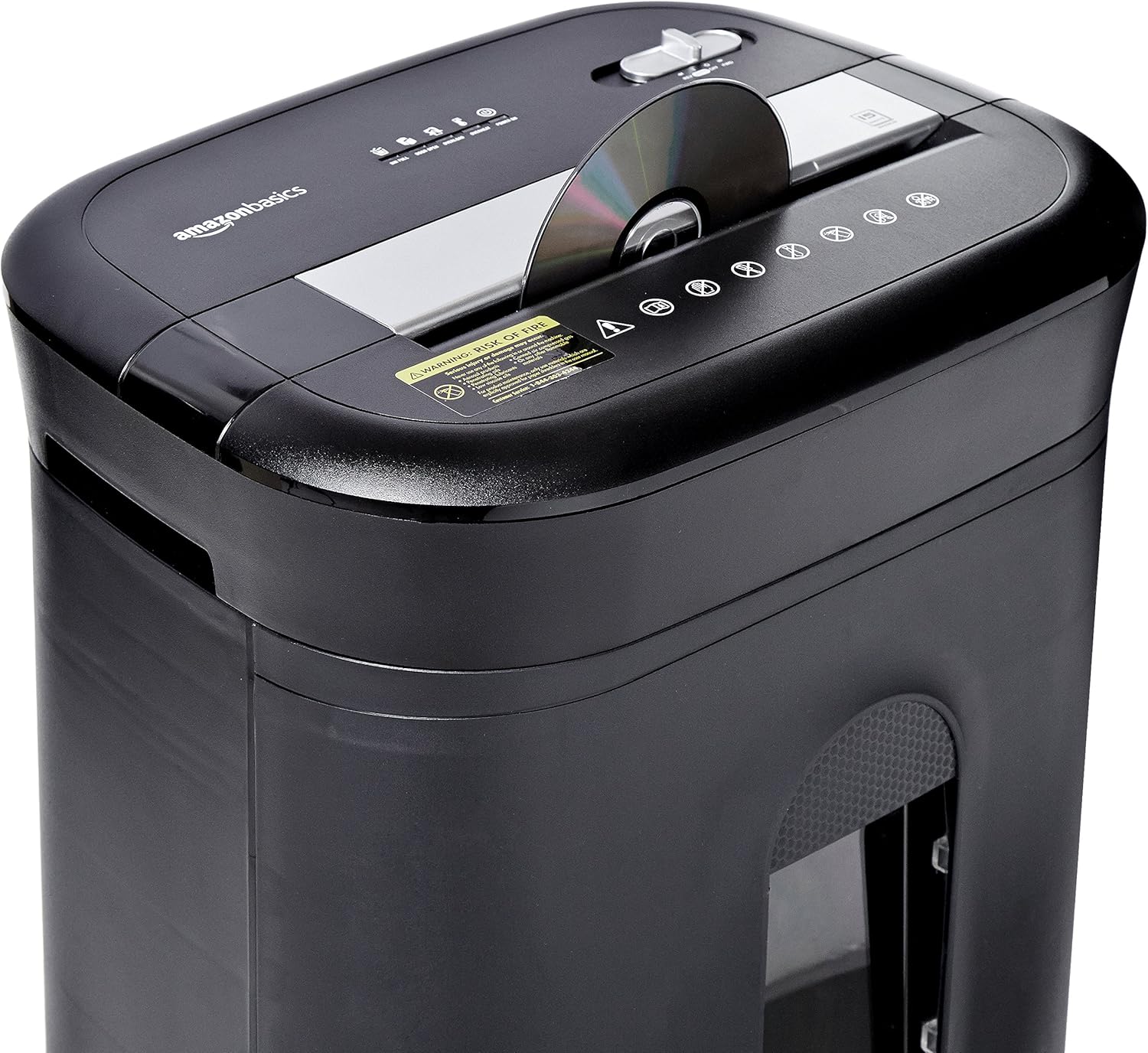
Figure 2: Diagram illustrating key features of the shredder.
సెటప్
మీ ష్రెడర్ను సెటప్ చేయడానికి ఈ దశలను అనుసరించండి:
- అన్ప్యాక్: ప్యాకేజింగ్ నుండి అన్ని భాగాలను జాగ్రత్తగా తొలగించండి.
- స్థానం: Place the shredder on a flat, stable surface. Ensure the waste bin is securely closed and properly inserted into the main unit.
- పవర్ కనెక్ట్ చేయండి: Plug the power cord into a standard 120-volt AC outlet.
Video 1: Official product video demonstrating the setup and basic operation of the Amazon Basics 15-Sheet Cross-Cut Shredder.
ఆపరేటింగ్ సూచనలు
పవర్ మోడ్ స్విచ్:
The shredder features a 4-mode slide switch located on the top panel:
- AUTO (I): కాగితం చొప్పించినప్పుడు ష్రెడర్ స్వయంచాలకంగా ప్రారంభమవుతుంది మరియు ష్రెడింగ్ పూర్తయినప్పుడు ఆగిపోతుంది. ఇది సాధారణ ఉపయోగం కోసం సిఫార్సు చేయబడిన సెట్టింగ్.
- OFF (O): Turns off all shredder functions. Always select this setting when emptying the waste bin or when the shredder is not in use.
- FORWARD (▶▶): Manually activates the shredder to continuously cut. Useful for clearing minor jams.
- REVERSE (◀◀): Reverses the shredder mechanism to help clear paper jams.

Figure 3: Close-up of the control panel with the 4-mode switch.
ముక్కలు చేసే కాగితం:
- Ensure the power mode switch is set to AUTO (I).
- Insert up to 15 sheets of paper (20 lb. bond) straight into the paper entry slot. The shredder will automatically start and stop.
- ష్రెడర్లోకి కాగితాన్ని బలవంతంగా చొప్పించవద్దు. ష్రెడర్ ఇబ్బంది పడుతుంటే, షీట్ల సంఖ్యను తగ్గించండి.

Figure 4: Inserting paper into the shredder.
Shredding Credit Cards and CDs/DVDs:
- Ensure the power mode switch is set to AUTO (I).
- Insert one credit card or CD/DVD at a time into the dedicated slot.
- ష్రెడర్ స్వయంచాలకంగా ప్రారంభమవుతుంది మరియు ఆగిపోతుంది.

Figure 5: Shredding a credit card.
నిర్వహణ
Emptying the Shredder Bin:
Regularly empty the waste bin to prevent paper jams and ensure optimal performance.
- Set the power mode switch to ఆఫ్ (ఓ) మరియు ష్రెడర్ను అన్ప్లగ్ చేయండి.
- ష్రెడర్ ముందు భాగంలో ఉన్న వ్యర్థాల బిన్ను బయటకు తీయండి.
- తురిమిన పదార్థాన్ని పారవేయండి.
- Slide the waste bin back into the shredder until it clicks securely into place.

Figure 6: Pull-out waste bin for easy emptying.
Oiling the Shredder:
To maintain the shredder's performance and longevity, it is recommended to oil the cutting blades periodically, especially after emptying the bin multiple times or if performance decreases.
- Apply shredder oil (or vegetable oil) in a zigzag pattern across the paper entry slot.
- Set the power mode switch to FORWARD (▶▶) నూనెను పంపిణీ చేయడానికి 2-3 సెకన్ల పాటు.
- Then, set the switch to REVERSE (◀◀) 2-3 సెకన్లు.
- Shred a few sheets of paper to remove any excess oil.
ట్రబుల్షూటింగ్
The shredder is equipped with LED indicators to help diagnose common issues:
- Standby (Green): ష్రెడర్ ఆన్ చేయబడిందని మరియు ఆపరేషన్కు సిద్ధంగా ఉందని సూచిస్తుంది.
- Overheat (Red): The shredder has exceeded its maximum operating temperature. Allow it to cool down for approximately 20-30 minutes before resuming use.
- Overload (Red): Too much material has been inserted. Use the REVERSE (◀◀) function to clear the jam, then reduce the amount of material.
- Door Open (Red): The waste bin is not properly closed or inserted. Ensure the bin is fully pushed in.
- Bin Full (Red): The waste bin is full and needs to be emptied.
| సమస్య | సాధ్యమైన కారణం | పరిష్కారం |
|---|---|---|
| ష్రెడర్ ఆన్ అవ్వదు. | Not plugged in; Power switch in OFF position; Waste bin not properly inserted. | Check power connection; Set switch to AUTO; Re-insert waste bin securely. |
| ఆపరేషన్ సమయంలో ష్రెడర్ ఆగిపోతుంది. | Overheat protection activated; Overload protection activated; Bin full. | Allow to cool down; Clear jam using REVERSE, then reduce material; Empty bin. |
| పేపర్ జామ్. | Too much paper inserted; Paper inserted at an angle. | Use REVERSE function; Reduce paper quantity; Insert paper straight. |
స్పెసిఫికేషన్లు
| ఫీచర్ | స్పెసిఫికేషన్ |
|---|---|
| బ్రాండ్ | అమెజాన్ బేసిక్స్ |
| మోడల్ సంఖ్య | PBH-49976 |
| ముక్కలు రకం | క్రాస్ కట్ |
| ముక్కలు పరిమాణం | 3/16" x 1-7/32" (4.7 x 31mm) |
| భద్రతా స్థాయి | P-4 |
| షీట్ కెపాసిటీ | 15 sheets (20 lb. paper) |
| నిరంతర రన్ టైమ్ | 20 నిమిషాల |
| చల్లబరిచే సమయం | 30 నిమిషాల |
| వేస్ట్ బిన్ కెపాసిటీ | 6 గ్యాలన్లు |
| వస్తువు బరువు | 22 పౌండ్లు |
| ఉత్పత్తి కొలతలు | 11 x 14.4 x 20.9 అంగుళాలు |
| రంగు | నలుపు |
వారంటీ మరియు మద్దతు
For warranty information or technical support, please refer to the documentation included with your product or contact Amazon Basics customer service.
Customer Service: 1-844-303-4244
అదనపు వనరుల కోసం, సందర్శించండి Amazon Basics Store.


