1. పరిచయం
The Vivitek Qumi Q8-BK is a compact and portable DLP projector designed for both business and personal use. It offers Full HD 1080p resolution, 1000 lumens brightness, and versatile connectivity options including HDMI, USB, and wireless mirroring for Android and iOS devices. This manual provides essential information for setting up, operating, maintaining, and troubleshooting your projector to ensure optimal performance.
2. భద్రతా సమాచారం
ప్రొజెక్టర్ని ఉపయోగించే ముందు దయచేసి అన్ని భద్రతా సూచనలను చదవండి. భవిష్యత్తు సూచన కోసం ఈ మాన్యువల్ని ఉంచండి.
- వెంటిలేషన్ ఓపెనింగ్లను బ్లాక్ చేయవద్దు. ప్రొజెక్టర్ చుట్టూ తగినంత గాలి ప్రవాహాన్ని నిర్ధారించుకోండి.
- l ఉన్నప్పుడు ప్రొజెక్టర్ లెన్స్లోకి నేరుగా చూడకండిamp ఆన్లో ఉంది. ప్రకాశవంతమైన కాంతి కంటికి హాని కలిగించవచ్చు.
- Avoid placing the projector in direct sunlight, near heat sources, or in environments with extreme temperatures or humidity.
- ప్రొజెక్టర్తో సరఫరా చేయబడిన పవర్ అడాప్టర్ను మాత్రమే ఉపయోగించండి.
- ప్రొజెక్టర్ను మీరే విడదీయడానికి లేదా మరమ్మతు చేయడానికి ప్రయత్నించవద్దు. అన్ని సర్వీసింగ్లను అర్హత కలిగిన సిబ్బందికి సూచించండి.
- ప్రొజెక్టర్ను నీరు లేదా ఇతర ద్రవాలకు దూరంగా ఉంచండి.
3. ప్యాకేజీ విషయాలు
మీ ప్యాకేజీలో అన్ని అంశాలు ఉన్నాయని ధృవీకరించండి:
- Vivitek Qumi Q8-BK Projector
- పవర్ అడాప్టర్
- రిమోట్ కంట్రోల్
- HDMI కేబుల్
- త్వరిత ప్రారంభ గైడ్
- క్యారీయింగ్ కేసు
4. ఉత్పత్తి ముగిసిందిview
Familiarize yourself with the projector's components and connection ports.
4.1 Top Panel and Controls
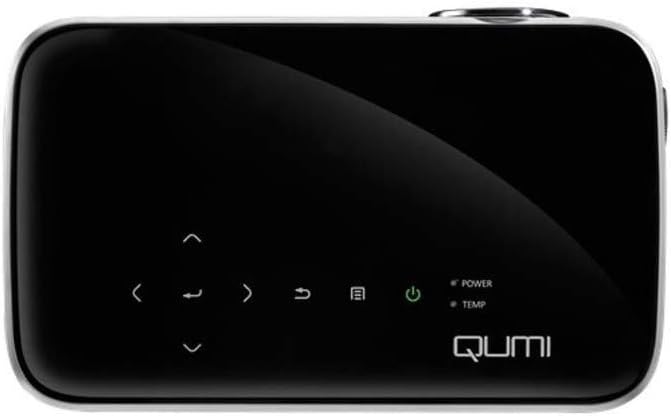
మూర్తి 1: టాప్ view of the Vivitek Qumi Q8-BK projector, highlighting the touch-sensitive control panel. This panel includes navigation arrows, menu access, source selection, and power buttons, along with LED indicators for power and temperature.
The top panel features touch-sensitive controls for navigating menus, adjusting settings, and power management. LED indicators show the power status and temperature warnings.
4.2 Side Panel and Ports
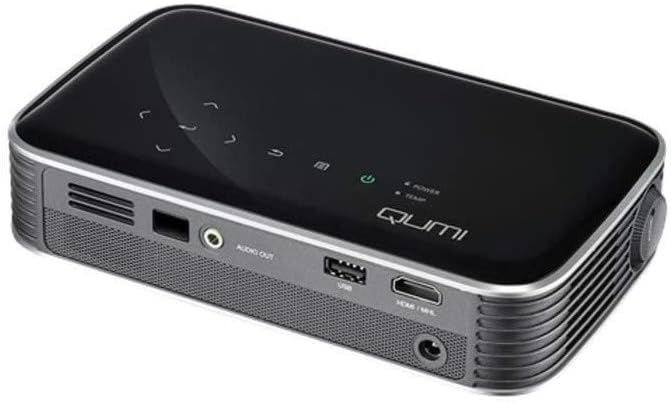
మూర్తి 2: వైపు view of the Vivitek Qumi Q8-BK projector, displaying its connectivity ports. These include an audio out jack, a USB port, and an HDMI/MHL input, along with ventilation grilles.
The side panel provides essential connectivity options:
- ఆడియో అవుట్: బాహ్య స్పీకర్లు లేదా హెడ్ఫోన్లను కనెక్ట్ చేయండి.
- USB: మీడియాను ప్లే చేయడానికి USB నిల్వ పరికరాలను కనెక్ట్ చేయడానికి fileలేదా ఫర్మ్వేర్ నవీకరణల కోసం.
- HDMI/MHL: Connect to HDMI-enabled devices such as laptops, Blu-ray players, or MHL-compatible smartphones/tablets.
- పవర్ ఇన్పుట్: సరఫరా చేయబడిన పవర్ అడాప్టర్ను కనెక్ట్ చేయండి.
5. సెటప్
Follow these steps to set up your Vivitek Qumi Q8-BK projector.
5.1 పవర్ ఆన్
- Connect the power adapter to the projector's power input port and then to an electrical outlet.
- Press the power button on the projector's top panel or on the remote control. The power LED indicator will illuminate.
- Allow a few moments for the projector to warm up and display the initial screen.
5.2 Adjusting Focus and Keystone
- దృష్టి: Rotate the focus ring located near the lens until the projected image is sharp and clear.
- కీస్టోన్ దిద్దుబాటు: If the image appears trapezoidal (wider at the top or bottom), use the keystone correction function in the projector's menu to adjust it. This corrects the image geometry to a rectangular shape.
5.3 ఇన్పుట్ సోర్స్లను కనెక్ట్ చేయడం
The Qumi Q8-BK supports multiple input sources:
- HDMI/MHL: Connect an HDMI cable from your source device (laptop, game console, Blu-ray player) to the HDMI/MHL port on the projector. For MHL-compatible mobile devices, use an MHL cable.
- USB: మీడియాను యాక్సెస్ చేయడానికి USB పోర్ట్లోకి USB ఫ్లాష్ డ్రైవ్ను చొప్పించండి. fileదానిపై నిల్వ చేయబడుతుంది.
- Wireless (Miracast/AirPlay): The projector features built-in Wi-Fi for wireless content sharing from Android and iOS devices. Refer to the "Operating" section for detailed instructions on wireless setup.
6. ఆపరేటింగ్
This section covers the basic operation of your projector.
6.1 మెనూను నావిగేట్ చేయడం
Use the navigation buttons on the top panel or the remote control to browse the projector's on-screen menu. Press the "Menu" button to access settings such as image adjustments, source selection, and system configurations.
6.2 మూలం ఎంపిక
Press the "Source" button on the remote or the projector to cycle through available input sources (HDMI, USB, Wireless). Select the desired source from the on-screen menu.
6.3 Wireless Content Sharing (Miracast/AirPlay)
The Qumi Q8-BK supports wireless mirroring for compatible devices:
- Ensure the projector's Wi-Fi is enabled and connected to your network (if required for your device's mirroring function).
- Select the "Wireless" input source on the projector.
- On your Android device, enable "Screen Mirroring," "Smart View," or a similar function. On iOS devices, use "AirPlay Mirroring."
- Select the Qumi Q8-BK from the list of available devices on your mobile device.
- Your device's screen should now be mirrored on the projector.
Note: Performance may vary depending on network conditions and device compatibility. Some streaming services may restrict mirrored content.
6.4 Media Playback from USB
Insert a USB flash drive into the USB port. The projector's media player interface will typically launch automatically, allowing you to browse and play supported video, audio, and image files.
6.5 3D కార్యాచరణ
The Qumi Q8-BK supports 3D content. To view 3D content, you will need compatible 3D glasses (sold separately) and a 3D-enabled source device playing 3D content. Refer to the projector's on-screen menu for 3D settings and modes.
7. నిర్వహణ
సరైన నిర్వహణ మీ ప్రొజెక్టర్ యొక్క దీర్ఘాయువు మరియు సరైన పనితీరును నిర్ధారిస్తుంది.
- లెన్స్ క్లీనింగ్: ఆప్టికల్ ఉపరితలాల కోసం ప్రత్యేకంగా రూపొందించిన మృదువైన, మెత్తటి రహిత వస్త్రంతో ప్రొజెక్టర్ లెన్స్ను సున్నితంగా తుడవండి. రాపిడి క్లీనర్లను లేదా అధిక శక్తిని ఉపయోగించవద్దు.
- వెంటిలేషన్: Regularly check and clean the ventilation grilles to prevent dust buildup, which can lead to overheating. Use a soft brush or compressed air.
- నిల్వ: When not in use for extended periods, store the projector in its carrying case in a cool, dry, and dust-free environment.
- LED L.amp: The projector uses an energy-efficient LED lamp with an estimated operational life of up to 30,000 hours, requiring no replacement under normal usage.
8. ట్రబుల్షూటింగ్
మీ ప్రొజెక్టర్తో మీకు సమస్యలు ఎదురైతే, ఈ క్రింది సాధారణ సమస్యలు మరియు పరిష్కారాలను చూడండి.
| సమస్య | సాధ్యమైన పరిష్కారం |
|---|---|
| ఏ చిత్రం ప్రదర్శించబడలేదు |
|
| శబ్దం లేదు |
|
| Wireless mirroring issues |
|
| ప్రొజెక్టర్ వేడెక్కుతుంది లేదా ఆగిపోతుంది |
|
If the problem persists after trying these solutions, please contact Vivitek customer support.
9. స్పెసిఫికేషన్లు
Key technical specifications for the Vivitek Qumi Q8-BK projector:
| ఫీచర్ | వివరాలు |
|---|---|
| బ్రాండ్ | వివిటెక్ |
| మోడల్ సంఖ్య | Qumi Q8-BK |
| డిస్ప్లే రిజల్యూషన్ | 1920 x 1080 (పూర్తి HD) |
| ప్రకాశం | అప్ 1000 లు |
| కాంట్రాస్ట్ రేషియో | 30,000:1 |
| Lamp టైప్ చేయండి | LED |
| Lamp జీవితం | అంచనా వేసిన సమయం 30,000 గంటలు |
| కనెక్టివిటీ టెక్నాలజీ | HDMI, USB, Wi-Fi (Miracast/AirPlay) |
| ప్రత్యేక లక్షణాలు | HDMI Connectivity, Portable, USB Connectivity, Wireless, Miracast |
| ఉత్పత్తి కొలతలు | 1.7 x 4.4 x 7.4 అంగుళాలు |
| వస్తువు బరువు | 1.4 పౌండ్లు |
10. వారంటీ మరియు మద్దతు
Vivitek products are designed for reliability and performance. For warranty information, please refer to the warranty card included in your product package or visit the official Vivitek website. For technical support, troubleshooting assistance beyond this manual, or service inquiries, please contact Vivitek customer support through their official channels.
Please have your product model number (Qumi Q8-BK) and serial number ready when contacting support.


