Biconic Bluetooth Tough Weatherproof Portable Wireless Speaker User Manual
Model: ABC-AU-BS-103-BK
బ్రాండ్: బైటెక్
1. ఉత్పత్తి ముగిసిందిview
The Biconic Bluetooth Tough Weatherproof Portable Wireless Speaker is designed for robust outdoor and indoor use, providing enhanced bass and clear audio. Its wireless capabilities allow for easy connection to various devices, and its durable, weatherproof construction ensures reliable performance in diverse environments.

మూర్తి 1.1: ముందు view of the Biconic Bluetooth Speaker, showcasing దాని దృఢమైన డిజైన్ మరియు స్పీకర్ గ్రిల్.
ముఖ్య లక్షణాలు:
- వైర్లెస్ కనెక్టివిటీ: Seamless Bluetooth pairing with smartphones, tablets, and other compatible devices.
- వాతావరణ నిరోధక డిజైన్: IPX6 water resistance protects against strong jets of water, making it suitable for outdoor use.
- మెరుగైన బాస్: Delivers rich, deep bass for a superior audio experience.
- పోర్టబుల్: Compact design with a durable strap for easy transport.
- సుదీర్ఘ ఆట సమయం: ఒక్కసారి ఛార్జ్ చేస్తే 4 గంటల వరకు నిరంతర ఆడియో ప్లేబ్యాక్.
2. భద్రతా సమాచారం
Please read all safety warnings and instructions carefully before using this product to ensure safe operation and prevent damage.
- స్పీకర్ను తీవ్రమైన ఉష్ణోగ్రతలకు (వేడి లేదా చలి) బహిర్గతం చేయవద్దు.
- Do not immerse the speaker in water. While it is IPX6 water resistant, it is not designed for submersion.
- Keep the speaker away from direct heat sources, open flames, and flammable liquids.
- Use only the provided charging cable and a compatible power adapter (5V/1A recommended) to charge the device.
- Do not attempt to disassemble, repair, or modify the speaker. This will void the warranty and may cause harm.
- పిల్లలకు దూరంగా ఉంచండి.
- స్పీకర్ను మృదువైన, పొడి గుడ్డతో శుభ్రం చేయండి. రాపిడి క్లీనర్లను లేదా ద్రావకాలను ఉపయోగించవద్దు.
3. ప్యాకేజీ విషయాలు
అన్బాక్సింగ్ సమయంలో అన్ని వస్తువులు ప్యాకేజీలో ఉన్నాయని నిర్ధారించుకోండి:
- Biconic Bluetooth Tough Weatherproof Portable Wireless Speaker
- USB ఛార్జింగ్ కేబుల్
- వినియోగదారు మాన్యువల్ (ఈ పత్రం)
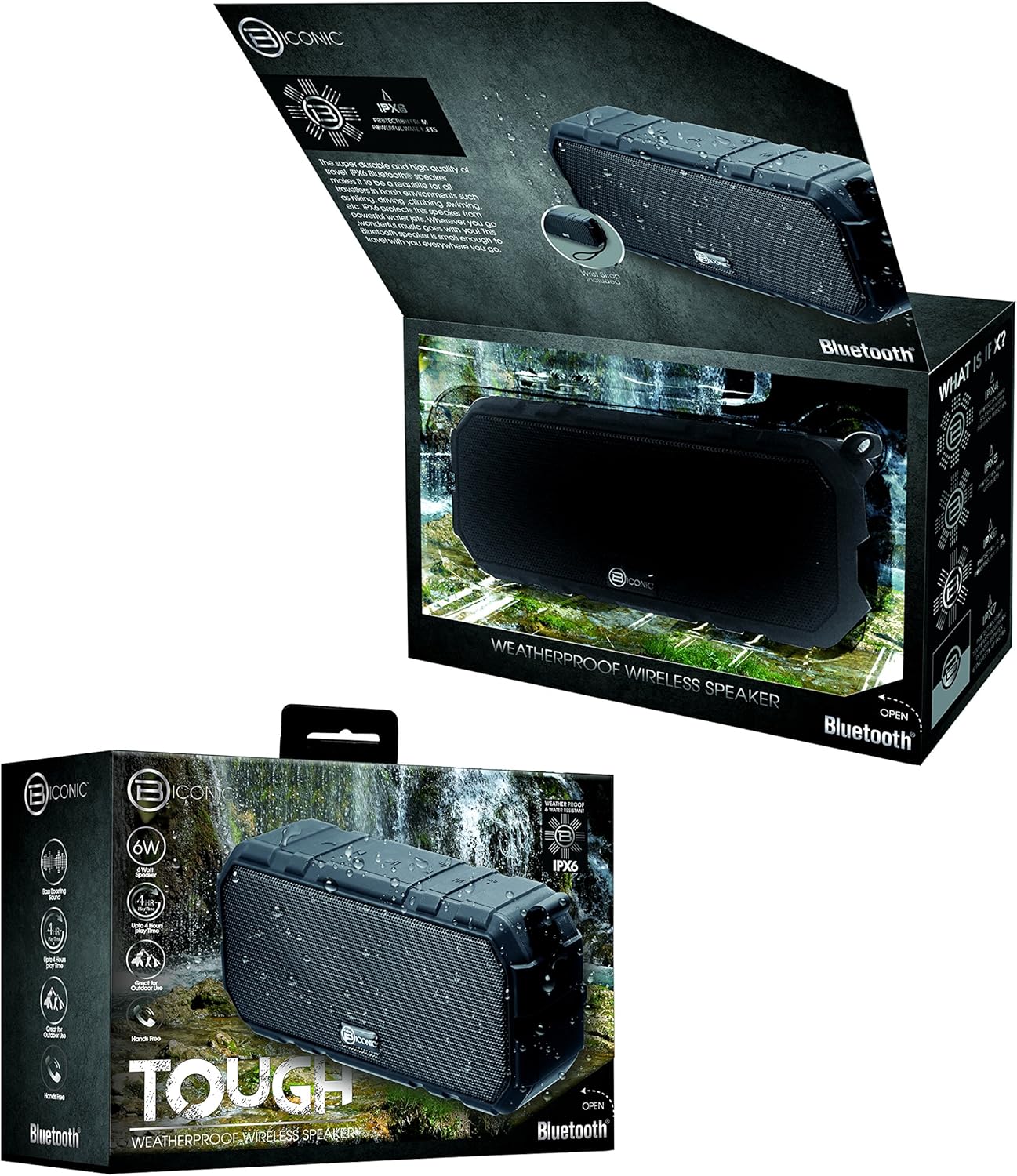
Figure 3.1: The Biconic Bluetooth Speaker shown with its retail packaging, indicating typical package contents.
4. సెటప్
4.1 స్పీకర్ను ఛార్జ్ చేయడం
- Locate the charging port on the side of the speaker. This port is typically protected by a rubber flap to maintain water resistance.
- రబ్బరు ఫ్లాప్ తెరవండి.
- అందించిన USB ఛార్జింగ్ కేబుల్ యొక్క చిన్న చివరను స్పీకర్ ఛార్జింగ్ పోర్ట్కు కనెక్ట్ చేయండి.
- USB కేబుల్ యొక్క పెద్ద చివరను USB పవర్ సోర్స్కి కనెక్ట్ చేయండి (ఉదా. కంప్యూటర్ USB పోర్ట్, USB వాల్ అడాప్టర్).
- The charging indicator light will illuminate, typically red, to show that the speaker is charging.
- Once fully charged (approximately 2-3 hours), the indicator light will change color (e.g., turn off or turn blue/green). Disconnect the charging cable and close the rubber flap securely to maintain water resistance.
4.2 పవర్ చేయడం ఆన్/ఆఫ్
- పవర్ ఆన్ చేయడానికి: Press and hold the Power button (usually marked with a power symbol) for a few seconds until you hear an audible tone or see an indicator light illuminate.
- పవర్ ఆఫ్ చేయడానికి: Press and hold the Power button again for a few seconds until you hear an audible tone or the indicator light turns off.
5. ఆపరేటింగ్ సూచనలు
5.1 బ్లూటూత్ జత చేయడం
Before first use, you need to pair the speaker with your Bluetooth-enabled device.
- Ensure the speaker is fully charged and powered on. It will automatically enter pairing mode, indicated by a flashing blue LED light.
- On your smartphone, tablet, or other Bluetooth device, go to the Bluetooth settings menu.
- బ్లూటూత్ ఇప్పటికే ప్రారంభించబడకపోతే దాన్ని ప్రారంభించండి.
- Scan for available devices. You should see "Biconic Speaker" or a similar name appear in the list.
- Select "Biconic Speaker" to connect. Once successfully paired, you will hear a confirmation tone, and the blue LED light on the speaker will stop flashing and remain solid.
- పాస్వర్డ్ అడిగితే, "0000" ఎంటర్ చేయండి.
- పరికరం పరిధిలో ఉండి, బ్లూటూత్ ప్రారంభించబడి ఉంటే, స్పీకర్ పవర్ ఆన్ చేసినప్పుడు చివరిగా జత చేసిన పరికరానికి స్వయంచాలకంగా తిరిగి కనెక్ట్ అవుతుంది.
5.2 మ్యూజిక్ ప్లేబ్యాక్
Once paired, you can control music playback directly from your connected device or using the speaker's controls.
- ప్లే/పాజ్: Press the Play/Pause button (often marked with a triangle or || symbol) once to play or pause music.
- ధ్వని పెంచు: Press the Volume Up button (+) to increase the volume.
- వాల్యూమ్ డౌన్: Press the Volume Down button (-) to decrease the volume.
- తదుపరి ట్రాక్: Press and hold the Volume Up button (+) for a few seconds to skip to the next track.
- మునుపటి ట్రాక్: Press and hold the Volume Down button (-) for a few seconds to go to the previous track.

మూర్తి 5.1: టాప్ view of the Biconic Bluetooth Speaker, highlighting the control buttons for power, volume, and playback.
5.3 కాల్స్ కు సమాధానం ఇవ్వడం (హ్యాండ్స్-ఫ్రీ ఫంక్షన్)
The speaker supports hands-free calling when connected to a smartphone.
- సమాధానం కాల్: When a call comes in, press the Play/Pause button once to answer.
- కాల్ ముగించు: During a call, press the Play/Pause button once to end the call.
- కాల్ని తిరస్కరించండి: ఇన్కమింగ్ కాల్ను తిరస్కరించడానికి ప్లే/పాజ్ బటన్ను కొన్ని సెకన్ల పాటు నొక్కి ఉంచండి.
6. నిర్వహణ
సరైన నిర్వహణ మీ స్పీకర్ యొక్క దీర్ఘాయువు మరియు సరైన పనితీరును నిర్ధారిస్తుంది.
- శుభ్రపరచడం: స్పీకర్ను మెత్తగా తుడవండి, డిamp cloth. Do not use harsh chemicals, solvents, or abrasive cleaners. Ensure the charging port flap is closed before cleaning with a damp గుడ్డ.
- నిల్వ: ఎక్కువసేపు ఉపయోగంలో లేనప్పుడు ప్రత్యక్ష సూర్యకాంతి మరియు తీవ్రమైన ఉష్ణోగ్రతలకు దూరంగా చల్లని, పొడి ప్రదేశంలో స్పీకర్ను నిల్వ చేయండి.
- బ్యాటరీ సంరక్షణ: To preserve battery life, fully charge the speaker before storing it for long periods. Recharge every 3-6 months if not used regularly.
- నీటి నిరోధకత: Always ensure the rubber flap covering the charging port is securely closed to maintain the IPX6 water resistance rating.

Figure 6.1: The Biconic Bluetooth Speaker demonstrating its water-resistant capabilities, highlighting the importance of proper sealing for maintenance.
7. ట్రబుల్షూటింగ్
| సమస్య | సాధ్యమైన కారణం | పరిష్కారం |
|---|---|---|
| స్పీకర్ పవర్ ఆన్ చేయదు. | బ్యాటరీ క్షీణించింది. | స్పీకర్ను పూర్తిగా ఛార్జ్ చేయండి. |
| బ్లూటూత్ పరికరంతో జత చేయడం సాధ్యపడదు. | Bluetooth is off on your device; speaker is not in pairing mode; device is too far. | Ensure Bluetooth is enabled on your device. Power off and on the speaker to re-enter pairing mode. Move device closer to the speaker (within 10 meters). Forget the device on your phone and try pairing again. |
| శబ్దం లేదు లేదా తక్కువ వాల్యూమ్ ఉంది. | స్పీకర్ లేదా పరికరంలో వాల్యూమ్ చాలా తక్కువగా ఉంది; స్పీకర్ కనెక్ట్ కాలేదు. | Increase volume on both the speaker and your connected device. Ensure the speaker is properly paired and connected. |
| ధ్వని వక్రీకరణ. | వాల్యూమ్ చాలా ఎక్కువ; అంతరాయం; తక్కువ బ్యాటరీ. | వాల్యూమ్ తగ్గించండి. స్పీకర్ను ఇతర ఎలక్ట్రానిక్ పరికరాల నుండి దూరంగా ఉంచండి. స్పీకర్ను ఛార్జ్ చేయండి. |
8. స్పెసిఫికేషన్లు
| ఫీచర్ | వివరాలు |
|---|---|
| మోడల్ సంఖ్య | ABC-AU-BS-103-BK |
| బ్రాండ్ | బైటెక్ |
| కనెక్టివిటీ టెక్నాలజీ | బ్లూటూత్ |
| స్పీకర్ గరిష్ట అవుట్పుట్ పవర్ | 3 వాట్స్ |
| ఆడియో అవుట్పుట్ మోడ్ | స్టీరియో |
| నీటి నిరోధకత రేటింగ్ | IPX6 (Water resistant, not submersible) |
| బ్యాటరీ రకం | 1 లిథియం అయాన్ బ్యాటరీ (అవసరం) |
| ప్లే టైమ్ | 4 గంటల వరకు |
| ఉత్పత్తి కొలతలు | 2.54 x 2.54 x 2.54 సెం.మీ |
| వస్తువు బరువు | 522 గ్రా |
| మౌంటు రకం | టాబ్లెట్ టాప్ |
9. వారంటీ మరియు మద్దతు
For warranty information and technical support, please contact Bytech customer service. Details are typically provided on the product packaging or the official Bytech webసైట్.
ఏవైనా వారంటీ క్లెయిమ్ల కోసం దయచేసి మీ కొనుగోలు రుజువును ఉంచుకోండి.
గమనిక: వారంటీ నిబంధనలు ప్రాంతాన్ని బట్టి మారవచ్చు.


