1. ఉత్పత్తి ముగిసిందిview
The WITMOTION BWT61CL is a high-performance 6-axis Bluetooth Gyro Inclinometer designed for precise measurement of acceleration, angular velocity (gyroscope), and angle. It integrates a Kalman filter for stable data output and excellent bias stability, enhancing measurement accuracy. This device is suitable for various applications requiring stable and accurate attitude data.

Figure 1: WITMOTION BWT61CL 6-Axis Bluetooth Gyro Inclinometer.
ముఖ్య లక్షణాలు:
- అధిక పనితీరు: Outputs XYZ acceleration, 3-axis gyroscope, and angle data. Measurement range and output rate (0.2-100 Hz) are selectable.
- బలమైన డిజైన్: Features a 4-hour battery life, allowing long-term measurement even while recharging. Offers a Bluetooth range of 10 meters (without obstacles). Supports simultaneous multi-device connection via WITMOTION PC software (USB-HID adapter required).
- Advanced Algorithm: Integrates a dynamic fusion algorithm and Kalman filtering for stable data output, excellent bias stability, low noise, and increased measurement precision.

Figure 2: Bluetooth 2.0 wireless connection with 10m range and 4-hour battery life.
2. సెటప్ మరియు ఇన్స్టాలేషన్
2.1 పరికరాన్ని ఛార్జ్ చేస్తోంది
Connect the BWT61CL sensor to a power source using the provided Type-C charging cable. The device can operate while charging, allowing for extended measurement periods.
2.2 సాఫ్ట్వేర్ ఇన్స్టాలేషన్
The BWT61CL sensor can be used with both PC software and a smartphone application.
PC సాఫ్ట్వేర్:
Download the WITMOTION PC software from the official website. A USB-HID adapter is required for pairing the device with your PC. The software allows for configuration settings, 3D demonstrations, data curve and chart display, data recording and playback, and raw data review.
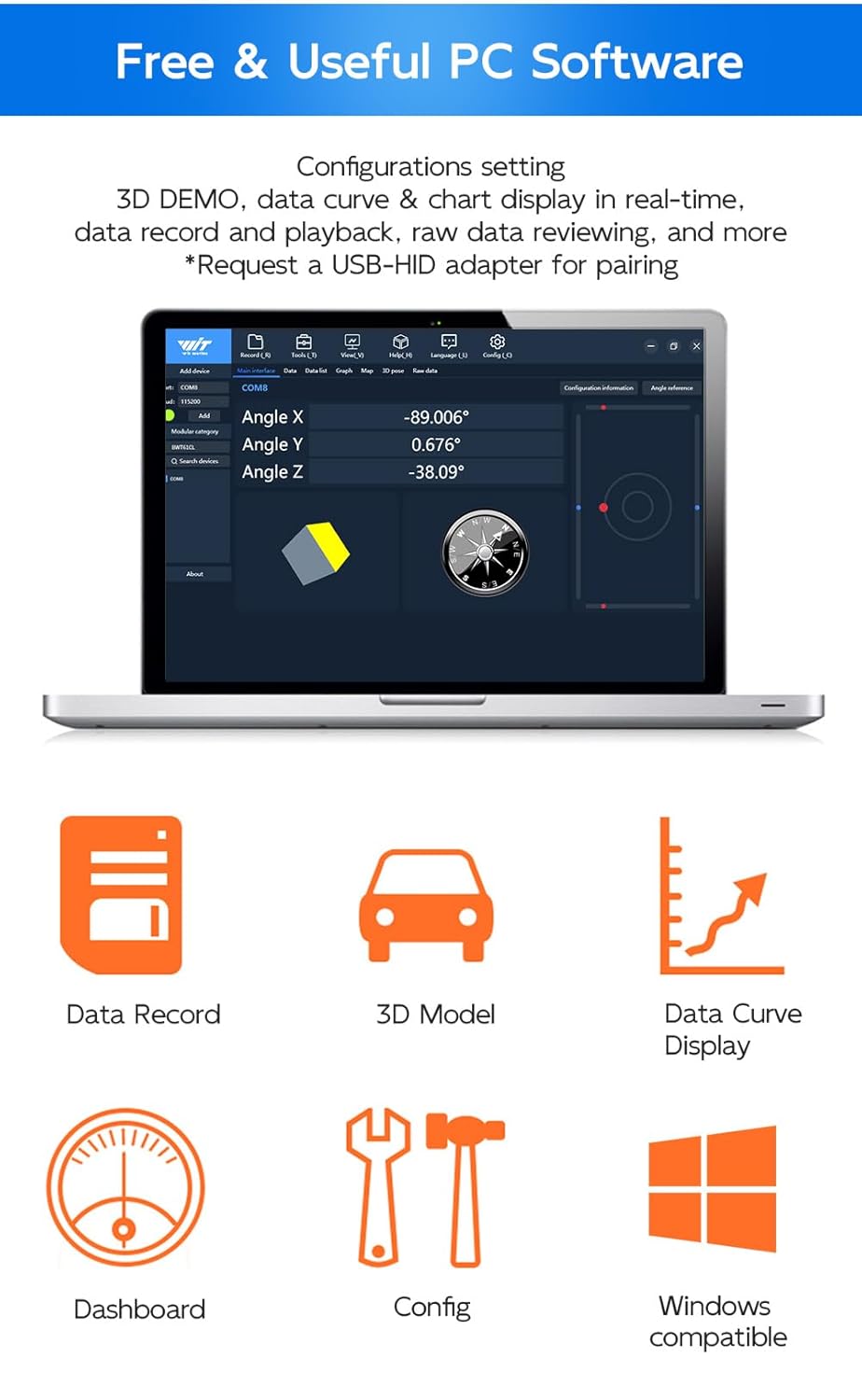
Figure 3: WITMOTION PC software interface showing data display and configuration options.
స్మార్ట్ఫోన్ యాప్:
The WitMotion app is available for both Android and iOS devices. కోసం వెతకండి "WitMotion" in the App Store (iOS) or Google Play Store (Android) to download and install the application. The app allows for basic configuration and real-time data viewing.
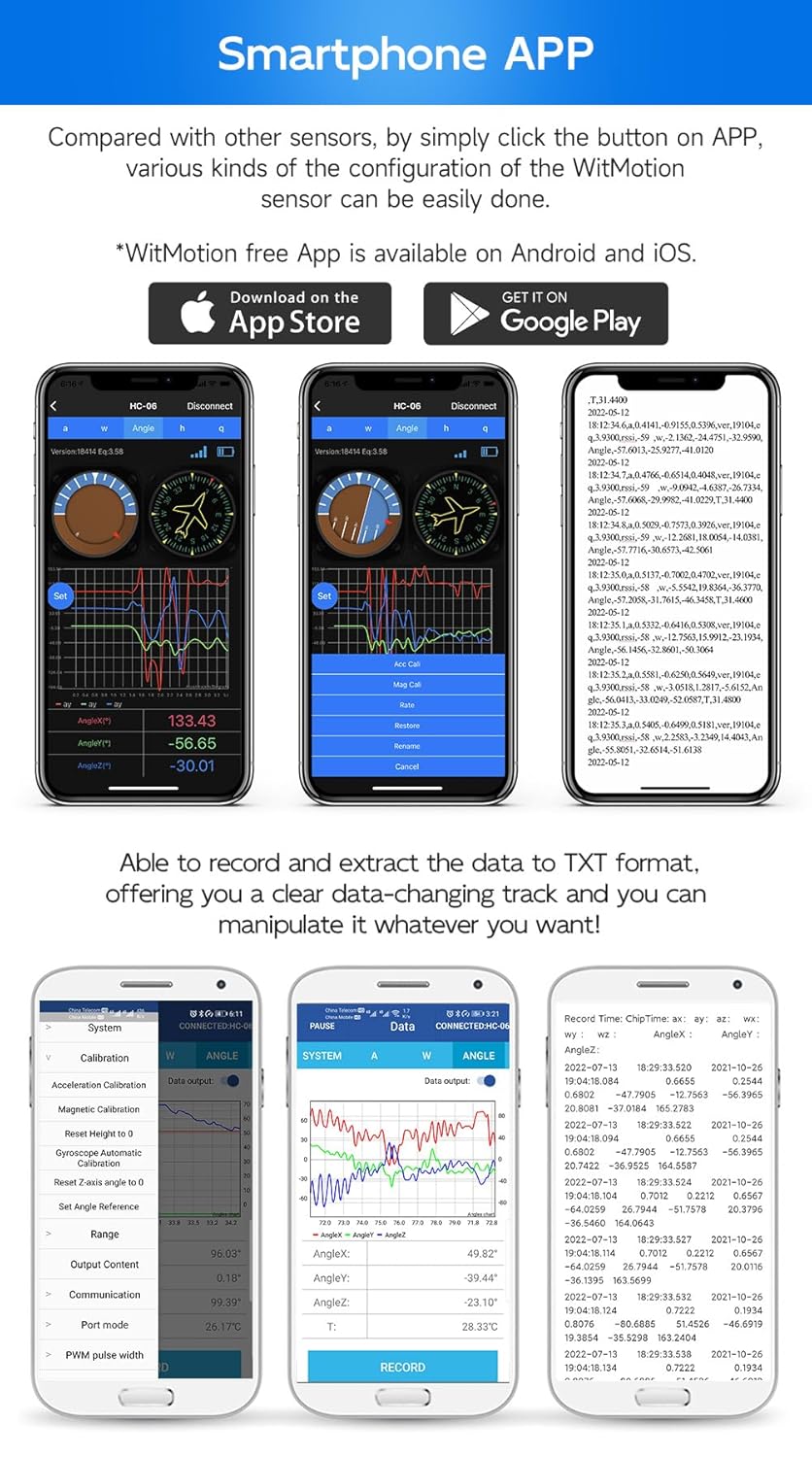
Figure 4: Smartphone app interface for configuring and viewing data from the WitMotion sensor.
2.3 బ్లూటూత్ కనెక్షన్
Ensure the BWT61CL sensor is powered on. On your PC or smartphone, enable Bluetooth and search for available devices. Select the BWT61CL from the list to establish a connection. The device typically appears as "HC-06" or similar. For PC connection, a USB-HID adapter is recommended for stable data transmission.
3. ఆపరేటింగ్ సూచనలు
3.1 Data Output and Recording
The BWT61CL outputs acceleration, gyroscope, and angle data. This data can be viewed in real-time through the PC software or smartphone app. The software allows for recording data and exporting it in TXT format for further analysis.

Figure 5: PC software displaying raw data output, which can be easily extracted to TXT format.
3.2 Real-time Data Visualization
The PC software provides graphical representations of the sensor's motion data, allowing users to observe changes in acceleration and angular velocity in real-time. This feature is crucial for understanding the sensor's behavior and for various testing applications.

Figure 6: PC software displaying real-time data curves for acceleration and angular velocity, showing motion changes.
3.3 క్రమాంకనం
For optimal accuracy, periodic calibration of the sensor may be required. Refer to the detailed tutorial available on the WitMotion website for specific calibration procedures for acceleration and angle. The PC software and smartphone app include options for calibration.
4. నిర్వహణ
4.1 బ్యాటరీ సంరక్షణ
The BWT61CL is equipped with a 3.7V Li-battery (260mAh) providing approximately 4 hours of working time. To prolong battery life, avoid extreme temperatures and store the device with a partial charge if not used for extended periods. Recharge the device using the provided Type-C cable when the battery is low.
4.2 శుభ్రపరచడం
Clean the device with a soft, dry cloth. Avoid using harsh chemicals or abrasive materials that could damage the casing లేదా అంతర్గత భాగాలు.
5. ట్రబుల్షూటింగ్
- కనెక్షన్ సమస్యలు: If the device fails to connect via Bluetooth, ensure it is powered on and within the 10-meter range. Check that Bluetooth is enabled on your PC or smartphone. For PC, verify the USB-HID adapter is correctly installed and functioning.
- Software/App Not Displaying Data: Ensure the sensor is properly connected. Restart the software/app and the sensor. Check for any driver updates for the USB-HID adapter if using PC software.
- సరికాని రీడింగ్లు: Perform a calibration as described in the operating instructions or the full tutorial on the WitMotion website. Ensure the sensor is placed on a stable surface during static measurements.
- బ్యాటరీ త్వరగా అయిపోతుంది: Ensure the device is fully charged before use. If battery life significantly degrades, contact customer support.
6. స్పెసిఫికేషన్లు

Figure 7: Technical specifications and dimensions of the BWT61CL sensor.
| పరామితి | విలువ |
|---|---|
| పేరు | 6-axis Bluetooth Gyro Inclinometer |
| బ్రాండ్ | WitMotion |
| బ్యాటరీ | 3.7V Li-battery 260mAh |
| వర్కింగ్ కరెంట్ | <50mA |
| కమ్యూనికేషన్ | Bluetooth 2.0, Serial TTL |
| డేటా అవుట్పుట్ | 3 Axis Acceleration, Gyro, Angle, Quaternion |
| Range (Accelerometer) | ± 16గ్రా |
| Range (Gyroscope) | ± 2000 ° / సె |
| Range (Angle) | X, Z-axis: ±180°, Y ±90° |
| Resolution (Acceleration) | 0.0005గ్రా |
| Resolution (Gyro) | 2000°/సె |
| Angle Accuracy (Static) | X Y axis 0.05°; Z: 1° (cumulative error & calibrated) |
| ఫ్రీక్వెన్సీ | 0.2Hz-200Hz |
| బాడ్ రేటు | 115200bps |
| బ్లూటూత్ కవరేజ్ | 10 మీటర్లు |
| పని సమయం | సుమారు 4 గంటలు |
| బరువు | 20గ్రా |
| పరిమాణం | 51*36*15mm / 2.02"*1.41"*0.59" |
7. వారంటీ మరియు మద్దతు
7.1 వారంటీ సమాచారం
The WITMOTION BWT61CL sensor comes with a 12-month warranty from the date of purchase.
7.2 కస్టమర్ మద్దతు
For any assistance, technical queries, or support, please contact the WitMotion customer service team. You can find detailed tutorials and resources on the official WitMotion webసైట్.
- ఆన్లైన్ ట్యుటోరియల్స్: A link to the tutorial is printed on the guide card inside the product packaging. Alternatively, visit wit-motion.com to download the complete tutorial.
- ఇమెయిల్ మద్దతు: వద్ద మద్దతును సంప్రదించండి support@wit-motion.com for direct assistance.

Figure 8: WitMotion's commitment to customer support.


