1. ఉత్పత్తి ముగిసిందిview
The GIGABYTE GA-B250M-D2V is a Micro ATX motherboard designed to support 7th and 6th Generation Intel Core processors in the LGA1151 package. It features the Intel B250 Express Chipset, providing a stable and efficient platform for personal computing. Key features include dual-channel non-ECC unbuffered DDR4 memory support, high-quality audio capacitors with LED trace path lighting, GbE LAN with cFosSpeed Internet Accelerator Software, and Smart Fan 5 for advanced cooling control.
This motherboard is built with GIGABYTE's Ultra Durable design, ensuring longevity and reliability. It offers essential connectivity and expansion options for a balanced system build.
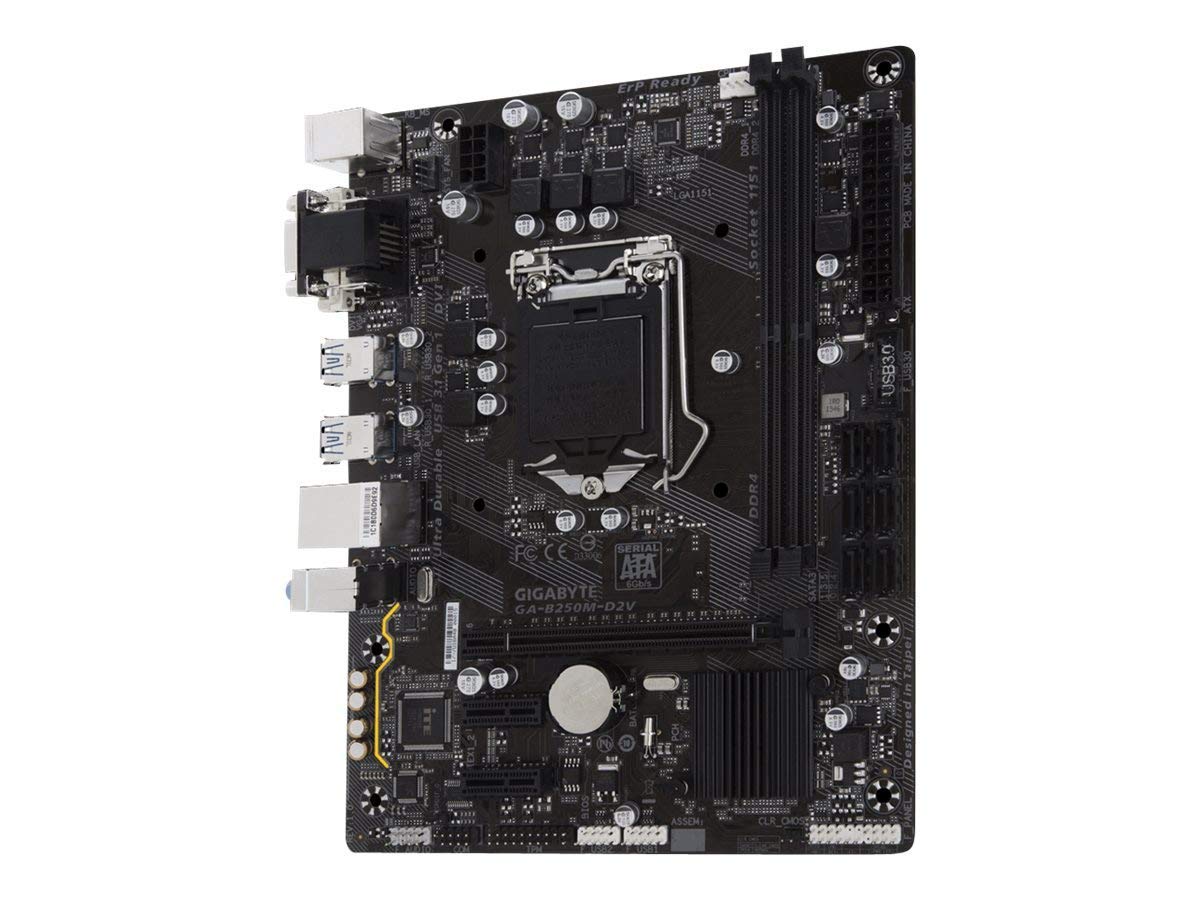
చిత్రం 1.1: పై నుండి క్రిందికి view of the GIGABYTE GA-B250M-D2V motherboard, showing the CPU socket, RAM slots, and various connectors.
2. సెటప్ మరియు ఇన్స్టాలేషన్
Proper installation is crucial for the stable operation of your system. It is highly recommended to have this motherboard installed by a trained professional to prevent damage and ensure correct configuration.
2.1 ప్రీ-ఇన్స్టాలేషన్ చెక్లిస్ట్
- Ensure you have a compatible CPU (7th/6th Gen Intel Core, Pentium, Celeron LGA1151).
- Acquire compatible DDR4 RAM modules (Non-ECC Unbuffered).
- Prepare a suitable Micro ATX compatible PC case.
- Gather necessary tools: screwdriver, thermal paste, anti-static wrist strap.
2.2. కాంపోనెంట్ ఇన్స్టాలేషన్ దశలు
- CPU ఇన్స్టాలేషన్: Carefully open the CPU socket lever. Align the CPU with the socket, ensuring the gold triangle on the CPU matches the mark on the socket. Gently place the CPU into the socket without force. Close the lever to secure the CPU.
- CPU కూలర్ ఇన్స్టాలేషన్: Apply thermal paste to the CPU (if not pre-applied on the cooler). Mount the CPU cooler according to its manufacturer's instructions. Connect the CPU fan cable to the "CPU_FAN" header on the motherboard.
- RAM ఇన్స్టాలేషన్: Open the clips on both ends of the DDR4 memory slots. Align the notch on the RAM module with the key in the slot. Press down firmly on both ends of the RAM module until the clips snap into place. Install modules in matching slots for dual-channel performance (refer to motherboard manual for specific slot pairing).
- మదర్బోర్డ్ మౌంటింగ్: Install standoffs in your PC case that align with the motherboard's screw holes. Carefully place the motherboard into the case, aligning the I/O shield with the case opening. Secure the motherboard with screws.
- విద్యుత్ కనెక్షన్లు: Connect the 24-pin ATX main power connector and the 8-pin (or 4-pin) ATX 12V CPU power connector from your power supply to the motherboard.
- నిల్వ పరికరాలు: మీ స్టోరేజ్ డ్రైవ్ల (HDDలు/SSDలు) నుండి SATA డేటా కేబుల్లను మదర్బోర్డ్లోని SATA పోర్ట్లకు కనెక్ట్ చేయండి. మీ పవర్ సప్లై నుండి డ్రైవ్లకు SATA పవర్ కేబుల్లను కనెక్ట్ చేయండి.
- ముందు ప్యానెల్ కనెక్టర్లు: Connect the front panel cables (Power SW, Reset SW, HDD LED, Power LED, USB, Audio) from your case to the corresponding headers on the motherboard. Refer to the detailed diagram in the full manual for correct pin assignments.
- విస్తరణ కార్డులు: Install any graphics cards or other PCI Express expansion cards into the appropriate PCIe slots. Secure them with the case's retention mechanism and connect any necessary PCIe power cables from the power supply.

చిత్రం 2.1: క్లోజప్ view of the motherboard's I/O panel and internal connectors, including USB 3.0 headers and SATA ports.
3. ఆపరేటింగ్ సూచనలు
3.1. మొదటి బూట్ మరియు BIOS సెటప్
After assembling your system, connect a monitor, keyboard, and mouse. Power on the system. During startup, repeatedly press the DEL key to enter the BIOS (Basic Input/Output System) setup utility. The GIGABYTE UEFI BIOS provides a graphical interface for configuration.
- బూట్ ఆర్డర్: Configure the boot order to prioritize your operating system installation media (USB drive or DVD-ROM).
- తేదీ మరియు సమయం: సరైన సిస్టమ్ తేదీ మరియు సమయాన్ని సెట్ చేయండి.
- SATA మోడ్: Ensure SATA mode is set to AHCI for optimal SSD performance, unless installing an older operating system that requires IDE mode.
- ఫ్యాన్ నియంత్రణ: Utilize the Smart Fan 5 features within the BIOS to customize fan curves and monitor temperatures for efficient cooling.
- పొందుపరుచు మరియు నిష్క్రమించు: After making changes, save your settings and exit the BIOS. The system will restart.
3.2. ఆపరేటింగ్ సిస్టమ్ ఇన్స్టాలేషన్
Insert your operating system installation media (e.g., Windows, Linux) and follow the on-screen prompts to install the OS on your storage drive. After installation, install the necessary drivers for the motherboard components (chipset, audio, LAN, graphics) from the GIGABYTE support website or the included driver CD (if applicable).
3.3. గిగాబైట్ యాప్ సెంటర్
The GIGABYTE APP Center provides a unified interface for various GIGABYTE utilities, including Cloud Station Utility, system monitoring tools, and BIOS update utilities. Install it from the GIGABYTE website for enhanced system management.
4. నిర్వహణ
క్రమం తప్పకుండా నిర్వహణ మీ మదర్బోర్డ్ మరియు సిస్టమ్ యొక్క దీర్ఘాయువు మరియు సరైన పనితీరును నిర్ధారించడంలో సహాయపడుతుంది.
- దుమ్ము తొలగింపు: Periodically clean dust from inside your PC case, especially from fans, heatsinks, and vents. Use compressed air for best results. Ensure the system is powered off and unplugged before cleaning.
- BIOS నవీకరణలు: GIGABYTE ని తనిఖీ చేయండి website for the latest BIOS updates. BIOS updates can improve system stability, compatibility, and performance. Follow the update instructions carefully to avoid system damage.
- డ్రైవర్ నవీకరణలు: Keep your motherboard drivers (chipset, audio, LAN) updated to ensure compatibility and optimal performance with your operating system and other hardware.
- కేబుల్ నిర్వహణ: గాలి ప్రవాహాన్ని మెరుగుపరచడానికి మరియు జోక్యాన్ని నివారించడానికి అంతర్గత కేబుల్లు చక్కగా రూట్ చేయబడ్డాయని నిర్ధారించుకోండి.
5. ట్రబుల్షూటింగ్
ఈ విభాగం మీరు ఎదుర్కొనే సాధారణ సమస్యలకు పరిష్కారాలను అందిస్తుంది.
5.1. No Power / System Does Not Turn On
- Verify that the power supply is connected to the motherboard (24-pin ATX and 8-pin/4-pin CPU power).
- విద్యుత్ సరఫరా స్విచ్ "ఆన్" స్థానంలో ఉందని నిర్ధారించుకోండి.
- ముందు ప్యానెల్ పవర్ స్విచ్ కేబుల్ మదర్బోర్డ్ హెడర్కి సరిగ్గా కనెక్ట్ చేయబడిందో లేదో తనిఖీ చేయండి.
- మరొక వ్యవస్థ లేదా విద్యుత్ సరఫరా టెస్టర్తో విద్యుత్ సరఫరాను పరీక్షించండి.
5.2. No Display / No POST (Power-On Self-Test)
- Ensure the monitor is connected to the correct video output (motherboard integrated graphics or discrete graphics card).
- Reseat the RAM modules. Try booting with only one RAM module installed.
- Reseat the graphics card (if applicable) and ensure its power cables are connected.
- Clear the CMOS by removing the CMOS battery for a few minutes or using the CLR_CMOS jumper (refer to the full manual for location).
- Check for any diagnostic LEDs or beep codes from the motherboard, which can indicate specific issues.
5.3. Operating System Issues
- If the OS fails to boot, check the boot order in BIOS.
- Ensure all storage drives are properly connected and detected in BIOS.
- Reinstall or update motherboard drivers if experiencing instability or peripheral issues.
6. స్పెసిఫికేషన్లు
| ఫీచర్ | స్పెసిఫికేషన్ |
|---|---|
| బ్రాండ్ | గిగాబైట్ |
| మోడల్ | GA-B250M-D2V |
| CPU సాకెట్ | LGA 1151 |
| అనుకూల ప్రాసెసర్లు | 7th/6th Generation Intel Core i7/i5/i3/Pentium/Celeron Processors |
| చిప్సెట్ | Intel B250 Express Chipset |
| RAM మెమరీ టెక్నాలజీ | DDR4 |
| మెమరీ స్లాట్లు | 2 x DDR4 DIMM sockets, up to 32 GB (Dual Channel, Non-ECC Unbuffered) |
| గ్రాఫిక్స్ కార్డ్ ఇంటర్ఫేస్ | PCI Express (1 x PCIe x16, 2 x PCIe x1) |
| ఫారమ్ ఫ్యాక్టర్ | మైక్రో ATX (24.4cm x 19.5cm) |
| USB పోర్ట్లు | Total 12 (various USB 3.0/2.0 ports) |
| ఆడియో | High Quality Audio Capacitors and Audio Noise Guard |
| LAN | GbE LAN with cFosSpeed Internet Accelerator Software |
| కొలతలు (LxWxH) | 24.4 x 4 x 30.5 సెం.మీ |
| వస్తువు బరువు | 300 గ్రా |
7. వారంటీ మరియు మద్దతు
7.1. వారంటీ సమాచారం
All GIGABYTE motherboards are manufactured by Gigabyte Technology Co., Ltd. Taiwan. For specific warranty terms and conditions, please refer to the warranty card included with your product or visit the official GIGABYTE website. Any unauthorized duplication or modification may void the warranty and attract legal jurisdiction.
7.2. సాంకేతిక మద్దతు
For technical assistance, driver downloads, BIOS updates, and further product information, please visit the official GIGABYTE support website. You can typically find support resources by searching for your specific model number (GA-B250M-D2V) on their site.
GIGABYTE అధికారికం Webసైట్: www.gigabyte.com


