1. పరిచయం
This manual provides detailed instructions for the proper use and maintenance of your ANYSECU HYT SM26M1 IP54 Portable Speaker Microphone. Designed for seamless integration with compatible Hytera two-way radios, this speaker microphone enhances communication by allowing you to transmit and receive audio without needing to remove your radio from its belt clip or carrying case. Its robust design includes a retractable coil cord and a 360-degree swivel clip for convenience and durability.
2. ఉత్పత్తి ముగిసిందిview
The ANYSECU HYT SM26M1 is a compact and reliable speaker microphone built for demanding environments. It features a clear speaker for receiving transmissions and an integrated microphone for clear voice transmission. The unit is equipped with a standard 2-pin connector for compatibility with various Hytera radio models.

మూర్తి 2.1: ముందు view of the ANYSECU HYT SM26M1 Portable Speaker Microphone, showing the speaker grille and overall design.
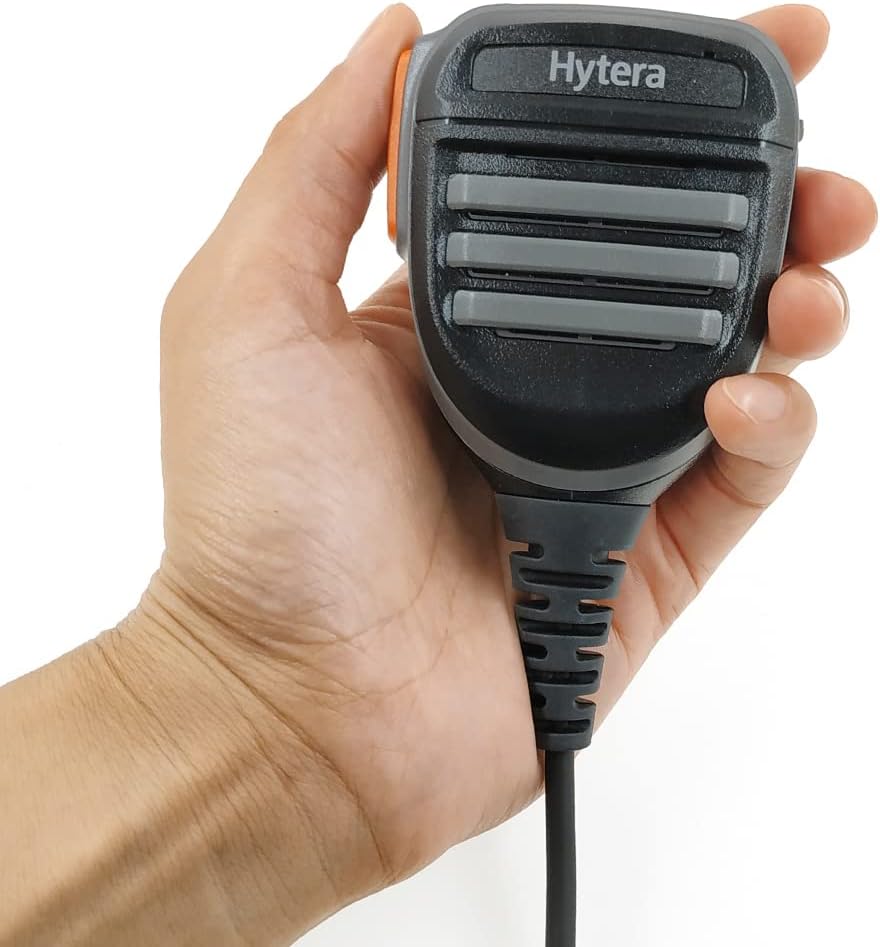
Figure 2.2: A hand holding the speaker microphone, illustrating its ergonomic design and compact size.
3. భాగాలు
- Speaker/Microphone Unit: Main body for audio input and output.
- పుష్-టు-టాక్ (PTT) బటన్: Located on the side for transmitting.
- 360-Degree Swivel Clip: For attaching the unit to clothing or gear.
- Retractable Coil Cord: Connects the speaker microphone to the radio.
- 2-పిన్ కనెక్టర్: For connecting to compatible two-way radios.
- 3.5mm ఆడియో జాక్: For connecting an external earpiece (not included).

మూర్తి 3.1: వైపు view of the speaker microphone, highlighting the Push-to-Talk (PTT) button and the 3.5mm audio jack for an earpiece.

చిత్రం 3.2: వెనుక view of the speaker microphone, displaying the robust 360-degree rotatable swivel clip for secure attachment.
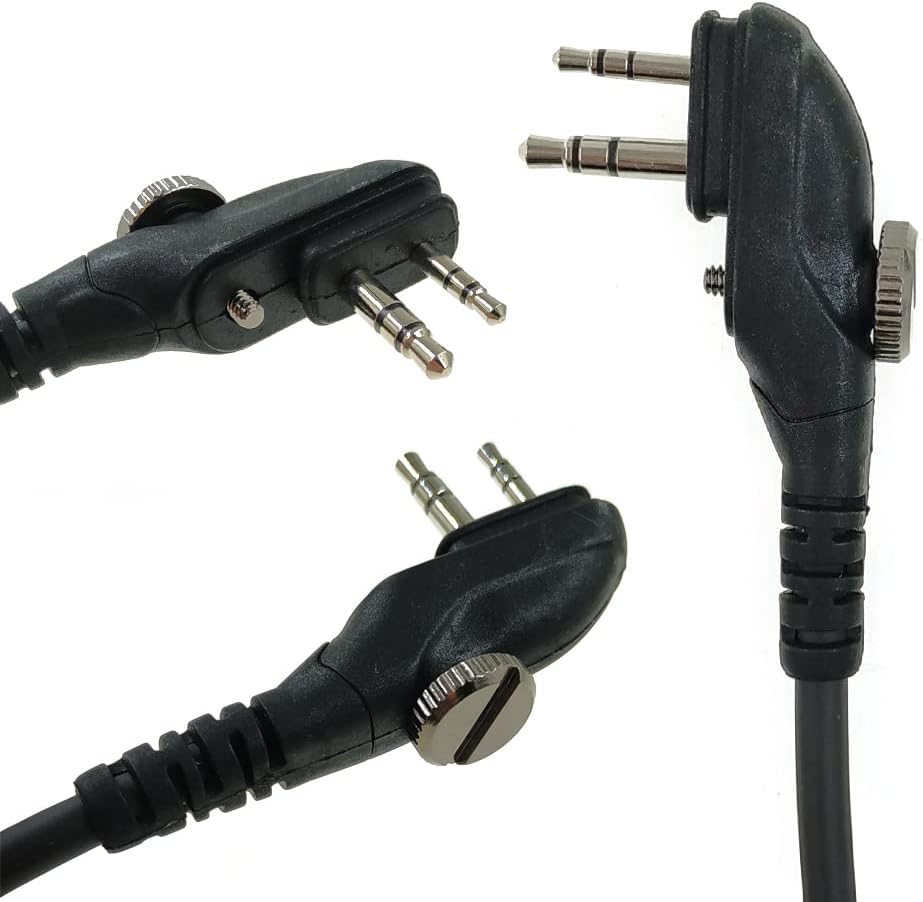
మూర్తి 3.3: వివరంగా view of the 2-pin connector, designed for compatibility with specific Hytera two-way radio models.
4. సెటప్ సూచనలు
- Identify Radio Connector: Ensure your Hytera two-way radio has a compatible 2-pin accessory port.
- Connect Speaker Microphone: Carefully align the 2-pin connector of the speaker microphone with the accessory port on your radio. Push firmly until it is securely seated. Some connectors may have a screw to further secure the connection; tighten if applicable.
- క్లిప్ను భద్రపరచండి: Attach the 360-degree swivel clip to your lapel, collar, or other convenient location on your clothing or gear. Adjust the angle for optimal comfort and accessibility.
- Optional Earpiece Connection: If using an external earpiece (not included), plug its 3.5mm jack into the audio port on the side of the speaker microphone.

Figure 4.1: The speaker microphone shown with its packaging and a small instruction manual, indicating the product's presentation.
5. ఆపరేటింగ్ సూచనలు
- ఆడియోను స్వీకరిస్తోంది: Once connected, audio from your radio will be routed through the speaker microphone's integrated speaker. Adjust the radio's volume for comfortable listening.
- Transmitting Audio (Push-to-Talk): To transmit, press and hold the PTT button located on the side of the speaker microphone. Speak clearly into the microphone. Release the PTT button to return to receive mode.
- ఇయర్పీస్ని ఉపయోగించడం: If an earpiece is connected to the 3.5mm audio jack, audio will be directed to the earpiece for private listening, bypassing the main speaker.
6 ఫీచర్లు
- IP54 రేటింగ్: Provides protection against dust ingress and splashing water from any direction, making it suitable for various outdoor and challenging environments.
- Retractable Coil Cord: Offers flexibility and prevents tangling, extending as needed for comfortable use and retracting for compact storage.
- 360-Degree Swivel Clip: Allows for versatile attachment to clothing or gear, ensuring the microphone can be positioned optimally for communication.
- సులభమైన ఆపరేషన్: Designed for ease of use, enabling transmission and reception without needing to handle the main radio unit.
7. అనుకూలత
The ANYSECU HYT SM26M1 Portable Speaker Microphone is compatible with the following Hytera two-way radio models:
- Hytera TC-600
- Hytera TC-610
- Hytera TC-620
- Hytera TC-700
- Hytera TC-580
- Hytera TC-518
- Hytera TC-618
- Hytera BD500
- Hytera TD500
- Hytera TD560
- హైటెరా PD530
8. స్పెసిఫికేషన్లు
| ఫీచర్ | వివరాలు |
|---|---|
| మోడల్ సంఖ్య | SM08M3 (also referred to as SM26M1) |
| బ్రాండ్ | ANYSECU |
| కొలతలు (L x W x H) | 1.34 x 2.38 x 1.34 అంగుళాలు (34 x 60.5 x 34 మిమీ) |
| వస్తువు బరువు | 5.6 ఔన్సులు (160 గ్రాములు) |
| మెటీరియల్ | Metal (internal components), Durable Plastic (housing) |
| మైక్రోఫోన్ ఫారమ్ ఫ్యాక్టర్ | లావాలియర్ |
| ఆడియో సెన్సిటివిటీ | 42 డెసిబెల్స్ |
| ఇంపెడెన్స్ | ౪౦ ఓం |
| సిగ్నల్-టు-శబ్ద నిష్పత్తి | 58 డిబి |
| ఫ్రీక్వెన్సీ రెస్పాన్స్ | 20 KHz |
| కనెక్టివిటీ టెక్నాలజీ | XLR (referring to the 2-pin connector type) |
| ప్రత్యేక ఫీచర్ | Clip (360-degree swivel) |
| శక్తి మూలం | కార్డెడ్ ఎలక్ట్రిక్ (రేడియో ద్వారా ఆధారితం) |
| చేర్చబడిన భాగాలు | Microphone, Holder, Screw |
| IP రేటింగ్ | IP54 |
9. నిర్వహణ మరియు సంరక్షణ
- శుభ్రపరచడం: Wipe the speaker microphone with a soft, damp గుడ్డ. కఠినమైన రసాయనాలు లేదా రాపిడి క్లీనర్లను ఉపయోగించడం మానుకోండి.
- నిల్వ: ఉపయోగంలో లేనప్పుడు ప్రత్యక్ష సూర్యకాంతి మరియు తీవ్రమైన ఉష్ణోగ్రతలకు దూరంగా పొడి, చల్లని ప్రదేశంలో యూనిట్ను నిల్వ చేయండి.
- త్రాడు సంరక్షణ: Avoid excessive pulling or twisting of the coiled cord to prevent damage.
- కనెక్టర్ రక్షణ: Keep the 2-pin connector clean and free from debris to ensure a reliable connection.
10. ట్రబుల్షూటింగ్
- స్పీకర్ నుండి ఆడియో లేదు:
- Ensure the speaker microphone is securely connected to the radio.
- రేడియో వాల్యూమ్ స్థాయిని తనిఖీ చేయండి.
- If an earpiece is connected, audio will be routed there; disconnect the earpiece to use the main speaker.
- ప్రసారం చేయలేము:
- Verify the 2-pin connector is fully inserted and secured.
- Ensure the PTT button is being pressed firmly.
- Check the radio's battery level.
- అడపాదడపా కనెక్షన్:
- Inspect the connector pins for any bends or damage.
- Clean the connector and the radio's accessory port.
11. వారంటీ మరియు మద్దతు
ఈ ఉత్పత్తి a తో వస్తుంది 1 సంవత్సరాల వారంటీ from the manufacturer, Hytera. For technical support, warranty claims, or further assistance, please refer to the contact information provided with your product packaging or visit the official Hytera webసైట్.


