1. పరిచయం
The AVerMedia AM310 is a plug-and-play USB microphone designed for high-quality audio recording. It is suitable for various applications including podcasting, streaming, gaming, and vocal performances. This manual provides detailed instructions for setting up, operating, and maintaining your AM310 microphone to ensure optimal performance.

Figure 1: AVerMedia AM310 USB Microphone
2. ఉత్పత్తి ముగిసిందిview
2.1 ముఖ్య లక్షణాలు
- Driver-Free and Plug-and-Play: Easy setup on PC or Mac without additional driver installation.
- Cardioid Condenser Microphone: Records sound sources directly in front of the microphone, providing detailed and clear audio.
- 3.5mm హెడ్ఫోన్ జాక్: Allows real-time audio monitoring or playback of computer audio.
- ఇంటిగ్రేటెడ్ కంట్రోల్స్: Features a volume knob and mute button for convenient audio management.
2.2 భాగాలు
Familiarize yourself with the main components of your AM310 microphone:

Figure 2: Labeled components of the AM310 USB Microphone
- LED సూచిక: Displays microphone status (Blue: Powered on, Red: Muted).
- హెడ్ఫోన్ వాల్యూమ్ నాబ్: Adjusts the volume for the connected headphones.
- మౌంట్: Connects the microphone to the base or other compatible stands.
- Base and Shaft: Provides stable support for the microphone.
- Headphone Mode Switch: Toggles between PC Audio Playback and Microphone Monitoring.
- 3.5mm హెడ్ఫోన్ జాక్: Output for connecting headphones.
3. సెటప్
The AVerMedia AM310 is designed for quick and easy setup. Follow these steps to get started:
- Assemble the Microphone: Attach the microphone unit to the provided base and shaft. Ensure it is securely fastened.
- కంప్యూటర్కు కనెక్ట్ చేయండి: Plug the USB cable from the AM310 microphone into an available USB port on your PC or Mac. The microphone is driver-free and will be automatically recognized by your operating system.
- హెడ్ఫోన్లను కనెక్ట్ చేయండి (ఐచ్ఛికం): If you wish to monitor your audio, plug your 3.5mm headphones into the headphone jack on the microphone.
- Select as Input Device: In your computer's sound settings, select the AVerMedia AM310 as your default audio input device.

Figure 3: Connection diagram for AM310 USB Microphone

Figure 4: AM310 compatibility with Mac and Windows operating systems
3.1 సెటప్ వీడియో గైడ్
For a visual guide on setting up and using your AVerMedia AM310 microphone, please watch the official product video below.
Video 1: AVerMedia AM310 USB Microphone Overview మరియు సెటప్
4. ఆపరేటింగ్ సూచనలు
4.1 Adjusting Volume and Muting
The AM310 features an integrated volume knob and mute button for easy control:
- వాల్యూమ్ నాబ్: Rotate the knob to adjust the headphone output volume.
- మ్యూట్ బటన్: Press the knob to mute or unmute the microphone. The LED indicator will change from blue (powered on) to red (muted) when activated.

Figure 5: Volume knob and LED indicator
4.2 హెడ్ఫోన్ పర్యవేక్షణ
The 3.5mm headphone jack allows you to monitor your audio in two modes:
- PC Audio Playback: Slide the switch to the 'PC' position to hear audio playing from your computer through your headphones.
- Microphone Monitoring: Slide the switch to the 'MONITOR' position to hear your own voice in real-time through your headphones, which is useful for adjusting your speaking volume and clarity.

Figure 6: Headphone mode switch (PC/Monitor)

Figure 7: User utilizing the AM310 for streaming with headphones
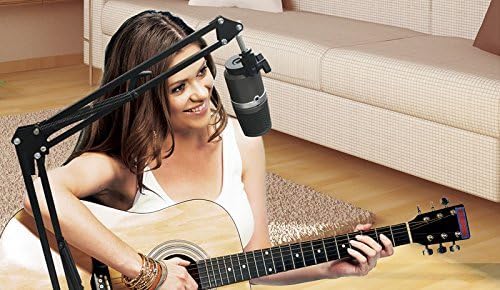
Figure 8: User recording music with the AM310 microphone
5. స్పెసిఫికేషన్లు
Below are the technical specifications for the AVerMedia AM310 USB Microphone:
| ఫీచర్ | స్పెసిఫికేషన్ |
|---|---|
| టైప్ చేయండి | Uni-directional Condenser Microphone |
| ధ్రువ నమూనా | గుండె నమూన |
| Sampలే రేటు | 48 kHz |
| బిట్ రేట్ | 16-బిట్ |
| శక్తి అవసరం | USB (5V DC) |
| సున్నితత్వం | -60 ± 5 dB (at 1 kHz) |
| ఫ్రీక్వెన్సీ రెస్పాన్స్ | 20–20,000 Hz |
| ఆడియో సెన్సిటివిటీ | 60 డెసిబెల్స్ |
| ఇంపెడెన్స్ | ౪౦ ఓం |
| సిగ్నల్-టు-శబ్ద నిష్పత్తి | 80 డిబి |
| హార్డ్వేర్ ప్లాట్ఫారమ్ | PC |
| ఛానెల్ల సంఖ్య | 1 |
| కనెక్టివిటీ టెక్నాలజీ | USB |
| కనెక్టర్ రకం | USB |
| వస్తువు బరువు | 1.03 పౌండ్లు |
| ఉత్పత్తి కొలతలు | 10 x 4 x 6 అంగుళాలు |
| మెటీరియల్ | అల్యూమినియం |
6. ట్రబుల్షూటింగ్
If you encounter issues with your AVerMedia AM310 microphone, please refer to the following common troubleshooting steps:
- సౌండ్ ఇన్పుట్ లేదు:
- Ensure the microphone is securely plugged into a USB port.
- Verify that the AM310 is selected as the default input device in your computer's sound settings.
- Check if the microphone is muted (red LED indicator). Press the volume knob to unmute.
- Try a different USB port or a different computer to isolate the issue.
- తక్కువ వాల్యూమ్:
- Adjust the input gain for the microphone in your computer's sound settings or recording software.
- Ensure you are speaking directly into the front of the microphone, as it has a cardioid polar pattern.
- స్టాటిక్ లేదా నాయిస్:
- Ensure the USB cable is not damaged and is properly connected.
- Avoid placing the microphone near sources of electromagnetic interference (e.g., power cables, unshielded electronics).
- Consider using a pop filter to reduce plosive sounds and a shock mount to minimize vibrations.
- హెడ్ఫోన్ పర్యవేక్షణ సమస్యలు:
- Check the headphone volume knob on the microphone.
- Verify the Headphone Mode Switch is set to the desired position (PC or MONITOR).
- Ensure your headphones are fully plugged into the 3.5mm jack.
7. నిర్వహణ
To ensure the longevity and optimal performance of your AVerMedia AM310 USB Microphone, follow these maintenance guidelines:
- శుభ్రపరచడం: Use a soft, dry cloth to clean the exterior of the microphone. Avoid using liquid cleaners or solvents, as they may damage the finish or internal components.
- నిల్వ: ఉపయోగంలో లేనప్పుడు, మైక్రోఫోన్ను ప్రత్యక్ష సూర్యకాంతి మరియు విపరీతమైన ఉష్ణోగ్రతల నుండి దూరంగా చల్లని, పొడి ప్రదేశంలో నిల్వ చేయండి.
- నిర్వహణ: మైక్రోఫోన్ను జాగ్రత్తగా నిర్వహించండి. సున్నితమైన అంతర్గత భాగాలను దెబ్బతీసే విధంగా దానిని పడవేయడం లేదా బలమైన ప్రభావాలకు గురిచేయడం మానుకోండి.
- కేబుల్ కేర్: USB కేబుల్ను ఎక్కువగా వంచవద్దు లేదా ముడతలు పెట్టవద్దు. డిస్కనెక్ట్ చేసేటప్పుడు ఎల్లప్పుడూ కేబుల్ను కాదు, ప్లగ్ను పట్టుకోండి.
8. వారంటీ మరియు మద్దతు
For warranty information, technical support, or further assistance with your AVerMedia AM310 USB Microphone, please visit the official AVerMedia webసైట్ లేదా వారి కస్టమర్ సపోర్ట్ని సంప్రదించండి.
మీరు మరింత సమాచారం మరియు మద్దతు వనరులను ఇక్కడ కనుగొనవచ్చు AVerMedia Store.


