1. ఉత్పత్తి ముగిసిందిview
The LG 43MU79-B is a 42.51-inch 4K UHD (3840 x 2160) IPS monitor designed for high-resolution display and versatile connectivity. It features a wide viewing angle and accurate color reproduction, making it suitable for various professional and entertainment applications.
ముఖ్య లక్షణాలు:
- 4K UHD (3840 x 2160) IPS Display
- HDCP 2.2 అనుకూలమైనది
- USB టైప్-C కనెక్టివిటీ
- 4x HDMI ఇన్పుట్లు
- On-Screen Control for easy adjustments
- Factory Calibrated for color accuracy
- Base detachable for flexible mounting options

2. సెటప్ మరియు అసెంబ్లీ
2.1 Unboxing the Monitor
Carefully remove the monitor and all accessories from the packaging. Ensure all components listed in the packing list are present. Keep the packaging materials for future transport or storage.
2.2 స్టాండ్ అటాచ్ చేయడం
- గీతలు పడకుండా ఉండటానికి మానిటర్ ముఖాన్ని మృదువైన, శుభ్రమైన గుడ్డపై ఉంచండి.
- మానిటర్ వెనుక భాగంలో ఉన్న మౌంటు రంధ్రాలతో స్టాండ్ మెడను సమలేఖనం చేయండి.
- అందించిన స్క్రూలను ఉపయోగించి స్టాండ్ మెడను మానిటర్కు బిగించండి.
- Attach the stand base to the stand neck and tighten the screw at the bottom of the base.
- Carefully lift the monitor and place it on a stable, flat surface.
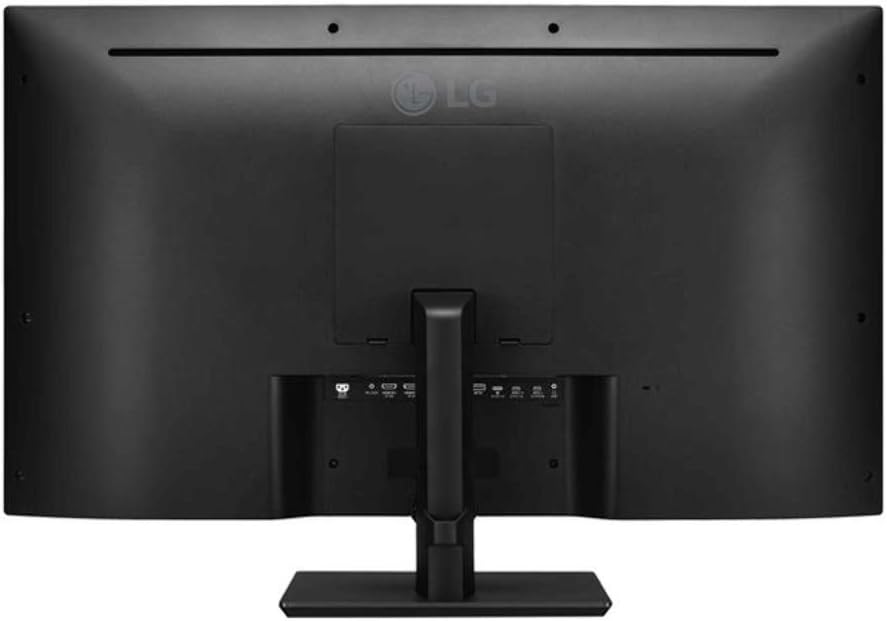
2.3 కనెక్ట్ కేబుల్స్
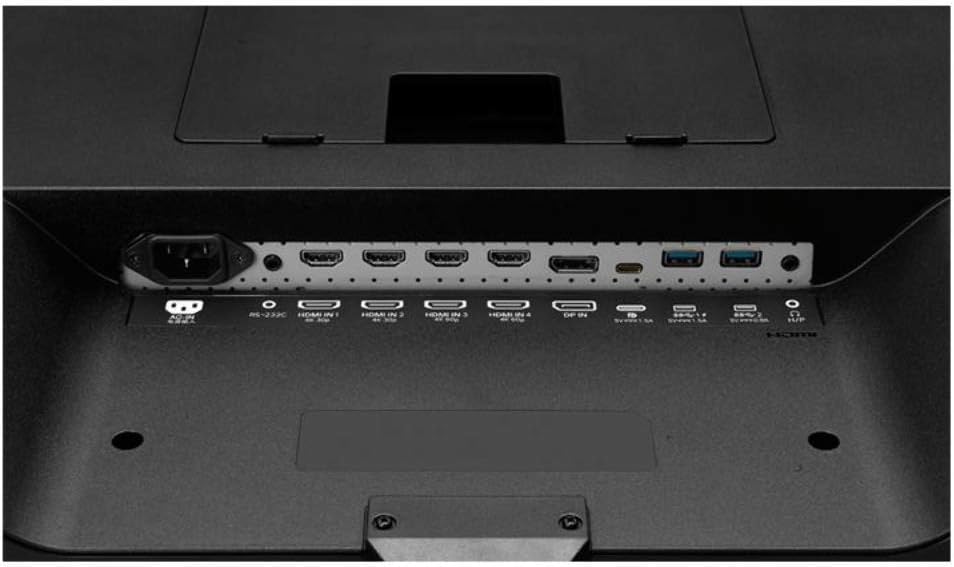
Connect the power cable to the monitor and a power outlet. Use the appropriate video cables (HDMI, DisplayPort, or USB Type-C) to connect your computer or other devices to the monitor. Ensure all connections are secure.
Note: No relevant official product videos from the seller were found for this specific product.
3. ఆపరేటింగ్ సూచనలు
3.1 పవర్ చేయడం ఆన్/ఆఫ్
Press the power button, usually located on the bottom center or side of the monitor, to turn the display on or off. The power indicator light will illuminate when the monitor is active.
3.2 ఆన్-స్క్రీన్ డిస్ప్లే (OSD) మెనూ
Access the On-Screen Display (OSD) menu using the joystick or buttons on the monitor. The OSD allows you to adjust various settings, including:
- చిత్ర సెట్టింగ్లు: Brightness, Contrast, Sharpness, Color Temperature, Gamma.
- ఇన్పుట్ ఎంపిక: Switch between HDMI 1, HDMI 2, HDMI 3, HDMI 4, DisplayPort, and USB Type-C inputs.
- ఆడియో సెట్టింగ్లు: Volume control for built-in speakers or connected audio devices.
- సాధారణ సెట్టింగ్లు: Language, Power Saving, OSD Lock, Factory Reset.
3.3 USB టైప్-సి ఫంక్షనాలిటీ
The USB Type-C port provides a single-cable solution for video, audio, data transfer, and power delivery (charging your connected laptop or device). Ensure your device supports USB Type-C Alt Mode for full functionality.
4. నిర్వహణ
4.1 మానిటర్ను శుభ్రపరచడం
స్క్రీన్ను శుభ్రం చేయడానికి, మృదువైన, మెత్తటి బట్టతో సున్నితంగా తుడవండి. మొండి మరకల కోసం, తేలికగా dampen the cloth with water or a mild, non-abrasive screen cleaner. Avoid using harsh chemicals or abrasive materials that could damage the screen surface.
మానిటర్ శుభ్రం చేయడానికి casing, మృదువైన, పొడి వస్త్రాన్ని ఉపయోగించండి. శుభ్రపరిచే ద్రావణాలను నేరుగా మానిటర్పై పిచికారీ చేయవద్దు.
4.2 సాధారణ సంరక్షణ
- మానిటర్ లేదా దాని కేబుల్స్పై బరువైన వస్తువులను ఉంచడం మానుకోండి.
- మానిటర్లో వెంటిలేషన్ ఓపెనింగ్లను నిరోధించవద్దు.
- మానిటర్ను ప్రత్యక్ష సూర్యకాంతి, ఉష్ణ వనరులు మరియు అధిక తేమ నుండి దూరంగా ఉంచండి.
- మెరుపు తుఫానుల సమయంలో లేదా ఎక్కువసేపు ఉపయోగించనప్పుడు మానిటర్ను పవర్ అవుట్లెట్ నుండి అన్ప్లగ్ చేయండి.
5. ట్రబుల్షూటింగ్
5.1 శక్తి లేదు
- పవర్ కేబుల్ మానిటర్ మరియు వర్కింగ్ పవర్ అవుట్లెట్ రెండింటికీ సురక్షితంగా కనెక్ట్ చేయబడిందని నిర్ధారించుకోండి.
- మరొక పరికరాన్ని ప్లగ్ చేయడం ద్వారా పవర్ అవుట్లెట్ పనిచేస్తుందో లేదో తనిఖీ చేయండి.
- మానిటర్ పవర్ బటన్ నొక్కినట్లు నిర్ధారించుకోండి.
5.2 సిగ్నల్ లేదు
- Confirm that the video cable (HDMI, DisplayPort, USB Type-C) is correctly connected to both the monitor and your computer/device.
- Select the correct input source using the monitor's OSD menu.
- మీ కంప్యూటర్/పరికరం ఆన్లో ఉందని మరియు స్లీప్ మోడ్లో లేదని నిర్ధారించుకోండి.
- అందుబాటులో ఉంటే వేరే వీడియో కేబుల్ లేదా పోర్ట్ని ప్రయత్నించండి.
5.3 చిత్ర సమస్యలు (అస్పష్టంగా, వక్రీకరించబడి, తప్పు రంగులు)
- Adjust the resolution and refresh rate settings on your computer to match the monitor's native resolution (3840 x 2160) and recommended refresh rate.
- OSD మెను ద్వారా ఫ్యాక్టరీ రీసెట్ చేయండి.
- Check your graphics card drivers for updates.
6. స్పెసిఫికేషన్లు
| ఫీచర్ | స్పెసిఫికేషన్ |
|---|---|
| బ్రాండ్ | LG |
| మోడల్ సంఖ్య | 43MU79-B |
| స్క్రీన్ పరిమాణం | 42.51 Inches (43 Inches viewసామర్థ్యం) |
| స్క్రీన్ రిజల్యూషన్ | 3840 x 2160 (4K UHD) |
| ప్యానెల్ రకం | IPS |
| కారక నిష్పత్తి | 16:9 |
| స్క్రీన్ ఉపరితల వివరణ | నిగనిగలాడే |
| కనెక్టివిటీ | USB Type-C, 4x HDMI inputs, DisplayPort 1.2, USB 3.1 |
| HDCP మద్దతు | HDCP 2.2 అనుకూలమైనది |
| వస్తువు బరువు | 27.1 పౌండ్లు |
| ఉత్పత్తి కొలతలు (LxWxH) | 38.1 x 10.8 x 25.5 అంగుళాలు |
| రంగు | నలుపు |
7. వారంటీ మరియు మద్దతు
7.1 వారంటీ సమాచారం
వివరణాత్మక వారంటీ సమాచారం కోసం, దయచేసి మీ ఉత్పత్తితో చేర్చబడిన వారంటీ కార్డును చూడండి లేదా అధికారిక LG ని సందర్శించండి. webసైట్. వారంటీ నిబంధనలు మరియు షరతులు ప్రాంతం మరియు రిటైలర్ను బట్టి మారవచ్చు.
7.2 కస్టమర్ మద్దతు
If you encounter any issues not covered in this manual or require further assistance, please contact LG Customer Support. You can find contact information on the LG webసైట్ లేదా మీ ఉత్పత్తి డాక్యుమెంటేషన్లో.
When contacting support, please have your monitor's model number (43MU79-B) and serial number ready.