1. ముఖ్యమైన భద్రతా సూచనలు
మీ ఇనుమును ఉపయోగించినప్పుడు, కింది వాటితో సహా ప్రాథమిక భద్రతా జాగ్రత్తలు ఎల్లప్పుడూ పాటించాలి:
- ఇనుమును ఉపయోగించే ముందు అన్ని సూచనలను చదవండి.
- ఇనుమును దాని ఉద్దేశించిన ఉపయోగం కోసం మాత్రమే ఉపయోగించండి.
- విద్యుత్ షాక్ ప్రమాదం నుండి రక్షించడానికి, ఇనుమును నీటిలో లేదా ఇతర ద్రవాలలో ముంచవద్దు.
- ఎలక్ట్రికల్ అవుట్లెట్ను ప్లగ్ చేయడానికి లేదా అన్ప్లగ్ చేయడానికి ముందు ఎల్లప్పుడూ ఐరన్ను ఆఫ్ చేయండి. అవుట్లెట్ నుండి డిస్కనెక్ట్ చేయడానికి ఎప్పుడూ త్రాడును లాగకండి; బదులుగా, ప్లగ్ను పట్టుకుని డిస్కనెక్ట్ చేయడానికి లాగండి.
- త్రాడు వేడి ఉపరితలాలను తాకడానికి అనుమతించవద్దు. దూరంగా ఉంచడానికి ముందు ఇనుము పూర్తిగా చల్లబరచండి. నిల్వ చేసేటప్పుడు ఇనుము చుట్టూ తాడును వదులుగా ఉంచండి.
- నీటిని నింపేటప్పుడు లేదా ఖాళీ చేసేటప్పుడు మరియు ఉపయోగంలో లేనప్పుడు ఎల్లప్పుడూ ఎలక్ట్రికల్ అవుట్లెట్ నుండి ఇనుమును డిస్కనెక్ట్ చేయండి.
- దెబ్బతిన్న త్రాడుతో లేదా ఐరన్ పడిపోయినా లేదా దెబ్బతిన్నా ఐరన్ను ఆపరేట్ చేయవద్దు. విద్యుత్ షాక్ ప్రమాదాన్ని నివారించడానికి, ఐరన్ను విడదీయవద్దు; పరీక్ష మరియు మరమ్మత్తు కోసం అర్హత కలిగిన సర్వీస్మెన్ వద్దకు తీసుకెళ్లండి. తప్పుగా తిరిగి అమర్చడం వల్ల ఐరన్ ఉపయోగించినప్పుడు విద్యుత్ షాక్ ప్రమాదం సంభవించవచ్చు.
- పిల్లలు లేదా సమీపంలోని ఏవైనా ఉపకరణాలను ఉపయోగించడానికి దగ్గరి పర్యవేక్షణ అవసరం. కనెక్ట్ చేసినప్పుడు లేదా ఇస్త్రీ బోర్డు మీద ఇనుమును గమనించకుండా ఉంచవద్దు.
- Burns could occur from touching hot metal parts, hot water, or steam. Use caution when you turn a steam iron upside down – there may be hot water in the reservoir.
- This iron features a Motion Smart 3-way auto-off feature: 30-second motionless shut-off when iron is horizontal or on its side and 15-minute shut-off when upright.
2. ఉత్పత్తి ముగిసిందిview
The Sunbeam 4275-200 SteamMaster Iron is designed for efficient and safe ironing. It incorporates several features to enhance user experience and garment care.

మూర్తి 2.1: ప్రధాన view of the Sunbeam SteamMaster Professional Iron. This image shows the overall design, including the black body, blue water tank, and the retractable cord at the back.

మూర్తి 2.2: వైపు view of the iron, highlighting its ergonomic handle and the placement of the temperature dial and steam buttons.

చిత్రం 2.3: వివరణాత్మక view of the easy-to-operate fabric and temperature dial, along with the buttons for spray mist and shot of steam functions.
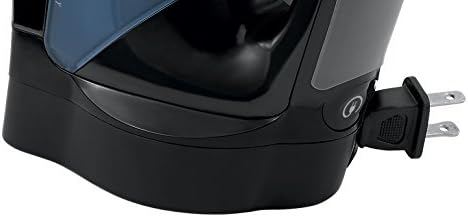
Figure 2.4: Close-up of the 8-foot retractable cord mechanism, designed for fast and convenient storage.
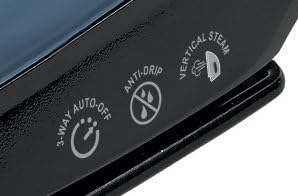
Figure 2.5: Icons indicating key features: 3-way auto-off for safety, anti-drip function to prevent water spots, and vertical steam capability.

మూర్తి 2.6: టాప్ view showing the water reservoir opening with its durable slide cover, and the various control buttons for steam and spray functions.
ముఖ్య లక్షణాలు:
- క్లియర్View LED లైట్: Makes ironing easier in any lighting environment.
- Versatile Steam Functions: Includes Spray Mist, Shot of Steam, Drip Free, and Vertical Steam.
- Safe Storage Strip: Indicates when it's safe to store the iron after use.
- ముడుచుకునే త్రాడు: An 8-foot cord that retracts for convenient storage.
- నాన్-స్టిక్ సోల్ప్లేట్: Ensures smooth gliding over fabrics.
- Self-Clean Feature: For easy maintenance and extended iron life.
- GreenSense Technology: Designed to deliver water savings of over 45% compared to standard irons.
- సులువు-View నీటి రిజర్వాయర్: With a durable slide cover for quick and spill-free filling and emptying.
3. సెటప్
3.1 నీటి నిల్వను నింపడం
- ఇనుము ఎలక్ట్రికల్ అవుట్లెట్ నుండి అన్ప్లగ్ చేయబడిందని నిర్ధారించుకోండి.
- Open the durable slide cover of the easy-view నీటి రిజర్వాయర్.
- Fill the reservoir with tap water up to the "MAX" fill line. The GreenSense iron is designed to use tap water.
- Close the slide cover securely to prevent spills.
3.2 Plugging In the Iron
Once the water reservoir is filled (if using steam), plug the 8-foot retractable cord into a standard electrical outlet. The iron is now ready for use.
4. ఆపరేటింగ్ సూచనలు
4.1 Setting Temperature and Fabric Type
Rotate the easy-to-operate fabric and temperature dial to select the appropriate setting for your garment. Refer to the fabric care label for recommended ironing temperatures. Allow the iron to heat up to the selected temperature before use.
4.2 Using Steam Functions
- నిరంతర ఆవిరి: Ensure the water reservoir is filled and the temperature dial is set to a steam-compatible setting (usually cotton, linen, etc.). The iron will produce continuous steam.
- ఆవిరి షాట్: Press the "Shot of Steam" button for an extra burst of steam to remove stubborn wrinkles.
- స్ప్రే మిస్ట్: Press the "Spray Mist" button to lightly dampen సులభంగా ఇస్త్రీ చేయడానికి బట్టలు.
- నిలువు ఆవిరి: Hold the iron upright and press the "Shot of Steam" button to steam hanging garments or drapes.
- Drip Free: This feature prevents water from dripping from the soleplate when the iron is not hot enough for steam.
4.3 క్లియర్View LED లైట్
ఇంటిగ్రేటెడ్ క్లియర్View LED light illuminates your ironing path, making it easier to spot and remove wrinkles, especially in dimly lit areas.
4.4 Safe Storage Strip
The Safe Storage Strip changes color to indicate when the iron has cooled down sufficiently and is safe to store, reducing the risk of accidental burns or damage.
5. నిర్వహణ మరియు శుభ్రపరచడం
5.1 Self-Clean Feature
To maintain optimal performance and prevent mineral buildup, use the Self-Clean feature periodically:
- Fill the water reservoir to the MAX line.
- Set the temperature dial to the highest setting.
- ఐరన్ను ప్లగ్ చేసి, సూచిక లైట్ ఆరిపోయే వరకు దానిని వేడి చేయడానికి అనుమతించండి.
- ఇనుమును అన్ప్లగ్ చేయండి.
- సింక్పై ఇనుమును అడ్డంగా పట్టుకోండి.
- Press and hold the Self-Clean button (refer to diagram in Product Overview if unsure of location). Water and steam will be expelled from the soleplate, flushing out mineral deposits.
- రిజర్వాయర్ ఖాళీ అయ్యే వరకు కొనసాగించండి.
- నిల్వ చేయడానికి ముందు ఇనుము పూర్తిగా చల్లబరచడానికి అనుమతించండి.
5.2 Anti-Calc Feature
The iron is equipped with an anti-calc feature that helps to reduce mineral deposits, ensuring consistent steam performance over time. Regular use of the Self-Clean feature complements this system.
5.3 సోల్ప్లేట్ను శుభ్రపరచడం
For the non-stick soleplate, wipe with a damp cloth after the iron has cooled down. Do not use abrasive cleaners or metallic scouring pads, as these can damage the soleplate coating.
5.4 Emptying Water Reservoir
After each use, it is recommended to empty any remaining water from the reservoir to prevent mineral buildup and prolong the life of the iron. Unplug the iron and allow it to cool before emptying.
6. ట్రబుల్షూటింగ్
| సమస్య | సాధ్యమైన కారణం | పరిష్కారం |
|---|---|---|
| ఇనుము వేడెక్కదు. | Iron is not plugged in; power outlet is not working; temperature dial is set to OFF or too low. | Ensure iron is securely plugged into a working outlet. Adjust temperature dial to desired setting. Check household fuse/circuit breaker. |
| ఆవిరి లేదు లేదా తగినంత ఆవిరి లేదు. | Water reservoir is empty; temperature is too low for steam; steam vents are clogged; iron needs self-cleaning. | Fill water reservoir. Set temperature to a steam-compatible setting (e.g., Cotton, Linen). Perform Self-Clean procedure to clear mineral deposits. |
| సోప్లేట్ నుండి నీరు కారుతుంది. | Temperature is too low for steam; iron is overfilled; Drip Free feature is not functioning optimally. | Ensure iron is heated to the correct temperature for steam. Do not overfill the water reservoir. If leaking persists, perform Self-Clean. |
| Retractable cord does not fully retract. | Cord mechanism may be jammed or partially obstructed. | Gently pull the cord out fully, then press the retract button. If it still doesn't retract, try guiding it gently. Avoid forcing the cord. |
| Iron automatically shuts off too quickly. | Motion Smart 3-way auto-off feature is active. | This is a safety feature. The iron will shut off after 30 seconds if horizontal/on its side, or 15 minutes if upright, without motion. Move the iron to reactivate. |
7. స్పెసిఫికేషన్లు
| గుణం | వివరాలు |
|---|---|
| బ్రాండ్ | సూర్యకిరణము |
| మోడల్ సంఖ్య | 4275-200 |
| రంగు | నలుపు మరియు నీలం |
| ప్రత్యేక ఫీచర్ | Non-stick, ClearView LED light, Retractable Cord, 3-way Auto-Off, Anti-Calc, Self-Clean |
| సిఫార్సు చేసిన ఉపయోగాలు | నిలువు ఆవిరి |
| బేస్ మెటీరియల్ | Stainless Steel with Non-Stick Coating |
| ఉత్పత్తి కొలతలు | 12.6 x 4.7 x 5.5 అంగుళాలు |
| వస్తువు బరువు | 2.7 పౌండ్లు |
| UPC | 027045765879 |
8. వారంటీ మరియు మద్దతు
8.1 ఉత్పత్తి వారంటీ
This Sunbeam product is covered by a limited warranty. Please refer to the warranty card included with your purchase for specific terms and conditions, or visit the official Sunbeam webవివరణాత్మక వారంటీ సమాచారం కోసం సైట్.
8.2 కస్టమర్ మద్దతు
For technical assistance, troubleshooting, or to inquire about replacement parts, please contact Sunbeam Customer Service. Contact information can typically be found on the product packaging or the official Sunbeam webసైట్.
మీరు కూడా సందర్శించవచ్చు అమెజాన్లో సన్బీమ్ స్టోర్ మరిన్ని ఉత్పత్తి సమాచారం మరియు మద్దతు వనరుల కోసం.


