1. పరిచయం
The Kaito KA768 is a versatile LED lantern designed for both indoor and outdoor use. It features twin adjustable LED panels, a built-in flashlight, and multiple charging options including solar and AC power. This manual provides essential information for the safe and effective operation and maintenance of your KA768 lantern.

మూర్తి 1: Kaito KA768 Multi-functional Twin-Panel Rechargeable & Portable Solar LED Lantern.
2. భద్రతా సూచనలు
- Do not expose the lantern to extreme temperatures or direct flame.
- Avoid disassembling the unit, as this may void the warranty and cause damage.
- పిల్లలకు దూరంగా ఉంచండి.
- Ensure the AC power cord is properly connected to a suitable power outlet during charging.
- Do not immerse the lantern in water. It is water-resistant, not waterproof.
- Regularly charge the battery, even when not in use, to maintain battery health. A full charge every three months is recommended.
3. ప్యాకేజీ విషయాలు
- Kaito KA768 LED Lantern
- AC పవర్ కార్డ్
4. ఉత్పత్తి ముగిసిందిview
The KA768 lantern features several key components for its multi-functional operation:
- Twin LED Panels: Each panel contains 21 SMD LEDs, providing bright illumination. They are adjustable with 180-degree tilt and 270-degree swivel capabilities.
- అంతర్నిర్మిత ఫ్లాష్లైట్: Located at the base of the unit for focused illumination.
- సోలార్ ప్యానెల్: Integrated on one of the LED panels for convenient solar charging.
- నియంత్రణ స్విచ్లు: For power, LED panel selection (single/dual), and flashlight activation.
- ఛార్జింగ్ పోర్ట్లు: AC input for wall charging and a USB output port for charging external devices.
- క్యారీయింగ్ హ్యాండిల్: సులభమైన పోర్టబిలిటీ కోసం.

మూర్తి 2: ముందు view of the Kaito KA768, highlighting the solar panel and control area.
5. సెటప్
5.1 ప్రారంభ ఛార్జింగ్
Before first use, fully charge the lantern's internal battery. This can be done via AC power or solar power.
- AC ఛార్జింగ్: Connect the included AC power cord to the lantern's AC input port and plug the other end into a standard wall outlet (90-240V, 50/60 Hz). The charging indicator light will illuminate. Allow approximately 8-10 hours for a full charge.
- సోలార్ ఛార్జింగ్: Place the lantern with the solar panel facing direct sunlight. The solar panel is located on one of the LED panels. Solar charging is slower than AC charging and its effectiveness depends on sunlight intensity.
It is recommended to perform an initial full AC charge for optimal battery performance.
6. ఆపరేటింగ్ సూచనలు
6.1 Powering On/Off and LED Panel Operation
The main control switch is located on the front of the lantern.
- స్విచ్ను స్లైడ్ చేయండి "ఆన్" to activate the LED panels.
- ఎంచుకోండి "ఎల్" for low brightness (one LED panel) or "హెచ్" for high brightness (both LED panels).
- స్విచ్ను స్లైడ్ చేయండి "ఆఫ్" to turn off the LED panels.

మూర్తి 3: Illustration of the KA768's various lighting and charging modes.
6.2 Adjusting LED Panels
The two LED panels can be independently adjusted to direct light where needed.
- వంపు: Each panel can tilt up to 180 degrees.
- స్వివెల్: Each panel can swivel up to 270 degrees.

మూర్తి 4: Demonstrating the adjustable tilt angles of the LED panels.
6.3 ఫ్లాష్లైట్ని ఉపయోగించడం
The flashlight is located at the bottom of the lantern. A separate switch or button controls its operation. Refer to the unit's markings for specific flashlight control.

మూర్తి 5: The integrated flashlight at the base of the lantern.
6.4 Charging External Devices (USB Output)
The KA768 features a USB output port that allows you to charge small electronic devices, such as smartphones, using the lantern's internal battery. Connect your device's USB charging cable to the lantern's USB output port.
7. నిర్వహణ
- శుభ్రపరచడం: లాంతరును మెత్తగా తుడవండి, డిamp గుడ్డ. రాపిడి క్లీనర్లు లేదా ద్రావకాలు ఉపయోగించవద్దు.
- బ్యాటరీ సంరక్షణ: To prolong battery life, fully charge the lantern at least once every three months, even if it has not been used. This prevents deep discharge and maintains battery capacity.
- నిల్వ: Store the lantern in a cool, dry place away from direct sunlight when not in use for extended periods.
8. ట్రబుల్షూటింగ్
| సమస్య | సాధ్యమైన కారణం | పరిష్కారం |
|---|---|---|
| లాంతరు ఆన్ చేయదు. | బ్యాటరీ క్షీణించింది. | Charge the lantern using the AC adapter or solar panel. |
| Solar charging is slow or ineffective. | తగినంత ప్రత్యక్ష సూర్యకాంతి లేదు; సోలార్ ప్యానెల్ మురికిగా ఉంది. | Ensure the solar panel is exposed to direct, strong sunlight. Clean the solar panel surface. |
| LED panels are dim. | Low battery charge; selected low brightness mode. | Recharge the battery. Ensure the switch is set to "H" for high brightness. |
| USB ద్వారా బాహ్య పరికరాన్ని ఛార్జ్ చేయలేరు. | Lantern battery is low; device not compatible. | Ensure the lantern is sufficiently charged. Verify device compatibility and cable connection. |
9. స్పెసిఫికేషన్లు
| ఫీచర్ | వివరాలు |
|---|---|
| మోడల్ సంఖ్య | KA768 |
| కాంతి మూలం | 42 SMD LEDs (21 per panel), 1 Watt Flashlight LED |
| బ్యాటరీ రకం | 1 Lithium Ion (2,500 mAh capacity) |
| వాల్యూమ్tage | 3.7 వోల్ట్లు |
| శక్తి వనరులు | AC (90-240V, 50/60 Hz), Solar Panel |
| మెటీరియల్ | ABS ప్లాస్టిక్ |
| కొలతలు (మడత) | 22.86 x 6.99 x 14.61 సెం.మీ (9.5 x 6.5 x 3.2 అంగుళాలు) |
| బరువు | 595.34 g (1.2 lbs / 21 ounces) |
| నీటి నిరోధకత | వాటర్ రెసిస్టెంట్ |
| UPC | 855851007179 |
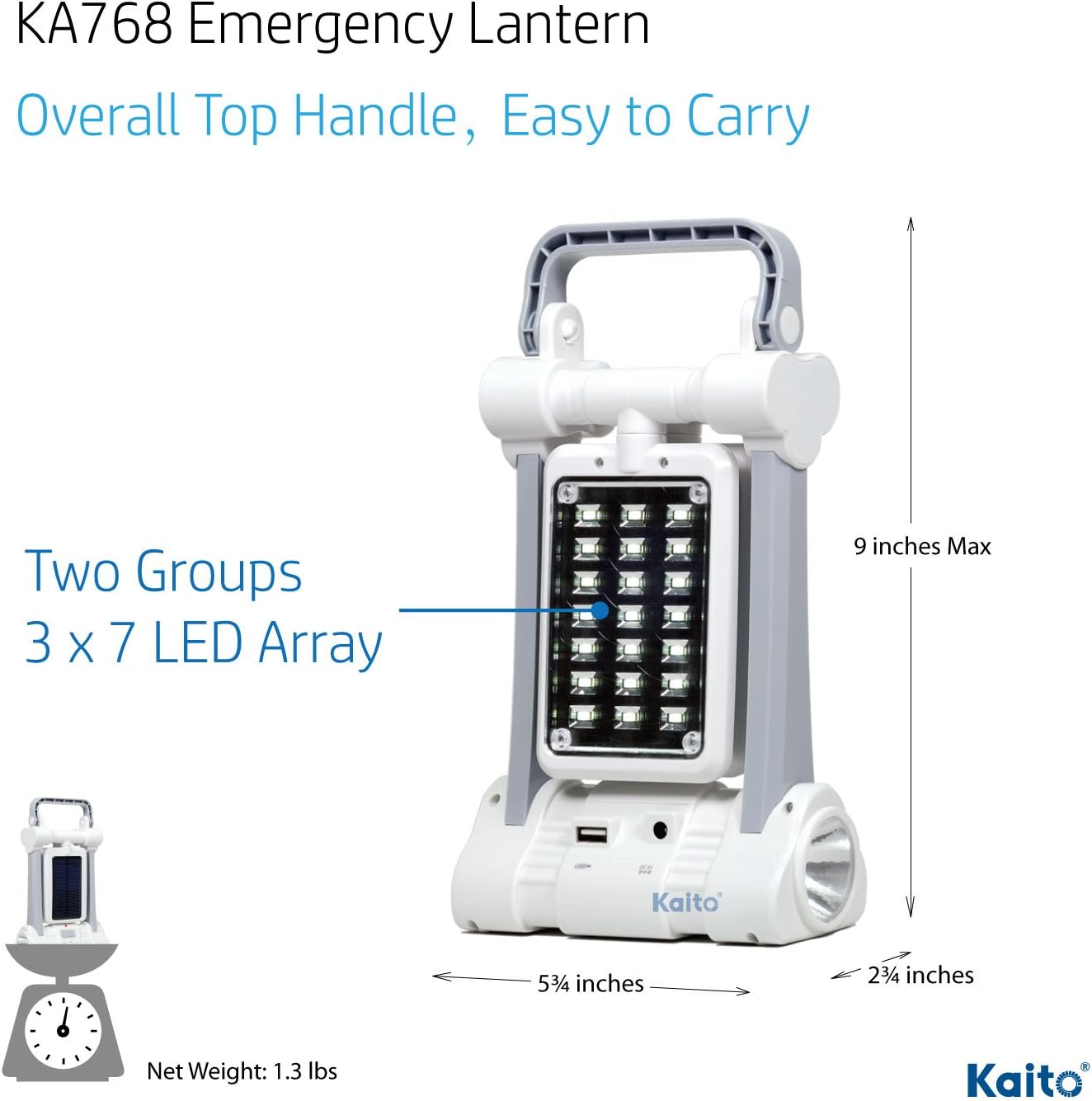
మూర్తి 6: Dimensions of the Kaito KA768 Lantern.
10. వారంటీ మరియు మద్దతు
10.1 వారంటీ సమాచారం
Kaito products are manufactured to high-quality standards. For specific warranty details, please refer to the warranty card included with your product or contact Kaito customer support directly. Keep your purchase receipt as proof of purchase.
10.2 కస్టమర్ మద్దతు
If you encounter any issues or have questions regarding your Kaito KA768 lantern, please contact Kaito customer support. Contact information can typically be found on the product packaging or the official Kaito webసైట్.


