
పరిచయం
The Weiser Phoenix Venetian Bronze Passage Door Knob is designed for interior doors that do not require a locking mechanism. This includes applications such as hallway doors and closet doors. Its traditional design and Venetian Bronze finish complement various home décors. The knob is reversible, allowing installation on both left-handed and right-handed doors.
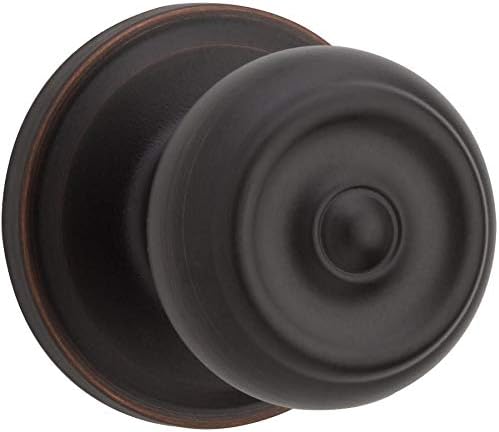
Image: Weiser Phoenix Venetian Bronze Passage Door Knob, showcasing its traditional design and finish.
ప్యాకేజీ విషయాలు
ఇన్స్టాలేషన్ ప్రారంభించే ముందు అన్ని భాగాలు ఉన్నాయని నిర్ధారించుకోండి:
- 1 Set of Door Knobs (Interior and Exterior)
- 1 Latch mechanism
- 1 Strike plate
- మౌంటు స్క్రూలు
- ఇన్స్టాలేషన్ మాన్యువల్
డోర్ స్పెసిఫికేషన్స్
Ensure your door meets the following specifications for proper fit and function:
- తలుపు మందం: 1-3/8 inches to 1-3/4 inches (35mm - 44mm)
- Latch Backset: Adjustable for 2-3/8 inches or 2-3/4 inches (60mm or 70mm)
- క్రాస్ బోర్: 2-1/8 అంగుళాలు (54మిమీ)
సెటప్ మరియు ఇన్స్టాలేషన్
Installation of the Weiser Phoenix Passage Door Knob is designed to be straightforward and can typically be completed with a screwdriver.
- తలుపును సిద్ధం చేయండి: Ensure the door has the correct bore holes and backset. If replacing an existing knob, remove the old hardware.
- గొళ్ళెం ఇన్స్టాల్ చేయండి: Insert the latch mechanism into the edge bore hole of the door. Ensure the latch bolt faces the door frame. Secure it with the provided screws. The latch is adjustable to fit either a 2-3/8 inch or 2-3/4 inch backset.
- బాహ్య నాబ్ను ఇన్స్టాల్ చేయండి: Place the exterior knob assembly through the 2-1/8 inch cross bore hole, ensuring the spindle aligns with the latch mechanism.
- ఇంటీరియర్ నాబ్ని ఇన్స్టాల్ చేయండి: Position the interior knob assembly over the spindle and align the mounting posts with the holes on the exterior assembly.
- Secure the Knobs: Fasten the interior and exterior knob assemblies together using the provided screws. Tighten securely, but do not overtighten, to ensure smooth operation.
- స్ట్రైక్ ప్లేట్ను ఇన్స్టాల్ చేయండి: Attach the strike plate to the door frame, aligning it with the latch bolt. Secure with screws.
- పరీక్ష ఆపరేషన్: Open and close the door several times, turning the knobs to ensure the latch retracts and extends smoothly without binding.
ఆపరేటింగ్ సూచనలు
The Weiser Phoenix Passage Door Knob is a non-locking mechanism designed for easy access. To open a door equipped with this knob:
- Grasp either the interior or exterior knob.
- Turn the knob in either direction (clockwise or counter-clockwise).
- Push or pull the door open.
The latch will retract when the knob is turned and extend automatically when the door is closed, holding the door in place without locking it.
సంరక్షణ మరియు నిర్వహణ
To maintain the appearance and functionality of your Weiser Phoenix Door Knob, follow these guidelines:
- శుభ్రపరచడం: Clean the knob with a soft, damp వస్త్రం. రాపిడి క్లీనర్లు, ద్రావకాలు లేదా కఠినమైన రసాయనాలను నివారించండి, ఎందుకంటే ఇవి ముగింపును దెబ్బతీస్తాయి.
- సరళత: If the latch mechanism becomes stiff over time, a small amount of silicone-based lubricant can be applied to the latch bolt. Do not use oil-based lubricants, as they can attract dust and debris.
- బిగించడం: Periodically check the mounting screws for tightness. If the knobs feel loose, gently tighten the screws to ensure secure attachment.
ట్రబుల్షూటింగ్
| సమస్య | సాధ్యమైన కారణం | పరిష్కారం |
|---|---|---|
| Knob is loose or wobbly. | మౌంటు స్క్రూలు వదులుగా ఉంటాయి. | Tighten the mounting screws connecting the interior and exterior knob assemblies. |
| Latch does not retract smoothly. | Debris in the latch mechanism or lack of lubrication. | Clean the latch mechanism. Apply a small amount of silicone-based lubricant to the latch bolt. |
| Door does not close properly or rattles. | Strike plate misalignment. | Adjust the position of the strike plate on the door frame to ensure proper alignment with the latch bolt. |
| Knob is difficult to turn. | Over-tightened mounting screws or misaligned components. | Loosen mounting screws slightly and re-test. Ensure all components are correctly aligned during installation. |
స్పెసిఫికేషన్లు
| ఫీచర్ | వివరాలు |
|---|---|
| బ్రాండ్ | వీజర్ |
| మోడల్ సంఖ్య | 9GA1010-015 పరిచయం |
| శైలి | Hall/Closet (Passage) |
| రంగు | వెనీషియన్ కాంస్యం |
| ముగించు | బ్రష్ చేయబడింది |
| ఆకారం | గుండ్రంగా |
| హ్యాండిల్ రకం | నాబ్ |
| లాక్ రకం | లాక్ లేదు |
| తలుపు మందం అనుకూలత | 1-3/8" - 1-3/4" |
| లాచ్ బ్యాక్సెట్ | Adjustable 2-3/8" - 2-3/4" |
| Cross Bore | 2-1/8" |
| వస్తువు బరువు | 480 గ్రా |
| ఉత్పత్తి కొలతలు | 11.58 x 7.59 x 7.59 సెం.మీ |
| ప్రత్యేక ఫీచర్ | ఇన్స్టాల్ చేయడం సులభం |
వారంటీ సమాచారం
This Weiser product comes with a 30-రోజుల వారంటీ. For specific details regarding mechanical and finish warranties, please refer to the documentation included with your purchase or visit the official Weiser webసైట్.
కస్టమర్ మద్దతు
For further assistance, technical support, or warranty claims, please contact Weiser customer service. You can find contact information and additional resources on the official Weiser webసైట్:
Visit Weiser's Official Webసైట్
Please have your model number (9GA1010-015) and purchase information ready when contacting support.


