1. పరిచయం
Thank you for choosing the ROVE R2-4K Dash Cam. This manual provides essential information for setting up, operating, and maintaining your device. The ROVE R2-4K is designed to capture high-quality video footage of your journeys, offering advanced features like 4K Ultra HD recording, built-in WiFi 6, GPS tracking, and comprehensive parking surveillance.
Please read this manual thoroughly before using the dash cam to ensure proper operation and to maximize its capabilities. Keep this manual for future reference.

Figure 1.1: ROVE R2-4K Dash Cam and companion smartphone application.
2. పెట్టెలో ఏముంది
Your ROVE R2-4K Dash Cam package includes the following items:
- ROVE R2-4K Dash Cam Unit
- కార్ ఛార్జర్
- ఛార్జింగ్ కేబుల్
- వినియోగదారు మాన్యువల్
- వారంటీ కార్డ్

Figure 2.1: Included accessories and components in the ROVE R2-4K package.
3. సెటప్
3.1 డాష్ క్యామ్ను మౌంట్ చేయడం
The ROVE R2-4K comes with both a suction mount and a 3M sticky mount for flexible installation. Choose the mount that best suits your vehicle and preferences.
- విండ్ షీల్డ్ శుభ్రం చేయండి: Ensure the mounting surface on your windshield is clean and dry for optimal adhesion.
- Attach Mount to Dash Cam: Securely attach your chosen mount (suction or sticky) to the dash cam unit.
- Position the Dash Cam: Place the dash cam on your windshield, ideally behind the rearview అద్దం, మీ view. Adjust the camera's angle for optimal recording coverage.
- మౌంట్ను భద్రపరచండి: For the suction mount, press firmly and flip the lever to secure. For the 3M sticky mount, peel off the protective film and press firmly onto the windshield for at least 30 seconds.

Figure 3.1: Mounting options for the ROVE R2-4K Dash Cam.
3.2 పవర్ కనెక్షన్
Connect the provided car charger to your vehicle's 12V power outlet and the dash cam's USB Type-C input. Route the cable neatly along the windshield and dashboard to avoid interference with driving controls.

Figure 3.2: Dash Cam ports and connections.
3.3 మైక్రో SD కార్డ్ ఇన్స్టాలేషన్
Insert a Class 10 - U3 speed micro SD card (up to 512GB, not included) into the designated slot on the dash cam. The device will prompt you to format the card upon first use. Formatting is crucial for optimal performance and to prevent data corruption.
ముఖ్యమైన: We strongly recommend using ROVE Ultimate Micro SD Cards for reliable operation. Avoid using generic or non-recommended cards as they may lead to performance issues or data loss.

Figure 3.3: Recommended Micro SD Cards for ROVE Dash Cams.
4. ఆపరేటింగ్ సూచనలు
4.1 ప్రాథమిక ఆపరేషన్
- పవర్ ఆన్/ఆఫ్: The dash cam will automatically power on and begin recording when connected to your vehicle's power and the engine starts. It will power off automatically when the engine is turned off.
- రికార్డింగ్: Once powered on, the dash cam automatically starts loop recording.
- మెను నావిగేషన్: Use the 'MENU' button to access settings and the arrow buttons to navigate. 'OK' confirms selections.
4.2 ముఖ్య లక్షణాలు
- 4K అల్ట్రా HD రికార్డింగ్: Captures video at a resolution of 2160P for exceptional clarity.
- Built-in WiFi 6: Connect to the ROVE App on your smartphone (iOS/Android) to view లైవ్ ఫూtage, manage settings, and download recorded videos at high speeds.
- అంతర్నిర్మిత GPS: Accurately records driving location and speed. View your route on Google Maps via the ROVE App or GPS Player software.
- సూపర్ నైట్ విజన్: Equipped with a 6-glass lens, F1.5 aperture, and SONY IMX335 sensor for clear footagఇ తక్కువ-కాంతి పరిస్థితుల్లో.
- పార్కింగ్ మోడ్: Provides 24-hour surveillance when your vehicle is parked. Requires a separate hardwire kit for continuous power.
- G-సెన్సార్: Detects sudden impacts or collisions and automatically locks the current video segment to prevent it from being overwritten.
- లూప్ రికార్డింగ్: Continuously records video, overwriting the oldest unlocked fileమెమరీ కార్డ్ నిండినప్పుడు s.
- టైమ్-లాప్స్ వీడియో: Records long-duration events at a low frame rate, condensing hours of footagనిమిషాల్లో.
- వాయిస్ గైడెన్స్: Provides audio alerts and guidance for various functions and status updates.
- స్క్రీన్ సేవర్: Minimizes distractions by turning off the display after a set period while recording continues in the background.

Figure 4.1: Dash Cam display and feature icons.
4.3 ROVE App & Firmware Updates
The ROVE App allows for seamless interaction with your dash cam. You can view live video, play back recordings, download files to your smartphone, and adjust camera settings. The app also facilitates over-the-air (OTA) firmware updates, ensuring your dash cam always has the latest features and improvements.
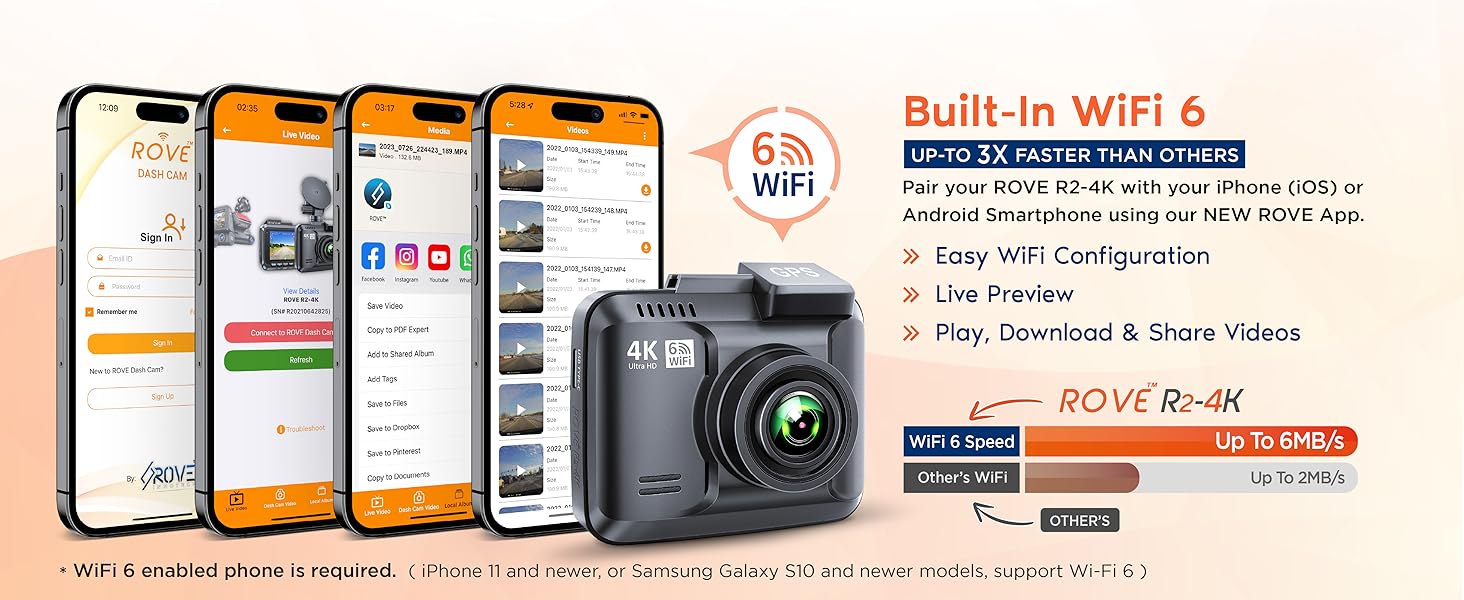
Figure 4.2: ROVE App functionality and firmware update process.
4.4 అధికారిక ఉత్పత్తి వీడియో
వీడియో 4.1: అధికారిక ఉత్పత్తి ముగిసిందిview of the ROVE R2-4K Dash Cam, highlighting its features and benefits.
5. నిర్వహణ
- రెగ్యులర్ ఫార్మాటింగ్: Format your micro SD card regularly (e.g., once a month) to maintain optimal performance and prevent data corruption.
- లెన్స్ శుభ్రం చేయండి: Use a soft, lint-free cloth to gently clean the camera lens to ensure clear video quality.
- ఉష్ణోగ్రత పరిగణనలు: The built-in supercapacitor allows the dash cam to withstand extreme temperatures (-4°F to 140°F / -20°C to +60°C). However, prolonged exposure to direct sunlight in extreme heat can still affect device longevity.
- ఫర్మ్వేర్ నవీకరణలు: Regularly check for and install firmware updates via the ROVE App to ensure your dash cam has the latest features and bug fixes.

Figure 5.1: Supercapacitor benefits and loop recording explanation.
6. ట్రబుల్షూటింగ్
- Choppy Video Playback: If videos appear choppy, try playing them back using a dedicated video player like VLC. Ensure you are using a recommended Class 10 - U3 speed micro SD card.
- Speed Freezes on Screen: This might be a software or GPS signal issue. Ensure the GPS is receiving a strong signal. Check for and install any available firmware updates.
- Camera Not Turning On/Off Automatically: Verify the power connection to your vehicle's 12V outlet. Ensure the car charger is functioning correctly.
- Poor Night Quality: While the dash cam has Super Night Vision, extreme darkness or glare from other lights can affect quality. Ensure your windshield is clean.
- యాప్ కనెక్టివిటీ సమస్యలు: If you have trouble connecting to the ROVE App, try disabling mobile data on your phone temporarily to ensure a proper connection to the dash cam's built-in WiFi.
7. స్పెసిఫికేషన్లు
| ఫీచర్ | వివరాలు |
|---|---|
| ఉత్పత్తి కొలతలు | 4.33 x 4.33 x 4.33 అంగుళాలు |
| వస్తువు బరువు | 1.14 పౌండ్లు |
| అంశం మోడల్ సంఖ్య | R2-4K |
| బ్యాటరీలు | 1 లిథియం అయాన్ బ్యాటరీలు అవసరం (చేర్చబడినవి) |
| కనెక్టివిటీ టెక్నాలజీస్ | Wi-Fi |
| ప్రత్యేక లక్షణాలు | Built-In WiFi, 360 Degree, Night Vision, App Control, Loop Recording, Parking Monitor, G-Sensor, Over-The-Air Firmware Update, Screen Saver, Live Speed, Voice Alert, Built-In Supercapacitor, Built-In GPS |
| మానవ ఇంటర్ఫేస్ ఇన్పుట్ | బటన్లు |
| రంగు | నలుపు |
| తయారీదారు | రోవ్ |
| మూలం దేశం | చైనా |
| వీడియో క్యాప్చర్ రిజల్యూషన్ | 2160p, 1440p, 1080p |
| మౌంటు రకం | విండ్షీల్డ్ మౌంట్ |
8. వారంటీ & సపోర్ట్
The ROVE R2-4K Dash Cam is backed by a full 1-YEAR WARRANTY. For any questions or issues, you can contact ROVE customer care via text for a faster response or email. The support team is based in Chicago, USA, and is dedicated to resolving your concerns promptly.
చట్టపరమైన నిరాకరణ: Please read and understand the user manual, safety warnings, and precautions before using this product.


