1. పరిచయం
ధన్యవాదాలు, ధన్యవాదాలు.asing the Fenton LIVE102 Party Station. This high-quality professional speaker features a built-in media player, Bluetooth receiver, and dynamic RGB LED illumination. This manual provides essential information for safe operation, setup, and maintenance of your device. Please read it thoroughly before use and retain it for future reference.
2. భద్రతా సూచనలు
సురక్షితమైన ఆపరేషన్ను నిర్ధారించడానికి, దయచేసి ఈ క్రింది భద్రతా జాగ్రత్తలను గమనించండి:
- విద్యుత్ భద్రత: Always connect the unit to a grounded mains outlet. Ensure the voltage matches the rating on the unit. Disconnect from the mains before cleaning or servicing.
- తేమ: Do not expose the unit to rain, moisture, or liquids. Do not place objects filled with liquids, such as vases, on the unit.
- వెంటిలేషన్: తగినంత వెంటిలేషన్ ఉండేలా చూసుకోండి. వెంటిలేషన్ ఓపెనింగ్లను బ్లాక్ చేయవద్దు.
- వేడి: రేడియేటర్లు, హీట్ రిజిస్టర్లు, స్టవ్లు లేదా వేడిని ఉత్పత్తి చేసే ఇతర ఉపకరణాలు వంటి ఉష్ణ వనరుల నుండి యూనిట్ను దూరంగా ఉంచండి.
- సర్వీసింగ్: యూనిట్ను మీరే రిపేర్ చేయడానికి ప్రయత్నించవద్దు. అన్ని సర్వీసింగ్లను అర్హత కలిగిన సేవా సిబ్బందికి సూచించండి.
- ప్లేస్మెంట్: Place the unit on a stable, flat surface. Avoid placing it in direct sunlight or extreme temperatures.
- పిల్లలు: యూనిట్ మరియు దాని ఉపకరణాలను పిల్లలకు అందుబాటులో లేకుండా ఉంచండి.
హెచ్చరిక: Risk of electric shock. Do not open the casing. No user-serviceable parts inside.

Close-up of the rear product label on the Fenton LIVE102 Party Station, showing model number (178.423), serial number, manufacturer details, and safety warnings regarding electrical shock and moisture exposure.
3. ప్యాకేజీ విషయాలు
దయచేసి అన్ప్యాక్ చేసిన తర్వాత అన్ని వస్తువులు ఉన్నాయో లేదో మరియు మంచి స్థితిలో ఉన్నాయో లేదో తనిఖీ చేయండి:
- Fenton LIVE102 Party Station
- పవర్ కేబుల్
- పరారుణ రిమోట్ నియంత్రణ
- వినియోగదారు మాన్యువల్ (ఈ పత్రం)
4. ఉత్పత్తి ముగిసిందిview
4.1 ఫ్రంట్ View

ముందు వైపు view of the Fenton LIVE102 Party Station, showcasing its main speaker, two tweeters, and the included remote control. The main woofer is illuminated with a green LED light.

క్లోజప్ ఫ్రంట్ view of the Fenton LIVE102 Party Station, highlighting the main woofer with its dynamic RGB LED illumination, currently displaying a yellow-green hue.
4.2 వెనుక ప్యానెల్

Rear panel of the Fenton LIVE102 Party Station, displaying the main power switch, AC input, RCA line input, and antenna connection for FM radio.
4.3 టాప్ కంట్రోల్ ప్యానెల్
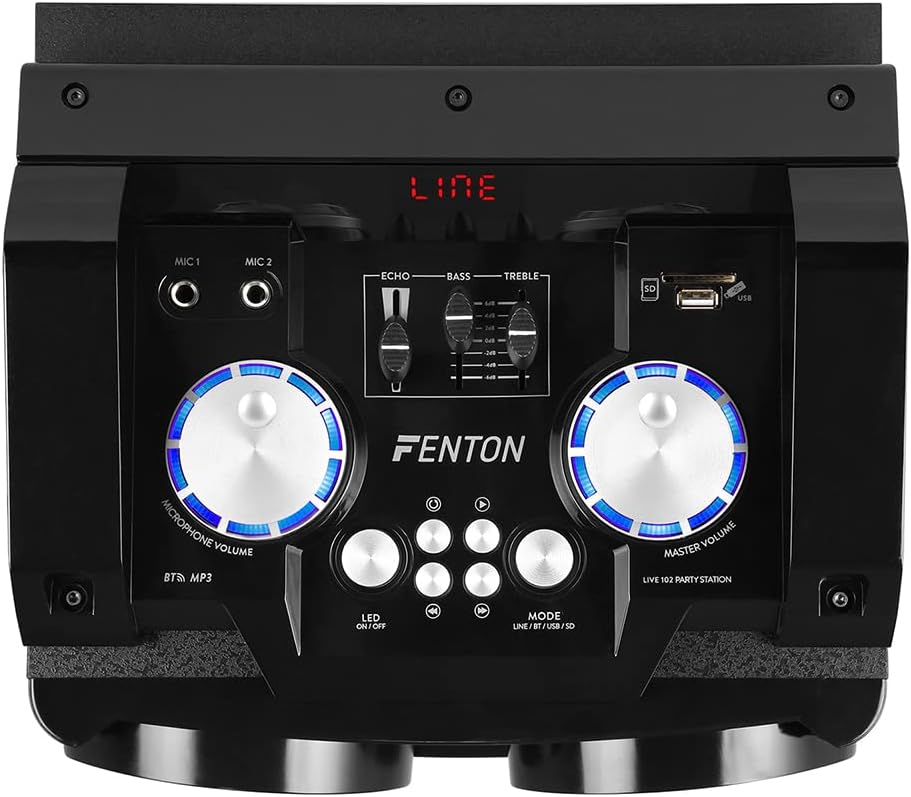
Top control panel of the Fenton LIVE102 Party Station, featuring microphone inputs (MIC 1, MIC 2), Echo, Bass, and Treble controls, USB/SD card slots, and main volume and microphone volume knobs with blue LED backlighting.

వివరంగా view of the top control panel, showing a USB flash drive inserted into the USB port, the SD card slot, and the media playback control buttons (Play/Pause, Stop, Previous, Next).
4.4 రిమోట్ కంట్రోల్

The infrared remote control for the Fenton LIVE102 Party Station, featuring buttons for mode selection (MODO), Bluetooth (BT), scan (SCAN), power (red button), USB/SD, FM, AUX, volume adjustment (VOL+/VOL-), track control (CH+/CH-), and a numeric keypad for direct track selection.
5. సెటప్
- అన్ప్యాకింగ్: Carefully remove the Party Station from its packaging. Retain the packaging for future transport or storage.
- ప్లేస్మెంట్: Place the unit on a stable, flat surface. Ensure there is enough space around the unit for proper ventilation.
- పవర్ కనెక్షన్: Connect the supplied power cable to the AC input on the rear panel of the Party Station and then to a suitable mains power outlet (220-240VAC/50Hz).
- పవర్ ఆన్: Flip the ON/OFF switch on the rear panel to the 'ON' position. The unit will power on, and the display will light up.
6. ఆపరేటింగ్ సూచనలు
6.1 మోడ్ ఎంపిక
Press the 'MODE' button on the top panel or the remote control to cycle through available input modes: Line (AUX), Bluetooth (BT), USB, SD, and FM Radio.
6.2 బ్లూటూత్ ఆపరేషన్
- Switch the Party Station to 'BT' mode. The display will show 'BT', and a pairing indicator will flash.
- మీ స్మార్ట్ఫోన్, టాబ్లెట్ లేదా ఇతర అనుకూల పరికరంలో బ్లూటూత్ను ప్రారంభించండి.
- కోసం వెతకండి 'Fenton LIVE102' in your device's Bluetooth list and select it to pair.
- Once paired, the unit will emit a confirmation sound, and the 'BT' indicator will stop flashing. You can now play audio from your device through the Party Station.
- Control playback (play/pause, next/previous track) using your connected device or the controls on the Party Station/remote.
6.3 USB/SD మీడియా ప్లేబ్యాక్
- Insert a USB flash drive or SD card into the respective slot on the top panel. The unit will automatically switch to USB or SD mode and begin playing compatible audio files.
- If it does not switch automatically, press the 'MODE' button to select 'USB' or 'SD' mode.
- Use the playback control buttons (Play/Pause, Previous, Next) on the top panel or remote control to manage your music.
6.4 AUX/Line-in Connection
- Connect an external audio source (e.g., CD player, laptop) to the 'LINE IN' RCA ports on the rear panel using an RCA cable.
- Switch the Party Station to 'LINE' or 'AUX' mode using the 'MODE' button.
- Adjust the volume on both the Party Station and your external audio source.
6.5 మైక్రోఫోన్ వాడకం
- Connect up to two microphones to the 6.3mm Jack inputs (MIC 1, MIC 2) on the top panel.
- Adjust the 'MICROPHONE VOLUME' knob to control the microphone input level.
- Use the 'ECHO' slider to add an echo effect to the microphone sound.
6.6 టోన్ నియంత్రణ
Use the 'BASS' and 'TREBLE' sliders on the top panel to adjust the low and high frequencies of the audio output to your preference.
6.7 RGB LED Illumination
The Party Station features integrated RGB LEDs in the woofer grill. Press the 'LED ON/OFF' button on the top panel to toggle the LED lights on or off. The lights will cycle through various colors automatically.

ముందు view of the Fenton LIVE102 Party Station, with the main woofer illuminated in a vibrant purple LED light.

ముందు వైపు view of the Fenton LIVE102 Party Station, showing the main woofer illuminated in red, with overlaid dimensions indicating its height (62.51cm), width (35cm), and depth (33.5cm).
6.8 FM రేడియో
- Switch the Party Station to 'FM' mode.
- Press the 'SCAN' button on the remote control to automatically scan and save available FM radio stations.
- Use the 'CH+' and 'CH-' buttons on the remote or top panel to navigate through the saved stations.
7. నిర్వహణ
- శుభ్రపరచడం: యూనిట్ వెలుపలి భాగాన్ని శుభ్రం చేయడానికి మృదువైన, పొడి వస్త్రాన్ని ఉపయోగించండి. రాపిడి క్లీనర్లు లేదా ద్రావకాలను ఉపయోగించవద్దు.
- నిల్వ: If storing the unit for an extended period, disconnect it from power and store it in a cool, dry place, preferably in its original packaging.
- వెంటిలేషన్: Regularly check that the ventilation openings are free from dust and debris.
8. ట్రబుల్షూటింగ్
| సమస్య | సాధ్యమైన కారణం | పరిష్కారం |
|---|---|---|
| శక్తి లేదు | పవర్ కేబుల్ కనెక్ట్ కాలేదు; పవర్ స్విచ్ ఆఫ్ చేయబడింది; అవుట్లెట్ నుండి పవర్ లేదు. | పవర్ కేబుల్ కనెక్షన్ను తనిఖీ చేయండి; పవర్ స్విచ్ ఆన్లో ఉందని నిర్ధారించుకోండి; మరొక పరికరంతో అవుట్లెట్ను పరీక్షించండి. |
| శబ్దం లేదు | Volume too low; Incorrect input mode; External device not playing. | Increase Master Volume; Select correct input mode (BT, USB, AUX); Ensure external device is playing and its volume is up. |
| బ్లూటూత్ కనెక్ట్ కావడం లేదు | Unit not in BT mode; Device too far; Already connected to another device. | Switch to BT mode; Move device closer; Disconnect from other devices and try pairing again. |
| USB/SD ప్లే కావడం లేదు | సరికాదు file format; USB/SD card corrupted; Unit not in USB/SD mode. | నిర్ధారించండి files are MP3 or compatible; Try another USB/SD card; Select USB/SD mode. |
| రిమోట్ కంట్రోల్ పనిచేయడం లేదు | Batteries depleted; Obstruction between remote and unit; Remote not pointed at sensor. | Replace batteries; Remove obstructions; Point remote directly at the unit's IR sensor. |
9. స్పెసిఫికేషన్లు
| ఫీచర్ | స్పెసిఫికేషన్ |
|---|---|
| బ్రాండ్ | ఫెంటన్ |
| మోడల్ సంఖ్య | LIVE102 (Sky-178.423) |
| గరిష్ట పవర్ అవుట్పుట్ | 300W |
| వూఫర్ సైజు | 10 అంగుళాలు |
| ట్వీటర్ పరిమాణం | 3.5 అంగుళాలు |
| విద్యుత్ సరఫరా | 220-240VAC / 50Hz |
| కొలతలు (W x D x H) | 28.5 x 30 x 56.5 సెం.మీ |
| బరువు | 8.4 కిలోలు |
| కనెక్టివిటీ టెక్నాలజీ | బ్లూటూత్, USB |
| నియంత్రణ పద్ధతి | రిమోట్ కంట్రోల్ |
| ప్రత్యేక లక్షణాలు | Bluetooth, LED-light, Media Player (USB/SD), FM Radio, Microphone Inputs, Echo Function |
| అనుకూల పరికరాలు | Smartphone, Tablet, MP3 Players |
| ఆడియో అవుట్పుట్ మోడ్ | స్టీరియో |
| మౌంటు రకం | ఫ్లోర్ స్టాండింగ్ |
10. వారంటీ మరియు మద్దతు
This product comes with a standard manufacturer's warranty. For specific warranty terms and conditions, please refer to the documentation provided at the time of purchase or contact your retailer. For technical support or service inquiries, please contact the Fenton customer service department or your authorized dealer.
Manufacturer: Tronios BV, Bedrijvenpark Twente 245, 7602KM Almelo, The Netherlands.


