1. పరిచయం
ధన్యవాదాలు, ధన్యవాదాలు.asing the Pyle PRJG74 Portable Home Theater LED Projector. This device is designed to provide a versatile and immersive viewing experience, supporting 1080p resolution for movies, video games, and presentations. Its compact and lightweight design makes it suitable for various environments, from home entertainment to small office use. This manual provides detailed instructions for setup, operation, maintenance, and troubleshooting to ensure optimal performance and longevity of your projector.
2. ముఖ్యమైన భద్రతా సూచనలు
Please read and follow all safety instructions carefully before using the projector to prevent fire, electric shock, or injury.
- వెంటిలేషన్: Ensure adequate ventilation around the projector. Do not block ventilation openings.
- శక్తి మూలం: Use only the specified power adapter and connect to a grounded power outlet.
- తేమ: Do not expose the projector to rain, moisture, or immerse it in water.
- వేడి: ప్రొజెక్టర్ను వేడి మూలాల దగ్గర లేదా ప్రత్యక్ష సూర్యకాంతిలో ఉంచడం మానుకోండి.
- శుభ్రపరచడం: Unplug the projector before cleaning. Use a dry, soft cloth. Do not use liquid or aerosol cleaners.
- సర్వీసింగ్: ఈ ఉత్పత్తిని మీరే సేవ చేయడానికి ప్రయత్నించవద్దు. అర్హత కలిగిన సేవా సిబ్బందికి అన్ని సర్వీసులను చూడండి.
- కంటి రక్షణ: l ఉన్నప్పుడు ప్రొజెక్టర్ లెన్స్లోకి నేరుగా చూడకండిamp ఆన్లో ఉంది.
3. పెట్టెలో ఏముంది
అన్ప్యాక్ చేసేటప్పుడు అన్ని భాగాలు ఉన్నాయని నిర్ధారించుకోండి:
- Compact Projector (Pyle PRJG74)
- రిమోట్ కంట్రోల్
- పవర్ కార్డ్
- AV కేబుల్
4. ఉత్పత్తి ముగిసిందిview
ప్రొజెక్టర్ యొక్క భాగాలు మరియు పోర్టులతో మిమ్మల్ని మీరు పరిచయం చేసుకోండి.
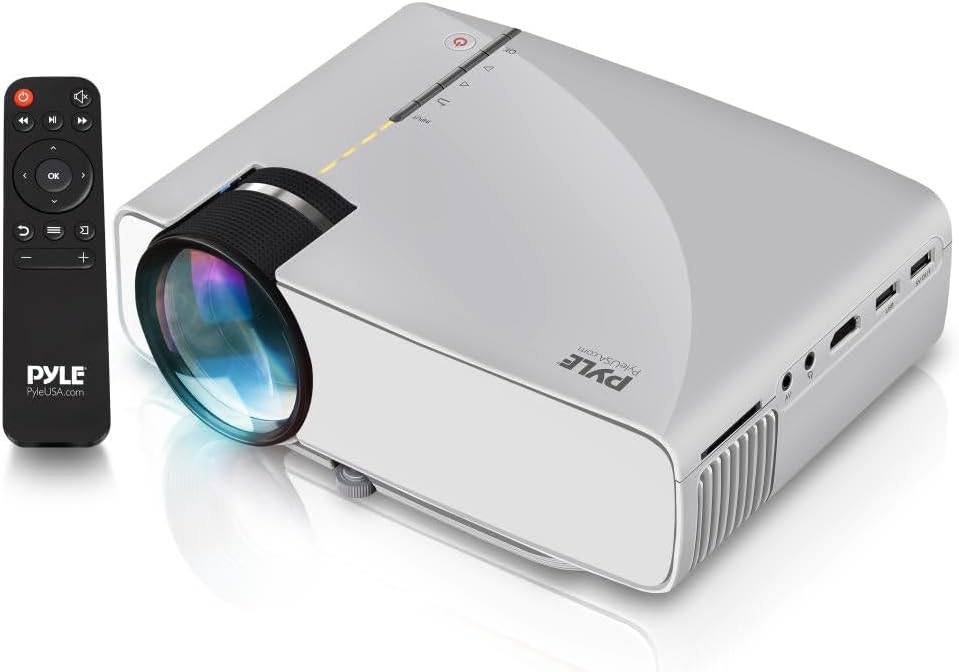
Image: The Pyle PRJG74 projector shown with its included remote control. The projector features a lens on the front, control buttons on top, and various input ports on the side.
4.1 ఫ్రంట్ ప్యానెల్
- ప్రొజెక్షన్ లెన్స్: చిత్రాన్ని ప్రసరింపజేస్తుంది.
- ఫోకస్ రింగ్: చిత్ర స్పష్టతను సర్దుబాటు చేస్తుంది.
4.2 టాప్ ప్యానెల్
- పవర్ బటన్: ప్రొజెక్టర్ను ఆన్/ఆఫ్ చేస్తుంది.
- Input Source Button: ఇన్పుట్ సోర్స్లను ఎంచుకుంటుంది.
- నావిగేషన్ బటన్లు (పైకి/క్రిందికి/ఎడమ/కుడి/సరే): మెనూ నావిగేషన్ మరియు ఎంపిక కోసం.
4.3 Side/Rear Panels
- HDMI పోర్ట్: Connects to HDMI-enabled devices (laptops, gaming consoles, Blu-ray players).
- USB పోర్ట్: Connects USB storage devices for media playback.
- SD కార్డ్ స్లాట్: Inserts SD cards for media playback.
- AV పోర్ట్: Connects to devices using RCA composite video/audio cables.
- VGA పోర్ట్: VGA అవుట్పుట్తో కంప్యూటర్లకు కనెక్ట్ అవుతుంది.
- ఆడియో అవుట్పుట్ (3.5mm): Connects to external speakers or headphones.
- పవర్ ఇన్పుట్: పవర్ కార్డ్ని కలుపుతుంది.
5. సెటప్
5.1 ప్లేస్మెంట్
Position the projector on a stable, flat surface or mount it overhead. Ensure the projection path is clear of obstructions. The optimal projection distance and screen size are:
- స్క్రీన్ పరిమాణం: Adjustable from 50 to 130 inches.
- ప్రొజెక్షన్ దూరం: Varies based on desired screen size. Refer to the table below for guidance.
| స్క్రీన్ పరిమాణం (అంగుళాలు) | Projection Distance (feet) |
|---|---|
| 50 | ~5.5 |
| 80 | ~8.5 |
| 100 | ~10.5 |
| 130 | ~13.5 |
5.2 పవర్ కనెక్షన్
- ప్రొజెక్టర్ యొక్క పవర్ ఇన్పుట్ పోర్ట్కు పవర్ కార్డ్ను కనెక్ట్ చేయండి.
- పవర్ కార్డ్ యొక్క మరొక చివరను ప్రామాణిక ఎలక్ట్రికల్ అవుట్లెట్లోకి ప్లగ్ చేయండి.
5.3 ఇన్పుట్ పరికరాలను కనెక్ట్ చేయడం
The PRJG74 supports multiple input sources:
- HDMI: Connect an HDMI cable from your device (e.g., laptop, game console) to the projector's HDMI port.
- USB/SD: Insert a USB flash drive or SD card into the respective port/slot.
- యొక్క: Use the provided AV cable to connect devices with RCA output.
- వీజీఏ: మీ కంప్యూటర్ నుండి ప్రొజెక్టర్ యొక్క VGA పోర్ట్కు VGA కేబుల్ను కనెక్ట్ చేయండి.
5.4 ఫోకస్ మరియు కీస్టోన్ సర్దుబాటు
- దృష్టి: Rotate the focus ring on the front of the projector until the image appears sharp and clear.
- కీస్టోన్: If the projected image appears trapezoidal (wider at the top or bottom), use the keystone correction dial (if available, or digital keystone in menu) to adjust it to a rectangular shape.
6. ఆపరేటింగ్ సూచనలు
6.1 పవర్ చేయడం ఆన్/ఆఫ్
- పవర్ ఆన్: Press the Power button on the projector or remote control. The indicator light will turn on.
- పవర్ ఆఫ్: Press the Power button again. Confirm shutdown if prompted.
6.2 ఇన్పుట్ సోర్స్ ఎంపిక
After connecting your input device:
- Press the 'Input' button on the projector or remote control.
- Use the navigation buttons to select the desired input source (HDMI, USB, SD, AV, VGA).
- Press 'OK' to confirm your selection.
6.3 మెనూ నావిగేషన్
Use the 'Menu' button on the remote or projector to access settings. Navigate using the arrow keys and 'OK' to select. Common settings include:
- చిత్ర సెట్టింగ్లు: Brightness, Contrast, Color, Aspect Ratio.
- సౌండ్ సెట్టింగ్లు: Volume, Audio Mode.
- సమయ సెట్టింగ్లు: స్లీప్ టైమర్.
- ఎంపిక సెట్టింగ్లు: Language, Factory Reset.
6.4 మీడియా ప్లేబ్యాక్ (USB/SD)
When a USB drive or SD card is inserted and selected as the input source, the projector will display a media browser. You can play various file types including:
- వీడియో: MP4, AVI, MKV, etc.
- ఆడియో: MP3, WMA, AAC, మొదలైనవి.
- చిత్రం: JPEG, BMP, PNG, etc.
- వచనం: TXT.
ఫోల్డర్ల ద్వారా నావిగేట్ చేయండి మరియు files using the remote control and press 'OK' to play or view.
7. నిర్వహణ
క్రమం తప్పకుండా నిర్వహణ సరైన పనితీరును నిర్ధారిస్తుంది మరియు మీ ప్రొజెక్టర్ జీవితాన్ని పొడిగిస్తుంది.
7.1 లెన్స్ శుభ్రపరచడం
Use a soft, lint-free cloth specifically designed for optical lenses. Gently wipe the lens to remove dust or smudges. Avoid using abrasive materials or harsh chemicals.
7.2 ప్రొజెక్టర్ బాడీని శుభ్రపరచడం
Wipe the exterior of the projector with a soft, dry cloth. For stubborn dirt, a slightly damp cloth can be used, followed by a dry cloth. Ensure no liquid enters the ventilation openings.
7.3 వెంటిలేషన్
Periodically check the ventilation openings for dust accumulation. Use a soft brush or compressed air to gently clear any blockages. Proper airflow is crucial for preventing overheating.
8. ట్రబుల్షూటింగ్
మీరు సమస్యలను ఎదుర్కొంటే, ఈ క్రింది సాధారణ సమస్యలు మరియు పరిష్కారాలను చూడండి:
| సమస్య | సాధ్యమైన కారణం | పరిష్కారం |
|---|---|---|
| ఏ చిత్రం ప్రదర్శించబడలేదు | Incorrect input source selected; loose cable connection; device not powered on. | Select the correct input source. Check all cable connections. Ensure the source device is powered on. |
| చిత్రం అస్పష్టంగా ఉంది | ఫోకస్ సర్దుబాటు చేయబడలేదు; ప్రొజెక్టర్ స్క్రీన్కు చాలా దగ్గరగా/దూరంగా ఉంది. | Adjust the focus ring. Reposition the projector according to recommended distances. |
| చిత్రం ట్రాపెజోయిడల్ గా ఉంది | ప్రొజెక్టర్ స్క్రీన్కు లంబంగా లేదు. | Adjust the keystone correction dial or digital keystone setting. |
| శబ్దం లేదు | Volume too low; audio cable not connected; source device audio settings. | Increase projector volume. Check audio cable connections. Adjust audio output settings on the source device. |
| రిమోట్ కంట్రోల్ పనిచేయడం లేదు | Batteries dead or incorrectly inserted; obstruction between remote and projector. | బ్యాటరీలను మార్చండి. ప్రొజెక్టర్ యొక్క IR రిసీవర్కు స్పష్టమైన దృశ్య రేఖ ఉండేలా చూసుకోండి. |
9. స్పెసిఫికేషన్లు
Key technical specifications for the Pyle PRJG74 Projector:
- మోడల్: PRJG74
- ప్రదర్శన రిజల్యూషన్: 1920 x 1080 (1080p Support)
- ప్రొజెక్షన్ స్క్రీన్ పరిమాణం: 50" నుండి 130" అంగుళాలు
- కనెక్టివిటీ టెక్నాలజీ: HDMI, USB, VGA, AV, Mini SD
- కాంతి మూలం: LED
- వస్తువు బరువు: 2.06 పౌండ్లు
- ఉత్పత్తి కొలతలు: 7.9 x 5.7 x 3 అంగుళాలు
- ప్రత్యేక లక్షణాలు: Lightweight, Portable, Built-in Dual Stereo Speaker
- సిఫార్సు చేయబడిన ఉపయోగం: Home Theater, Gaming, Presentations
10. వారంటీ మరియు మద్దతు
Pyle products are designed and manufactured to the highest quality standards. For warranty information, technical support, or service inquiries, please refer to the warranty card included with your product or visit the official Pyle webసైట్. కొనుగోలు రుజువుగా మీ కొనుగోలు రసీదుని ఉంచండి.
ఆన్లైన్ మద్దతు: For additional resources, FAQs, and contact information, please visit www.pyleusa.com.


