OttLite Renew LED Desk Lamp
ఇన్స్ట్రక్షన్ మాన్యువల్
ఉత్పత్తి ముగిసిందిview
The OttLite Renew LED Desk Lamp (Model: F1DY8G59-SHPR) is designed to provide superior illumination for various tasks, incorporating OttLite's exclusive ClearSun LED technology to reduce eyestrain and glare. This versatile lamp also features an integrated LCD display for date, time, and ambient temperature, along with a convenient 2.1A USB charging port for your devices.

The OttLite Renew LED Desk Lamp, featuring a modern black design with an adjustable arm and an LCD display on its vertical stand.

ది ఎల్amp's light panel, showcasing the ClearSun LED technology which is engineered to reduce eyestrain by up to 51% for a healthier viewing అనుభవం.
సెటప్ గైడ్
అన్ప్యాక్ చేస్తోంది
l ను జాగ్రత్తగా తొలగించండిamp and all components from the packaging. Ensure all parts are present: the lamp unit, power adapter, and this instruction manual. Retain packaging for future storage or transport.
పవర్ కనెక్షన్
Connect the provided power adapter to the DC input port located at the rear base of the lamp. Plug the other end of the adapter into a standard wall outlet (120 Volts). The LCD display should illuminate, indicating power is connected.
ది ఎల్amp features a 5V, 2.1A USB port on its base, allowing you to conveniently charge tablets, phones, and other compatible devices directly from the lamp.
ఆపరేటింగ్ సూచనలు
పవర్ ఆన్/ఆఫ్
ఎల్ని తిప్పడానికిamp on or off, gently touch the power icon (U) on the lamp's base. The lamp will illuminate or extinguish accordingly.
ప్రకాశం సెట్టింగ్లు
ది ఎల్amp offers six brightness settings. To adjust the brightness, slide your finger along the touch-activated dimmer control located on the lamp's base. This allows you to customize the light output up to 400 lumens to suit your needs.

ది ఎల్amp's base features a sliding touch dimmer, allowing for seamless adjustment of the light's brightness to your preferred level.
LCD డిస్ప్లే విధులు
The integrated LCD display shows the current date, time, and ambient temperature. It also includes an alarm function. To adjust these settings, use the control buttons located on the back of the lamp's vertical stand. A dedicated button with an 'X' symbol on the rear of the pedestal can be pressed to turn the LCD display on or off.

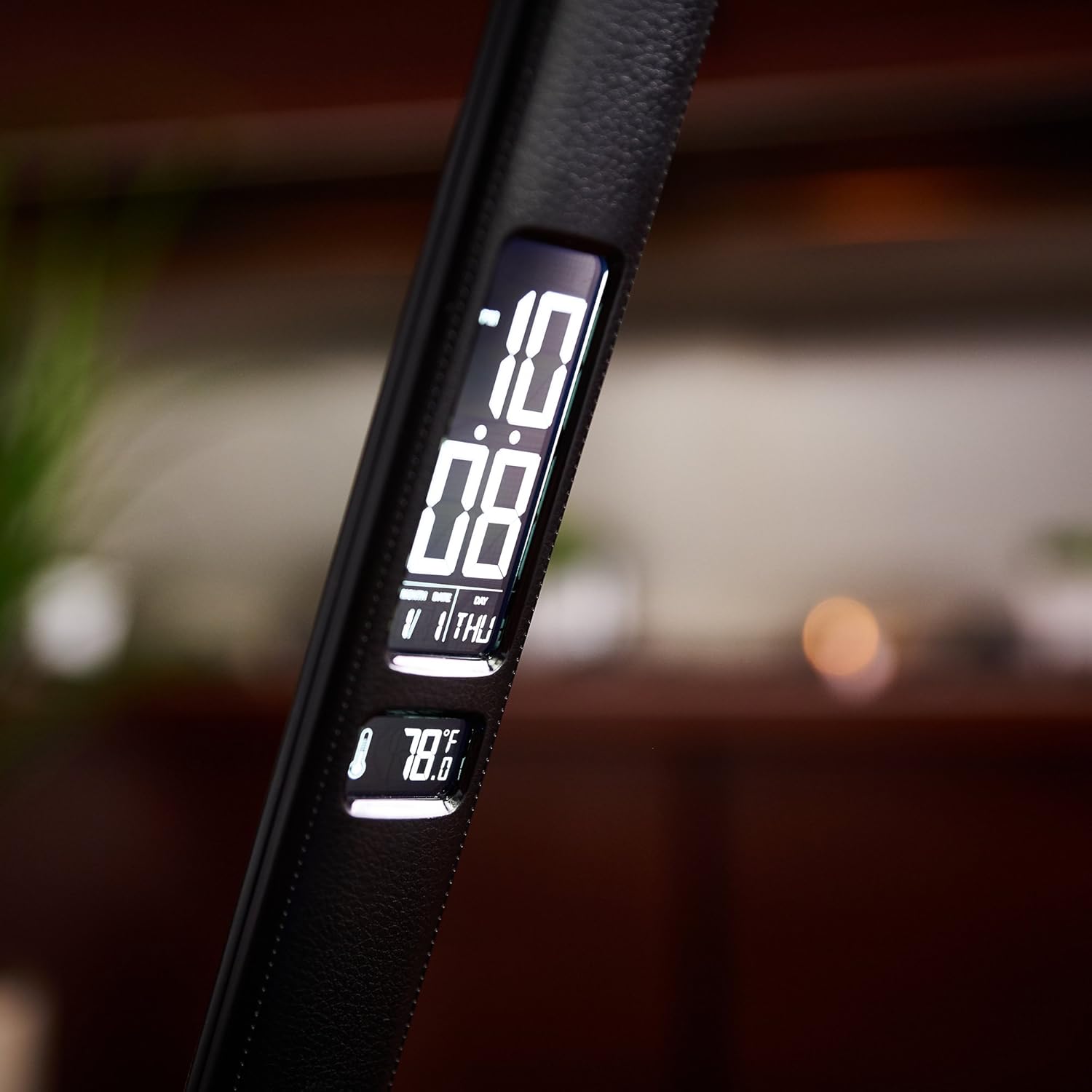
ది ఎల్amp's digital display provides essential information at a glance, including the current calendar date, time, and ambient temperature.

ఒక వివరణాత్మక view l యొక్కamp's digital display, highlighting the clear and easy-to-read presentation of time, date, and temperature.
Official Product Video: OttLite ClearSun Technology
ఈ వీడియో ఓవర్ని అందిస్తుందిview of OttLite's ClearSun LED technology, explaining how it helps reduce eyestrain and glare by matching the spectral output of the sun, offering vivid and true-to-life colors for improved visual comfort.
నిర్వహణ
క్లీనింగ్
l శుభ్రం చేయడానికిamp, ensure it is unplugged from the power outlet. Use a soft, dry cloth to wipe down the surfaces. Avoid using abrasive cleaners, solvents, or harsh chemicals, as these may damage the finish or electronic components.
నిల్వ
ఎక్కువ కాలం ఉపయోగంలో లేనప్పుడు, l ని నిల్వ చేయండిamp in a cool, dry place. The lamp's foldable design allows for compact storage. Keep it away from direct sunlight and extreme temperatures.
ట్రబుల్షూటింగ్
| సమస్య | సాధ్యమైన కారణం / పరిష్కారం |
|---|---|
| Lamp ఆన్ చేయదు. | పవర్ అడాప్టర్ l రెండింటికీ సురక్షితంగా ప్లగ్ చేయబడిందని నిర్ధారించుకోండిamp and a working wall outlet. Check if the outlet has power. |
| LCD డిస్ప్లే ఖాళీగా ఉంది లేదా తప్పుగా ఉంది. | Check if the display has been turned off using the button on the rear of the pedestal. Ensure the lamp has continuous power. The alarm has a battery backup to save settings in case of power interruption. |
| కాంతి మిణుకుమిణుకుమంటుంది లేదా రెప్పపాటు చేస్తుంది. | Ensure the power connection is stable. If the issue persists, contact customer support. |
| USB ఛార్జింగ్ పోర్ట్ పనిచేయడం లేదు. | l ని ధృవీకరించండిamp is powered on. Ensure the device being charged is compatible with 5V, 2.1A USB charging. Try a different USB cable. |
ఉత్పత్తి లక్షణాలు
- బ్రాండ్: ఓట్లైట్
- మోడల్ సంఖ్య: F1DY8G59-SHPR
- కొలతలు: 7.25 x 5.5 x 14.75 అంగుళాలు (L x W x H)
- వస్తువు బరువు: 2.86 పౌండ్లు
- రంగు: నలుపు
- మెటీరియల్: ఫాక్స్ లెదర్
- బల్బ్ రకం: LED (ClearSun Technology)
- వాట్tage: 8.4 వాట్స్
- శక్తి మూలం: Corded Electric (Battery backup for LCD display)
- USB పోర్ట్: 5V, 2.1A
- ప్రత్యేక లక్షణాలు: Adjustable, LCD display (Date, Time, Temperature, Alarm), Touch Control
వారంటీ మరియు మద్దతు
For warranty information, technical support, or replacement parts, please contact OttLite customer service. Refer to the contact details provided on the product packaging or the official OttLite website. Please have your model number (F1DY8G59-SHPR) and purchase information ready when contacting support.
You can visit the OttLite Store for more information: OttLite Store on Amazon


