1. పరిచయం
This manual provides detailed instructions for the installation, operation, and maintenance of your Pyle PLRVST400 Double DIN In-Dash Car Stereo Head Unit. This versatile audio and video receiver system is designed for universal standard console or wall panel installation, making it suitable for RVs, travel trailers, motor homes, and campers. It features Bluetooth connectivity, a CD/DVD player, MP3/USB playback, AM/FM radio, and a 3-zone audio control system.
2. భద్రతా సమాచారం
- Ensure proper wiring connections to prevent electrical shorts or damage.
- డ్రైవింగ్ నుండి మిమ్మల్ని దృష్టి మరల్చే విధంగా యూనిట్ను ఆపరేట్ చేయవద్దు.
- Avoid exposing the unit to extreme temperatures, moisture, or direct sunlight.
- అన్ని సేవలను అర్హత కలిగిన సిబ్బందికి సూచించండి.
- Always disconnect the vehicle's battery before performing any installation or wiring.
3. ప్యాకేజీ విషయాలు
ప్యాకేజీలో అన్ని అంశాలు ఉన్నాయని నిర్ధారించుకోండి:
- Pyle PLRVST400 A/V Receiver System
- పవర్ & వైరింగ్ హార్నెస్
- రిమోట్ కంట్రోల్
- మౌంటింగ్ హార్డ్వేర్ (స్క్రూలు)

Image 3.1: Pyle PLRVST400 unit, remote control, and wiring harness.
4. సెటప్ మరియు ఇన్స్టాలేషన్
The PLRVST400 is designed for universal Double DIN installation in a console or wall panel. Proper installation requires careful attention to wiring connections.
4.1 వైరింగ్ కనెక్షన్లు
Use the included power and wiring harness to connect the unit to your vehicle's electrical system and speakers. Refer to the wiring diagram provided with the harness for specific connections. Ensure all connections are secure to prevent intermittent operation or damage.
- Power (Yellow B+): Connect to constant 12V power.
- Accessory (Red ACC): Connect to switched 12V power (ignition).
- నేల (నలుపు): వాహన చట్రం గ్రౌండ్కు కనెక్ట్ చేయండి.
- స్పీకర్ అవుట్పుట్లు: ధ్రువణతను గమనిస్తూ, మీ వాహనం స్పీకర్లకు కనెక్ట్ చేయండి.
- RCA Audio/Video: Use for external audio/video input or output connections.

చిత్రం 4.1: వెనుక view of the Pyle PLRVST400, illustrating the various input and output ports for wiring.
4.2 మౌంటు
Secure the unit into the Double DIN opening using the provided mounting hardware. Ensure the unit is firmly seated and does not obstruct any vehicle controls.
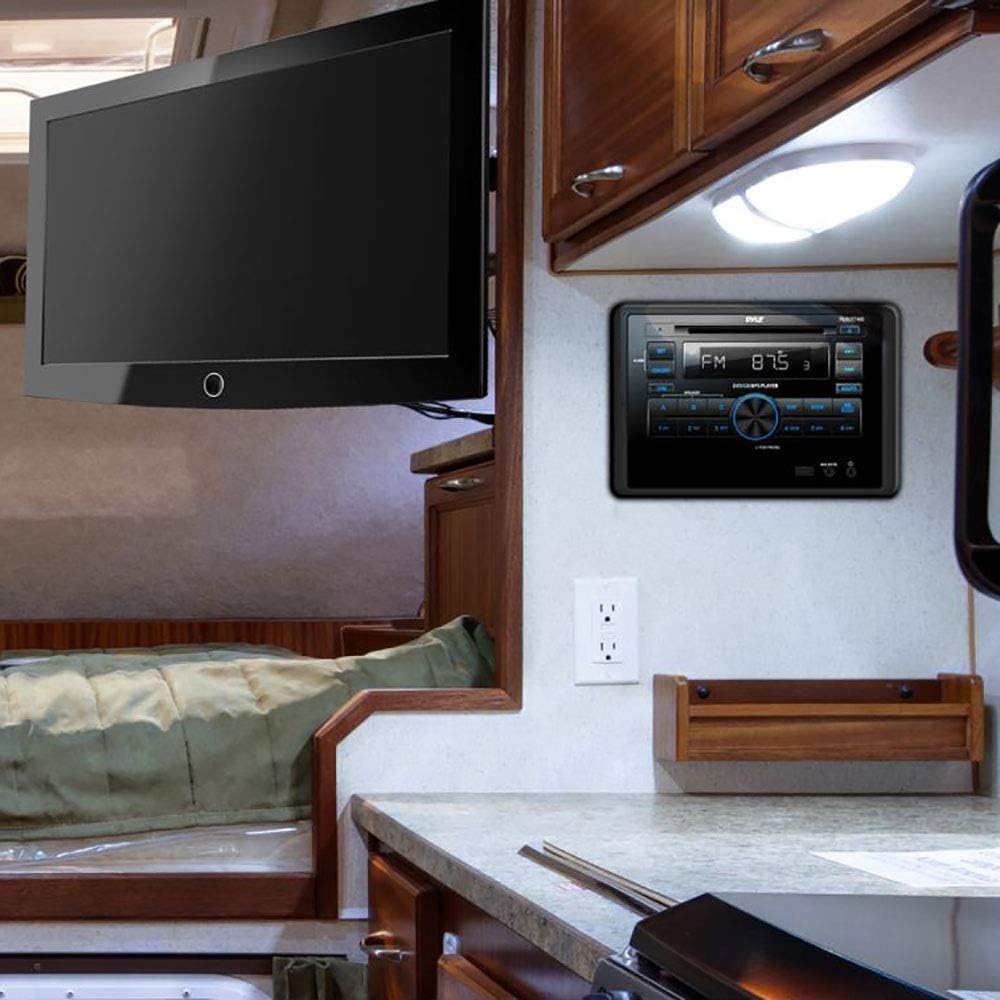
Image 4.2: The Pyle PLRVST400 unit installed in an RV wall panel, demonstrating a typical mounting scenario.
5. ఆపరేటింగ్ సూచనలు
The PLRVST400 features a user-friendly interface with front panel controls and a remote control for convenient operation.

Image 5.1: Front panel of the Pyle PLRVST400 with its accompanying remote control, highlighting key buttons and the LCD display.
5.1 ప్రాథమిక నియంత్రణలు
- ఆన్/ఆఫ్: యూనిట్ను ఆన్ లేదా ఆఫ్ చేయడానికి నొక్కండి.
- DIM: Adjusts the brightness of the LCD display.
- PUSH PWR/SEL Knob: Press to select functions or confirm settings. Rotate to adjust volume or navigate menus.
- DIRECTIONS: Cycles through available audio sources (Radio, CD/DVD, USB, AUX, Bluetooth).
- సెట్: సిస్టమ్ సెట్టింగ్లు మరియు కాన్ఫిగరేషన్ ఎంపికలను యాక్సెస్ చేస్తుంది.
5.2 బ్లూటూత్ కనెక్టివిటీ
The unit features built-in Bluetooth for wireless audio streaming.
- Ensure Bluetooth is enabled on your mobile device (smartphone, tablet, etc.).
- Select 'Bluetooth' as the source on the PLRVST400 using the MODE button.
- కోసం వెతకండి available Bluetooth devices on your mobile device. The unit will appear as 'Pyle Audio' or similar.
- Select the unit to pair. The default Bluetooth network password is '0000' (four zeroes).
- Once paired, you can stream audio wirelessly from your device to the PLRVST400.
5.3 CD/DVD Player
Insert a compatible CD or DVD into the disc slot. The unit will automatically detect the disc and begin playback. Supported disc types include CD-R, CD-RW, VCD, DVD, and MP3-CD.
5.4 రేడియో ఆపరేషన్
Press the MODE button to select 'Radio'.
- AM/FM: Use the band button (often labeled 'WB BAND' or similar) to switch between AM, FM, and Weatherband frequencies.
- ట్యూనింగ్: Use the seek buttons (◀◀ / ▶▶) to automatically search for stations. Manual tuning may be available through the SET menu or by holding seek buttons.
- ప్రీసెట్లు: Store up to 30 radio stations using the numbered preset buttons (1-6). To save a station, tune to it, then press and hold a preset button until you hear a confirmation beep.
- Weatherband (WB): Access weather alerts and information on the Weatherband frequency.
5.5 USB ప్లేబ్యాక్
Insert a USB flash drive (up to 32GB) into the USB port. The unit supports MP3 and WMA audio files. Playback will begin automatically or can be selected via the MODE button.
5.6 AUX ఇన్పుట్
Connect external audio devices using the RCA (L/R) audio input connectors or a 3.5mm jack. Select 'AUX' as the source via the MODE button.
5.7 3-Zone Audio Control
The unit features a multi-speaker '3-zone' audio source feature, allowing you to control three separate speaker zones. Use the A, B, and C buttons on the front panel to select and manage audio output for each zone independently.
5.8 Sound Configuration
Access sound settings through the SET menu. Adjust Bass/Treble levels (+/-10dB) and other equalizer settings to customize your audio experience.
6. నిర్వహణ
- శుభ్రపరచడం: Use a soft, dry cloth to clean the unit's front panel. Do not use abrasive cleaners or solvents.
- డిస్క్ కేర్: Handle CDs and DVDs by their edges. Keep discs clean and free of scratches to ensure optimal playback.
- USB పోర్ట్: USB పోర్ట్ను దుమ్ము మరియు చెత్త లేకుండా ఉంచండి.
7. ట్రబుల్షూటింగ్
If you encounter issues with your PLRVST400, refer to the following common problems and solutions:
| సమస్య | సాధ్యమైన కారణం / పరిష్కారం |
|---|---|
| యూనిట్ పవర్ ఆన్ చేయదు. | Check power connections (Yellow B+ and Red ACC). Ensure both are connected to a 12V source. Some installations may require twisting the Yellow B+ and Red ACC wires together and connecting both to constant 12V power. Check the ground connection. Verify vehicle's fuse. |
| స్పీకర్ల నుండి శబ్దం లేదు. | Check speaker wiring connections and polarity. Ensure the correct audio source is selected. Verify volume level is not at minimum or muted. Check 3-zone audio settings (A, B, C buttons) to ensure desired zones are active. |
| బ్లూటూత్ కనెక్షన్ సమస్యలు. | Ensure the unit is in Bluetooth mode. Verify Bluetooth is enabled on your mobile device and within range (30+ ft). Try unpairing and re-pairing the device. Confirm the correct password ('0000') is used. |
| Disc playback errors. | Ensure the disc is clean and free of scratches or damage. Verify the disc type is compatible (CD-R, CD-RW, VCD, DVD, MP3-CD). |
| రిమోట్ కంట్రోల్ పనిచేయడం లేదు. | Check the battery in the remote control. Ensure there are no obstructions between the remote and the unit's IR sensor. |
| Volume control issues (e.g., too loud at lowest setting). | This can sometimes occur due to specific audio source or zone settings. Adjust individual zone levels if available, then control overall volume. |
8. స్పెసిఫికేషన్లు
| ఫీచర్ | స్పెసిఫికేషన్ |
|---|---|
| మోడల్ సంఖ్య | PLRVST400 |
| MAX పవర్ అవుట్పుట్ | 4 x 50 వాట్ |
| Universal Size Standard | డబుల్ DIN |
| సౌండ్ మోడ్ | స్టీరియో / మోనో |
| ఫ్రీక్వెన్సీ రెస్పాన్స్ | 40Hz-18kHz (+/- 3dB) |
| ఇంపెడెన్స్ | 4 ఓం |
| S/N నిష్పత్తి | 60dB |
| స్టీరియో వేరు | >50dB, @ 1kHz |
| టోన్ నియంత్రణ | Bass/Treble +/-10dB |
| రేడియో | PLL Synthesizer Stereo Radio, Weatherband |
| Electronic Shockproof (ESP) | Function included |
| గరిష్ట USB ఫ్లాష్ మద్దతు | 32GB |
| రేడియో స్టేషన్ మెమరీ | Up to 30 Presets |
| డిజిటల్ ఆడియో File మద్దతు | MP3, WMA |
| డిజిటల్ వీడియో File మద్దతు | MP4, AVI, MOV, MPG, FLV, XVID |
| CD/DVD Disc Compatibility | CD-R, CD-RW, VCD, DVD, MP3-CD |
| శక్తి | DC 12V |
| Current Drain/Power Consumption | 10 Amp (మాక్స్.) |
| చట్రం కొలతలు | 7.0'' x 6.3'' x 3.9'' |
| ఉత్పత్తి కొలతలు | 7.13 x 6.3 x 10.52 అంగుళాలు |
| వస్తువు బరువు | 4 పౌండ్లు |
| కనెక్టివిటీ టెక్నాలజీ | బ్లూటూత్ |
| కంట్రోలర్ రకం | Hand Control (Remote) |
| అనుకూల పరికరాలు | Smartphone, Speaker, Tablet |
| కనెక్టర్ రకం | 3.5mm Jack, HDMI, RCA, USB Type A |
| ఆడియో అవుట్పుట్ మోడ్ | స్టీరియో, మోనో |
| సరౌండ్ సౌండ్ ఛానెల్ కాన్ఫిగరేషన్ | 3.0 |
9. వారంటీ మరియు మద్దతు
Warranty information for the Pyle PLRVST400 is typically provided with your purchase documentation. For specific warranty details, claims, or technical support, please refer to the official Pyle website or contact Pyle customer service directly. Keep your proof of purchase for warranty purposes.


