1. పరిచయం
ధన్యవాదాలు, ధన్యవాదాలు.asing the GPX PDB1077B Portable DVD Player. This device offers versatile entertainment with its 10.1-inch display, DVD/CD playback capabilities, and built-in Bluetooth wireless transmitter for audio streaming to compatible headphones. This manual provides detailed instructions for setup, operation, and maintenance to ensure optimal performance and longevity of your device.
2. ముఖ్యమైన భద్రతా సమాచారం
Please read all safety warnings and instructions carefully before using this product. Retain this manual for future reference.
- శక్తి మూలం: పేర్కొన్న పవర్ అడాప్టర్ను మాత్రమే ఉపయోగించండి. సరికాని వాల్యూమ్tage పరికరాన్ని దెబ్బతీయవచ్చు మరియు వారంటీని రద్దు చేయవచ్చు.
- నీరు మరియు తేమ: Do not expose the device to rain, moisture, or immerse it in water.
- వేడి: రేడియేటర్లు, హీట్ రిజిస్టర్లు, స్టవ్లు లేదా ఇతర ఉపకరణాలు (సహా) వంటి ఉష్ణ వనరుల నుండి పరికరాన్ని దూరంగా ఉంచండి. ampలిఫైయర్లు) వేడిని ఉత్పత్తి చేస్తాయి.
- వెంటిలేషన్: సరైన వెంటిలేషన్ ఉండేలా చూసుకోండి. ఎలాంటి వెంటిలేషన్ ఓపెనింగ్లను బ్లాక్ చేయవద్దు.
- శుభ్రపరచడం: పొడి గుడ్డతో మాత్రమే శుభ్రం చేయండి. లిక్విడ్ క్లీనర్లు లేదా ఏరోసోల్ క్లీనర్లను ఉపయోగించవద్దు.
- సర్వీసింగ్: ఈ ఉత్పత్తిని మీరే సేవ చేయడానికి ప్రయత్నించవద్దు. అర్హత కలిగిన సేవా సిబ్బందికి అన్ని సర్వీసులను చూడండి.
- బ్యాటరీ భద్రత: The device contains a rechargeable battery. Do not expose to excessive heat or direct sunlight. Dispose of batteries properly according to local regulations.
- వినికిడి రక్షణ: వినికిడి దెబ్బతినకుండా నిరోధించడానికి ఎక్కువ కాలం పాటు అధిక వాల్యూమ్ స్థాయిలలో వినడం మానుకోండి.
3. ప్యాకేజీ విషయాలు
క్రింద జాబితా చేయబడిన అన్ని వస్తువులు మీ ప్యాకేజీలో చేర్చబడ్డాయని ధృవీకరించండి:
- GPX PDB1077B Portable DVD Player
- వైర్లెస్ బ్లూటూత్ హెడ్ఫోన్లు
- రిమోట్ కంట్రోల్
- AC/DC పవర్ అడాప్టర్
- కారు పవర్ అడాప్టర్
- AV కేబుల్
- వినియోగదారు మాన్యువల్ (ఈ పత్రం)
4. ఉత్పత్తి ముగిసిందిview
Familiarize yourself with the components of your GPX PDB1077B Portable DVD Player.
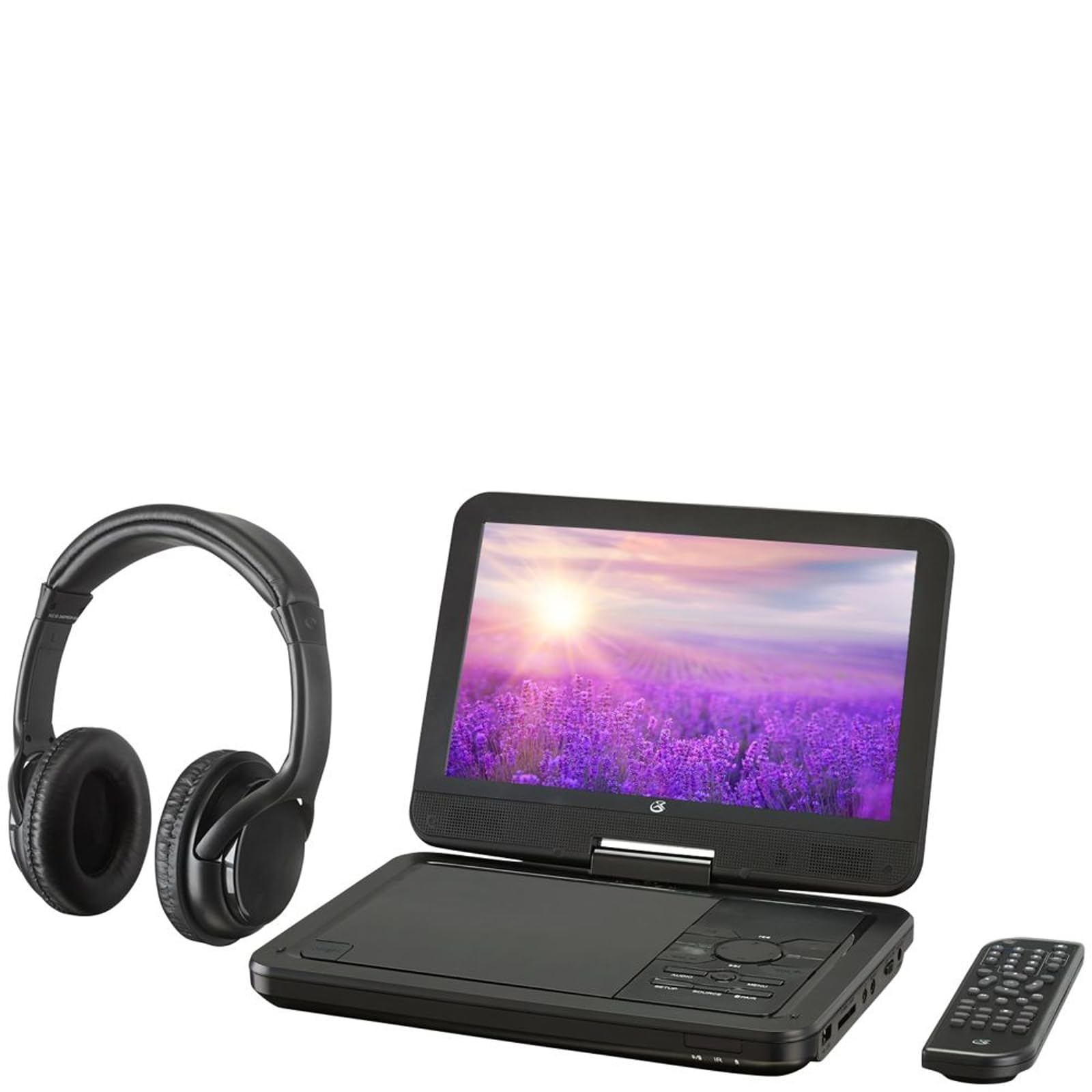
మూర్తి 4.1: The GPX PDB1077B Portable DVD Player, showing the 10.1-inch screen, control panel, wireless Bluetooth headphones, and remote control.
4.1 Portable DVD Player Unit
The main unit features a swivel screen, disc tray, and control buttons. Key components include:
- 10.1-అంగుళాల LCD డిస్ప్లే: కోసం viewing video content.
- డిస్క్ ట్రే: DVDలు మరియు CDలను చొప్పించడానికి.
- నియంత్రణ ప్యానెల్: Buttons for playback, menu navigation, volume, and source selection.
- పోర్టులు: USB, SD card slot, AV out, headphone jack, DC in.
- స్పీకర్లు: ఇంటిగ్రేటెడ్ స్టీరియో స్పీకర్లు.
4.2 Wireless Bluetooth Headphones
The included headphones connect wirelessly to the DVD player via Bluetooth for private listening.
మూర్తి 4.2: ఒక క్లోజప్ view of the black wireless Bluetooth headphones, featuring padded earcups and an adjustable headband.
4.3 రిమోట్ కంట్రోల్
రిమోట్ కంట్రోల్ దూరం నుండి అన్ని ఫంక్షన్లకు అనుకూలమైన యాక్సెస్ను అందిస్తుంది.
మూర్తి 4.3: ఒక క్లోజప్ view of the compact black remote control with various buttons for playback, menu navigation, and volume adjustment.
5. సెటప్ గైడ్
5.1 పరికరాన్ని ఛార్జ్ చేస్తోంది
- Connect the AC/DC power adapter to the DC IN port on the DVD player.
- అడాప్టర్ను ప్రామాణిక గోడ అవుట్లెట్లోకి ప్లగ్ చేయండి.
- ఛార్జింగ్ ఇండికేటర్ లైట్ వెలుగుతుంది. పూర్తిగా ఛార్జ్ చేయడానికి దాదాపు 3-4 గంటలు పట్టండి.
- For in-car use, connect the car power adapter to the DC IN port and your vehicle's 12V power outlet.
5.2 పవర్ చేయడం ఆన్/ఆఫ్
- To power on, slide the POWER switch to the ON position. The screen will light up.
- పవర్ ఆఫ్ చేయడానికి, POWER స్విచ్ను OFF స్థానానికి స్లయిడ్ చేయండి.
5.3 Connecting Bluetooth Headphones
- DVD ప్లేయర్ ఆన్ చేయబడిందని నిర్ధారించుకోండి.
- Turn on the Bluetooth headphones and put them into pairing mode (refer to headphone manual if needed).
- On the DVD player, navigate to the Bluetooth settings menu.
- Select "Scan for Devices" or similar option.
- Choose your headphones from the list of available devices to pair.
- Once paired, audio will automatically transmit to the headphones.
5.4 Connecting to an External Display (Optional)
Use the included AV cable to connect the DVD player to a TV or monitor.
- Connect one end of the AV cable to the AV OUT port on the DVD player.
- Connect the other end to the AV IN ports (Yellow for Video, White for Left Audio, Red for Right Audio) on your external display.
- Select the correct AV input on your external display.
6. ఆపరేటింగ్ సూచనలు
6.1 Playing DVDs and CDs
- Open the disc tray by gently lifting the screen.
- లేబుల్ వైపు పైకి ఎదురుగా ఉండేలా కుదురుపై DVD లేదా CD ఉంచండి.
- Gently close the disc tray.
- The player will automatically detect the disc and begin playback or display the disc menu.
- Use the navigation buttons (Up, Down, Left, Right, Enter) on the control panel or remote to navigate menus.
- నొక్కండి ప్లే/పాజ్ చేయండి ప్లేబ్యాక్ ప్రారంభించడానికి లేదా పాజ్ చేయడానికి బటన్.
- నొక్కండి ఆపు ప్లేబ్యాక్ ఆపడానికి బటన్.
6.2 Using USB and SD Card Media
- USB పోర్ట్లోకి USB ఫ్లాష్ డ్రైవ్ను లేదా SD కార్డ్ స్లాట్లోకి SD కార్డ్ను చొప్పించండి.
- నొక్కండి మూలం button on the control panel or remote to select "USB" or "SD".
- మీ ద్వారా నావిగేట్ చేయండి files using the control buttons.
- ఎ ఎంచుకోండి file (e.g., MP3, JPEG) and press నమోదు చేయండి to play or view.
6.3 సెట్టింగులను సర్దుబాటు చేయడం
Access the system settings to customize your viewing మరియు శ్రవణ అనుభవం.
- నొక్కండి సెటప్ button on the remote or control panel.
- Use the navigation buttons to select options such as:
- డిస్ ప్లే సెట్టింగులు: Adjust brightness, contrast, color.
- ఆడియో సెట్టింగ్లు: Adjust volume, equalizer.
- భాషా సెట్టింగ్లు: Select OSD language, audio language, subtitle language.
- తల్లిదండ్రుల నియంత్రణ: Set rating levels for disc playback.
- నొక్కండి నమోదు చేయండి to confirm selections and సెటప్ మళ్ళీ నిష్క్రమించడానికి.
6.4 రిమోట్ కంట్రోల్ ఉపయోగించడం
The remote control provides full functionality. Ensure batteries are correctly inserted (2 x AAA, not included).
| బటన్ | ఫంక్షన్ |
|---|---|
| శక్తి | ప్లేయర్ను ఆన్ లేదా ఆఫ్ చేస్తుంది. |
| సెటప్ | సిస్టమ్ సెటప్ మెనూను యాక్సెస్ చేస్తుంది. |
| మూలం | Switches between DVD, USB, SD, and AV input modes. |
| ప్లే/పాజ్ చేయండి | ప్లేబ్యాక్ను ప్రారంభిస్తుంది లేదా పాజ్ చేస్తుంది. |
| ఆపు | ప్లేబ్యాక్ను ఆపివేస్తుంది. |
| VOL + / VOL- | వాల్యూమ్ స్థాయిని సర్దుబాటు చేస్తుంది. |
| NAVIGATE (Up/Down/Left/Right/ENTER) | మెనూలను నావిగేట్ చేస్తుంది మరియు ఎంపికలను నిర్ధారిస్తుంది. |
| మెనూ | Accesses the disc menu during DVD playback. |
7. నిర్వహణ
7.1 పరికరాన్ని శుభ్రపరచడం
- శుభ్రపరిచే ముందు పరికరం ఆఫ్ చేయబడిందని మరియు అన్ప్లగ్ చేయబడిందని నిర్ధారించుకోండి.
- బయటి ఉపరితలాలను తుడవడానికి మృదువైన, పొడి, మెత్తటి బట్టను ఉపయోగించండి.
- For the screen, use a screen-specific cleaning solution and a microfiber cloth, applying gentle pressure.
- రాపిడి క్లీనర్లు, మైనపులు లేదా ద్రావకాలను ఉపయోగించవద్దు.
7.2 డిస్క్ కేర్
- వేలిముద్రలను నివారించడానికి డిస్క్లను వాటి అంచుల వద్ద పట్టుకోండి.
- గీతలు పడకుండా ఉండటానికి డిస్క్లను ఉపయోగంలో లేనప్పుడు వాటి కవర్లలోనే నిల్వ చేయండి.
- మురికిగా ఉన్న డిస్క్లను మృదువైన, మెత్తటి గుడ్డతో శుభ్రం చేసి, మధ్య నుండి బయటికి తుడవండి.
7.3 బ్యాటరీ సంరక్షణ
- To prolong battery life, fully charge the device before first use.
- పరికరాన్ని ఎక్కువ కాలం నిల్వ చేయాలనుకుంటే, ప్రతి కొన్ని నెలలకు దాదాపు 50% వరకు ఛార్జ్ చేయండి.
- పరికరాన్ని తీవ్రమైన ఉష్ణోగ్రతలకు బహిర్గతం చేయకుండా ఉండండి.
8. ట్రబుల్షూటింగ్
If you encounter issues with your GPX PDB1077B, refer to the following common problems and solutions.
| సమస్య | సాధ్యమైన కారణం | పరిష్కారం |
|---|---|---|
| పవర్ లేదు | Battery drained; Power adapter not connected properly; Power switch off. | Charge the device; Ensure power adapter is securely connected; Slide power switch to ON. |
| No Disc Playback | Disc inserted incorrectly; Disc is dirty or scratched; Disc format not supported. | Reinsert disc label-side up; Clean or replace disc; Check supported media types in specifications. |
| సౌండ్ లేదు | Volume too low; Mute function active; Headphones not connected/paired correctly. | Increase volume; Deactivate mute; Reconnect or re-pair headphones. |
| Bluetooth Headphones Not Pairing | Headphones not in pairing mode; Player not in Bluetooth scan mode; Interference. | Ensure headphones are in pairing mode; Activate Bluetooth scan on player; Move closer to player, away from other devices. |
| రిమోట్ కంట్రోల్ పనిచేయడం లేదు | బ్యాటరీలు డెడ్ అయ్యాయి లేదా తప్పుగా చొప్పించబడ్డాయి; రిమోట్ మరియు ప్లేయర్ మధ్య అడ్డంకి; రిమోట్ సెన్సార్ బ్లాక్ చేయబడింది. | Replace batteries, check polarity; Remove obstructions; Ensure remote sensor on player is clear. |
9. స్పెసిఫికేషన్లు
Technical specifications for the GPX PDB1077B Portable DVD Player.
| ఫీచర్ | వివరాలు |
|---|---|
| మోడల్ | PDB1077B |
| ప్రదర్శన పరిమాణం | 10.1 అంగుళాలు |
| ప్రదర్శన రకం | LCD |
| స్థానిక రిజల్యూషన్ | 1024 x 600 |
| మద్దతు ఉన్న మీడియా | DVD, DVD±R/RW, CD, CD-R/RW, MP3 CD, JPEG CD |
| కనెక్టివిటీ | Bluetooth wireless transmitter, USB port, SD card slot, AV Out, Headphone Jack, DC In |
| శక్తి మూలం | Built-in rechargeable battery, AC/DC adapter, Car adapter |
10. వారంటీ మరియు కస్టమర్ మద్దతు
GPX products are designed for reliability and performance. For specific warranty information, please refer to the warranty card included with your purchase or visit the official GPX website. If you require technical assistance or have questions regarding your device, please contact GPX customer support.
GPX Official Webసైట్: www.gpx.com
Please note that warranty terms and customer support availability may vary by region.


