1. పరిచయం
The Polycom RealPresence Trio 8500 is a versatile conference phone designed to facilitate clear and efficient communication in meeting environments. It offers robust audio capabilities and a user-friendly interface, making it suitable for various collaboration needs.
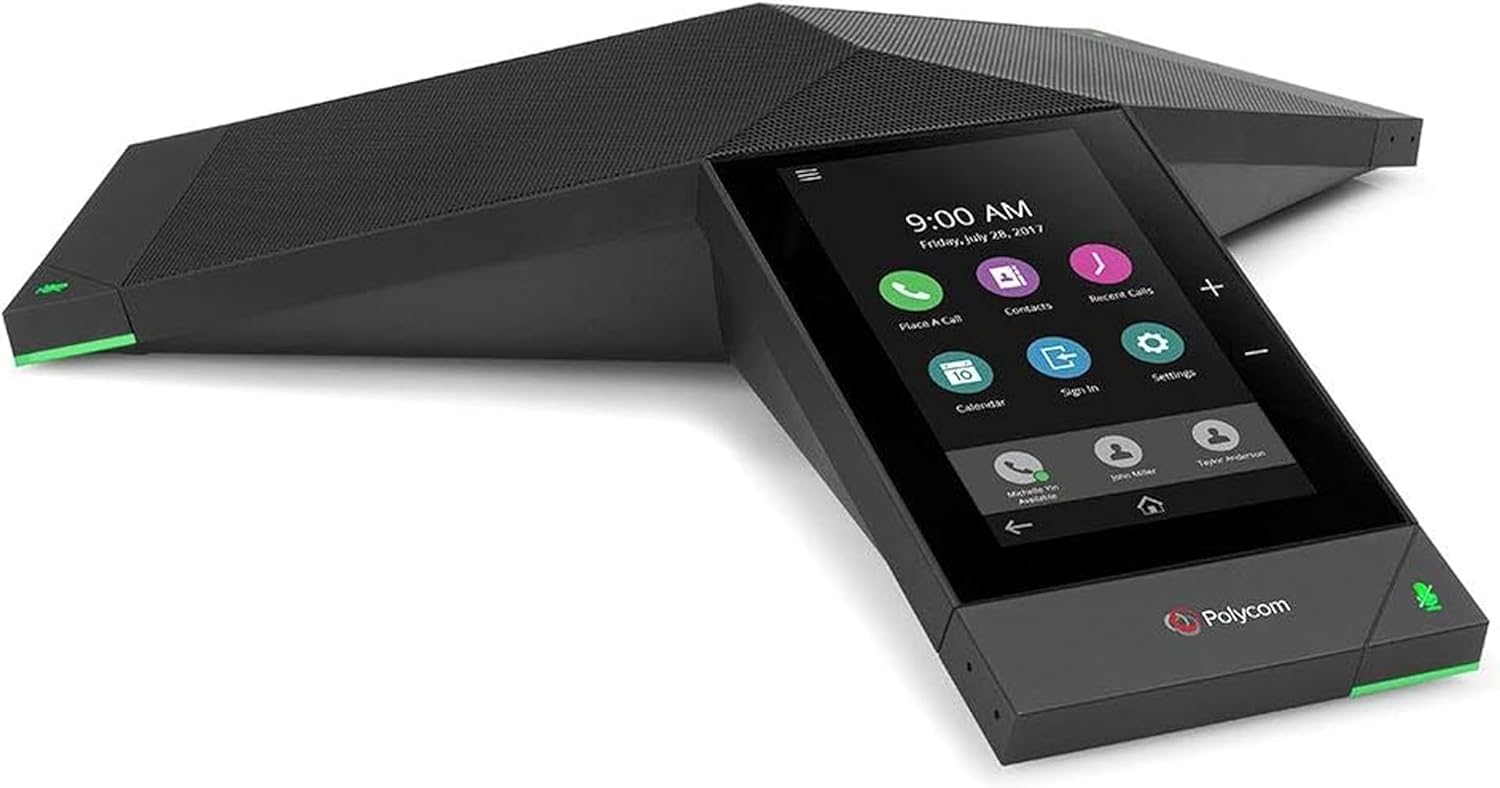
Figure 1.1: Polycom RealPresence Trio 8500 Conference Phone, showcasing its sleek design and integrated touch display.
ముఖ్య లక్షణాలు ఉన్నాయి:
- Conference Phone Flexibility: Supports video conferencing and content sharing additions, with built-in USB and Bluetooth for device connectivity.
- Outstanding Audio: Delivers room-filling audio up to 14kHz with full duplex, echo cancellation, and noise reduction for superior voice clarity.
- టచ్ డిస్ప్లే: Features a 5-inch color touch display for intuitive navigation and control.
- ప్లాట్ఫారమ్ ఇంటిగ్రేషన్: Compatible with various communication platforms, supporting hybrid registration.
- Conference Meeting Options: Enables collaboration through audio, video, and content sharing.
2. పెట్టెలో ఏముంది
Upon unboxing your Polycom RealPresence Trio 8500, verify that all components are present:
- Polycom RealPresence Trio 8500 Conference Phone
- Ethernet Cable (for network connectivity and Power over Ethernet, if applicable)

Figure 2.1: The Polycom RealPresence Trio 8500 unit alongside its included Ethernet cable.

Figure 2.2: The Polycom RealPresence Trio 8500 as packaged, showing the protective inserts.
3. సెటప్
Follow these steps to set up your Polycom RealPresence Trio 8500:
- ప్లేస్మెంట్: Position the conference phone centrally in your meeting room for optimal audio pickup. Ensure it is on a stable, flat surface.
- పవర్ మరియు నెట్వర్క్ కనెక్షన్:
Connect the Ethernet cable to the network port on the underside of the Trio 8500. This connection provides both network access and power (if using Power over Ethernet - PoE). If PoE is not available, an external power adapter (sold separately) will be required.

Figure 3.1: The underside of the Polycom Trio 8500, highlighting the network port and other connections.
- ప్రారంభ బూట్-అప్: Once connected, the device will power on automatically. The 5-inch color touch display will illuminate and guide you through the initial setup process, which may include language selection, network configuration, and platform registration.
- సాఫ్ట్వేర్ అప్డేట్: It is recommended to check for and install any available software updates via the device's web interface or touch display menu to ensure optimal performance and access to the latest features.
4. ఆపరేటింగ్ సూచనలు
The Polycom RealPresence Trio 8500 is designed for intuitive operation via its touch display.
4.1 ప్రాథమిక కాల్ విధులు
- కాల్ చేయడం: Tap the "Place a Call" icon on the home screen, enter the number using the on-screen keypad, and tap the call button.
- కాల్కు సమాధానం ఇవ్వడం: When an incoming call rings, tap the "Answer" button on the display.
- కాల్ని ముగించడం: Tap the "End Call" button during an active call.
- మ్యూట్/అన్మ్యూట్: Tap the microphone icon on the display or press the physical mute button on the device to mute or unmute your audio. The LED indicators on the device will change color to indicate mute status.
- వాల్యూమ్ నియంత్రణ: Use the physical volume buttons (+/-) on the device or the on-screen controls to adjust the speaker volume.

చిత్రం 4.1: క్లోజప్ view of the Polycom Trio 8500's 5-inch color touch display, showing typical call and menu icons.
4.2 సమావేశ లక్షణాలు
- పాల్గొనేవారిని జోడించడం: During an active call, tap the "Add Participant" or "Conference" icon and dial the number of the new participant.
- కంటెంట్ భాగస్వామ్యం: If configured, use the content sharing options on the display to share presentations or documents from a connected device.
- బ్లూటూత్ కనెక్టివిటీ: Pair your mobile device via Bluetooth to use the Trio 8500 as a high-quality speakerphone for calls on your personal device.

Figure 4.2: A typical meeting room setup demonstrating the Polycom Trio 8500 facilitating a video conference, with participants viewing content on a large screen.
5. నిర్వహణ
Proper maintenance ensures the longevity and optimal performance of your Polycom RealPresence Trio 8500.
- శుభ్రపరచడం: Use a soft, dry, lint-free cloth to clean the device's exterior and touch display. Avoid abrasive cleaners, solvents, or aerosol sprays.
- వెంటిలేషన్: Ensure the device's ventilation openings are not blocked to prevent overheating.
- నిల్వ: If storing the device for an extended period, disconnect it from power and network, and store it in a cool, dry place.
6. ట్రబుల్షూటింగ్
This section addresses common issues you might encounter with your Polycom RealPresence Trio 8500.
| సమస్య | సాధ్యమైన కారణం | పరిష్కారం |
|---|---|---|
| పరికరం పవర్ ఆన్ చేయదు. | విద్యుత్ లేదా నెట్వర్క్ కనెక్షన్ లేదు. | Ensure the Ethernet cable is securely connected and that the network port provides Power over Ethernet (PoE). If not using PoE, ensure the external power adapter is connected and functional. |
| డయల్ టోన్ లేదు లేదా కాల్స్ చేయలేరు. | Network connectivity issue or incorrect SIP/platform registration. | Verify network cable connection. Check network settings on the device's display. Confirm successful registration with your communication platform (e.g., SIP server, Zoom, Microsoft Teams). Consult your IT administrator if necessary. |
| Poor audio quality (echo, noise). | Improper placement, environmental noise, or network latency. | Ensure the device is centrally located and not too close to walls or reflective surfaces. Minimize background noise. Check network stability. |
| Touch display unresponsive. | తాత్కాలిక సాఫ్ట్వేర్ లోపం. | Restart the device by disconnecting and reconnecting the power/network cable. If the issue persists, consider a factory reset (consult your IT administrator first as this will erase configurations). |
7. స్పెసిఫికేషన్లు
Detailed technical specifications for the Polycom RealPresence Trio 8500:
| ఫీచర్ | వివరాలు |
|---|---|
| ఉత్పత్తి కొలతలు (L x W x H) | 14.02 x 12.17 x 2.76 అంగుళాలు |
| వస్తువు బరువు | 2.17 పౌండ్లు (985 గ్రాములు) |
| మోడల్ సంఖ్య | 2200-66700-025 |
| బ్రాండ్ | POLY |
| రంగు | Red (Note: Product images show black/dark grey, but specification lists 'Red'. User should refer to actual product color.) |
| టెలిఫోన్ రకం | సమావేశం |
| శక్తి మూలం | Corded Electric (PoE compatible) |
| డయలర్ రకం | Single Keypad (on-screen) |
| సమాధానం సిస్టమ్ రకం | డిజిటల్ |
| కాన్ఫరెన్స్ కాల్ సామర్థ్యం | 3 మార్గం |
| కాలర్ గుర్తింపు | నం |
| కనిపించే స్క్రీన్ వికర్ణం | 5 అంగుళాలు / 13 సెం.మీ |
| మొదట అందుబాటులో ఉన్న తేదీ | నవంబర్ 11, 2017 |

Figure 7.1: Product label on the underside of the Polycom Trio 8500, displaying model number, FCC compliance, and other regulatory information.
8. వారంటీ మరియు మద్దతు
For information regarding the product warranty, please refer to the documentation provided with your purchase or visit the official POLY website. Technical support and additional resources can also be found on the manufacturer's support pages.
It is recommended to register your product with POLY to receive updates and support notifications.
For further assistance, contact POLY customer support directly.


