పరిచయం
The SOUL Electronics X-Shock Absolute True Wireless Earphones are designed to provide a superior audio experience with advanced features such as waterproofing, extended playtime, and a built-in power bank. This manual provides essential information for the proper use and maintenance of your X-Shock earphones.
పెట్టెలో ఏముంది
- ఎడమ చెవి ముక్క
- కుడి చెవి ముక్క
- ఛార్జింగ్ కేసు
- carabiner
- USB కేబుల్
- చెవిపోగులు (వివిధ పరిమాణాలు)
- రక్షణ కేసు
- వినియోగదారు మాన్యువల్ (ఈ పత్రం)

Image: The SOUL X-Shock True Wireless Earphones, showing both the left and right earbuds. These compact, black earbuds feature the SOUL logo prominently on their outer surface.
సెటప్ గైడ్
ప్రారంభ ఛార్జింగ్
Before first use, fully charge the X-Shock earphones and their charging case. Connect the provided USB cable to the charging case and a power source. The LED indicators on the case will show charging status. A full charge typically takes a few hours.
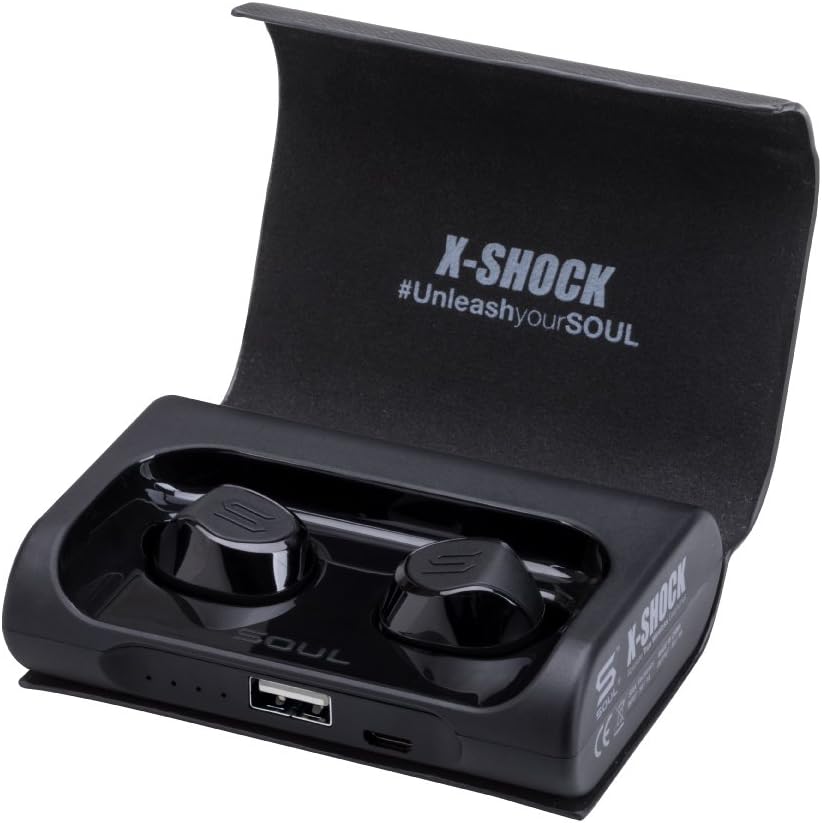
Image: The SOUL X-Shock charging case, open to reveal the earbud compartments. The case is black with a textured finish, and the earbuds are securely seated inside. A USB port is visible on the front edge of the case, along with small LED indicator lights.
మీ పరికరంతో జత చేయడం
- ఇయర్ఫోన్లు ఛార్జ్ చేయబడి, ఛార్జింగ్ కేసులో ఉంచబడ్డాయని నిర్ధారించుకోండి.
- ఛార్జింగ్ కేస్ను తెరవండి. ఇయర్ఫోన్లు స్వయంచాలకంగా జత చేసే మోడ్లోకి ప్రవేశిస్తాయి.
- మీ మొబైల్ పరికరంలో, బ్లూటూత్ని ప్రారంభించండి మరియు అందుబాటులో ఉన్న పరికరాల కోసం శోధించండి.
- Select "SOUL X-SHOCK" from the list of devices.
- కనెక్ట్ అయిన తర్వాత, వాయిస్ ప్రాంప్ట్ విజయవంతమైన జతను నిర్ధారిస్తుంది.
The X-Shock features advanced mobile connectivity and seamless auto-pairing, meaning they will automatically connect to the last paired device when removed from the case.
ఆపరేటింగ్ సూచనలు
ఇయర్ఫోన్లు ధరించి
Select the appropriate eartip size for a secure and comfortable fit. The ergonomic design of the X-Shock ensures they fit securely in your ears, ideal for active use.

చిత్రం: క్లోజప్ view of a man's ear with the SOUL X-Shock earphone securely in place. The earphone's compact design is visible, fitting snugly within the ear canal.
నియంత్రణలు
The X-Shock earphones feature multi-function buttons on each earbud for controlling various functions:
- పవర్ ఆన్/ఆఫ్: Automatically power on when removed from case, off when placed back. Manual power on/off by pressing and holding the button.
- ప్లే/పాజ్: ఏ ఇయర్బడ్నైనా ఒకసారి నొక్కండి.
- తదుపరి ట్రాక్: కుడి ఇయర్బడ్పై రెండుసార్లు నొక్కండి.
- మునుపటి ట్రాక్: ఎడమ ఇయర్బడ్పై రెండుసార్లు నొక్కండి.
- సమాధానం/ముగింపు కాల్: ఏ ఇయర్బడ్నైనా ఒకసారి నొక్కండి.
- కాల్ని తిరస్కరించండి: ఏ ఇయర్బడ్ను అయినా నొక్కి పట్టుకోండి.
- వాయిస్ అసిస్టెంట్ (సిరి/గూగుల్ అసిస్టెంట్)ని యాక్టివేట్ చేయండి: ఏ ఇయర్బడ్పైనైనా మూడుసార్లు నొక్కండి.
Charging Case as Power Bank
The X-Shock charging case has a 3,000mAh battery and can also function as a power bank for your mobile devices. Connect your device to the USB-A output port on the charging case using your device's charging cable.

Image: An infographic highlighting key features of the SOUL X-Shock earphones. Icons represent auto-pairing, up to 60 hours playtime, waterproof rating, LED safety lights, noise isolation, voice control (Siri/Google Assistant), comfort and fit, 3000mAh rechargeable power bank, Bluetooth connectivity, and universal control.
నిర్వహణ
క్లీనింగ్
Regularly clean your earphones and charging case with a soft, dry, lint-free cloth. Do not use harsh chemicals or abrasive materials. For eartips, remove them and clean with mild soap and water, then dry thoroughly before reattaching.
వాటర్ఫ్రూఫింగ్
The X-Shock earphones are designed with double-injection technology, allowing them to be submerged in water for up to 30 minutes. This ensures resistance to extreme sweat and various weather conditions. Always ensure the charging port cover on the case is securely closed when exposed to water.

Image: A man pouring water over his head, demonstrating the waterproof capability of the SOUL X-Shock earphone, which is visible in his ear. Water droplets are splashing around his face and the earbud.
నిల్వ
When not in use, store the earphones in their charging case to protect them and keep them charged. Store in a cool, dry place away from direct sunlight and extreme temperatures.
ట్రబుల్షూటింగ్
శబ్దం లేదు / డిస్కనెక్షన్
- ఇయర్ఫోన్లు ఛార్జ్ అయ్యాయని నిర్ధారించుకోండి.
- Check Bluetooth connection on your device. Try re-pairing if necessary.
- Ensure earphones are within the 10-meter Bluetooth range of your device.
- Restart your mobile device and the earphones.
ఇయర్బడ్స్ ఛార్జింగ్ కావడం లేదు
- ఛార్జింగ్ కేసు కూడా ఛార్జ్ అయ్యిందని నిర్ధారించుకోండి.
- Verify the earbuds are correctly seated in their charging slots.
- ఇయర్బడ్లు మరియు కేస్ రెండింటిలోని ఛార్జింగ్ కాంటాక్ట్లను పొడి కాటన్ స్వాబ్తో శుభ్రం చేయండి.
ఒకే ఒక ఇయర్బడ్ పనిచేస్తోంది
- రెండు ఇయర్బడ్లు ఛార్జ్ అయ్యాయని నిర్ధారించుకోండి.
- Try placing both earbuds back into the charging case, closing the lid, waiting a few seconds, and then taking them out again to re-establish the connection between them.
- If the issue persists, perform a factory reset (refer to the full user manual PDF for specific instructions if available, or contact support).
స్పెసిఫికేషన్లు
| మోడల్ పేరు | X-షాక్ |
| మోడల్ సంఖ్య | SX15BK |
| కనెక్టివిటీ టెక్నాలజీ | బ్లూటూత్ |
| బ్లూటూత్ రేంజ్ | 10 మీటర్లు |
| బ్యాటరీ లైఫ్ (ఇయర్బడ్స్) | 30 గంటల వరకు (ఛార్జింగ్ కేసుతో) |
| ఛార్జింగ్ కేస్ బ్యాటరీ | 3000mAh (functions as power bank) |
| నీటి నిరోధక స్థాయి | Water Resistant (submersible up to 30 minutes) |
| వస్తువు బరువు | 145 గ్రాములు (5.1 ఔన్సులు) |
| ఉత్పత్తి కొలతలు | 3.54 x 1.1 x 2.56 అంగుళాలు |
| నాయిస్ కంట్రోల్ | సౌండ్ ఐసోలేషన్ |
| చేర్చబడిన భాగాలు | Ear pieces, USB cable, User Manual, Charging case, Protective Case, Carabiner, Eartips |
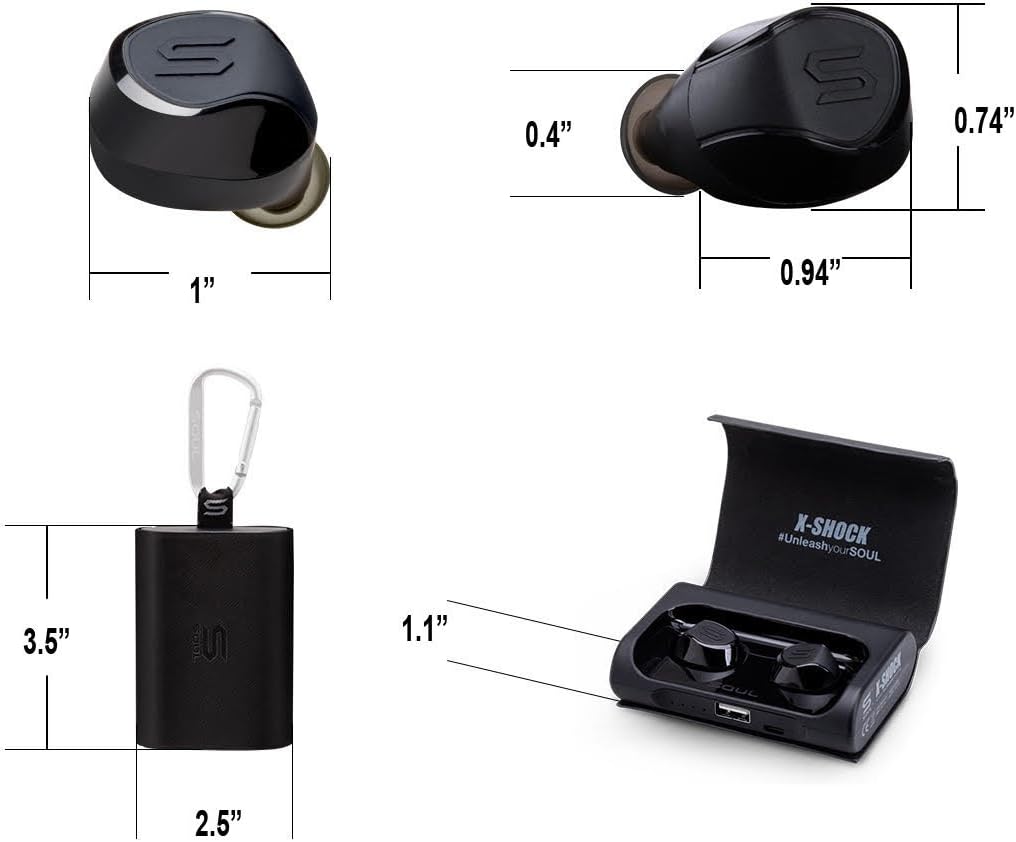
Image: Technical drawing showing the dimensions of the SOUL X-Shock earphones and their charging case. The earbuds are approximately 0.74 inches long and 0.94 inches wide, while the case is about 3.5 inches tall and 2.5 inches wide.
వారంటీ మరియు మద్దతు
SOUL Electronics products are manufactured to the highest quality standards. For detailed warranty information and support, please refer to the official SOUL Electronics website or the full User Manual PDF.
A digital version of the User Manual is available for download:
యూజర్ మాన్యువల్ (PDF) డౌన్లోడ్ చేసుకోండి
For further assistance, please contact Soul Electronics customer support.


