1. పరిచయం
This manual provides detailed instructions for the safe and effective operation of your BENNING CM 12 True RMS Digital Power Clamp Multimeter. Please read this manual thoroughly before using the device and keep it for future reference. The BENNING CM 12 is designed for demanding measurement tasks in industrial and commercial environments, offering precise measurements of AC, AC+DC True RMS, inrush current, and more, with data logging and Bluetooth connectivity.
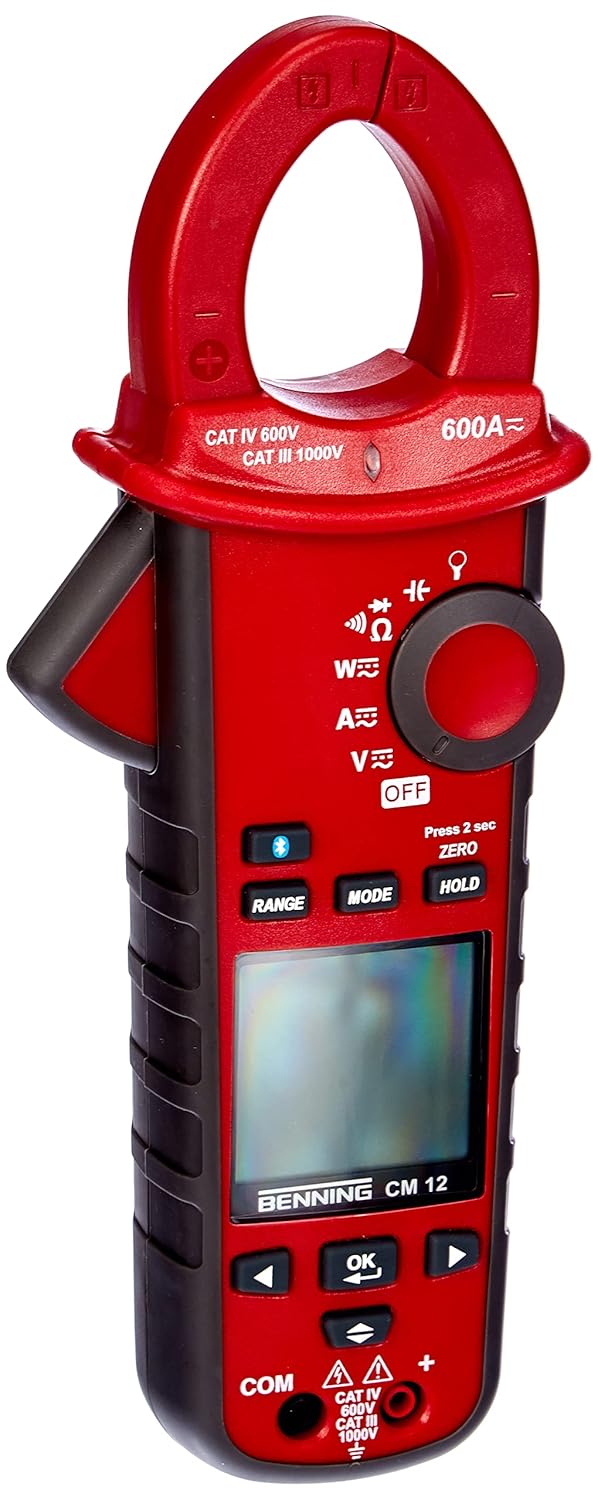
మూర్తి 1: The Benning CM 12 True RMS Digital Power Clamp Multimeter. This image displays the main unit with its red casing, clamp jaw, display screen, and control buttons.
2. భద్రతా సమాచారం
వ్యక్తిగత గాయం మరియు పరికరానికి నష్టం జరగకుండా ఉండటానికి ఎల్లప్పుడూ క్రింది భద్రతా జాగ్రత్తలను గమనించండి:
- మీటర్ దెబ్బతిన్నట్లు కనిపిస్తే లేదా టెస్ట్ లీడ్స్పై ఇన్సులేషన్ దెబ్బతిన్నట్లయితే దాన్ని ఉపయోగించవద్దు.
- కొలతలు చేసే ముందు సరైన ఫంక్షన్ మరియు పరిధిని ఎంచుకున్నారని నిర్ధారించుకోండి.
- ఏదైనా ఫంక్షన్ కోసం గరిష్ట ఇన్పుట్ పరిమితులను మించకూడదు.
- వాల్యూమ్తో పని చేస్తున్నప్పుడు జాగ్రత్త వహించండిtag30V AC RMS, 42V పీక్ లేదా 60V DC కంటే ఎక్కువ, ఎందుకంటే ఇవి షాక్ ప్రమాదాన్ని కలిగిస్తాయి.
- ఎల్లప్పుడూ సర్క్యూట్కు విద్యుత్తును డిస్కనెక్ట్ చేసి, అధిక-వాల్యూమ్ విద్యుత్తును విడుదల చేయండి.tagనిరోధకత, కొనసాగింపు, డయోడ్ లేదా కెపాసిటెన్స్ పరీక్షలను నిర్వహించడానికి ముందు ఇ కెపాసిటర్లు.
- స్థానిక మరియు జాతీయ భద్రతా కోడ్లకు కట్టుబడి ఉండండి.
3. ఉత్పత్తి భాగాలు
The BENNING CM 12 package includes the following items:
- బెన్నింగ్ CM 12 డిజిటల్ పవర్ Clamp మల్టీమీటర్
- పరీక్ష లీడ్లు (ఎరుపు మరియు నలుపు)
- AAA బ్యాటరీలు (6 చేర్చబడ్డాయి)
- క్యారీయింగ్ కేసు
- వినియోగదారు మాన్యువల్ (ఈ పత్రం)
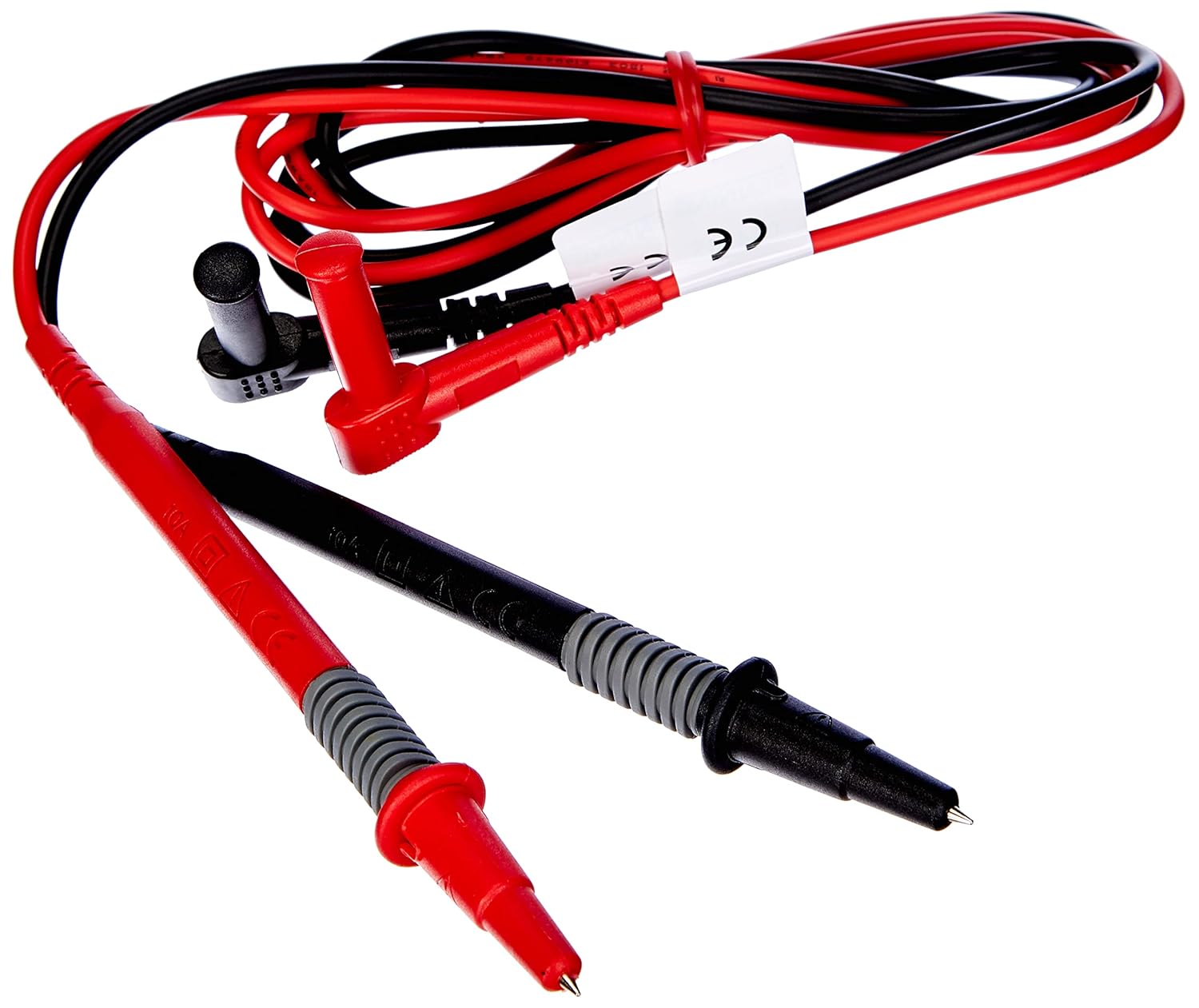
మూర్తి 2: Red and black test leads. These leads are used for voltage, resistance, continuity, and other measurements.

మూర్తి 3: Six AAA batteries. These batteries power the Benning CM 12 multimeter.

మూర్తి 4: Black carrying case. This case provides protection and portability for the multimeter and its accessories.
4. సెటప్
4.1. బ్యాటరీ ఇన్స్టాలేషన్
- పరికరం వెనుక భాగంలో బ్యాటరీ కంపార్ట్మెంట్ కవర్ను గుర్తించండి.
- బ్యాటరీ కంపార్ట్మెంట్ను తెరవడానికి స్క్రూడ్రైవర్ని ఉపయోగించండి.
- కంపార్ట్మెంట్ లోపల సూచించిన విధంగా సరైన ధ్రువణతను నిర్ధారించుకుని, ఆరు (6) AAA బ్యాటరీలను చొప్పించండి.
- బ్యాటరీ కంపార్ట్మెంట్ కవర్ను మార్చండి మరియు దానిని స్క్రూతో భద్రపరచండి.
4.2. ప్రారంభ పవర్ ఆన్
Turn the rotary switch to any measurement function (e.g., V~ for AC Voltage) to power on the device. The display will illuminate, indicating the device is ready for use.
5. ఆపరేటింగ్ సూచనలు
The BENNING CM 12 offers a variety of measurement functions. Select the desired function using the rotary switch.
5.1. AC/DC కరెంట్ కొలత (Clamp ఫంక్షన్)
- Turn the rotary switch to the 'A~' (AC Current) or 'A=' (DC Current) position.
- cl నొక్కండిamp trigger to open the jaw.
- cl తో ఒకే కండక్టర్ను జతపరచండిamp దవడ పూర్తిగా మూసివేయబడిందని నిర్ధారించుకోండి.
- డిస్ప్లేలో ప్రస్తుత విలువను చదవండి.
- For AC+DC True RMS measurements, ensure the appropriate mode is selected if available via the MODE button.
5.2. సంtagఇ కొలత (AC/DC)
- ఎరుపు రంగు టెస్ట్ లీడ్ను 'VΩ' ఇన్పుట్ జాక్లోకి మరియు నలుపు రంగు టెస్ట్ లీడ్ను 'COM' ఇన్పుట్ జాక్లోకి చొప్పించండి.
- Turn the rotary switch to 'V~' (AC Voltage) or 'V=' (DC Voltagమరియు).
- పరీక్ష లీడ్లను పరీక్షించబడుతున్న సర్క్యూట్ లేదా కాంపోనెంట్కు సమాంతరంగా కనెక్ట్ చేయండి.
- సంపుటాన్ని చదవండిtagడిస్ప్లేలో ఇ విలువ.
5.3. Resistance and Continuity Measurement
- Ensure the circuit is de-energized before measurement.
- Insert test leads as for voltagఇ కొలత.
- Turn the rotary switch to 'Ω' (Resistance/Continuity).
- పరీక్ష లీడ్లను కాంపోనెంట్ అంతటా కనెక్ట్ చేయండి.
- For continuity, the meter will beep if resistance is below approximately 30Ω - 100Ω.
5.4. డయోడ్ టెస్ట్
- సర్క్యూట్ డి-ఎనర్జైజ్ చేయబడిందని నిర్ధారించుకోండి.
- Insert test leads as for voltagఇ కొలత.
- Turn the rotary switch to the 'Diode' symbol.
- Connect the red lead to the anode and the black lead to the cathode of the diode. A forward voltage drop (approx. 0.8V) will be displayed. Reverse the leads for an open circuit reading.
5.5. Inrush Current Measurement
This function measures the initial surge of current when a device (e.g., motor, lamp) is first turned on.
- Turn the rotary switch to the 'A~' position.
- Press the 'INRUSH' button (if dedicated) or activate via 'MODE' button.
- Clamp the meter around the power conductor of the device.
- Turn on the device to measure the inrush current.
5.6. Power Measurement (W) and Power Factor
The BENNING CM 12 can simultaneously detect current (A) and voltage (V) to calculate active power (W) and power factor in AC/DC networks.
- Turn the rotary switch to the 'W' (Power) position.
- Connect the test leads for voltage measurement and clamp the jaw around the current conductor.
- The display will show active power (W) and power factor.
5.7. Data Logger Function (LOG) and Bluetooth Interface
The device features a data logger capable of storing 10,000 readings with a sampling rate from 1 second to 10 minutes. It also includes a Bluetooth interface for data connection to smartphones or tablets via the "BENNING MM-CM Link" app.
- Download and install the "BENNING MM-CM Link" app from your device's app store (iOS and Android compatible).
- Activate Bluetooth on your smartphone/tablet and on the BENNING CM 12 (refer to the device's specific button for Bluetooth activation, usually a dedicated button or a long press of 'MODE').
- Pair the device with the app.
- Use the app to configure logging parameters (sampling rate, start/stop logging) and to view/export recorded data.
5.8. Low-Pass Filter (HFR)
The HFR (High-Frequency Rejection) low-pass filter is used for accurate measurements on clocked motor drives or other noisy environments by filtering out high-frequency interference.
- Activate the HFR filter via a dedicated button or by pressing the 'MODE' button in relevant measurement functions (e.g., AC Voltage or Current).
- The display will typically show an indicator when the filter is active.
5.9. Total Harmonic Distortion (THD) Measurement
The THD function assesses network quality by measuring the total harmonic distortion of voltage or current waveforms.
- Select the THD function using the rotary switch or 'MODE' button in AC Voltage/Current modes.
- Connect the meter as appropriate for voltagఇ లేదా ప్రస్తుత కొలత.
- The display will show the THD value.
5.10. Two-Pole Rotary Field Testing
This function is used to determine the phase sequence in three-phase systems.
- Turn the rotary switch to the 'Rotary Field' symbol (if dedicated) or select via 'MODE' button in a relevant AC voltagఇ ఫంక్షన్.
- Connect the test leads to two phases of the three-phase system.
- The display will indicate the phase sequence (e.g., L1-L2, L2-L3).
6. నిర్వహణ
6.1. శుభ్రపరచడం
ప్రకటనతో కేసును తుడిచివేయండిamp cloth and mild detergent. Do not use abrasives or solvents. Ensure the device is powered off and disconnected from any circuits before cleaning.
6.2. బ్యాటరీ భర్తీ
When the low battery indicator appears on the display, replace the batteries as described in Section 4.1. Remove batteries if the device will not be used for an extended period to prevent leakage.
6.3. నిల్వ
Store the multimeter in its carrying case in a cool, dry environment, away from direct sunlight and extreme temperatures. Remove batteries for long-term storage.
7. ట్రబుల్షూటింగ్
| సమస్య | సాధ్యమైన కారణం | పరిష్కారం |
|---|---|---|
| మీటర్ పవర్ ఆన్ అవ్వదు. | డెడ్ లేదా తప్పుగా ఇన్స్టాల్ చేయబడిన బ్యాటరీలు. | బ్యాటరీ ధ్రువణతను తనిఖీ చేయండి; బ్యాటరీలను భర్తీ చేయండి. |
| రీడింగ్ లేదా "OL" (ఓవర్లోడ్) ప్రదర్శించబడలేదు. | Incorrect range selected, open circuit, or measurement exceeds range. | Select appropriate range, check circuit connections, ensure measurement is within device limits. |
| సరికాని రీడింగ్లు. | Poor test lead connection, external interference, or low battery. | Ensure secure connections, move away from strong electromagnetic fields, replace batteries. |
| బ్లూటూత్ కనెక్షన్ సమస్యలు. | Bluetooth not activated on device/phone, app issues, or out of range. | Ensure Bluetooth is on for both devices, restart app, move closer to the meter. |
8. స్పెసిఫికేషన్లు
| ఫీచర్ | వివరాలు |
|---|---|
| మోడల్ సంఖ్య | CM 12 |
| కొలత రకం | True RMS (AC, AC+DC) |
| ఇన్రష్ కరెంట్ | అవును |
| ప్రోని లోడ్ చేయండిfile రికార్డింగ్ | Yes (single-phase and three-phase) |
| శక్తి కొలత | Active Power (W), Power Factor |
| కంటిన్యుటీ టెస్ట్ | 30 Ω - 100 Ω |
| డయోడ్ టెస్ట్ | 0.8 వి |
| Rotary Field Testing | రెండు-పోల్ |
| తక్కువ-పాస్ ఫిల్టర్ | HFR (High-Frequency Rejection) |
| Harmonic Measurement | THD (మొత్తం హార్మోనిక్ డిస్టార్షన్) |
| డేటా లాగర్ | 10,000 readings, 1s - 10min sampలింగ్ రేటు |
| ఇంటర్ఫేస్ | Bluetooth (iOS and Android app "BENNING MM-CM Link") |
| శక్తి మూలం | 6 AAA బ్యాటరీలు (చేర్చబడినవి) |
| ఉత్పత్తి కొలతలు | 11.42 x 5.12 x 2.76 అంగుళాలు |
| వస్తువు బరువు | 1.3 పౌండ్లు (590 గ్రాములు) |
| తయారీదారు | బెన్నింగ్ |

మూర్తి 5: డైమెన్షనల్ view of the Benning CM 12 Multimeter, indicating its approximate height of 11 inches (27 cm).
9. వారంటీ సమాచారం
BENNING products are manufactured to high-quality standards. For specific warranty terms and conditions, please refer to the warranty card included with your product or visit the official BENNING webవారంటీ క్లెయిమ్ల కోసం మీ కొనుగోలు రుజువును ఉంచండి.
10. కస్టమర్ మద్దతు
If you encounter any issues or have questions regarding your BENNING CM 12, please contact BENNING customer support. You can find contact information on the official BENNING webసైట్ లేదా మీ స్థానిక పంపిణీదారు ద్వారా.
- Webసైట్: www.benning.de (దయచేసి మీ ప్రాంతీయ చిరునామా కోసం తనిఖీ చేయండి) webసైట్)
- ఇమెయిల్: చూడండి website for specific contact emails.
- ఫోన్: చూడండి website for specific contact numbers.


