1. పరిచయం
The Pyle PSWP28BK is a versatile 2-in-1 device combining an MP3 player and Bluetooth headphones, designed for active lifestyles, including swimming and other water sports. It features an IPX8 waterproof rating, 8GB of internal flash memory, and Bluetooth wireless streaming capabilities. This manual provides detailed instructions for the proper use and maintenance of your device.

Figure 1: Pyle PSWP28BK Waterproof Bluetooth MP3 Player Headphones.
2. పెట్టెలో ఏముంది
అన్ని భాగాలను జాగ్రత్తగా అన్ప్యాక్ చేయండి మరియు కింది అంశాలు చేర్చబడ్డాయని నిర్ధారించుకోండి:
- Pyle PSWP28BK MP3 Player Headphones
- USB Charge / Data Transfer Clip Cable
- Two (2) Pairs of Water-Blocking Earbuds (for in-water use)
- Three (3) Pairs of Active Sport Earbuds (for on-land use)

Figure 2: Pyle PSWP28BK with included accessories.
3. ఉత్పత్తి లక్షణాలు
- 2-ఇన్-1 ఫంక్షనాలిటీ: Combines MP3 player and Bluetooth headphones.
- జలనిరోధిత డిజైన్: Marine Grade IPX8 rated for full submersion.
- వైర్లెస్ మ్యూజిక్ స్ట్రీమింగ్: Bluetooth 4.2 for connection to compatible devices.
- Integrated Memory: 8GB flash memory for storing audio files.
- పునర్వినియోగపరచదగిన బ్యాటరీ: అంతర్నిర్మిత లిథియం బ్యాటరీ 10 గంటల వరకు ప్లేబ్యాక్ను అందిస్తుంది.
- ఫ్లెక్సిబుల్ డిజైన్: Wrap-around style for a secure and comfortable fit during activities.
- సులువు File నిర్వహణ: Supports 'Drag & Drop' for MP3, WMA, APE, FLAC, WMV audio files.
- సాధారణ నియంత్రణలు: Intuitive touch buttons for playback and volume.

Figure 3: Pyle PSWP28BK highlighting model and memory.

Figure 4: IPX8 waterproof rating for swimming.
4. సెటప్
4.1 పరికరాన్ని ఛార్జ్ చేస్తోంది
- Connect the USB Charge / Data Transfer Clip Cable to the charging contacts on the headphones.
- Plug the USB end of the cable into a powered USB port (e.g., computer, USB wall adapter).
- The device will indicate charging status (e.g., LED indicator).
- పూర్తిగా ఛార్జ్ చేయడానికి సుమారు 2 గంటలు పడుతుంది.
4.2 సంగీతాన్ని లోడ్ చేస్తోంది Files (MP3 Mode)
- Connect the headphones to your computer using the USB Charge / Data Transfer Clip Cable.
- The device will appear as a removable disk drive on your computer.
- మీకు కావలసిన ఆడియోను లాగి వదలండి files (MP3, WMA, APE, FLAC, WMV) directly into the device's storage folder.
- కేబుల్ను డిస్కనెక్ట్ చేసే ముందు మీ కంప్యూటర్ నుండి పరికరాన్ని సురక్షితంగా బయటకు తీయండి.

Figure 5: Quick connect charging and drag & drop file నిర్వహణ.
4.3 బ్లూటూత్ జత చేయడం
- Ensure the headphones are powered on and in Bluetooth pairing mode (refer to operating instructions for mode switching).
- మీ స్మార్ట్ఫోన్, టాబ్లెట్ లేదా ఇతర బ్లూటూత్-ప్రారంభించబడిన పరికరంలో, బ్లూటూత్ సెట్టింగ్లకు నావిగేట్ చేయండి.
- కోసం వెతకండి available devices and select 'PyleUSA'.
- If prompted for a password, enter '0000' (four zeroes).
- Once paired, the headphones will confirm the connection. The Bluetooth wireless range is approximately 30+ feet.

Figure 6: Bluetooth wireless audio streaming.
4.4 Earbud Selection
Proper earbud selection is crucial for comfort, sound quality, and waterproofing.
- For In-Water Use: Use the two (2) pairs of water-blocking earbuds. These are designed to create a seal that prevents water from entering the ear canal and interfering with sound. Experiment with sizes to find the best fit.
- For On-Land Use: Use the three (3) pairs of active sport earbuds. These provide a comfortable fit for general activities.
Ensure the earbuds are securely attached to the headphone speakers before use.
5. ఆపరేటింగ్ సూచనలు
5.1 పవర్ ఆన్/ఆఫ్
- పవర్ ఆన్: Press and hold the Power button (usually the Play/Pause button) for a few seconds until an indicator light illuminates or an audible prompt is heard.
- పవర్ ఆఫ్: Press and hold the Power button again for a few seconds until the indicator light turns off or an audible prompt is heard.
5.2 Mode Switching (MP3 / Bluetooth)
The device can switch between internal MP3 player mode and Bluetooth streaming mode. Typically, a dedicated mode button or a long press of a specific control button is used to toggle between modes. Refer to the device's audible prompts for confirmation of the current mode.
5.3 ప్లేబ్యాక్ నియంత్రణలు
The headphones feature simple touch button controls:
- ప్లే/పాజ్: ఆడియోను ప్లే చేయడానికి లేదా పాజ్ చేయడానికి ప్లే/పాజ్ బటన్ను ఒకసారి నొక్కండి.
- తదుపరి ట్రాక్: Press the 'Next' button (often '+') once to skip to the next track.
- మునుపటి ట్రాక్: Press the 'Previous' button (often '-') once to go to the previous track.
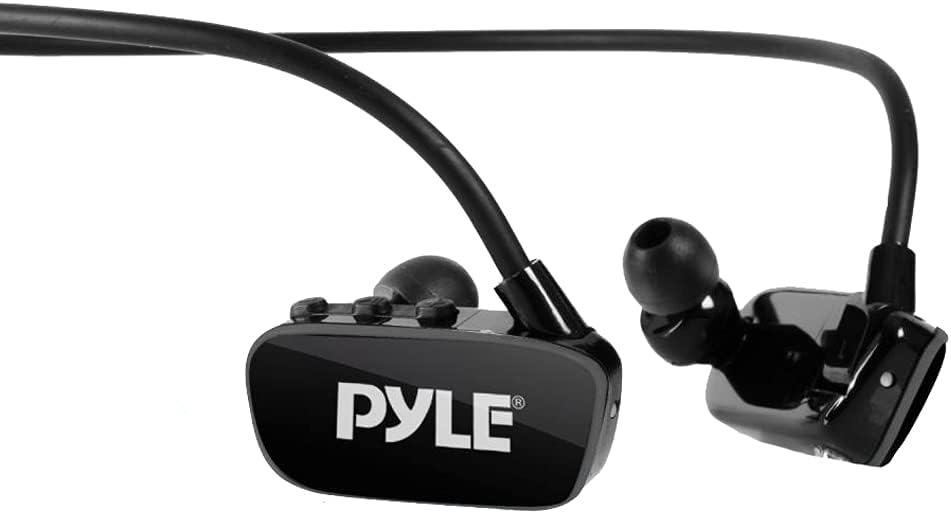
Figure 7: Close-up of control buttons.
5.4 వాల్యూమ్ నియంత్రణ
- వాల్యూమ్ పెంచండి: Press and hold the 'Volume Up' button (often '+').
- వాల్యూమ్ తగ్గించండి: Press and hold the 'Volume Down' button (often '-').
5.5 Water Use Guidelines
When using the headphones in water:
- Always use the designated water-blocking earbuds to ensure a proper seal and prevent water ingress.
- Ensure the charging port is clean and dry before and after water exposure.
- The IPX8 rating means the device is suitable for continuous immersion in water under specified conditions. Avoid using it beyond recommended depths or durations.

Figure 8: User swimming with Pyle PSWP28BK headphones.
6. నిర్వహణ
6.1 శుభ్రపరచడం
- After water use, rinse the headphones with fresh water to remove chlorine or salt residue.
- Wipe the device dry with a soft, clean cloth.
- Clean the charging contacts periodically with a dry cotton swab to ensure good connection.
- Remove earbuds and clean them separately with mild soap and water, then dry thoroughly before reattaching.
6.2 నిల్వ
- హెడ్ఫోన్లను ప్రత్యక్ష సూర్యకాంతి మరియు విపరీతమైన ఉష్ణోగ్రతలకు దూరంగా చల్లని, పొడి ప్రదేశంలో నిల్వ చేయండి.
- Avoid storing with heavy objects that could deform the flexible band.
- If storing for an extended period, charge the battery to about 50% to prolong its lifespan.
7. ట్రబుల్షూటింగ్
| సమస్య | సాధ్యమైన కారణం | పరిష్కారం |
|---|---|---|
| పరికరం పవర్ ఆన్ చేయదు | బ్యాటరీ తక్కువగా ఉంది; పరికరం పనిచేయకపోవడం | Charge the device fully. If issue persists, contact support. |
| బ్లూటూత్ ద్వారా కనెక్ట్ చేయడం సాధ్యపడదు | Device not in pairing mode; Out of range; Incorrect password | Ensure device is in Bluetooth pairing mode. Move closer to the source device. Enter '0000' if prompted. |
| ధ్వని లేదా పేలవమైన ధ్వని నాణ్యత లేదు | Incorrect earbud size; Water in earbud (swimming); Low volume; Corrupt audio file | Ensure correct earbud size and fit. Clear water from earbuds. Adjust volume. Re-upload audio files. |
| Computer does not recognize device | Faulty USB cable; Loose connection; Driver issue | Try a different USB port or cable. Ensure cable is securely connected. Restart computer. |
| బ్యాటరీ జీవితం .హించిన దానికంటే తక్కువ | High volume usage; Aging battery | Reduce volume. Battery capacity naturally decreases over time. |
8. స్పెసిఫికేషన్లు
| ఫీచర్ | స్పెసిఫికేషన్ |
|---|---|
| మోడల్ | PSWP28BK |
| జలనిరోధిత రేటింగ్ | Marine Grade IPX8 |
| అంతర్గత మెమరీ | 8 GB ఫ్లాష్ మెమరీ |
| బ్లూటూత్ వెర్షన్ | 4.2, A2DP |
| బ్లూటూత్ నెట్వర్క్ పేరు | 'పైలుసా' |
| బ్లూటూత్ నెట్వర్క్ పాస్వర్డ్ | '0000' (4 సున్నాలు) |
| బ్లూటూత్ వైర్లెస్ రేంజ్ | 30+ అడుగులు. |
| మద్దతు ఉన్న ఆడియో Files | MP3, WMA, APE, FLAC, WMV |
| File ఫార్మాట్ | FAT16, FAT32 |
| బ్యాటరీ రకం | లిథియం బ్యాటరీ, 200mAh |
| బ్యాటరీ ఛార్జ్ సమయం | 2 గంటలు |
| మ్యూజిక్ టైమ్ ప్లే అవుతోంది | Up to 10 Hours (varies with volume/songs) |
| స్పీకర్ రకం | NdFeB 9mm |
| ఫ్రీక్వెన్సీ రెస్పాన్స్ | 20 హెర్ట్జ్ - 20 కిలోహెర్ట్జ్ |
| USB | USB 2.0 High Speed Data Transfer |
| కొలతలు (L x W x H) | 5.51'' x 1.69'' x 4.33'' అంగుళాలు |
| ఆపరేటింగ్ ఎన్విరాన్మెంట్ | 0℃ - 40℃ |
9. వారంటీ మరియు మద్దతు
Pyle products are designed for reliability and performance. For warranty information, please refer to the documentation included with your purchase or visit the official Pyle website. If you encounter any issues not covered in this manual or require further assistance, please contact Pyle customer support.
పైల్ కస్టమర్ సపోర్ట్: దయచేసి సందర్శించండి www.pyleusa.com మద్దతు వనరులు, తరచుగా అడిగే ప్రశ్నలు మరియు సంప్రదింపు సమాచారం కోసం.


