1. పరిచయం
This manual provides comprehensive instructions for the installation, operation, maintenance, and troubleshooting of your ATOTO A6 Pro A6Y1021PRB-G 10-inch Android Car Navigation Stereo. Please read this manual thoroughly before using the product to ensure proper functionality and safety.
The ATOTO A6 Pro is an advanced in-car entertainment system featuring a 10.1-inch display, Android operating system, dual Bluetooth, Wi-Fi connectivity, and gesture control capabilities.
2. భద్రతా సమాచారం
ముఖ్యమైన భద్రతా సూచనలు:
- Do not attempt to operate the device in a manner that distracts you from driving. Always prioritize road safety.
- Installation should be performed by a qualified professional to prevent damage to the vehicle or the device.
- Ensure all wiring is correctly connected and insulated to avoid short circuits or electrical hazards.
- పరికరాన్ని తీవ్రమైన ఉష్ణోగ్రతలకు, ఎక్కువసేపు ప్రత్యక్ష సూర్యకాంతికి లేదా అధిక తేమకు గురిచేయవద్దు.
- Avoid using harsh chemicals or abrasive cleaners on the screen or unit.
3. ప్యాకేజీ విషయాలు
ప్యాకేజీలో అన్ని అంశాలు ఉన్నాయని నిర్ధారించుకోండి:
- 1 x ATOTO A6 Pro Car Radio
- 1 x బ్లూటూత్ అడాప్టర్
- 1 x USB Extension Cable
- 1 x బాహ్య మైక్రోఫోన్
- 1 x వైఫై యాంటెన్నా
- 1 x GPS యాంటెన్నా
- 1 x Power Camera Input Cable
- Brackets and Mounting Screws
- వినియోగదారు మాన్యువల్ (ఈ పత్రం)
Note: Additional accessories such as DVR camera, steering wheel control remote, OBD2 tool, rearview camera, or TPMS are sold separately.
4. సెటప్ మరియు ఇన్స్టాలేషన్
The ATOTO A6 Pro features a 10.1-inch floating display. Ensure your vehicle's dashboard can accommodate the unit's dimensions (178mm x 100mm for the double DIN base, 252mm x 155mm for the screen) without obstructing essential controls or vents.
4.1. ప్రీ-ఇన్స్టాలేషన్ తనిఖీలు
- ఇన్స్టాలేషన్ ప్రారంభించే ముందు వాహనం యొక్క బ్యాటరీని డిస్కనెక్ట్ చేయండి.
- Confirm compatibility with your vehicle's wiring harness.
- If using optional accessories (e.g., DVR, rearview camera), connect them before fully installing the main unit.
4.2. భౌతిక సంస్థాపనా దశలు
- Remove the existing car radio and dashboard trim.
- Attach the mounting brackets to the ATOTO A6 Pro unit.
- Connect the wiring harness, including power, speakers, and accessory cables. Refer to the wiring diagram provided in the package.
- Connect the GPS antenna, Wi-Fi antenna, and external microphone. Position the antennas for optimal signal reception.
- Slide the unit into the dashboard opening and secure it with screws.
- Adjust the display module's height and viewing angle as needed. The display offers adjustable height and angle settings.
- డాష్బోర్డ్ ట్రిమ్ను తిరిగి ఇన్స్టాల్ చేయండి.


5. ఆపరేటింగ్ సూచనలు
5.1. Initial Power-On and Setup
- వాహనం యొక్క బ్యాటరీని తిరిగి కనెక్ట్ చేయండి.
- Turn on the vehicle's ignition. The ATOTO A6 Pro should power on automatically.
- Follow the on-screen prompts for initial setup, including language selection, time zone, and Wi-Fi connection.
5.2. యూజర్ ఇంటర్ఫేస్ ఓవర్view
The system runs on ATOTO AICE OS 9.x, based on Android 6.0. The main screen displays various applications and widgets. Navigation is primarily via the 10.1-inch 5-touch capacitive touchscreen.

5.3. ముఖ్య లక్షణాలు మరియు విధులు
- నావిగేషన్: Built-in GPS receiver module with external GPS antenna. Google Maps is pre-installed; other navigation apps can be installed from the Google Play Store.
- బ్లూటూత్: Dual Bluetooth (BT1 5.0 & BT2 4.0). BT1 supports HFP/HSP/A2DP/AVRCP/PBAP with aptX for high-quality audio.
- Wi-Fi: Dual-band Wi-Fi (2.4G and 5G) for internet access.
- Phone Mirroring/Casting: Easy-connect app supports iOS (Air-play) and Android (USB/Wi-Fi) devices.
- రేడియో: Built-in FM/AM Radio Tuner with RDS.
- ఆడియో: Built-in Max 4*49W BTL Amplifier with RMS 4*29W. Features a preset 9-band EQ with 12 section adjustable frequency.
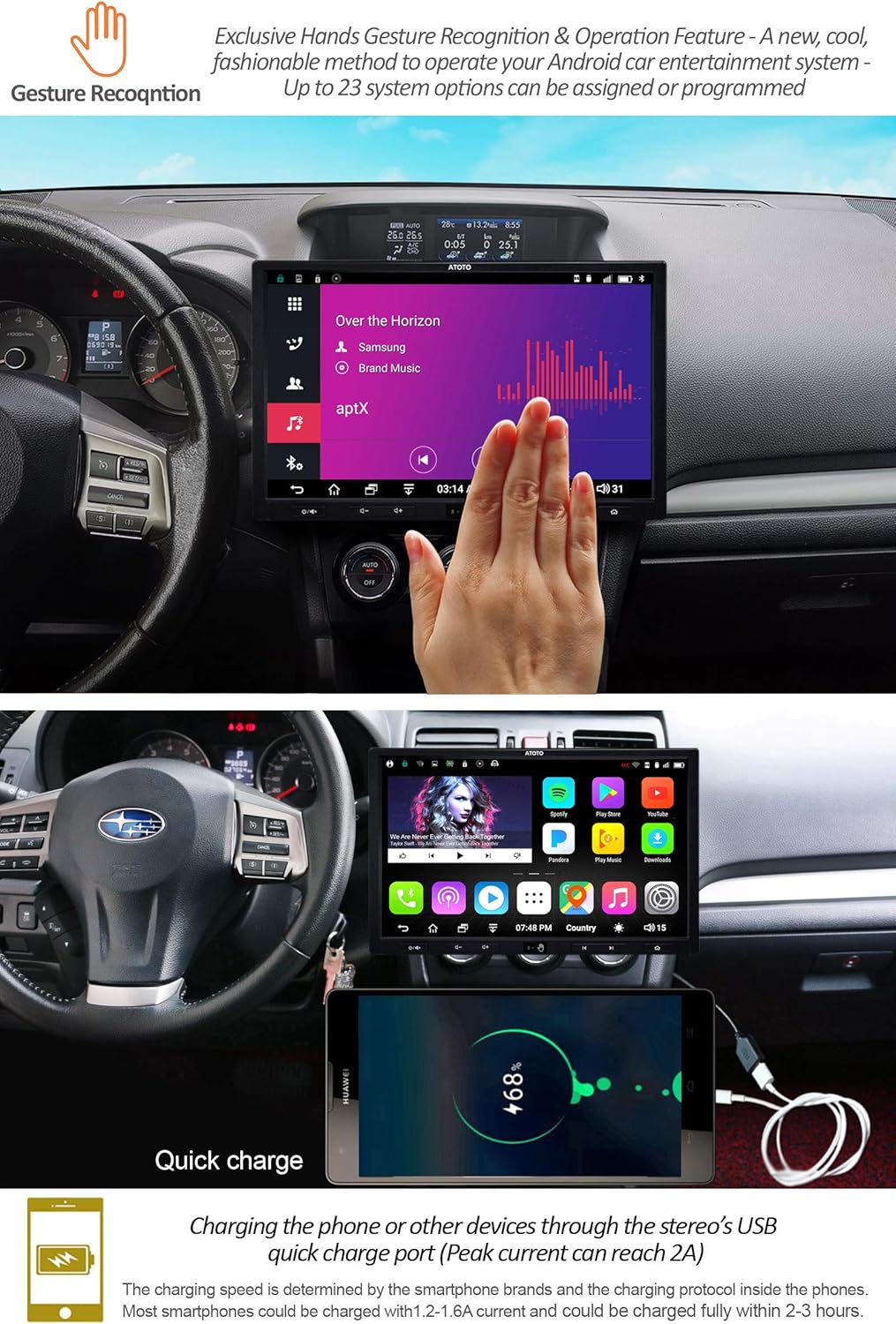
- సంజ్ఞ నియంత్రణ: (Available on Pro models) Recognizes 7 types of hand gestures (Move Up, Move Down, Move Forward, Move Backward, Circle clock-wise, Circle Counter-clockwise, Wave) with up to 23 programmable options.

Gesture Control Demonstration:
Video 5.3.1: Demonstration of the gesture recognition feature on the ATOTO A6 Pro, showing how hand movements control various functions like volume adjustment and track skipping.
5.4 కనెక్టివిటీ
- USB ఇంటర్ఫేస్లు: 4 USB interfaces for connecting USB drives and optional USB devices. Supports unlimited external storage devices (e.g., SSD Hard-drive) if powered by USB 500mA.
- మైక్రో SD స్లాట్: మీడియా కోసం files and dash DVR records.
- AUX Audio/Video Input: బాహ్య ఆడియో/వీడియో మూలాల కోసం.
- RCA ఆడియో అవుట్: 4-CH RCA Audio Out (2v) for external ampజీవితకారులు.
- Sub-woofer Out: Separate Sub-woof Out (0.8v) with manual/automatic mode.
- రివర్సింగ్ కెమెరా ఇన్పుట్: Dedicated input for a rearview కెమెరా.

6. నిర్వహణ
6.1. పరికరాన్ని శుభ్రపరచడం
- స్క్రీన్ మరియు వెలుపలి భాగాన్ని శుభ్రం చేయడానికి మృదువైన, పొడి వస్త్రాన్ని ఉపయోగించండి.
- మొండి మచ్చల కోసం, తేలికగా dampనీటితో లేదా స్క్రీన్-సేఫ్ క్లీనర్తో వస్త్రాన్ని తుడవండి.
- Avoid spraying cleaners directly onto the unit.
6.2. సాఫ్ట్వేర్ నవీకరణలు
Periodically check for system firmware updates to ensure optimal performance and access to new features. Updates can typically be found on the ATOTO official website or through the device's settings menu (if available).
6.3. సాధారణ సంరక్షణ
- Do not attempt to disassemble or modify the unit. This can void the warranty and cause damage.
- Protect the screen from sharp objects to prevent scratches.
7. ట్రబుల్షూటింగ్
If you encounter issues with your ATOTO A6 Pro, refer to the following common problems and solutions:
| సమస్య | సాధ్యమైన కారణం | పరిష్కారం |
|---|---|---|
| యూనిట్ పవర్ ఆన్ చేయదు. | తప్పు వైరింగ్, ఫ్యూజ్ పేలిపోయింది, వాహన బ్యాటరీ డిస్కనెక్ట్ చేయబడింది. | Check power connections, inspect vehicle fuses, ensure battery is connected. |
| స్పీకర్ల నుండి శబ్దం లేదు. | Speaker wires incorrectly connected, volume too low, mute activated. | Verify speaker wiring, increase volume, check if mute is active. |
| GPS signal is weak or unavailable. | GPS యాంటెన్నా సరిగ్గా ఇన్స్టాల్ చేయబడలేదు లేదా అడ్డుపడింది. | GPS యాంటెన్నా స్పష్టంగా ఉందని నిర్ధారించుకోండి view ఆకాశం నుండి మరియు సురక్షితంగా అనుసంధానించబడి ఉంది. |
| బ్లూటూత్ కనెక్షన్ సమస్యలు. | పరికరం జత చేసే మోడ్లో లేదు, జోక్యం, తప్పు జత చేసే ప్రక్రియ. | Ensure both devices are in pairing mode, clear previous pairings, try again. |
| టచ్స్క్రీన్ స్పందించలేదు. | Temporary software glitch, screen damage. | యూనిట్ను పునఃప్రారంభించండి. సమస్య కొనసాగితే, కస్టమర్ మద్దతును సంప్రదించండి. |
For further assistance, please refer to the support section or contact ATOTO customer service.
8. స్పెసిఫికేషన్లు
| ఫీచర్ | వివరాలు |
|---|---|
| మోడల్ సంఖ్య | A6Y1021PRB-G |
| ప్రదర్శించు | 10.1" 1024*600 5-Touch Capacitive Touchscreen, 600cd/m2, 178° IPS display |
| ఆపరేటింగ్ సిస్టమ్ | ATOTO AICE OS 9.x (based on Android 6.0 Marshmallow) |
| ప్రాసెసర్ | MTK 8127A Soc-based Quad-core 1.5Ghz CPU with ARM Mali-450 MP4 GPU |
| మెమరీ/నిల్వ | 2GB RAM / 32GB ఇంటర్నల్ స్టోరేజ్ |
| బ్లూటూత్ | Dual Bluetooth (BT1 5.0 with aptX, BT2 4.0) |
| Wi-Fi | Dual-band (2.4G & 5G) |
| ముందు-Ampజీవితకాలం | Max 4*49W BTL Amplifier (RMS 4*29W), 9-band EQ |
| GPS | Built-in GPS Receiver module with external GPS antenna |
| ఇన్పుట్లు | Reversing camera input, AUX Audio/Video input, 4 USB interfaces, 1 Micro SD slot |
| అవుట్పుట్లు | 4-CH RCA Audio Out (2v), Separate Sub-woof Out (0.8v) |
| Dimensions (Base) | 178mm x 100mm (Double DIN) |
| Dimensions (Screen) | 252mm x 155mm (10.1-inch floating display) |
| బరువు | 6.69 పౌండ్లు |
9. వారంటీ మరియు మద్దతు
ATOTO provides a manufacturer's warranty for this product. Please register your product for warranty purposes. Rooting the ATOTO A6 system is not covered by the manufacturer's warranty and may damage the device.
For detailed warranty information, product registration, and technical support, please visit the official ATOTO webసైట్ లేదా వారి కస్టమర్ సేవను నేరుగా సంప్రదించండి.
Official ATOTO Store: amazon.com/atoto


