1. పరిచయం
The EMART 61x72in Collapsible Green Screen is a portable and retractable chroma key panel designed for seamless background removal in various applications. Its wrinkle-resistant fabric and stable design make it ideal for streaming, photographic studios, and video conferencing. This manual provides detailed instructions to ensure optimal use and longevity of your green screen.

Figure 1: EMART 61x72in Collapsible Green Screen in extended position.
2. సెటప్ సూచనలు
Setting up your EMART Collapsible Green Screen is a quick and straightforward process, allowing you to create a professional backdrop in seconds.
- Adjust Support Feet: Locate the two adjustable feet at the base of the green screen case. Swivel them outwards to a 360-degree position to ensure maximum stability.
- Release Safety Locks: On the top surface of the case, locate and release the safety locks.
- Unfold the Box: Gently open the top lid of the case.
- Extend Backdrop Panel: Grasp the handle located at the top center of the screen. Pull the screen upwards. The pneumatic X-frame mechanism will automatically lock the screen at your desired height.
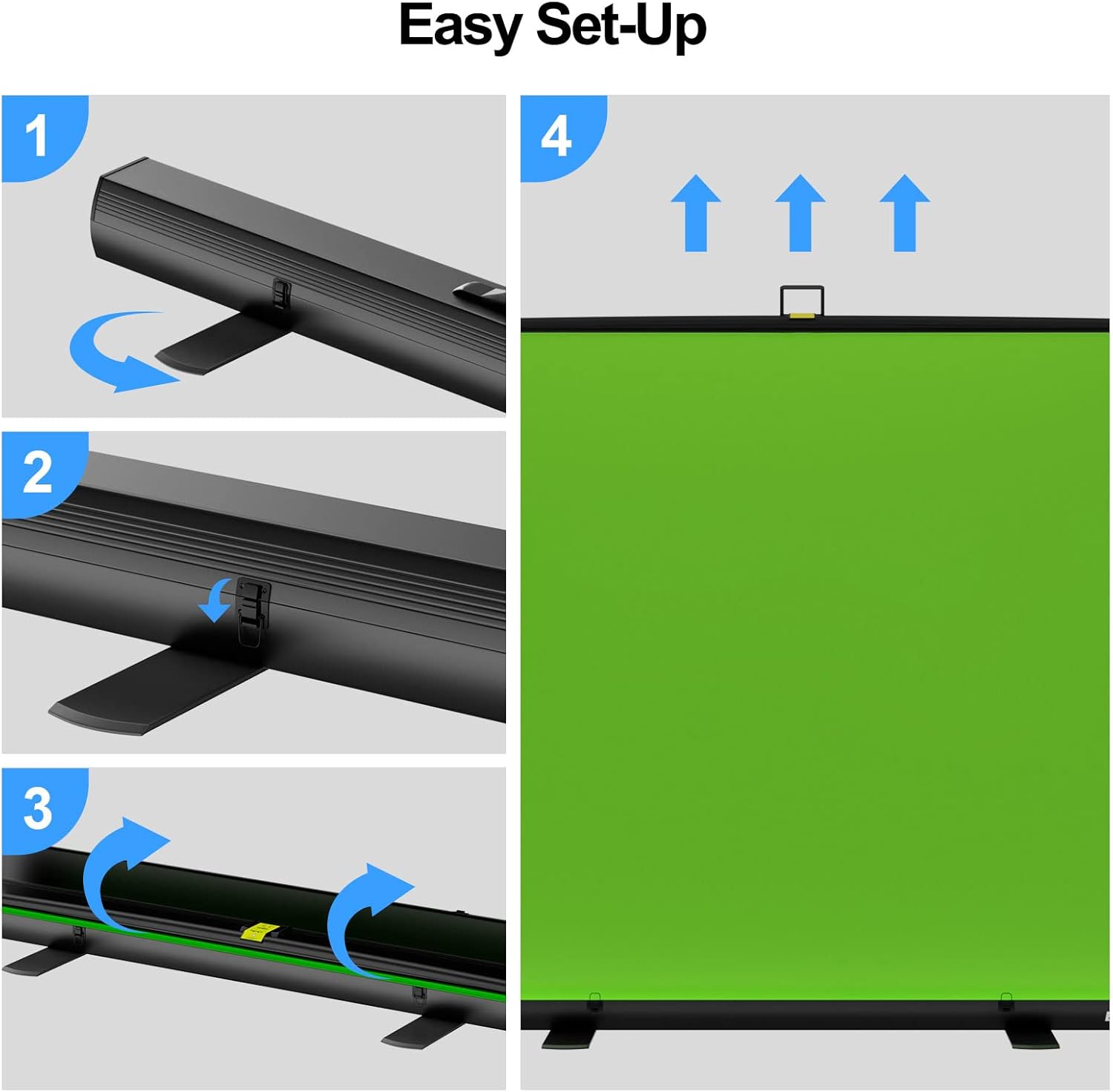
Figure 2: Easy four-step setup process for the green screen.

Figure 3: Adjustable legs provide stability, and the screen height can be stretched as needed.
3. ఆపరేటింగ్ సూచనలు
Once set up, the EMART green screen offers flexibility and performance for various creative needs.
- ఎత్తు సర్దుబాటు: The pneumatic X-frame allows for effortless adjustment of the screen's height. Simply pull up or gently push down on the top bar to achieve the desired vertical extension. The mechanism will hold the screen securely in place.
- Wrinkle-Resistant Fabric: The high-density, wrinkle-resistant fabric is optimized for camera chroma keying, ensuring clear and natural edges for your subjects. This minimizes color variation and simplifies post-production.
- స్థిరమైన నిర్మాణం: The double pneumatic rod structure at the back provides enhanced stability and precise positioning control for the screen.

Figure 4: Features include improved hydraulic tub parts for durability and a wrinkle-resistant fabric for optimal chroma keying.

Figure 5: The back of the screen features a stable double pneumatic rod structure for secure positioning.
The EMART green screen is suitable for a wide range of applications:
- ఫోటోగ్రఫి: Create professional-looking photos with custom backgrounds.
- వీడియో కాన్ఫరెన్సింగ్: Enhance your virtual meetings with dynamic and engaging backdrops.
- Streaming & Gaming: Immerse your audience with virtual environments for live streams and gaming content.
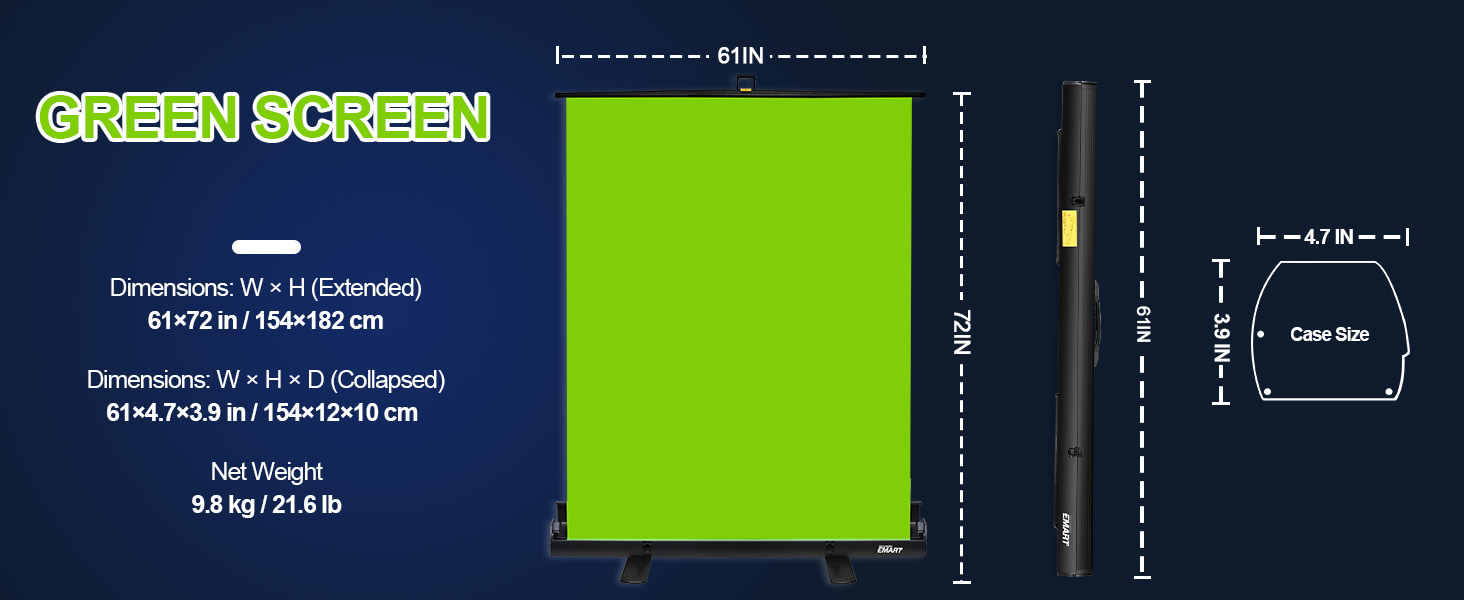
Figure 6: Versatile applications for the EMART green screen.
4. నిర్వహణ
Proper maintenance ensures the longevity and performance of your green screen.
- శుభ్రపరచడం: The green screen fabric should be hand washed only. Avoid machine washing or harsh chemicals to prevent damage to the material and color.
- నిల్వ: To retract the screen, gently push down on the top bar. The pneumatic mechanism will guide the screen back into its hard case. Once fully retracted, secure the safety locks and swivel the support feet back into their closed position. This compact design allows for easy transport and storage, saving space when not in use.
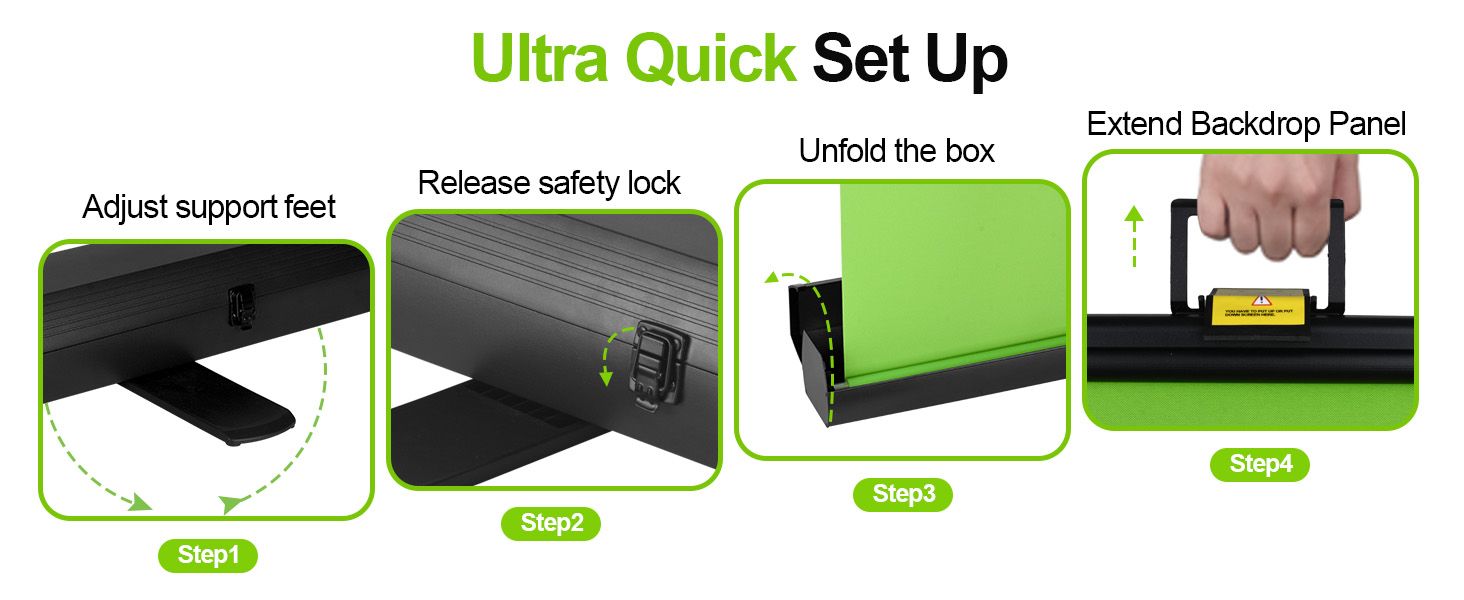
Figure 7: The collapsible design allows for easy transport and space-saving storage.
5. ట్రబుల్షూటింగ్
If you encounter any issues with your EMART green screen, consider the following:
- Screen Leaning: Ensure that both support feet at the base are fully extended and properly positioned to provide maximum stability. Uneven surfaces can also cause leaning; place the screen on a flat, stable surface.
- Wrinkles/Uneven Chroma Key: While the fabric is wrinkle-resistant, improper storage or handling can sometimes cause minor creases. Ensure the screen is fully extended and taut. For optimal chroma key results, ensure your green screen is evenly lit, avoiding shadows or hot spots.
- Difficulty Retracting/Extending: Check that the safety locks are fully disengaged before attempting to extend or retract the screen. Apply gentle, even pressure when operating the pneumatic mechanism. Avoid forcing the screen.
6. స్పెసిఫికేషన్లు
| ఫీచర్ | వివరాలు |
|---|---|
| ఉత్పత్తి కొలతలు (విస్తరించినవి) | 61.02 (wide) x 72.44 (high) x 0.04 (depth) inches (154 x 182 x 0.1 cm) |
| Product Dimensions (Retracted) | 3.94 x 4.72 x 61.02 అంగుళాలు (10 x 12 x 154 సెం.మీ.) |
| వస్తువు బరువు | 19.56 పౌండ్లు (8.89 కిలోగ్రాములు) |
| రంగు | ఆకుపచ్చ |
| మెటీరియల్ | Wrinkle-Resistant Fabric |
| మెకానిజం | Pneumatic X-frame with Hydraulic Tub |
| సంరక్షణ సూచనలు | హ్యాండ్ వాష్ మాత్రమే |
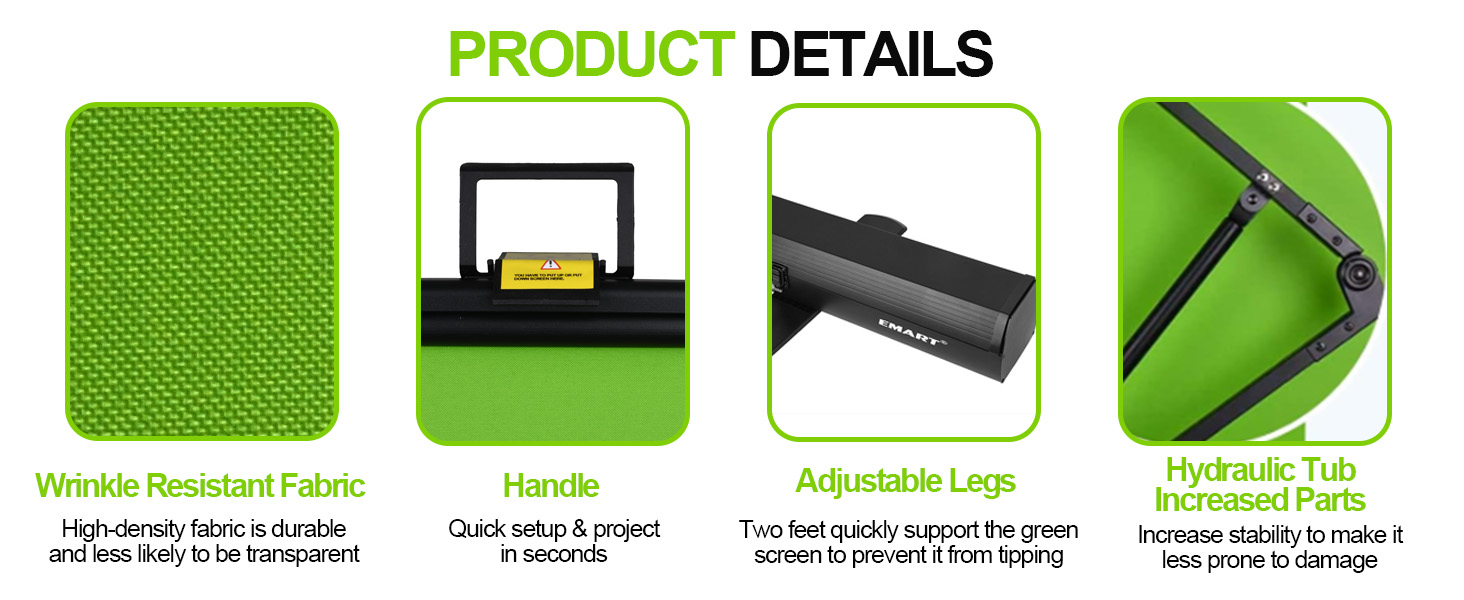
Figure 8: Detailed dimensions of the green screen in both extended and collapsed forms.
7. వారంటీ మరియు మద్దతు
EMART products are designed for durability and performance. This product typically comes with a 12-month warranty covering manufacturing defects.
For technical support, warranty claims, or any product-related inquiries, please refer to the contact information provided on the product packaging or visit the official EMART website. When contacting support, please have your product model number (green screen) and purchase details readily available.


