పరిచయం
This manual provides essential information for the safe and efficient operation of your VIZIO SB362An-F6 36-inch 2.1 Channel Soundbar with Built-in Dual Subwoofers. Please read these instructions thoroughly before use and retain them for future reference.

మూర్తి 1: ముందు view of the VIZIO SB362An-F6 Soundbar.
పెట్టెలో ఏముంది
ప్యాకేజింగ్లో అన్ని భాగాలు ఉన్నాయని నిర్ధారించుకోండి:
- VIZIO SB362An-F6 36-inch 2.1 Channel Soundbar
- రిమోట్ కంట్రోల్ (2 AAA బ్యాటరీలు అవసరం, చేర్చబడలేదు)
- పవర్ కార్డ్
- ఆప్టికల్ కేబుల్
- 3.5mm to 3.5mm Audio Cable (Auxiliary Cable)
- USB కేబుల్
- వాల్ మౌంటింగ్ బ్రాకెట్లు (2)
- మౌంటు గైడ్

మూర్తి 2: టాప్ view of the soundbar with integrated controls.
సెటప్
ప్లేస్మెంట్ ఎంపికలు
The soundbar can be placed in two orientations: laid flat or upright. This allows for sound projection either upward or forward, depending on your preference and room acoustics.
- ఫ్లాట్ ప్లేస్మెంట్: Position the soundbar horizontally on a flat surface, such as a TV stand or shelf, directly below your television.
- నిటారుగా ఉంచడం: The soundbar can also be positioned vertically. Ensure stability in this orientation.
- వాల్ మౌంటు: Utilize the included brackets and mounting guide to securely attach the soundbar to a wall.

మూర్తి 3: వైపు view of the soundbar, highlighting its trapezoid contour.
సౌండ్బార్ని కనెక్ట్ చేస్తోంది
- పవర్ కనెక్షన్: పవర్ కార్డ్ను సౌండ్బార్ యొక్క పవర్ ఇన్పుట్కి మరియు తరువాత వాల్ అవుట్లెట్కి కనెక్ట్ చేయండి.
- Audio Connection (Choose One):
- ఆప్టికల్ కేబుల్: For optimal digital audio quality, connect one end of the optical cable to the soundbar's OPTICAL input and the other end to your TV's OPTICAL OUT port.
- Auxiliary Cable: Connect one end of the 3.5mm audio cable to the soundbar's AUX input and the other end to your TV's 3.5mm audio output or headphone jack.
- USB కేబుల్: Connect the USB cable to the soundbar's USB port and to a compatible USB audio source.
- బ్లూటూత్ పెయిరింగ్: To stream audio wirelessly from a mobile device, activate Bluetooth on your device and select the VIZIO soundbar from the list of available devices. Refer to your device's manual for specific pairing instructions.
ఆపరేటింగ్ సూచనలు
The soundbar features intuitive controls for an enhanced audio experience.
రిమోట్ కంట్రోల్ విధులు
Use the included remote control to access all soundbar functions. Ensure batteries are correctly installed.
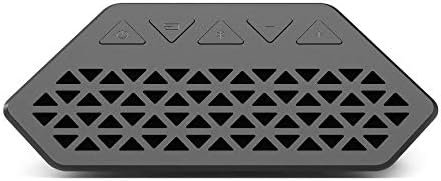
Figure 4: VIZIO Soundbar remote control.
- శక్తి: సౌండ్బార్ను ఆన్ లేదా ఆఫ్ చేస్తుంది.
- ఇన్పుట్: Cycles through available audio inputs (Optical, Aux, USB, Bluetooth).
- వాల్యూమ్ (+/-): మాస్టర్ వాల్యూమ్ స్థాయిని సర్దుబాటు చేస్తుంది.
- మ్యూట్: ఆడియోను మ్యూట్ చేస్తుంది లేదా అన్మ్యూట్ చేస్తుంది.
- EQ మోడ్లు: Switch between preset equalizer modes (e.g., Music, Movie) to optimize audio for different content types.
- బాస్/ట్రిబుల్: Adjust bass and treble levels to customize your sound.
- బ్లూటూత్ పెయిరింగ్: బ్లూటూత్ జత చేసే మోడ్ను ప్రారంభిస్తుంది.
ఇంటిగ్రేటెడ్ కంట్రోల్స్
Basic controls are also available on the soundbar itself, typically located on the top or side panel.
- పవర్ బటన్: సౌండ్బార్ను ఆన్ లేదా ఆఫ్ చేస్తుంది.
- ఇన్పుట్ బటన్: Cycles through audio inputs.
- వాల్యూమ్ బటన్లు: మాస్టర్ వాల్యూమ్ను సర్దుబాటు చేస్తుంది.

చిత్రం 5: అంతర్గత view highlighting the integrated dual subwoofers for enhanced bass.
నిర్వహణ
మీ సౌండ్బార్ యొక్క దీర్ఘాయువు మరియు సరైన పనితీరును నిర్ధారించడానికి, ఈ సాధారణ నిర్వహణ మార్గదర్శకాలను అనుసరించండి:
- శుభ్రపరచడం: Gently wipe the soundbar's surface with a soft, dry cloth. Avoid using liquid cleaners or abrasive materials, as they may damage the finish.
- వెంటిలేషన్: Ensure that the soundbar's vents are not obstructed to prevent overheating.
- నిల్వ: సౌండ్బార్ను ఎక్కువసేపు నిల్వ ఉంచినట్లయితే, దానిని పవర్ నుండి డిస్కనెక్ట్ చేసి, చల్లని, పొడి ప్రదేశంలో నిల్వ చేయండి.
ట్రబుల్షూటింగ్
If you encounter issues with your VIZIO soundbar, refer to the following common solutions:
| సమస్య | పరిష్కారం |
|---|---|
| పవర్ లేదు | Ensure the power cord is securely connected to both the soundbar and a working electrical outlet. |
| సౌండ్ లేదు | Verify the correct input source is selected on the soundbar. Check all audio cable connections (Optical, Aux, USB). Ensure the soundbar and TV are not muted and volume is up. |
| బ్లూటూత్ డిస్కనక్షన్ | Ensure your Bluetooth device is within range (approx. 30 feet) and not connected to another device. Try re-pairing the device. |
| పేలవమైన ధ్వని నాణ్యత | Adjust EQ modes, bass, and treble settings. Ensure audio cables are not damaged. For optical connections, check the cable for kinks or damage. |
స్పెసిఫికేషన్లు
- మోడల్ పేరు: Vizio 36" 2.1-Channel Sound Bar
- మోడల్ సంఖ్య: SB362AN-F6
- స్పీకర్ రకం: Soundbar, Subwoofer (Built-in Dual Subwoofers)
- సరౌండ్ సౌండ్ ఛానెల్ కాన్ఫిగరేషన్: 2.1
- స్పీకర్ గరిష్ట అవుట్పుట్ పవర్: 150 వాట్స్
- కనెక్టివిటీ టెక్నాలజీ: Auxiliary, Optical, USB, Bluetooth, Wi-Fi
- నియంత్రణ పద్ధతి: రిమోట్
- వస్తువు బరువు: 7.5 పౌండ్లు
- మెటీరియల్: మెటల్, ప్లాస్టిక్
- మౌంటు రకం: వాల్ మౌంట్
- UPC: 845226016653
వారంటీ మరియు మద్దతు
Your VIZIO SB362An-F6 Soundbar comes with a ఒక సంవత్సరం వారంటీ from the date of purchase. For detailed warranty information, technical support, or service inquiries, please refer to the official VIZIO support channels or visit their webసైట్.
ఉత్పత్తి ముగిసిందిview వీడియో
ఈ వీడియో సాధారణ వివరణను అందిస్తుందిview of the VIZIO Soundbar. Please refer to the official product specifications in this manual for exact features and connectivity options of the SB362An-F6 model.


