పరిచయం
This manual provides comprehensive instructions for the installation, operation, and maintenance of your Lorex Solar Panel, designed exclusively for U471AA 2K Wire-Free cameras. This solar panel offers an environmentally-friendly solution to continuously power your camera, extending battery life and ensuring uninterrupted surveillance.
భద్రతా సమాచారం
- Ensure all connections are secure and waterproof to prevent damage from moisture.
- Do not attempt to disassemble or modify the solar panel. This may void the warranty and cause damage.
- Install the solar panel in a location where it is not easily accessible to unauthorized individuals.
- Avoid placing the solar panel near flammable materials or in areas with extreme temperatures outside its operating range.
- Use only the provided mounting hardware to ensure secure installation.
ప్యాకేజీ విషయాలు
మీ ప్యాకేజీలో అన్ని అంశాలు ఉన్నాయని ధృవీకరించండి:
- Lorex Solar Panel (Model: ACSOL2B)
- మౌంటు బ్రాకెట్
- మౌంటు స్క్రూలు మరియు వాల్ ప్లగ్లు
- USB Charging Cable (integrated with solar panel)
ఉత్పత్తి ముగిసిందిview
The Lorex Solar Panel is designed to provide continuous power to your compatible Lorex U471AA 2K Wire-Free cameras. It features a durable, weather-resistant design suitable for outdoor use.

మూర్తి 1: ముందు view of the Lorex Solar Panel, showing the photovoltaic cells and the integrated mounting base.

మూర్తి 2: కోణీయ view of the Lorex Solar Panel, highlighting the adjustable mounting bracket for versatile positioning.
- Photovoltaic Cells: Convert sunlight into electrical energy.
- మౌంటు బ్రాకెట్: సౌకర్యవంతమైన స్థానం మరియు కోణ సర్దుబాటు కోసం అనుమతిస్తుంది.
- USB ఛార్జింగ్ కేబుల్: Connects the solar panel to the camera.
- LED సూచిక: Provides status information (e.g., charging status).
- IP66 రేటింగ్: Ensures the panel is weather-resistant against dust and powerful water jets.
సెటప్
1. సంస్థాపనా స్థానమును ఎంచుకోవడం
Optimal performance of the solar panel depends on its placement. Select a location that receives direct sunlight for the majority of the day, ideally 4-6 hours of direct sunlight. Avoid areas with significant shade from trees, buildings, or other obstructions.
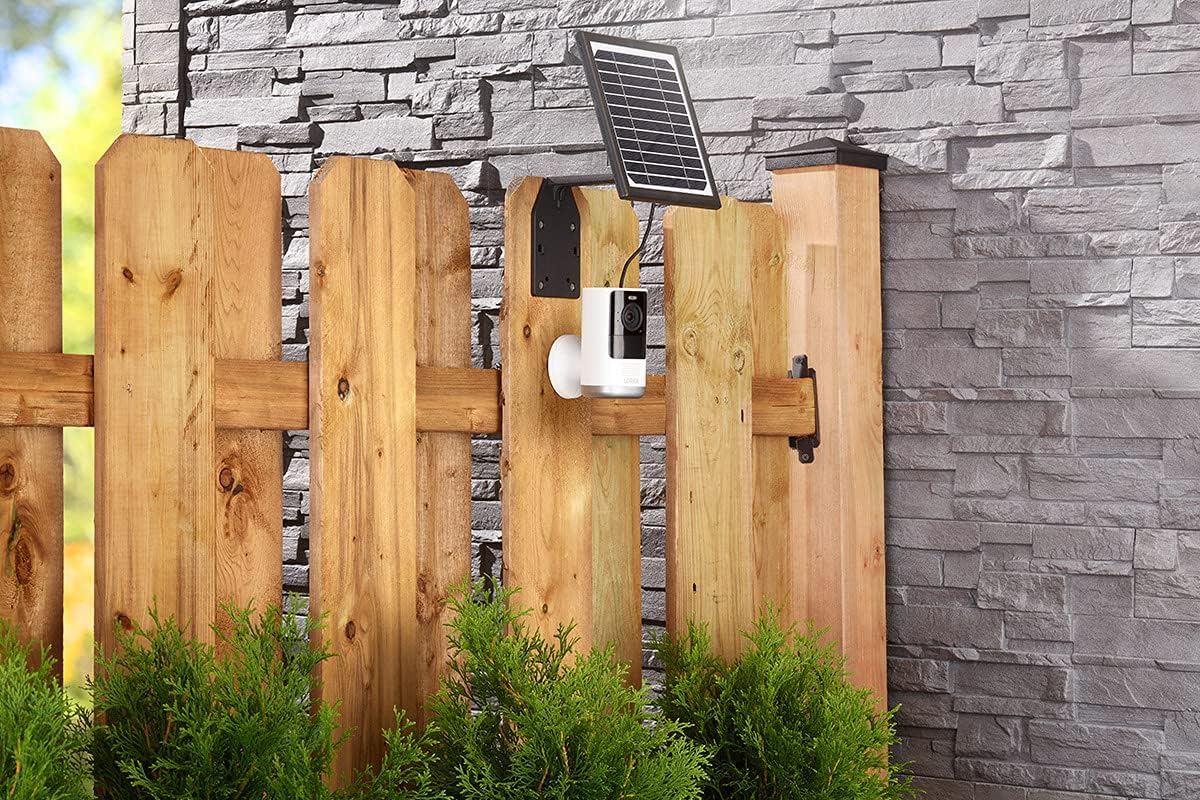
మూర్తి 3: Example installation on a wooden fence, demonstrating outdoor placement.

మూర్తి 4: Example installation on a stone wall, showing a common mounting surface.
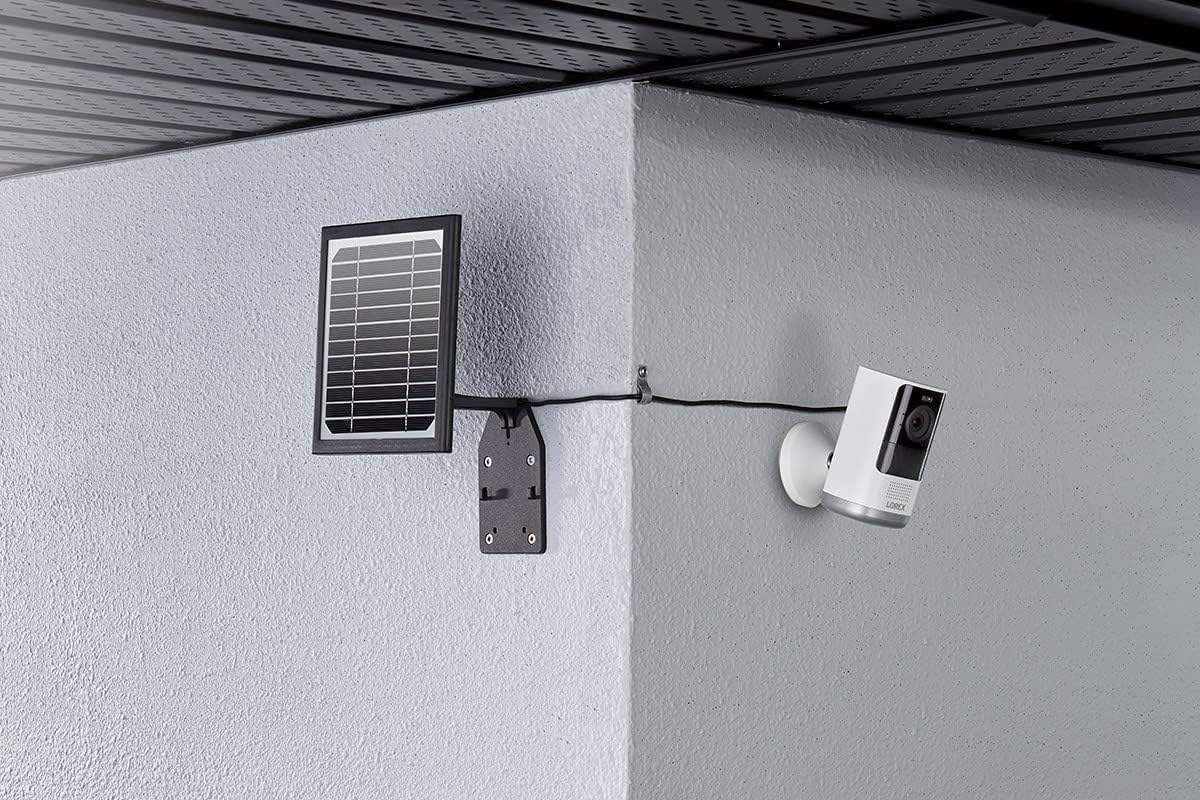
మూర్తి 5: Example installation in a corner, illustrating flexible mounting options.
2. సోలార్ ప్యానెల్ మౌంట్ చేయడం
- Position the mounting bracket against the chosen surface. Use a pencil to mark the drill holes.
- Drill pilot holes at the marked locations. If mounting on masonry or stucco, insert the wall plugs.
- అందించిన స్క్రూలను ఉపయోగించి మౌంటు బ్రాకెట్ను ఉపరితలంపై భద్రపరచండి.
- Attach the solar panel to the mounting bracket. Adjust the angle of the solar panel to maximize sun exposure. The panel should face the direction that receives the most direct sunlight throughout the day.
3. కెమెరాకు కనెక్ట్ చేస్తోంది
The solar panel comes with an integrated USB charging cable. Connect this cable to the charging port on your Lorex U471AA 2K Wire-Free camera.

మూర్తి 6: వైపు view illustrating the connection of the solar panel to the camera via the charging cable.
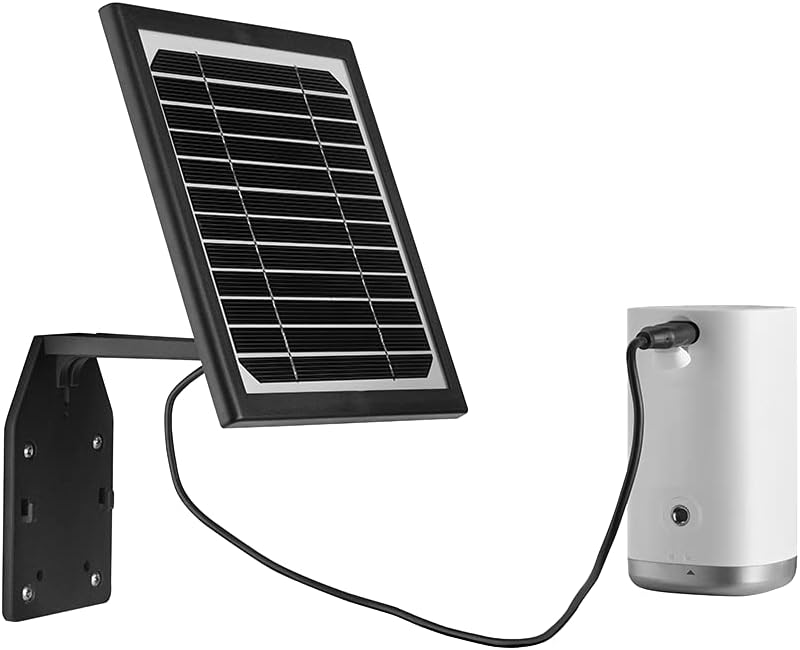
మూర్తి 7: ముందు view of the solar panel connected to the camera, showing the cable routing.
Ensure the connection is snug to maintain weather resistance. Once connected, the solar panel will begin charging the camera's battery when exposed to sufficient sunlight. The LED indicator on the solar panel will illuminate to confirm charging status.
ఆపరేటింగ్
The Lorex Solar Panel operates automatically. When exposed to sunlight, it converts solar energy into electrical energy, which is then used to charge the connected U471AA 2K Wire-Free camera's internal battery. The panel is designed to provide a trickle charge, maintaining the camera's battery level and reducing the need for manual recharging.
- ఛార్జింగ్ సూచిక: Refer to your camera's user manual for specific battery status indicators. The solar panel itself may have an LED that indicates charging activity.
- శక్తి సామర్థ్యం: The panel is designed for high efficiency, even in less than ideal sunlight conditions, though direct sunlight is always preferred for optimal performance.
నిర్వహణ
Regular maintenance ensures the longevity and efficiency of your solar panel.
- శుభ్రపరచడం: కాలానుగుణంగా సోలార్ ప్యానెల్ ఉపరితలాన్ని మృదువైన, damp cloth to remove dust, dirt, or debris that may accumulate and reduce efficiency. Do not use abrasive cleaners or harsh chemicals.
- అడ్డంకి తనిఖీ: Regularly check for any new obstructions (e.g., growing tree branches, new constructions) that might cast shadows on the panel and reduce its sun exposure.
- కేబుల్ తనిఖీ: Inspect the charging cable and connections for any signs of wear, damage, or corrosion. Ensure the connection to the camera remains secure and waterproof.
- మౌంటు భద్రత: Periodically check that the mounting screws and bracket are still securely fastened, especially after strong winds or storms.
ట్రబుల్షూటింగ్
| సమస్య | సాధ్యమైన కారణం | పరిష్కారం |
|---|---|---|
| Camera battery not charging. | తగినంత సూర్యకాంతి. ప్యానెల్ ఉపరితలం మురికిగా ఉంది. కేబుల్ కనెక్షన్ వదులుగా ఉంది లేదా దెబ్బతింది. Camera battery issue. | Relocate panel to an area with more direct sunlight. ప్యానెల్ ఉపరితలాన్ని శుభ్రం చేయండి. Check and secure the USB cable connection. Inspect for damage. Test camera with a standard USB charger to rule out camera battery issues. |
| Solar panel LED not illuminating. | No sunlight. Panel is faulty. Cable not connected. | Ensure panel is exposed to direct sunlight. Contact Lorex support if problem persists after ensuring sunlight and connection. Verify the USB cable is securely connected to the camera. |
| Panel appears damaged after installation. | సరికాని సంస్థాపన. Environmental factors (e.g., severe weather). | Review installation steps to ensure correct mounting. Contact Lorex support for assistance if damage is significant. |
స్పెసిఫికేషన్లు
- బ్రాండ్: లోరెక్స్
- మోడల్ సంఖ్య: ACSOL2B
- మెటీరియల్: సిలికాన్
- సమర్థత: అధిక సామర్థ్యం
- కనెక్టర్ రకం: USB
- గరిష్ట శక్తి: 3 వాట్స్
- వస్తువు బరువు: 1.45 పౌండ్లు
- ప్యాకేజీ కొలతలు: 8.78 x 7.32 x 3.82 అంగుళాలు
- IP రేటింగ్: IP66 (వాతావరణ నిరోధకం)
- అనుకూలత: Lorex U471AA 2K Wire-Free Cameras
వారంటీ మరియు మద్దతు
For warranty information and technical support, please refer to the official Lorex website or contact Lorex customer service directly. Keep your purchase receipt as proof of purchase for warranty claims.
Lorex Support: www.lorex.com/support


