పరిచయం
ఈ మాన్యువల్ Amazon Fire 7 Tablet (2019 విడుదల) కోసం సమగ్ర సూచనలను అందిస్తుంది. ఇది పరికర సెటప్, కార్యాచరణ విధానాలు, నిర్వహణ మార్గదర్శకాలు, ట్రబుల్షూటింగ్ చిట్కాలు మరియు వివరణాత్మక ఉత్పత్తి వివరణలను కవర్ చేస్తుంది. మీ పరికరం యొక్క సరైన ఉపయోగం మరియు సంరక్షణను నిర్ధారించుకోవడానికి దయచేసి ఈ మాన్యువల్ను పూర్తిగా చదవండి.
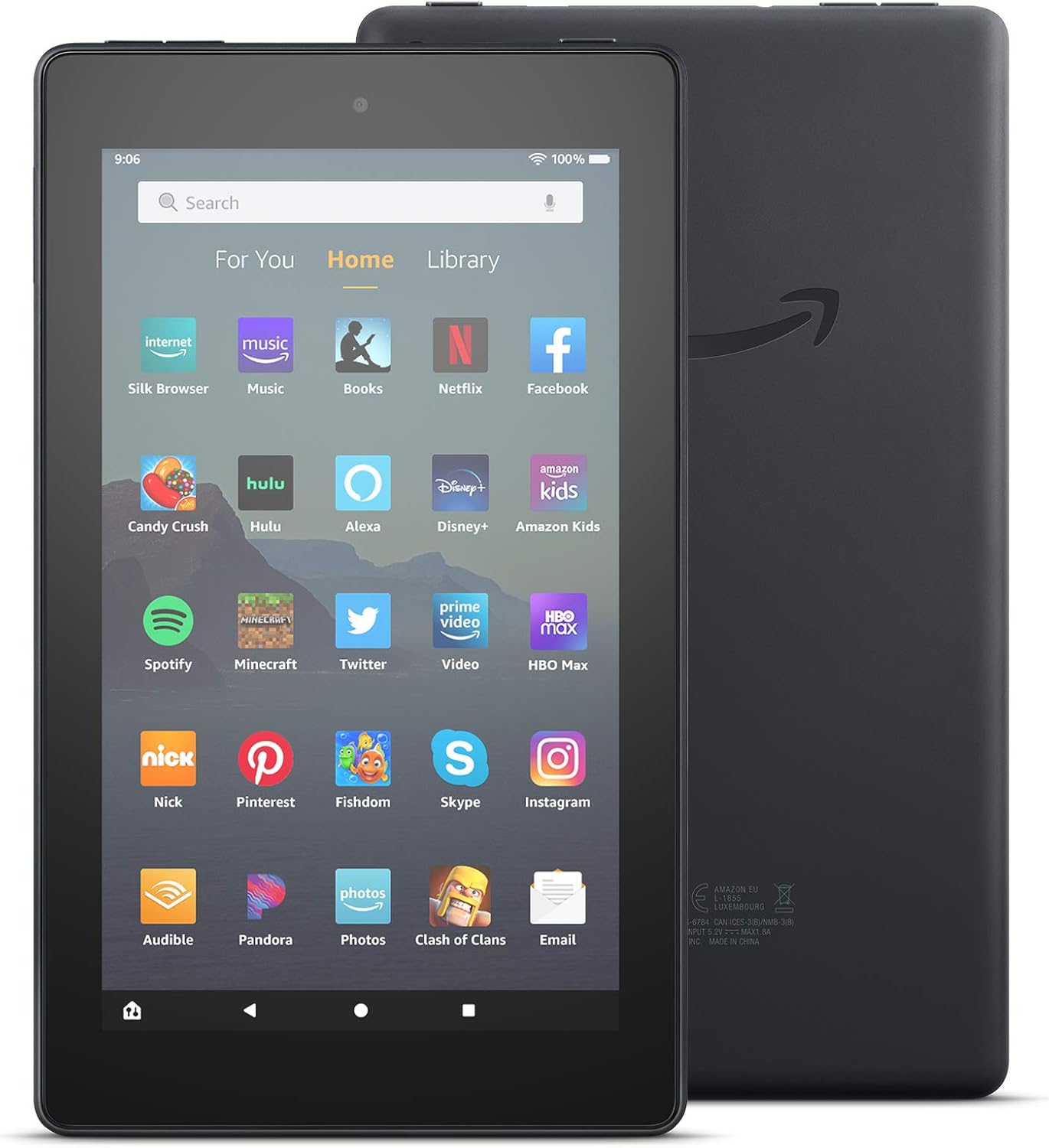
చిత్రం: ముందు మరియు వెనుక view అమెజాన్ ఫైర్ 7 టాబ్లెట్ (2019 విడుదల), షోcasing దాని డిజైన్ మరియు వెనుక భాగంలో అమెజాన్ లోగో.
పెట్టెలో ఏముంది
మీ అమెజాన్ ఫైర్ 7 టాబ్లెట్ను అన్బాక్సింగ్ చేసిన తర్వాత, ఈ క్రింది అంశాలు చేర్చబడ్డాయో లేదో ధృవీకరించండి:
- ఫైర్ 7 టాబ్లెట్
- USB 2.0 కేబుల్ (మైక్రో-బి కనెక్టర్)
- 5W పవర్ అడాప్టర్
- త్వరిత ప్రారంభ గైడ్
సెటప్
1. మీ టాబ్లెట్ను ఛార్జ్ చేస్తోంది
ప్రారంభ ఉపయోగం ముందు, మీ ఫైర్ 7 టాబ్లెట్ను పూర్తిగా ఛార్జ్ చేయండి. చేర్చబడిన USB 2.0 కేబుల్ను టాబ్లెట్ యొక్క మైక్రో-B పోర్ట్ మరియు 5W పవర్ అడాప్టర్కు కనెక్ట్ చేయండి. అడాప్టర్ను వాల్ అవుట్లెట్లోకి ప్లగ్ చేయండి. పూర్తిగా ఛార్జ్ చేయడానికి సాధారణంగా దాదాపు 4 గంటలు పడుతుంది.
2. పవర్ చేయడం ఆన్/ఆఫ్
- పవర్ ఆన్ చేయడానికి: అమెజాన్ లోగో కనిపించే వరకు టాబ్లెట్ వైపున ఉన్న పవర్ బటన్ను నొక్కి పట్టుకోండి.
- పవర్ ఆఫ్ చేయడానికి: పవర్ బటన్ను నొక్కి పట్టుకోండి, ఆపై స్క్రీన్పై ఉన్న ఎంపికల నుండి "పవర్ ఆఫ్" ఎంచుకోండి.
3. ప్రారంభ సెటప్ మరియు Wi-Fi కనెక్షన్
ప్రారంభ సెటప్ను పూర్తి చేయడానికి ఆన్-స్క్రీన్ ప్రాంప్ట్లను అనుసరించండి. ఇందులో మీ భాషను ఎంచుకోవడం, Wi-Fi నెట్వర్క్కు కనెక్ట్ చేయడం మరియు మీ పరికరాన్ని Amazon ఖాతాతో నమోదు చేయడం వంటివి ఉంటాయి. టాబ్లెట్ డ్యూయల్-బ్యాండ్ 802.11a/b/g/n Wi-Fi నెట్వర్క్లకు మద్దతు ఇస్తుంది.
4. మైక్రో SD కార్డ్ని చొప్పించడం
నిల్వను విస్తరించడానికి, నియమించబడిన స్లాట్లో మైక్రో SD కార్డ్ను చొప్పించండి. ఫైర్ 7 టాబ్లెట్ 512 GB వరకు అదనపు నిల్వను సపోర్ట్ చేస్తుంది. కొన్ని అప్లికేషన్లను అంతర్గత నిల్వలో ఇన్స్టాల్ చేయాల్సి రావచ్చు.
మీ ఫైర్ 7 టాబ్లెట్ను ఆపరేట్ చేస్తోంది
ప్రాథమిక నావిగేషన్
ఫైర్ 7 టాబ్లెట్ 7-అంగుళాల IPS టచ్స్క్రీన్ డిస్ప్లేను కలిగి ఉంది. ట్యాప్ చేయడం, స్వైప్ చేయడం మరియు పించ్ చేయడం ద్వారా నావిగేట్ చేయండి. హోమ్ స్క్రీన్ మీ యాప్లు, కంటెంట్ మరియు సెట్టింగ్లకు యాక్సెస్ను అందిస్తుంది.

చిత్రం: వివిధ రంగులలో అనేక అమెజాన్ ఫైర్ 7 టాబ్లెట్లు, షోక్asinవారి హోమ్ స్క్రీన్లు Netflix, Spotify మరియు Zoom వంటి వివిధ అప్లికేషన్ చిహ్నాలతో నిండి ఉన్నాయి.
అలెక్సాను ఉపయోగించడం
మీ ఫైర్ 7 టాబ్లెట్లో హ్యాండ్స్-ఫ్రీ అలెక్సా ఉంది. యాక్టివేట్ చేయడానికి, "అలెక్సా" అని చెప్పి, ఆ తర్వాత మీ కమాండ్ చెప్పండి. మీరు పరికర సెట్టింగ్లలో అలెక్సాను ఆన్ లేదా ఆఫ్ కూడా టోగుల్ చేయవచ్చు.

చిత్రం: అమెజాన్ ఫైర్ 7 టాబ్లెట్ సంగీతం ప్లే చేస్తోంది, దిగువన స్పీచ్ బబుల్ అలెక్సా వాయిస్ కమాండ్ను సూచిస్తుంది: "అలెక్సా, షాన్ మెండిస్ ప్లే చేయండి."
అప్లికేషన్లు మరియు కంటెంట్
Amazon Appstore నుండి అప్లికేషన్లను యాక్సెస్ చేయండి మరియు డౌన్లోడ్ చేసుకోండి. స్ట్రీమింగ్, సోషల్ మీడియా మరియు ఉత్పాదకత కోసం టాబ్లెట్ ప్రసిద్ధ యాప్లకు మద్దతు ఇస్తుంది. Google Playకి మద్దతు లేదని గమనించండి.
- ఇమెయిల్ మరియు ఉత్పాదకత: ఇమెయిల్ తనిఖీ చేయండి, వీడియో కాల్స్ చేయండి, షాపింగ్ జాబితాలను నవీకరించండి మరియు రిమైండర్లను సెట్ చేయండి. Zoom, Outlook మరియు OneNote వంటి యాప్లను ఉపయోగించండి.
- వినోదం: నెట్ఫ్లిక్స్, ఫేస్బుక్, హులు, ఇన్స్ వంటి యాప్లను ఆస్వాదించండిtagరామ్, టిక్టాక్ మరియు మరిన్ని.
- పఠనం: ఈ-పుస్తకాలు చదవడానికి టాబ్లెట్ను ఉపయోగించండి.

చిత్రం: అమెజాన్ ఫైర్ 7 టాబ్లెట్ ఇమెయిల్ ఇన్బాక్స్ను ప్రదర్శిస్తోంది, అనేక చదవని సందేశాలను చూపిస్తోంది.

చిత్రం: అమెజాన్ ఫైర్ 7 టాబ్లెట్ పట్టుకున్న వ్యక్తి, "వేర్ ది క్రాడాడ్స్ సింగ్" అనే ఇ-బుక్ చదువుతున్నాడు.
కెమెరా ఫంక్షనాలిటీ
ఫైర్ 7 టాబ్లెట్ 2 MP ముందు మరియు వెనుక కెమెరాలతో అమర్చబడి ఉంది, ఇవి 720p HD వీడియో రికార్డింగ్ సామర్థ్యాన్ని కలిగి ఉంటాయి.
ఆడియో
ఈ పరికరంలో ఇంటిగ్రేటెడ్ స్పీకర్ మరియు హెడ్ఫోన్ల కోసం 3.5 mm స్టీరియో జాక్ ఉన్నాయి. బ్లూటూత్ అంతర్నిర్మితంగా ఉంటుంది, A2DP అనుకూల స్టీరియో హెడ్ఫోన్లు, స్పీకర్లు, మైక్రోఫోన్లు మరియు LE ఉపకరణాలకు మద్దతు ఇస్తుంది.
యాక్సెసిబిలిటీ ఫీచర్లు
ఫైర్ 7 టాబ్లెట్ వివిధ యాక్సెసిబిలిటీ ఎంపికలను అందిస్తుంది:
- వాయిస్View స్క్రీన్ రీడర్: దృష్టి లోపం ఉన్న వినియోగదారులకు టెక్స్ట్-టు-స్పీచ్ లేదా రిఫ్రెషబుల్ బ్రెయిలీ డిస్ప్లే యాక్సెస్ను అందిస్తుంది.
- స్క్రీన్ మాగ్నిఫైయర్: జూమ్ ఇన్ మరియు అవుట్ చేయడానికి మరియు స్క్రీన్ చుట్టూ ప్యాన్ చేయడానికి అనుమతిస్తుంది.
- సెట్టింగ్లు: క్లోజ్డ్ క్యాప్షనింగ్, ఫాంట్ సైజు, హై కాంట్రాస్ట్ టెక్స్ట్, కలర్ ఇన్వర్షన్, కలర్ కరెక్షన్ మరియు స్టీరియోను మోనో ఆడియోగా మార్చడం కోసం ఎంపికలను కలిగి ఉంటుంది.
నిర్వహణ
బ్యాటరీ లైఫ్ ఆప్టిమైజేషన్
ఈ టాబ్లెట్ చదవడానికి 7 గంటల వరకు వినియోగాన్ని అందిస్తుంది, web బ్రౌజింగ్, వీడియో చూడటం మరియు సంగీతం వినడం. పరికర సెట్టింగ్లు, వినియోగ విధానాలు మరియు ఇతర అంశాల ఆధారంగా బ్యాటరీ జీవితకాలం మారుతుంది. బ్యాటరీ పనితీరును ఆప్టిమైజ్ చేయడానికి:
- స్క్రీన్ ప్రకాశాన్ని సర్దుబాటు చేయండి.
- ఉపయోగించని అప్లికేషన్లను మూసివేయండి.
- ఉపయోగంలో లేనప్పుడు Wi-Fi లేదా బ్లూటూత్ను నిలిపివేయండి.
నిల్వ నిర్వహణ
ఈ టాబ్లెట్ 16 GB (యూజర్ కు 9.4 GB అందుబాటులో ఉంది) లేదా 32 GB (యూజర్ కు 23.6 GB అందుబాటులో ఉంది) అంతర్గత నిల్వతో వస్తుంది. అదనపు నిల్వ కోసం మైక్రో SD కార్డ్ని ఉపయోగించండి. క్రమం తప్పకుండా రీview మరియు అనవసరమైన వాటిని తొలగించండి fileస్థలాన్ని ఖాళీ చేయడానికి లు లేదా అప్లికేషన్లను ఉపయోగించండి.
సాఫ్ట్వేర్ నవీకరణలు
తాజా ఫీచర్లు మరియు భద్రతా మెరుగుదలల నుండి ప్రయోజనం పొందడానికి మీ టాబ్లెట్ సాఫ్ట్వేర్ తాజాగా ఉందని నిర్ధారించుకోండి. Wi-Fiకి కనెక్ట్ చేసినప్పుడు అప్డేట్లు సాధారణంగా స్వయంచాలకంగా డౌన్లోడ్ చేయబడతాయి. మీరు పరికర సెట్టింగ్లలో మాన్యువల్గా అప్డేట్ల కోసం తనిఖీ చేయవచ్చు.
ట్రబుల్షూటింగ్
మీ ఫైర్ 7 టాబ్లెట్తో మీకు సమస్యలు ఎదురైతే, ఈ క్రింది సాధారణ పరిష్కారాలను పరిగణించండి:
- పరికరం స్పందించడం లేదు: రీస్టార్ట్ చేయమని బలవంతం చేయడానికి పవర్ బటన్ను 20-30 సెకన్ల పాటు నొక్కి పట్టుకోండి.
- Wi-Fi కనెక్టివిటీ సమస్యలు:
- సెట్టింగ్లలో Wi-Fi ప్రారంభించబడిందని నిర్ధారించుకోండి.
- మీ Wi-Fi రూటర్ను పునఃప్రారంభించండి.
- నెట్వర్క్ను మర్చిపోయి తిరిగి కనెక్ట్ చేయండి.
- బ్యాటరీ త్వరగా ఆరిపోతుంది: "బ్యాటరీ లైఫ్ ఆప్టిమైజేషన్" విభాగాన్ని చూడండి. స్క్రీన్ బ్రైట్నెస్ తగ్గించి, బ్యాక్గ్రౌండ్ యాప్లను మూసివేయండి.
- నెమ్మదిగా పనితీరు: యాప్ కాష్లను క్లియర్ చేయండి, ఉపయోగించని యాప్లను అన్ఇన్స్టాల్ చేయండి లేదా పరికరాన్ని రీస్టార్ట్ చేయండి.
- డౌన్లోడ్/ఇన్స్టాల్ చేయని యాప్లు: అందుబాటులో ఉన్న నిల్వను తనిఖీ చేయండి. స్థిరమైన Wi-Fi కనెక్షన్ను నిర్ధారించుకోండి.
మరింత సహాయం కోసం, అధికారిక Amazon మద్దతును సందర్శించండి webసైట్లో లేదా మీ పరికరంతో చేర్చబడిన త్వరిత ప్రారంభ మార్గదర్శిని సంప్రదించండి.
స్పెసిఫికేషన్లు
| ప్రదర్శించు | 7” టచ్స్క్రీన్, 171 ppi వద్ద 1024 x 600 రిజల్యూషన్, SD వీడియో ప్లేబ్యాక్, IPS (ఇన్-ప్లేన్ స్విచింగ్) టెక్నాలజీ మరియు అధునాతన పోలరైజింగ్ ఫిల్టర్తో |
| పరిమాణం | 7.6” x 4.5” x 0.4” (192 x 115 x 9.6 మిమీ) |
| బరువు | 10.1 ఔన్సులు (286 గ్రాములు) |
| CPU & RAM | క్వాడ్-కోర్ 1.3 GHz 1 GB RAM |
| నిల్వ | 16 GB (9.4 GB అందుబాటులో ఉంది) లేదా 32 GB (23.6 GB అందుబాటులో ఉంది) అంతర్గత నిల్వ. మైక్రో SD కార్డ్తో 512 GB వరకు విస్తరించవచ్చు. |
| బ్యాటరీ లైఫ్ | 7 గంటల వరకు చదవడం, web బ్రౌజింగ్, వీడియో మరియు మ్యూజిక్ ప్లేబ్యాక్. |
| ఛార్జ్ సమయం | 5W పవర్ అడాప్టర్తో దాదాపు 4 గంటలు. |
| ప్రాసెసర్ | మీడియాటెక్ 8163 |
| Wi-Fi కనెక్టివిటీ | సింగిల్-యాంటెన్నా డ్యూయల్-బ్యాండ్ Wi-Fi (802.11a/b/g/n). WEP, WPA, WPA2 లకు మద్దతు ఇస్తుంది. తాత్కాలిక నెట్వర్క్లు లేదా Wi-Fi 6 కి మద్దతు ఇవ్వదు. |
| ఓడరేవులు | USB 2.0 (మైక్రో-బి కనెక్టర్), మైక్రో SD స్లాట్. |
| ఆడియో | 3.5 mm స్టీరియో జాక్, ఇంటిగ్రేటెడ్ స్పీకర్. |
| సెన్సార్లు | యాక్సిలెరోమీటర్. |
| కెమెరా స్పెక్స్ | 720p HD వీడియో రికార్డింగ్తో 2 MP ముందు మరియు వెనుక వైపు కెమెరాలు. |
| స్థాన సేవలు | Wi-Fi ద్వారా స్థాన ఆధారిత సేవలు. |
| అదనపు ఫీచర్లు | బాహ్య వాల్యూమ్ నియంత్రణలు, అంతర్నిర్మిత బ్లూటూత్ (A2DP, LE మద్దతు). |
| తరం | 9వ తరం - 2019 విడుదల. |
వారంటీ మరియు మద్దతు
అమెజాన్ ఫైర్ 7 టాబ్లెట్ (2019 విడుదల) 90 రోజుల పరిమిత వారంటీ మరియు సేవను కలిగి ఉంది. ఐచ్ఛికంగా 1-సంవత్సరం, 2-సంవత్సరాలు మరియు 3-సంవత్సరాల పొడిగించిన వారంటీలు US కస్టమర్లకు అందుబాటులో ఉన్నాయి మరియు విడిగా అమ్ముడవుతాయి. ఫైర్ 7 టాబ్లెట్ వాడకం అమెజాన్ యొక్క ఉపయోగ నిబంధనలు మరియు అనుబంధ నిబంధనలకు లోబడి ఉంటుంది.
వివరణాత్మక వారంటీ సమాచారం మరియు కస్టమర్ మద్దతు కోసం, దయచేసి అధికారిక Amazon మద్దతు వనరులను చూడండి.


