1. పరిచయం
The Pyle PRJG98.5 is a compact digital multimedia projector designed for versatile projection of images, videos, audio, and text files. It supports Full HD 1080p resolution and features multiple input interfaces, making it suitable for home entertainment, office presentations, and educational use. This manual provides detailed instructions for setting up, operating, and maintaining your projector.
2. భద్రతా సమాచారం
- l ఉన్నప్పుడు ప్రొజెక్టర్ లెన్స్లోకి నేరుగా చూడకండిamp ఆన్లో ఉంది.
- Ensure proper ventilation around the projector to prevent overheating. Do not block ventilation openings.
- యూనిట్తో సరఫరా చేయబడిన పవర్ అడాప్టర్ను మాత్రమే ఉపయోగించండి.
- Avoid placing the projector in direct sunlight, near heat sources, or in environments with high humidity or dust.
- ప్రొజెక్టర్ను విడదీయడానికి లేదా సవరించడానికి ప్రయత్నించవద్దు. అన్ని సర్వీసింగ్లను అర్హత కలిగిన సిబ్బందికి సూచించండి.
- ప్రొజెక్టర్ను నీరు లేదా ఇతర ద్రవాలకు దూరంగా ఉంచండి.
3. ప్యాకేజీ విషయాలు
దయచేసి ప్యాకేజీలో అన్ని అంశాలు ఉన్నాయో లేదో తనిఖీ చేయండి:
- Digital Projector (Pyle PRJG98.5)
- రిమోట్ కంట్రోల్
- VGA కేబుల్
- ఎసి కేబుల్
- పవర్ కార్డ్
4. ఉత్పత్తి ముగిసిందిview
The Pyle PRJG98.5 projector features a compact design with various input options and controls for an optimal viewing అనుభవం.

మూర్తి 4.1: Pyle PRJG98.5 Digital Multimedia Projector and included remote control. The projector is black with a lens on the front and control buttons on top. The remote is also black with various function buttons.
4.1 ముందు మరియు పై ప్యానెల్
- ప్రొజెక్షన్ లెన్స్: చిత్రాన్ని తెరపైకి విడుదల చేస్తుంది.
- ఫోకస్ రింగ్: చిత్ర స్పష్టతను సర్దుబాటు చేస్తుంది.
- కీస్టోన్ సర్దుబాటు: Corrects trapezoidal distortion.
- నియంత్రణ బటన్లు: Power, menu navigation, input selection.
4.2 వెనుక ప్యానెల్ (కనెక్టివిటీ)

మూర్తి 4.2: Rear panel of the Pyle PRJG98.5 Projector, displaying various input ports including AV, USB (x2), HDMI, VGA, and DC power input. This allows connection to multiple devices.
- HDMI ఇన్పుట్: Connects to devices like Blu-Ray players, game consoles, laptops.
- USB పోర్ట్లు (x2): For multimedia file playback from USB drives or charging devices.
- VGA (RGB) Input: Connects to computers and laptops.
- AV (RCA) Input: Connects to older video sources.
- DC పవర్ ఇన్పుట్: పవర్ అడాప్టర్కు కనెక్ట్ చేస్తుంది.
- ఆడియో అవుట్పుట్: బాహ్య స్పీకర్లు లేదా హెడ్ఫోన్లను కనెక్ట్ చేయడానికి.
5. సెటప్
5.1 ప్లేస్మెంట్
Position the projector on a stable, flat surface or mount it overhead. Ensure the projector is perpendicular to the projection surface for the best image quality. The adjustable screen size ranges up to 120 inches.
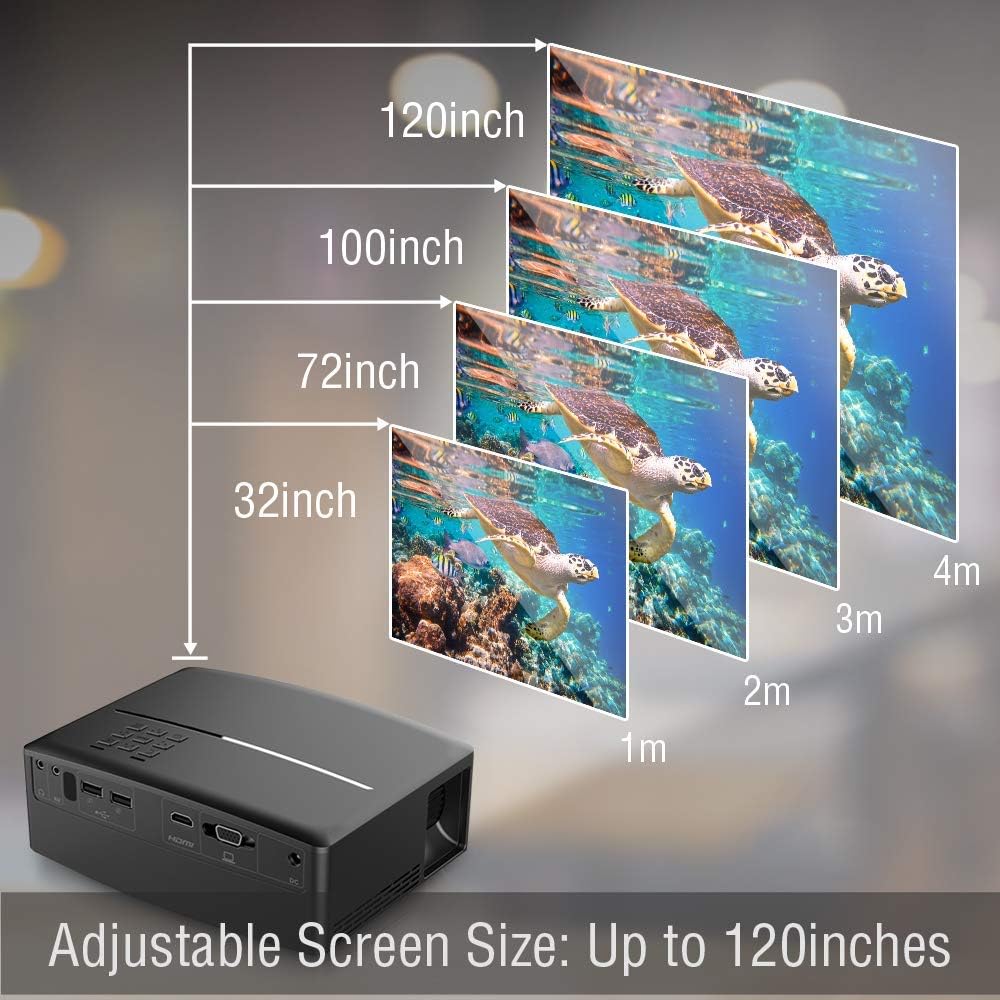
మూర్తి 5.1: Illustration of the adjustable screen size capability of the Pyle PRJG98.5 Projector, showing projection sizes from 32 inches to 120 inches at varying distances from the screen.
5.2 పవర్ కనెక్షన్
- Connect the power cord to the AC cable.
- Plug the AC cable into the DC Power Input port on the projector.
- పవర్ కార్డ్ యొక్క మరొక చివరను గోడ అవుట్లెట్లోకి ప్లగ్ చేయండి.
5.3 ఇన్పుట్ పరికరాలను కనెక్ట్ చేయడం
ప్రొజెక్టర్ వివిధ ఇన్పుట్ వనరులకు మద్దతు ఇస్తుంది:
- HDMI: Connect an HDMI cable from your device (e.g., laptop, game console, Blu-Ray player) to the HDMI port on the projector.
- USB: Insert a USB flash drive into one of the USB ports for multimedia playback.
- వీజీఏ: Connect a VGA cable from your computer to the VGA port on the projector.
- యొక్క: Use an RCA cable to connect to devices with AV output.
5.4 చిత్రం సర్దుబాటు
After powering on the projector, adjust the image for clarity and proper display.
- ఫోకస్ సర్దుబాటు: Rotate the focus ring around the lens until the projected image is sharp and clear.
- కీస్టోన్ దిద్దుబాటు: If the image appears trapezoidal (wider at the top or bottom), use the keystone adjustment dial or lever on the projector to correct the distortion. The projector supports a 15-degree keystone angle adjustment.

మూర్తి 5.2: Visual representation of keystone angle adjustment, showing how to correct a distorted rectangular display to a proper rectangular display using the projector's adjustment mechanism. The projector supports a 15-degree keystone adjustment.
6. ఆపరేషన్
6.1 పవర్ చేయడం ఆన్/ఆఫ్
- పవర్ ఆన్ చేయడానికి: Press the power button on the projector or the remote control. The indicator light will turn on.
- పవర్ ఆఫ్ చేయడానికి: Press the power button again. Confirm shutdown if prompted.
6.2 ఇన్పుట్ సోర్స్ ఎంపిక
After connecting your input device, select the corresponding source:
- Press the "Input" button on the projector or remote control.
- Use the arrow keys to navigate through the input options (HDMI, USB, VGA, AV).
- మీ ఎంపికను నిర్ధారించడానికి "సరే" లేదా "ఎంటర్" నొక్కండి.
6.3 మల్టీమీడియా ప్లేబ్యాక్ (USB)
The projector supports various digital media file formats including AVI, MPG, MOV, MP3, WMV, and TXT.
- USB పోర్టులో USB ఫ్లాష్ డ్రైవ్ను చొప్పించండి.
- Select "USB" as the input source.
- ద్వారా నావిగేట్ చేయండి file browser to select the desired media file (image, video, audio, text).
- Press "OK" or "Enter" to play the file.
6.4 మెనూ నావిగేషన్
Use the "Menu" button on the projector or remote to access settings. Navigate with arrow keys and confirm with "OK" or "Enter". Options include picture adjustment, sound settings, and system settings.
7. నిర్వహణ
7.1 లెన్స్ శుభ్రపరచడం
ప్రొజెక్టర్ లెన్స్ను సున్నితంగా తుడవడానికి ఆప్టికల్ లెన్స్ల కోసం ప్రత్యేకంగా రూపొందించిన మృదువైన, మెత్తటి రహిత వస్త్రాన్ని ఉపయోగించండి. రాపిడి క్లీనర్లను లేదా అధిక శక్తిని ఉపయోగించవద్దు.
7.2 ప్రొజెక్టర్ బాడీని శుభ్రపరచడం
ప్రొజెక్టర్ యొక్క బాహ్య భాగాన్ని మృదువైన, పొడి వస్త్రంతో తుడవండి. మొండి ధూళి కోసం, కొద్దిగా dampen గుడ్డను నీటితో తుడిచి, వెంటనే ఆరబెట్టండి.
7.3 ఎల్amp జీవితం
LED lamp in your projector has an estimated life of 30,000+ hours. No user-replaceable lamp నిర్వహణ అవసరం.
8. ట్రబుల్షూటింగ్
| సమస్య | సాధ్యమైన కారణం | పరిష్కారం |
|---|---|---|
| ఏ చిత్రం ప్రదర్శించబడలేదు | Power not connected; Incorrect input source; Device not connected properly. | Check power connection; Select correct input source; Ensure cables are securely connected. |
| చిత్రం అస్పష్టంగా ఉంది | ఫోకస్ సర్దుబాటు చేయబడలేదు; ప్రొజెక్టర్ స్క్రీన్కు చాలా దూరంగా/దగ్గరగా ఉంది. | Adjust the focus ring; Reposition the projector. |
| చిత్రం ట్రాపెజోయిడల్ గా ఉంది | ప్రొజెక్టర్ స్క్రీన్కు లంబంగా లేదు. | Adjust keystone correction. |
| శబ్దం లేదు | Volume too low; Muted; External speakers not connected. | Increase volume; Unmute; Connect external speakers if desired. |
| రిమోట్ కంట్రోల్ పనిచేయడం లేదు | బ్యాటరీలు తక్కువగా ఉన్నాయి/డెడ్ అయ్యాయి; రిమోట్ మరియు ప్రొజెక్టర్ మధ్య అడ్డంకి. | బ్యాటరీలను మార్చండి; IR రిసీవర్కు స్పష్టమైన దృశ్య రేఖ ఉండేలా చూసుకోండి. |
9. స్పెసిఫికేషన్లు
| ఇమేజింగ్ టెక్నాలజీ | 4.0'' LCD + LED Lamp |
| Adjustable Screen Size | Up to 120'' -inches |
| స్థానిక రిజల్యూషన్ | 800 x 480 SVGA, 1080p Support |
| రంగు ఉష్ణోగ్రత | Full Color, 16.7K |
| కాంట్రాస్ట్ రేషియో | 2,200:1 (Dynamic: 10,000:1) |
| ప్రకాశం | 1,800 ల్యూమెన్స్ |
| Lamp జీవితం | 30,000+ గంటలు |
| Scale Ratio | 16:9, 4:3 |
| రిఫ్రెష్ రేట్ | 60Hz |
| Keystone Angle Adjustment | 15 ° డిగ్రీ |
| డిజిటల్ File మద్దతు | AVI, MPG, MOV, MP3, WMV, TXT & More |
| స్పీకర్ పవర్ | 2 x 5 వాట్ |
| విద్యుత్ సరఫరా | 120V (12V Power Adapter) |
| కొలతలు (L x W x H) | 7.5'' x 6.3'' x 2.7'' |
| వస్తువు బరువు | 1.99 పౌండ్లు |
10. వారంటీ మరియు మద్దతు
వారంటీ సమాచారం లేదా సాంకేతిక మద్దతు కోసం, దయచేసి మీ ఉత్పత్తితో చేర్చబడిన వారంటీ కార్డును చూడండి లేదా అధికారిక పైల్ను సందర్శించండి. webసైట్. కొనుగోలు రుజువుగా మీ కొనుగోలు రసీదుని ఉంచండి.


