1. పరిచయం
This user manual provides detailed instructions for the installation, operation, and maintenance of your CHORTAU Full HD 1080P WiFi Dashcam. Please read this manual thoroughly before using the device to ensure proper functionality and safety.
2. ప్యాకేజీ విషయాలు
ప్యాకేజీలో అన్ని అంశాలు ఉన్నాయని నిర్ధారించుకోండి:
- CHORTAU Full HD 1080P WiFi Dashcam
- కార్ ఛార్జర్
- Car Mount (with adhesive and suction cup options)
- వినియోగదారు మాన్యువల్
- USB కేబుల్ (PC కనెక్షన్ కోసం)
3. ఉత్పత్తి ముగిసిందిview
Familiarize yourself with the components of your dashcam.

చిత్రం: ముందు మరియు పక్క view of the CHORTAU Dashcam, showing the screen, control buttons, lens, USB port, and microSD card slot.
ముఖ్య లక్షణాలు:
- SONY IMX323 Sensor: Captures clear Full HD 1080P video with F2.0 large aperture and 170° wide-angle lens, suitable for day and night recording.
- వైఫై కనెక్టివిటీ: Integrated WiFi module for connecting to the "RoadCam" app on smartphones or tablets. Allows real-time viewing, saving, and sharing of recorded files.
- ఉష్ణోగ్రత నిరోధకత: Designed to operate in temperatures from -20°C to 70°C.
- G-సెన్సార్: ఆకస్మిక వణుకులు లేదా ఢీకొన్నప్పుడు స్వయంచాలకంగా గుర్తించి, ప్రస్తుత వీడియో ఫూను లాక్ చేస్తుంది.tagఇ ఓవర్ రైటింగ్ నిరోధించడానికి.
- చలన గుర్తింపు: Initiates recording when motion is detected in front of the vehicle.
- పార్కింగ్ మానిటర్: Provides 24-hour surveillance for your parked vehicle.
- 2-అంగుళాల స్క్రీన్: Compact display that does not obstruct the driver's view.
4. సంస్థాపన
The dashcam can be easily installed on your windshield using the provided removable plate or suction cup mount.
- మౌంటు స్థానాన్ని ఎంచుకోండి: మీ విండ్షీల్డ్పై మీకు ఆటంకం కలిగించని ప్రదేశాన్ని ఎంచుకోండి view రోడ్డు వైపు. సాధారణంగా, ఇది వెనుక ఉంటుందిview అద్దం.
- శుభ్రమైన ఉపరితలం: Ensure the windshield surface is clean and dry before attaching the mount.
- మౌంట్ని అటాచ్ చేయండి: Securely attach the chosen mount (adhesive or suction cup) to the windshield.
- Attach Dashcam: Slide the dashcam onto the mount until it clicks into place.
- పవర్ కనెక్ట్ చేయండి: Connect the car charger to the dashcam and plug it into your vehicle's cigarette lighter socket. Route the cable neatly to avoid interference with driving.
- మైక్రో SD కార్డ్ని చొప్పించండి: Insert a Class 10 or higher microSD card (up to 32GB, not included) into the designated slot. Ensure it is inserted correctly.

Image: The CHORTAU Dashcam mounted on a car's windshield, showing its compact size and placement.

Image: A visual guide demonstrating the easy installation process of the dashcam onto its removable plate.
5. ప్రారంభ సెటప్ మరియు Wi-Fi కనెక్షన్
Before first use, format the microSD card and set up basic preferences.
5.1. మైక్రో SD కార్డ్ను ఫార్మాట్ చేయడం
- డాష్క్యామ్పై పవర్.
- నొక్కండి M మెనుని నమోదు చేయడానికి బటన్.
- Navigate to the "Format" option using the arrow buttons.
- నొక్కండి OK to confirm and format the card. This will erase all data on the card.
5.2. వై-ఫై కనెక్షన్
Connect your dashcam to your smartphone or tablet via Wi-Fi using the "RoadCam" app.
- On the dashcam, press the M మెనుని నమోదు చేయడానికి బటన్.
- Navigate to the "Wi-Fi" option.
- నొక్కండి OK to turn Wi-Fi ON. The dashcam display will show the Wi-Fi network name (SSID) and password.
- On your smartphone/tablet, download and install the "RoadCam" app.
- Go to your device's Wi-Fi settings and connect to the dashcam's Wi-Fi network (SSID).
- Enter the default password (usually 12345678).
- Open the "RoadCam" app and select the dashcam to establish a connection. You can now view లైవ్ ఫూtage, యాక్సెస్ రికార్డ్ చేయబడింది files, and adjust settings via the app.
Video: This video demonstrates how to connect the CHORTAU B-T007 dashcam's Wi-Fi to a smartphone, including navigating the dashcam menu, finding the Wi-Fi network, entering the password, and connecting via the RoadCam app.
6. ఆపరేటింగ్ సూచనలు
6.1. ఆటోమేటిక్ రికార్డింగ్
The dashcam automatically starts recording when connected to power and the vehicle engine is started. It will stop recording and save the file when the engine is turned off.
6.2. లూప్ రికార్డింగ్
The dashcam records video in continuous loops (e.g., 1, 3, or 5-minute segments). When the memory card is full, the oldest unlocked files will be overwritten by new recordings. You can adjust the loop recording duration in the settings menu.
6.3. G-Sensor (Emergency Lock)
The built-in G-Sensor detects sudden impacts or rapid acceleration/deceleration. When triggered, it automatically locks the current video segment, preventing it from being overwritten by loop recording. This ensures critical footage is preserved in case of an accident.

Image: Illustration of the G-Sensor function, which automatically locks video files during a collision to secure accident evidence.
6.4. పార్కింగ్ మానిటర్
When enabled, the parking monitor function allows the dashcam to automatically start recording if it detects a collision or vibration while your vehicle is parked. This provides surveillance for your car 24 hours a day.
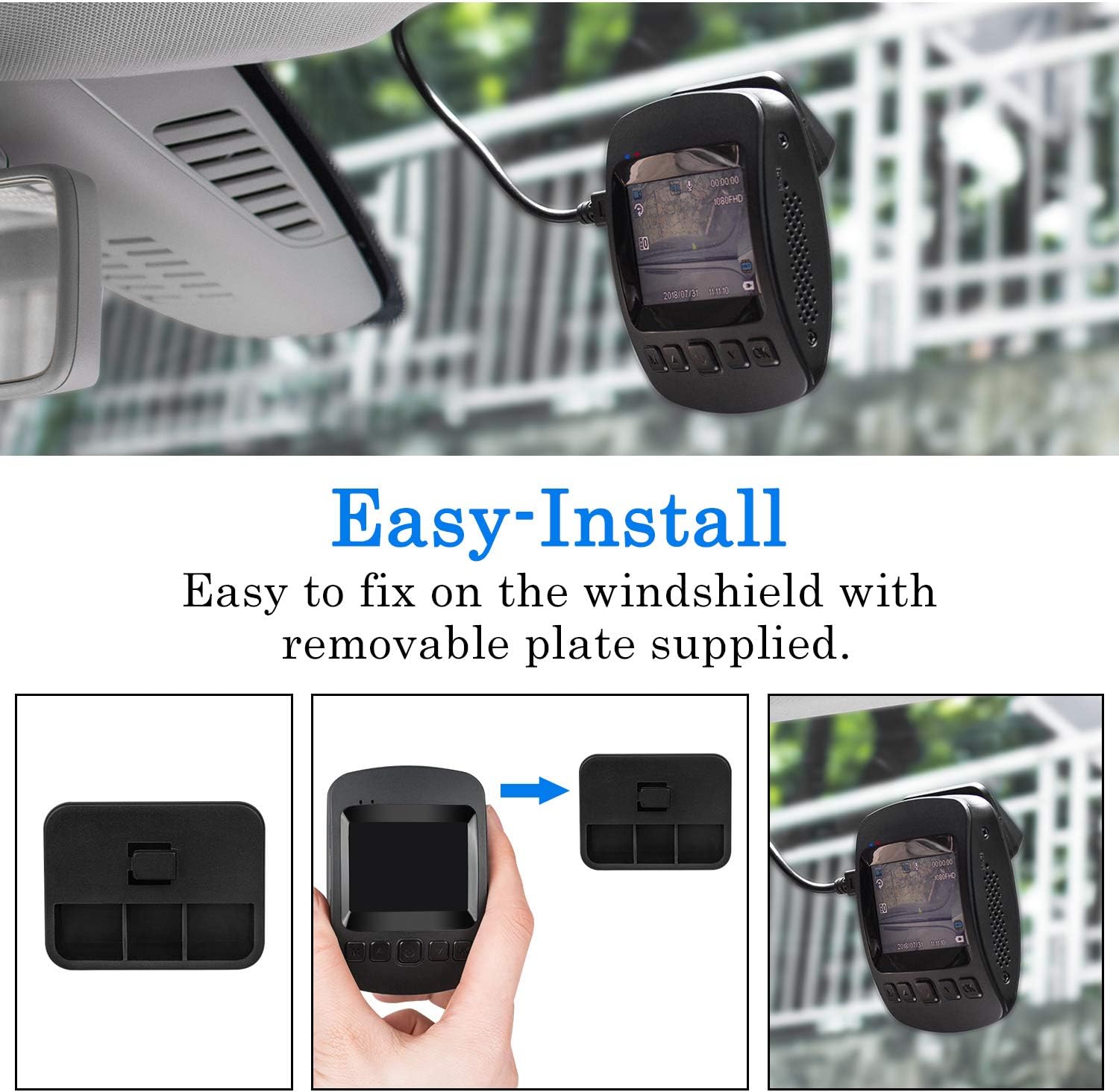
Image: The dashcam actively monitoring a parked car in a parking garage, demonstrating its 24-hour parking surveillance capability.
6.5 మోషన్ డిటెక్షన్
With motion detection enabled, the dashcam will begin recording automatically if it senses movement in its field of view while the vehicle is stationary. This is useful for capturing events around your parked car.
7. Viewing Playback
మీరు చెయ్యగలరు view recorded videos directly on the dashcam or through the "RoadCam" app on your smartphone/tablet.
7.1. On the Dashcam
- Stop recording by pressing the OK button if it's currently recording.
- లాంగ్ ప్రెస్ ది M ప్లేబ్యాక్ మోడ్లోకి ప్రవేశించడానికి రెండుసార్లు బటన్ నొక్కండి.
- Use the arrow buttons to navigate through the recorded files.
- నొక్కండి OK ఎంచుకున్న వీడియోను ప్లే చేయడానికి.
Video: This video demonstrates how to view రికార్డ్ చేసిన footage directly on the CHORTAU B-T007 dashcam's screen, including stopping recording and navigating to playback mode.
7.2. Via RoadCam App
Once connected via Wi-Fi (as described in Section 5.2), open the "RoadCam" app. You can access live view, browse recorded videos, download them to your device, or share them.
8. నిర్వహణ
- మైక్రో SD కార్డ్: Regularly format the microSD card (at least once a month) to ensure optimal performance and prevent data corruption. Replace the card if it shows signs of wear or error.
- లెన్స్ క్లీనింగ్: Keep the camera lens clean for clear recordings. Use a soft, lint-free cloth.
- ఫర్మ్వేర్ నవీకరణలు: Check the CHORTAU official website or app for any available firmware updates to improve performance and add features.
- ఉష్ణోగ్రత: Avoid exposing the dashcam to extreme temperatures outside its operating range (-20°C to 70°C) for extended periods.
9. ట్రబుల్షూటింగ్
| సమస్య | సాధ్యమైన కారణం | పరిష్కారం |
|---|---|---|
| డాష్క్యామ్ పవర్ ఆన్ అవ్వదు. | విద్యుత్ సరఫరా లేదు; కారు ఛార్జర్ పనిచేయడం లేదు; కనెక్షన్ కోల్పోయింది. | Check car charger connection and vehicle's cigarette lighter socket. Ensure the car charger is functional. |
| రికార్డింగ్ అనుకోకుండా ఆగిపోతుంది. | MicroSD card full; card error; low power. | Format the microSD card. Replace the card if errors persist. Ensure continuous power supply. |
| వీడియో footage అస్పష్టంగా ఉంది. | లెన్స్ మురికిగా ఉంది; లెన్స్పై ఇప్పటికీ రక్షణ పొర ఉంది; తప్పు ఫోకస్. | Clean the lens. Remove any protective film. Ensure the lens is not obstructed. |
| Wi-Fi కనెక్షన్ సమస్యలు. | తప్పు పాస్వర్డ్; యాప్ అప్డేట్ చేయబడలేదు; జోక్యం. | Verify Wi-Fi password (default: 12345678). Update the "RoadCam" app. Try connecting in a different location. |
| G-సెన్సార్ చాలా సున్నితంగా ఉంది/తగినంత సున్నితంగా లేదు. | G-సెన్సార్ సెన్సిటివిటీ సెట్టింగ్. | Adjust G-Sensor sensitivity in the dashcam's settings menu. |
10. స్పెసిఫికేషన్లు
| బ్రాండ్: | చోర్టావు |
| మోడల్: | B-T007 (also known as B-T006) |
| కొలతలు: | 1.52 x 7.98 x 4.98 సెం.మీ |
| బరువు: | 310 గ్రాములు |
| ప్రదర్శన పరిమాణం: | 2 అంగుళాలు |
| వీడియో రిజల్యూషన్: | 1080p పూర్తి HD |
| సెన్సార్: | సోనీ IMX323 |
| లెన్స్ ఎపర్చరు: | F2.0 |
| Viewకోణం: | 170 డిగ్రీలు |
| కనెక్టివిటీ: | USB, Wi-Fi |
| నిల్వ: | MicroSD (up to 32GB, Class 10 recommended) |
| బ్యాటరీ: | 1 లిథియం పాలిమర్ బ్యాటరీ (చేర్చబడింది) |
| ఆపరేటింగ్ ఉష్ణోగ్రత: | -20°C నుండి 70°C |
| ప్రత్యేక లక్షణాలు: | G-Sensor, Motion Detection, Parking Monitor, Loop Recording |
11. వారంటీ మరియు మద్దతు
CHORTAU products typically come with a warranty. Please refer to the warranty information provided with your purchase or visit the official CHORTAU webవారంటీ నిబంధనలు మరియు షరతులకు సంబంధించిన వివరాల కోసం సైట్ను చూడండి.
For technical support or further assistance, please contact CHORTAU customer service. Contact information can usually be found on the product packaging or the official brand webసైట్.
మీరు సందర్శించవచ్చు CHORTAU Store on Amazon మరింత సమాచారం కోసం.


