1. భద్రతా సూచనలు
యూనిట్ను ఆపరేట్ చేసే ముందు దయచేసి ఈ భద్రతా సూచనలను జాగ్రత్తగా చదవండి. భవిష్యత్తు సూచన కోసం ఈ మాన్యువల్ని ఉంచండి.
- శక్తి మూలం: Ensure the unit is connected to an AC power supply that matches the voltagఇ రేటింగ్ లేబుల్పై పేర్కొనబడింది.
- వెంటిలేషన్: వెంటిలేషన్ ఓపెనింగ్లను నిరోధించవద్దు. సరైన గాలి ప్రవాహం కోసం యూనిట్ చుట్టూ తగినంత స్థలాన్ని అనుమతించండి.
- నీరు మరియు తేమ: యూనిట్ను వర్షం, తేమ, చినుకులు లేదా చిమ్ముటకు గురిచేయవద్దు. కుండీల వంటి ద్రవాలతో నిండిన వస్తువులను యూనిట్పై ఉంచవద్దు.
- ఉష్ణ మూలాలు: రేడియేటర్లు, హీట్ రిజిస్టర్లు, స్టవ్లు లేదా ఇతర ఉపకరణాలు (సహా) వంటి ఉష్ణ వనరుల నుండి యూనిట్ను దూరంగా ఉంచండి. ampలిఫైయర్లు) వేడిని ఉత్పత్తి చేస్తాయి.
- శుభ్రపరచడం: శుభ్రం చేయడానికి ముందు యూనిట్ను గోడ అవుట్లెట్ నుండి అన్ప్లగ్ చేయండి. మృదువైన, పొడి వస్త్రాన్ని ఉపయోగించండి. లిక్విడ్ క్లీనర్లను లేదా ఏరోసోల్ క్లీనర్లను ఉపయోగించవద్దు.
- సర్వీసింగ్: ఈ ఉత్పత్తిని మీరే సేవ చేయడానికి ప్రయత్నించవద్దు. అర్హత కలిగిన సేవా సిబ్బందికి అన్ని సర్వీసులను చూడండి.
- ప్లేస్మెంట్: యూనిట్ పడిపోకుండా నిరోధించడానికి స్థిరమైన, చదునైన ఉపరితలంపై ఉంచండి.
2. ఉత్పత్తి ముగిసిందిview
The Soundmaster NR566BR is a versatile 7-in-1 Hi-Fi system designed to play various audio formats with a nostalgic aesthetic.
2.1 ప్రధాన భాగాలు
- గ్రామఫోన్: Supports 33, 45, and 78 RPM records, equipped with an Audio Technica magnetic cartridge.
- DAB+/FM Digital Radio: For receiving digital and analog radio broadcasts.
- CD/MP3 Player: Compatible with CD and MP3-CD discs.
- USB పోర్ట్: For MP3 playback and digitization (recording).
- క్యాసెట్ ప్లేయర్: ఆడియో క్యాసెట్లను ప్లే చేయడానికి.
- బ్లూటూత్ కనెక్టివిటీ: అనుకూల పరికరాల నుండి వైర్లెస్ ఆడియో స్ట్రీమింగ్ కోసం.
- ఇంటిగ్రేటెడ్ స్టీరియో స్పీకర్లు: 2 x 4 Watt RMS output.
- సమం: For sound customization.
- రిమోట్ కంట్రోల్: అనుకూలమైన ఆపరేషన్ కోసం.
2.2 Front Panel Controls and Features

మూర్తి 2.2.1: ముందు view of the Soundmaster NR566BR Hi-Fi System with the turntable lid open, showcasing the turntable and the main control panel below.

మూర్తి 2.2.2: వివరంగా view of the CD player tray located on the front panel of the unit.

మూర్తి 2.2.3: Close-up of the USB port, showing a USB flash drive inserted, located on the front panel.

మూర్తి 2.2.4: వివరంగా view of the cassette player slot, typically located on the side of the unit.
- పవర్ బటన్: యూనిట్ ఆన్/ఆఫ్ చేస్తుంది.
- ఫంక్షన్ సెలెక్టర్: Switches between Turntable, Radio, CD, USB, Cassette, and Bluetooth modes.
- వాల్యూమ్ నియంత్రణ: మొత్తం ధ్వని స్థాయిని సర్దుబాటు చేస్తుంది.
- Tuning Knob/Buttons: For radio station selection.
- ప్లేబ్యాక్ నియంత్రణలు: Play/Pause, Stop, Skip/Search (for CD, USB, Cassette).
- డిస్ప్లే స్క్రీన్: ప్రస్తుత మోడ్, ట్రాక్ సమాచారం, రేడియో ఫ్రీక్వెన్సీ మొదలైనవాటిని చూపుతుంది.
- ఈక్వలైజర్ నియంత్రణలు: Buttons or knobs for adjusting bass, treble, or preset EQ modes.
2.3 వెనుక ప్యానెల్ కనెక్షన్లు
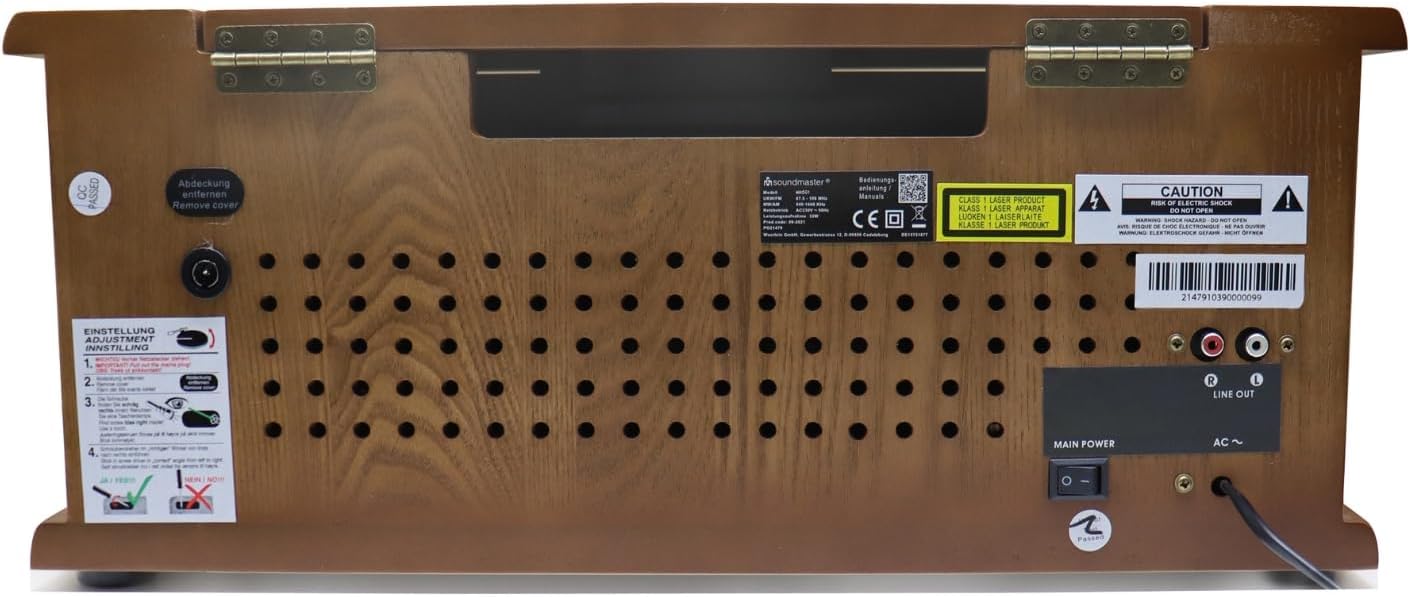
మూర్తి 2.3.1: Rear panel of the Soundmaster NR566BR, displaying the power input, antenna connection, and Line Out ports.

మూర్తి 2.3.2: క్లోజ్-అప్ view of the red and white RCA Line Out ports on the rear of the unit, labeled 'R' and 'L'.
- AC పవర్ ఇన్పుట్: పవర్ కార్డ్ కనెక్ట్ చేయడానికి.
- యాంటెన్నా టెర్మినల్: For connecting the DAB+/FM antenna.
- లైన్ అవుట్ (RCA): Red (Right) and White (Left) outputs for connecting to an external ampలైఫైయర్ లేదా పవర్డ్ స్పీకర్లు.
3. సెటప్
3.1 అన్ప్యాకింగ్ మరియు ప్లేస్మెంట్
- దాని ప్యాకేజింగ్ నుండి యూనిట్ను జాగ్రత్తగా తొలగించండి.
- Place the unit on a stable, level surface, ensuring adequate ventilation around all sides.
- Avoid placing the unit near strong magnetic fields, direct sunlight, or sources of excessive heat or moisture.
3.2 కనెక్ట్ పవర్
- యూనిట్ పవర్ స్విచ్ ఆఫ్ స్థానంలో ఉందని నిర్ధారించుకోండి.
- Connect the AC power cord to the AC power input on the rear of the unit.
- పవర్ కార్డ్ యొక్క మరొక చివరను తగిన గోడ అవుట్లెట్లోకి ప్లగ్ చేయండి.
3.3 యాంటెన్నా కనెక్షన్
- Connect the supplied DAB+/FM antenna to the antenna terminal on the rear of the unit.
- Extend the antenna fully and position it for optimal reception. You may need to adjust its position later to improve signal quality.
4. ఆపరేటింగ్ సూచనలు
Press the Power button to turn on the unit. Use the Function Selector to choose your desired audio source.
4.1 టర్న్ టేబుల్ ఆపరేషన్

మూర్తి 4.1.1: వివరంగా view of the turntable platter and tonearm, highlighting the Audio Technica magnetic cartridge.
- టర్న్ టేబుల్ మూతను ఎత్తండి.
- ప్లేటర్లో రికార్డు ఉంచండి.
- స్పీడ్ సెలెక్టర్ స్విచ్ని ఉపయోగించి తగిన వేగాన్ని (33, 45, లేదా 78 RPM) ఎంచుకోండి. 45 RPM రికార్డుల కోసం, చేర్చబడిన అడాప్టర్ను స్పిండిల్పై ఉంచండి.
- టోన్ ఆర్మ్ లాక్ని విడుదల చేయండి.
- Gently lift the tonearm using the cueing lever and position the stylus over the desired track of the record.
- Lower the tonearm slowly using the cueing lever. The record will begin to play.
- At the end of the record, the tonearm will automatically return to its rest position (if auto-stop is enabled).
- To stop playback manually, lift the tonearm, return it to its rest, and engage the tonearm lock.
4.2 Radio (DAB+/FM) Operation
- 'రేడియో' ఫంక్షన్ను ఎంచుకోండి.
- For DAB+ radio, the unit will automatically scan for available digital stations. Use the tuning controls to navigate through the station list.
- For FM radio, use the tuning knob or buttons to manually tune to a station or perform an auto-scan.
- To save a station as a preset, refer to the specific instructions in the full manual (usually involves pressing and holding a preset button).
4.3 CD/MP3 ప్లేయర్ ఆపరేషన్
- 'CD' ఫంక్షన్ను ఎంచుకోండి.
- CD ట్రేని తెరవడానికి ఎజెక్ట్ బటన్ను నొక్కండి.
- Place a CD or MP3-CD disc with the label side facing up into the tray.
- Press the Eject button again to close the tray. The unit will read the disc and begin playback.
- Use the Play/Pause, Stop, and Skip/Search buttons to control playback.
4.4 USB ప్లేబ్యాక్
- USB పోర్టులో USB ఫ్లాష్ డ్రైవ్ను చొప్పించండి.
- Select the 'USB' function. The unit will automatically detect and begin playing MP3 files.
- Use the navigation buttons to browse folders and select specific tracks.
4.5 క్యాసెట్ ప్లేయర్ ఆపరేషన్
- Insert an audio cassette into the cassette slot.
- 'క్యాసెట్' ఫంక్షన్ను ఎంచుకోండి.
- Use the playback controls (Play, Stop, Fast Forward, Rewind) to operate the cassette player.
4.6 బ్లూటూత్ కనెక్టివిటీ
- Select the 'Bluetooth' function. The unit will enter pairing mode, indicated on the display.
- మీ బ్లూటూత్-ప్రారంభించబడిన పరికరంలో (స్మార్ట్ఫోన్, టాబ్లెట్), అందుబాటులో ఉన్న బ్లూటూత్ పరికరాల కోసం శోధించండి.
- Select 'Soundmaster NR566BR' from the list to pair. Once paired, you can stream audio wirelessly to the unit.
4.7 Digitization (Recording to USB)
The NR566BR allows you to record audio from Vinyl, CD, or Radio directly to a USB flash drive in MP3 format.
- Insert a USB flash drive with sufficient free space into the USB port.
- Select the desired source (Turntable, CD, or Radio).
- Begin playback of the source audio.
- Press the 'Record' button (usually labeled 'REC') on the unit or remote control. Recording will begin.
- Press the 'Record' button again or 'Stop' to end the recording. The recorded file USB డ్రైవ్లో సేవ్ చేయబడుతుంది.
4.8 ఈక్వలైజర్ సర్దుబాటు
Use the Equalizer controls to adjust the sound characteristics to your preference. This may include preset modes (e.g., Rock, Pop, Classic) or manual bass/treble adjustments.

మూర్తి 4.8.1: The remote control for the Soundmaster NR566BR, featuring various function and playback buttons, including EQ controls.
5. నిర్వహణ
5.1 యూనిట్ శుభ్రపరచడం
- శుభ్రపరిచే ముందు ఎల్లప్పుడూ యూనిట్ను పవర్ అవుట్లెట్ నుండి అన్ప్లగ్ చేయండి.
- బయటి ఉపరితలాలను తుడవడానికి మృదువైన, పొడి, మెత్తటి బట్టను ఉపయోగించండి.
- రాపిడి క్లీనర్లు, మైనపులు లేదా ద్రావకాలను ఉపయోగించవద్దు ఎందుకంటే అవి ముగింపును దెబ్బతీస్తాయి.
5.2 Turntable and Stylus Care
- Keep the turntable platter and stylus free from dust. Use a soft brush specifically designed for stylus cleaning.
- మీ వేళ్లతో స్టైలస్ను తాకడం మానుకోండి.
- If the sound quality deteriorates, the stylus may need cleaning or replacement. Consult a qualified technician for stylus replacement.
5.3 CD ప్లేయర్ కేర్
- వేలిముద్రలను నివారించడానికి CDలను వాటి అంచుల దగ్గర పట్టుకోండి.
- మృదువైన, మెత్తటి బట్టతో డిస్క్లను శుభ్రం చేసి, మధ్య నుండి బయటికి తుడవండి.
- Do not use abrasive cleaners or solvents on discs.
6. ట్రబుల్షూటింగ్
If you experience problems with your unit, please check the following points before contacting service personnel.
| సమస్య | సాధ్యమైన కారణం | పరిష్కారం |
|---|---|---|
| శక్తి లేదు | Power cord not connected; Power outlet faulty; Unit is off. | Ensure power cord is securely plugged in; Test outlet with another device; Press the Power button to turn on the unit. |
| శబ్దం లేదు | Volume too low; Incorrect function selected; Speakers disconnected (if external). | Increase volume; Select correct function (e.g., CD, Turntable); Check speaker connections. |
| పేలవమైన రేడియో రిసెప్షన్ | యాంటెన్నా పొడిగించబడలేదు లేదా సరిగ్గా ఉంచబడలేదు; బలహీనమైన సిగ్నల్. | Extend and adjust the antenna; Try relocating the unit for better signal. |
| Turntable not spinning or sound distorted | Speed setting incorrect; Stylus dirty or damaged; Tonearm locked. | Select correct RPM (33/45/78); Clean or replace stylus; Release tonearm lock. |
| CD ప్లే కావడం లేదు లేదా దాటవేయడం లేదు | Disc dirty or scratched; Disc inserted incorrectly; Incompatible disc format. | Clean disc; Insert disc with label side up; Ensure disc is CD or MP3-CD format. |
| బ్లూటూత్ జత చేయడం విఫలమైంది | Unit not in pairing mode; Device too far; Bluetooth on device is off. | Ensure unit is in Bluetooth mode; Move device closer; Enable Bluetooth on your device. |
7. స్పెసిఫికేషన్లు
| ఫీచర్ | స్పెసిఫికేషన్ |
|---|---|
| మోడల్ పేరు | NR566BR |
| కొలతలు (L x W x H) | 51 x 35 x 22 సెం.మీ |
| బరువు | 8 కిలోలు |
| తయారీదారు | సౌండ్ మాస్టర్ |
| టర్న్ చేయగల వేగం | 33, 45, 78 RPM |
| చేర్చబడిన భాగాలు | CD Player, Integrated Speakers |
| ప్రత్యేక ఫీచర్ | Adjustable speed, Digitization function |
| మెటీరియల్ | చెక్క |
| రంగు | గోధుమ రంగు |
| అనుకూల పరికరాలు | స్మార్ట్ఫోన్, టాబ్లెట్ |
| స్పీకర్ అవుట్పుట్ | 2 x 4 వాట్ RMS |
8. వారంటీ మరియు మద్దతు
ఈ ఉత్పత్తి తయారీదారు వారంటీ పరిధిలోకి వస్తుంది. నిర్దిష్ట నిబంధనలు మరియు షరతుల కోసం దయచేసి మీ కొనుగోలుతో చేర్చబడిన వారంటీ కార్డ్ను చూడండి.
For technical support, service, or warranty claims, please contact your retailer or the Soundmaster customer service department. Contact information can typically be found on the manufacturer's official webసైట్ లేదా ఉత్పత్తి ప్యాకేజింగ్లో.
When contacting support, please have your product model number (NR566BR) and proof of purchase readily available.


