1. పరిచయం
This manual provides essential information for the proper use and maintenance of your Speedlink Competition Pro Extra USB Joystick (Model SL-650212-BKRD). This joystick is designed for use with PCs and Android devices, offering a retro arcade gaming experience. Please read these instructions carefully before using the product.
2. ముఖ్యమైన భద్రతా సూచనలు
Failure to observe these instructions can cause product damage, explosion, fire, and/or electric shock.
- Use this device only as indicated in the user guide. Do not open or repair it.
- పరికరాన్ని ద్రవాలు, వేడి లేదా చలికి బహిర్గతం చేయవద్దు.
- ప్రకటనలో పరికరాన్ని ఉపయోగించవద్దుamp పర్యావరణం.
- పరికరాన్ని పొడి గుడ్డతో శుభ్రం చేయండి.
- పరికరాన్ని మరియు అన్ని వదులుగా ఉండే భాగాలను పిల్లలు, పెంపుడు జంతువులు మరియు అనధికార వ్యక్తులకు దూరంగా ఉంచండి.
- Use only with the appropriate provided accessories/cables.
- Disconnect the charging cable from the device if it will not be used for a long time. When disconnecting the cable, don't pull on the cable but on the plug.
- Don't use the cables in any way other than mentioned in the user guide; don't bend, cut, extend, or knot up them.
- పరికరం యొక్క ఓపెనింగ్లలో విదేశీ వస్తువులను చొప్పించవద్దు.
- పరికరం ఏదైనా విధంగా దెబ్బతిన్నట్లయితే లేదా చాలా వేడిగా ఉంటే, వెంటనే దాన్ని ఉపయోగించడం ఆపివేయండి.
- Take caution when using the device if you have a pacemaker or are dependent on other sensitive electronic aids, as the device emits radio signals.
Safety instructions in further languages can be found at www.speedlink.com.
3. ప్యాకేజీ విషయాలు
The Speedlink Competition Pro Extra USB Joystick package includes:
- Speedlink Competition Pro Extra USB Joystick (Model SL-650212-BKRD)
- ఇంటిగ్రేటెడ్ USB కేబుల్
- Information on how to download the included 20 retro games
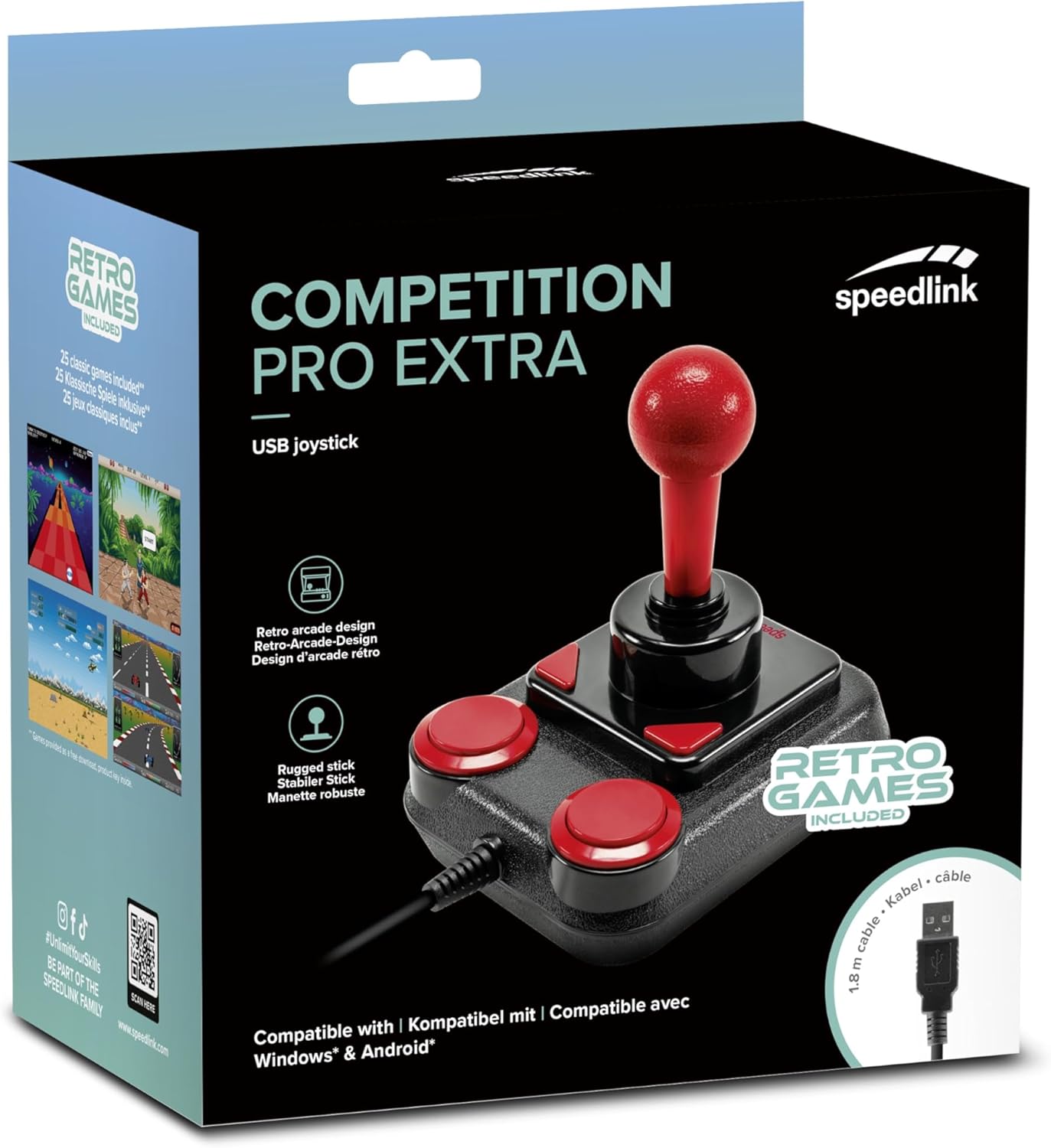
Image: Retail packaging for the Speedlink Competition Pro Extra USB Joystick, showing the product and "Retro Games Included" label.
4. ఉత్పత్తి ముగిసిందిview
The Competition Pro Extra USB Joystick features a classic arcade design with a robust stick and responsive buttons.

చిత్రం: పై నుండి క్రిందికి view of the joystick, highlighting the red ball-top stick and red circular fire buttons.

చిత్రం: కోణీయ view showing the joystick's main stick, two circular fire buttons, and two triangular fire buttons.
The joystick includes:
- Arcade Stick: A classic red ball-top joystick for directional control.
- ఫైర్ బటన్లు: Two large circular red buttons and two smaller triangular red buttons for in-game actions.
- Rapid-Fire Switch: A switch located on the underside of the joystick to enable or disable rapid-fire functionality for the main fire buttons.

Image: Underside of the joystick, showing the "ON" and "OFF" positions for the rapid-fire switch.
5. సెటప్
5.1 PCకి కనెక్ట్ చేస్తోంది
- మీ కంప్యూటర్లో అందుబాటులో ఉన్న USB పోర్ట్ను గుర్తించండి.
- Plug the USB connector of the Competition Pro Extra joystick into the USB port.
- The operating system (Windows 7 or later) will automatically detect and install the necessary drivers. No manual driver installation is typically required.
- Once installed, the joystick is ready for use with compatible games and emulators. You may need to configure joystick settings within individual game or emulator software.
5.2 Connecting to an Android Device
For Android devices, an OTG (On-The-Go) adapter is required (not included).
- Connect the USB connector of the joystick to an OTG adapter.
- మీ Android పరికరం యొక్క USB పోర్ట్లోకి OTG అడాప్టర్ను ప్లగ్ చేయండి.
- The Android device should recognize the joystick. Compatibility may vary depending on the Android device and game/application.
6. ఆపరేటింగ్ సూచనలు
6.1 ప్రాథమిక నియంత్రణ
- జాయ్ స్టిక్: Use the main stick for directional movement (up, down, left, right, and diagonals).
- ఫైర్ బటన్లు: Press any of the four red buttons to perform in-game actions such as firing, jumping, or selecting.
6.2 Rapid-Fire Mode
The joystick features a rapid-fire function for enhanced gameplay in certain titles.
- To activate rapid-fire, locate the switch on the underside of the joystick and slide it to the "ON" position.
- To deactivate rapid-fire, slide the switch to the "OFF" position.
6.3 Included Games
The Anniversary Edition includes a collection of 20 retro games available for download. Refer to the instructions provided with your product for details on how to access and download these games.

Image: Screenshot of the game launcher interface, displaying a list of classic games such as Bomberwarrior, Summer Games, and River Attack.
7. నిర్వహణ
- శుభ్రపరచడం: Use a soft, dry cloth to clean the surface of the joystick. Do not use liquid cleaners or abrasive materials.
- నిల్వ: Store the joystick in a dry place away from direct sunlight and extreme temperatures.
- కేబుల్ కేర్: Avoid bending or twisting the USB cable excessively. Do not pull on the cable to disconnect it; always grasp the plug.
8. ట్రబుల్షూటింగ్
- Joystick not recognized by PC:
- USB కేబుల్ పనిచేసే USB పోర్ట్కి సురక్షితంగా ప్లగ్ చేయబడిందని నిర్ధారించుకోండి.
- వేరే USB పోర్ట్ని ప్రయత్నించండి.
- మీ కంప్యూటర్ని పునఃప్రారంభించండి.
- Check Device Manager (Windows) to see if the device is listed and if there are any driver issues.
- Joystick not recognized by Android device:
- Ensure your Android device supports USB OTG functionality.
- Verify the OTG adapter is functioning correctly.
- Try a different OTG adapter or Android device if possible.
- Buttons or stick unresponsive:
- Ensure the joystick is properly connected.
- Test the joystick in a different game or application to rule out software-specific issues.
- Calibrate the joystick through your operating system's game controller settings if available.
- Rapid-fire not working:
- Check that the rapid-fire switch on the underside of the joystick is set to "ON".
9. స్పెసిఫికేషన్లు
| ఫీచర్ | వివరాలు |
|---|---|
| మోడల్ పేరు | SL-650212-BKRD |
| బ్రాండ్ | స్పీడ్లింక్ |
| కనెక్టివిటీ టెక్నాలజీ | USB |
| అనుకూల పరికరాలు | PC (Windows 7 or later), Android (via OTG adapter) |
| కంట్రోలర్ రకం | జాయ్ స్టిక్ |
| రంగు | నలుపు, ఎరుపు |
| వస్తువు బరువు | 3.53 ఔన్సులు (సుమారు 100గ్రా) |
| ఉత్పత్తి కొలతలు (LxWxH) | 4.65 x 3.78 x 5.12 అంగుళాలు (సుమారు 11.8 x 9.6 x 13 సెం.మీ) |
| శక్తి మూలం | కార్డెడ్ ఎలక్ట్రిక్ (USB ఆధారితం) |
| వాల్యూమ్tage | 5 వోల్ట్లు |
10 వర్తింపు సమాచారం
10.1 FCC ప్రకటన
ఈ పరికరం FCC నియమాలలో పార్ట్ 15కి అనుగుణంగా ఉంటుంది. ఆపరేషన్ కింది రెండు షరతులకు లోబడి ఉంటుంది: (1) ఈ పరికరం హానికరమైన జోక్యాన్ని కలిగించకపోవచ్చు మరియు (2) అవాంఛనీయ ఆపరేషన్కు కారణమయ్యే జోక్యంతో సహా స్వీకరించిన ఏదైనా జోక్యాన్ని ఈ పరికరం తప్పనిసరిగా అంగీకరించాలి.
ఈ పరికరాలు పరీక్షించబడ్డాయి మరియు FCC నియమాలలోని 15వ భాగం ప్రకారం క్లాస్ B డిజిటల్ పరికరం కోసం పరిమితులకు అనుగుణంగా ఉన్నట్లు కనుగొనబడింది. రెసిడెన్షియల్ ఇన్స్టాలేషన్లో హానికరమైన జోక్యానికి వ్యతిరేకంగా సహేతుకమైన రక్షణను అందించడానికి ఈ పరిమితులు రూపొందించబడ్డాయి. ఈ పరికరం రేడియో ఫ్రీక్వెన్సీ శక్తిని ఉత్పత్తి చేస్తుంది, ఉపయోగిస్తుంది మరియు ప్రసరిస్తుంది మరియు ఇన్స్టాల్ చేయకపోతే మరియు సూచనలకు అనుగుణంగా ఉపయోగించకపోతే, రేడియో కమ్యూనికేషన్లకు హానికరమైన జోక్యాన్ని కలిగించవచ్చు. అయినప్పటికీ, నిర్దిష్ట సంస్థాపనలో జోక్యం జరగదని ఎటువంటి హామీ లేదు. ఈ పరికరం రేడియో లేదా టెలివిజన్ రిసెప్షన్కు హానికరమైన జోక్యాన్ని కలిగిస్తే, పరికరాన్ని ఆఫ్ చేయడం మరియు ఆన్ చేయడం ద్వారా నిర్ణయించవచ్చు, కింది చర్యలలో ఒకటి లేదా అంతకంటే ఎక్కువ జోక్యాన్ని సరిచేయడానికి ప్రయత్నించమని వినియోగదారు ప్రోత్సహించబడతారు:
- స్వీకరించే యాంటెన్నాను తిరిగి మార్చండి లేదా మార్చండి.
- పరికరాలు మరియు రిసీవర్ మధ్య విభజనను పెంచండి.
- రిసీవర్ కనెక్ట్ చేయబడిన దానికంటే భిన్నమైన సర్క్యూట్లోని అవుట్లెట్కు పరికరాలను కనెక్ట్ చేయండి.
- సహాయం కోసం డీలర్ లేదా అనుభవజ్ఞుడైన రేడియో/టీవీ సాంకేతిక నిపుణుడిని సంప్రదించండి.
Note: Modifications to this product will void the user's authority to operate this equipment.
10.2 CE, UKCA, EAC Compliance
ఉత్పత్తి క్రింది ఆదేశాలకు అనుగుణంగా ఉంటుంది:
- EMC: 2014/30 / EU
- RoHS: 2011/65/EU
అనుగుణ్యత యొక్క పూర్తి ప్రకటన, తాజా వినియోగదారు గైడ్, తరచుగా అడిగే ప్రశ్నలు లేదా తదుపరి సమాచారం కోసం, దయచేసి సందర్శించండి www.speedlink.com.

Image: Excerpt from the product manual showing safety instructions, warnings, FCC statement, and conformity information in multiple languages.
11. వారంటీ మరియు మద్దతు
For warranty information, technical support, and frequently asked questions, please visit the official Speedlink webసైట్:
దయచేసి భవిష్యత్తు సూచన కోసం ఈ సమాచారాన్ని అలాగే ఉంచుకోండి.


