పరిచయం
This manual provides essential information for the proper setup, operation, and maintenance of your Audio-Technica 3000 Series Wireless System (ATW-3212/C710EE1). This fourth-generation frequency-agile, True Diversity UHF wireless microphone system is designed to deliver clear, natural audio performance while minimizing interference, making it suitable for various applications including live stage, television, lectures, and event presentations. Please read this manual thoroughly before using the system to ensure optimal performance and longevity.
ప్యాకేజీ విషయాలు
Your Audio-Technica 3000 Series Wireless System (ATW-3212/C710EE1) package should include the following components:
- ATW-R3210 True Diversity Receiver: The core unit for receiving wireless signals.
- ATW-T3202 Handheld Transmitter: The wireless microphone unit.
- ATW-C710 Cardioid Condenser Microphone Capsule: The interchangeable microphone head for the handheld transmitter.
- రిసీవర్ కోసం విద్యుత్ సరఫరా
- యాంటెన్నాలు
- Rack-mount adapters (if applicable)
- వినియోగదారు మాన్యువల్ (ఈ పత్రం)
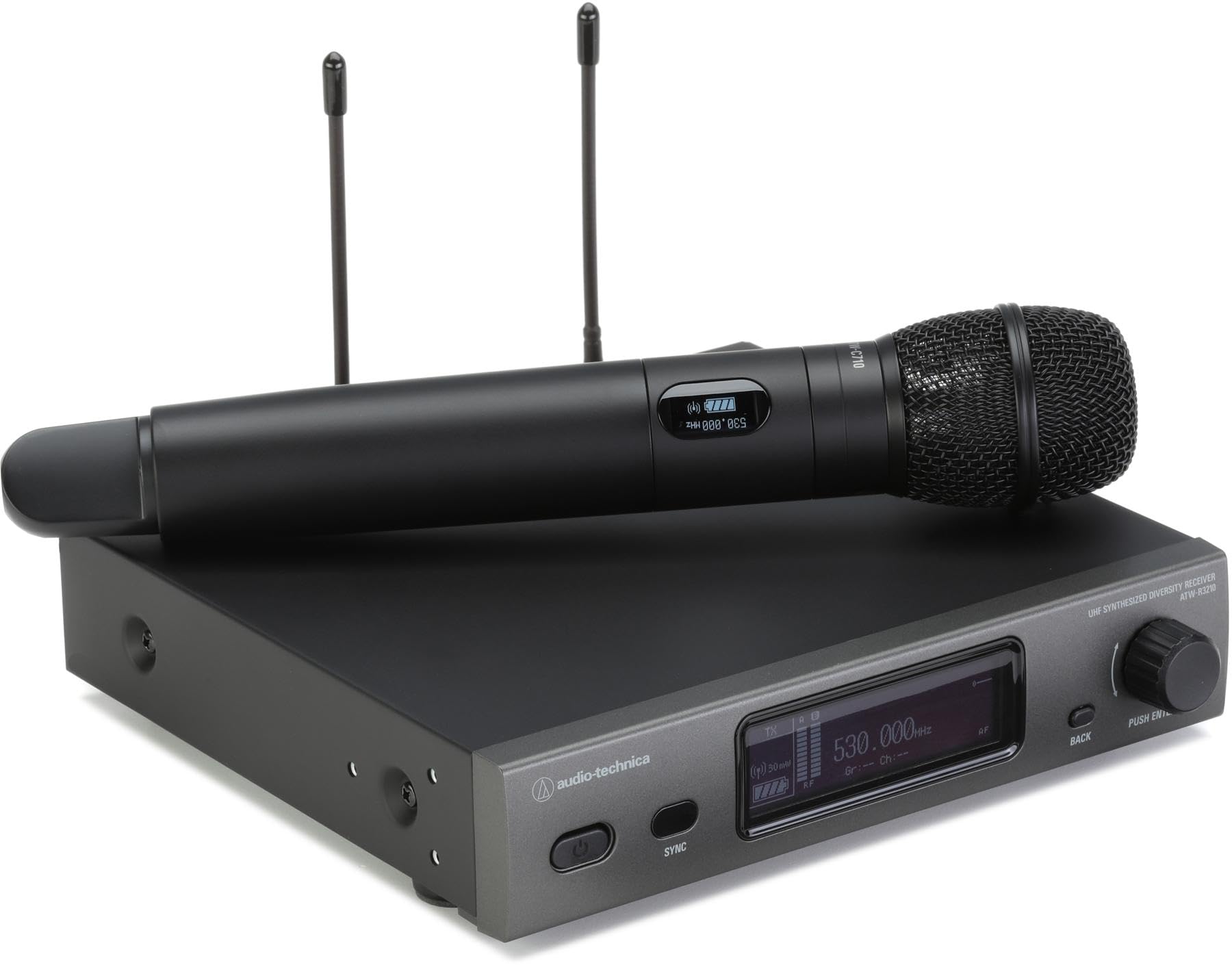
This image displays the complete Audio-Technica 3000 Series Wireless System, including the ATW-R3210 True Diversity Receiver and the ATW-T3202 Handheld Transmitter equipped with the ATW-C710 Cardioid Condenser Microphone Capsule.
సెటప్
1. Receiver Placement and Connection (ATW-R3210)
- స్థానం: Place the ATW-R3210 receiver in a location free from obstructions and away from other wireless devices or strong electromagnetic fields. Ensure good line-of-sight to the intended operating area of the transmitter.
- యాంటెన్నా కనెక్షన్: Attach the supplied antennas to the ANT1 and ANT2 connectors on the rear panel of the receiver. Position them vertically for optimal reception.
- ఆడియో అవుట్పుట్: Connect the receiver's XLR audio output to your mixer or amplifier using a balanced XLR cable.
- పవర్ కనెక్షన్: Connect the supplied AC adapter to the DC input jack on the receiver and then to an appropriate AC power outlet. Do not power on yet.
2. Transmitter Setup (ATW-T3202 Handheld)
- బ్యాటరీ ఇన్స్టాలేషన్: Unscrew the lower body of the ATW-T3202 handheld transmitter to access the battery compartment. Insert two fresh AA alkaline batteries, observing the correct polarity (+/-).
- మైక్రోఫోన్ క్యాప్సూల్: Ensure the ATW-C710 cardioid condenser microphone capsule is securely screwed onto the top of the handheld transmitter.
- పవర్ ఆన్: Press and hold the power button on the transmitter until the display illuminates.
ఆపరేటింగ్
1. Powering On and Initial Scan
- రిసీవర్ పవర్: Turn on the ATW-R3210 receiver. The display will show the current operating status.
- Frequency Scan: Access the receiver's menu to perform a frequency scan. This will identify clear, interference-free channels in your operating environment. Select an available channel.
- Transmitter Sync: With the transmitter powered on, use the IR sync function on the receiver to automatically transfer the selected frequency to the handheld transmitter. Follow the on-screen instructions on the receiver.
2. సెట్టింగులను సర్దుబాటు చేయడం
- నియంత్రణ సంపాదించు: Adjust the input gain on the transmitter (usually accessible within the battery compartment) to prevent distortion. Speak into the microphone at your typical volume while monitoring the receiver's audio level indicators.
- అవుట్పుట్ స్థాయి: Adjust the audio output level on the receiver to match the input requirements of your mixer or ampజీవితకాలం.
- మ్యూట్ ఫంక్షన్: The handheld transmitter features a programmable button (often located near the antenna) that can be configured for mute, lock, or other functions via the internal menu. Refer to the receiver's menu for configuration.
3. Best Practices for Performance
- Maintain line-of-sight between the transmitter and receiver antennas.
- Avoid placing the receiver near large metal objects or other wireless devices.
- Always use fresh, high-quality AA alkaline batteries for the transmitter.
- Perform a frequency scan before each use, especially in new environments.
నిర్వహణ
- శుభ్రపరచడం: Wipe the exterior of the receiver and transmitter with a soft, dry cloth. For stubborn dirt, use a slightly damp cloth and mild soap, then wipe dry. Do not use abrasive cleaners or solvents.
- బ్యాటరీ భర్తీ: Replace the transmitter batteries when the low battery indicator appears on the transmitter or receiver display. Always replace both batteries simultaneously. Remove batteries if the system will not be used for an extended period.
- నిల్వ: వ్యవస్థను చల్లని, పొడి ప్రదేశంలో, ప్రత్యక్ష సూర్యకాంతి మరియు తీవ్రమైన ఉష్ణోగ్రతలకు దూరంగా నిల్వ చేయండి.
ట్రబుల్షూటింగ్
| సమస్య | సాధ్యమైన కారణం | పరిష్కారం |
|---|---|---|
| ధ్వని లేదా బలహీనమైన ధ్వని లేదు |
|
|
| Interference or dropouts |
|
|
| వక్రీకృత ఆడియో |
|
|
స్పెసిఫికేషన్లు
| ఫీచర్ | వివరాలు |
|---|---|
| మోడల్ సంఖ్య | ATW-3212/C710EE1 |
| సిస్టమ్ రకం | UHF True Diversity Wireless Microphone System |
| ఫ్రీక్వెన్సీ బ్యాండ్విడ్త్ | 60 MHz UHF Tuning Bandwidth |
| అందుబాటులో ఉన్న ఫ్రీక్వెన్సీలు | 2400 selectable frequencies |
| ఆపరేటింగ్ రేంజ్ | 328 feet (100 meters) typical, line-of-sight |
| మైక్రోఫోన్ క్యాప్సూల్ | ATW-C710 Cardioid Condenser |
| ట్రాన్స్మిటర్ పవర్ సోర్స్ | 2 AA batteries (alkaline recommended) |
| సిగ్నల్-టు-శబ్ద నిష్పత్తి | 60 డిబి |
| Frequency Response (lower bound) | 31 Hz |
| అవుట్పుట్ కనెక్టర్ | XLR (Receiver) |
| Dimensions (Handheld Transmitter) | సుమారుగా 7 x 1 x 4 అంగుళాలు (L x W x H) |
| బరువు (సిస్టమ్) | Approx. 1 pound |
| సిఫార్సు ఉపయోగం | లైవ్ ఎస్tage Performance, Television, Lecture, Event Presentation, House of Worship |
వారంటీ మరియు మద్దతు
Audio-Technica products are designed for reliability and performance. For specific warranty information, please refer to the warranty card included with your product or visit the official Audio-Technica website. For technical support, service, or replacement parts, please contact your authorized Audio-Technica dealer or Audio-Technica customer service directly. Keep your purchase receipt as proof of purchase for warranty claims.
ఆన్లైన్ వనరులు: For the most up-to-date information, FAQs, and additional resources, please visit the Audio-Technica official webసైట్.


