1. పరిచయం
ధన్యవాదాలు, ధన్యవాదాలు.asing the Pyle PLCMTR83QIR Wireless Backup Rearview Dash Camera System. This comprehensive system is designed to enhance vehicle safety and parking convenience with its wireless connectivity, 7-inch quad-view LCD monitor, and durable waterproof cameras. This manual provides detailed instructions for installation, operation, and maintenance to ensure optimal performance and longevity of your device.
ప్యాకేజీ విషయాలు
Please check the package contents carefully. If any items are missing or damaged, contact your dealer immediately.
- డిస్ప్లే మానిటర్
- (4) Cameras
- (4) 2.4G Antennas
- రిమోట్ కంట్రోల్
- Camera DC Power Cables
- పవర్ & వైరింగ్ హార్నెస్

Image: The complete Pyle PLCMTR83QIR system, including the 7-inch monitor, four wireless cameras, remote control, and all necessary cables and antennas.

Image: A visual representation of all components included in the Pyle PLCMTR83QIR package, confirming the contents listed.
2. ముఖ్యమైన భద్రతా సమాచారం
- సంస్థాపన మరియు ఆపరేషన్ ముందు అన్ని సూచనలను జాగ్రత్తగా చదవండి.
- Installation should be performed by a qualified professional if you are unsure about vehicle electrical systems.
- షార్ట్ సర్క్యూట్లు లేదా నష్టాన్ని నివారించడానికి అన్ని వైరింగ్లు సరిగ్గా ఇన్సులేట్ చేయబడి మరియు సురక్షితంగా ఉన్నాయని నిర్ధారించుకోండి.
- Do not operate the system in a manner that distracts you from driving. Always prioritize safe driving practices.
- Keep the monitor and cameras clean and free from obstructions for clear visibility.
- This system is an aid for safe driving and parking; it does not replace the need for careful observation and judgment.
- ఏదైనా నిర్వహణ లేదా సంస్థాపన చేసే ముందు విద్యుత్తును డిస్కనెక్ట్ చేయండి.
3. సెటప్ మరియు ఇన్స్టాలేషన్
The Pyle PLCMTR83QIR system is designed for easy wireless setup, minimizing the need for long cable runs. Follow these steps for proper installation.
3.1 కెమెరా సంస్థాపన
- మౌంటు స్థానాన్ని ఎంచుకోండి: Select a suitable location for each camera on your vehicle (car, truck, bus, van, trailer). Common locations include the rear of the vehicle for backup, or sides for blind spot monitoring. Ensure the camera has a clear line of sight.
- సురక్షిత కెమెరాలు: Mount each camera securely using the provided hardware. The cameras are IP-68 marine grade waterproof and designed for outdoor use.
- పవర్ కనెక్ట్ చేయండి: Connect the camera's DC power cable to a 12V DC power source on your vehicle. For a backup camera, this is typically connected to the reverse light circuit so it powers on when reversing. For continuous monitoring, connect to a constant 12V source.
- యాంటెన్నాలను అటాచ్ చేయండి: Screw the 2.4G antennas onto each camera. Ensure they are tightened securely for optimal wireless signal transmission.

చిత్రం: వివరణాత్మక view of one of the wireless cameras, highlighting its wide 120-degree viewing angle, essential for comprehensive coverage.

Image: This diagram visually explains the wireless communication between the camera and the monitor, showing the signal transmission path and the external antenna for extended range.
3.2 మానిటర్ ఇన్స్టాలేషన్
- మానిటర్ను మౌంట్ చేయండి: Use the universal car/automobile mounting ability to securely place the 7-inch LCD monitor on your dashboard or windshield. Ensure it does not obstruct your view రహదారి.
- పవర్ కనెక్ట్ చేయండి: Connect the monitor's power and wiring harness to a 12V DC power source in your vehicle. This can be a cigarette lighter adapter or hardwired to the vehicle's electrical system.
- యాంటెన్నాలను అటాచ్ చేయండి: Screw the antennas onto the monitor for receiving wireless signals from the cameras.
- పవర్ ఆన్ మరియు పెయిర్: Once powered, the monitor should automatically detect and pair with the wireless cameras. If not, refer to the "Operating" section for manual pairing instructions.
4. ఆపరేటింగ్ సూచనలు
The Pyle PLCMTR83QIR system offers various features for enhanced vehicle monitoring. Familiarize yourself with the monitor controls and remote functions.
4.1 మానిటర్ నియంత్రణలు
The 7-inch LCD monitor features intuitive buttons for navigation and control:
- మానిటర్: Cycles through single camera views (CAM1, CAM2, CAM3, CAM4) and quad-view ప్రదర్శన.
- మెనూ/సరే: Accesses the system menu for settings adjustments. Press again to confirm selections.
- < / >: Navigation buttons for moving through menu options or adjusting values.
- శక్తి: మానిటర్ను ఆన్/ఆఫ్ చేస్తుంది.
- DIRECTIONS: Switches between different display modes (e.g., single view, క్వాడ్ view).

చిత్రం: మానిటర్ షోasing its quad-view display ability, allowing simultaneous monitoring of up to four camera feeds for comprehensive situational awareness.
4.2 రిమోట్ కంట్రోల్ విధులు
The included remote control provides convenient access to all monitor functions from a distance.
- పవర్ బటన్: మానిటర్ను ఆన్/ఆఫ్ చేస్తుంది.
- ఛానెల్ ఎంపిక: Buttons to directly select specific camera channels (CAM1, CAM2, CAM3, CAM4).
- క్వాడ్ View బటన్: Activates the quad-view ప్రదర్శన.
- Menu/Navigation: Access and navigate system settings.
- రికార్డింగ్ నియంత్రణలు: Start/stop DVR recording (if applicable).
4.3 DVR రికార్డింగ్
The system supports DVR recording via an SD card slot (SD card not included). This feature allows you to record video footage for evidence in case of an accident or for reviewing parking maneuvers.
- SD కార్డ్ని చొప్పించండి: Insert a compatible SD card into the designated slot on the monitor.
- Access Recording Settings: Use the MENU button to navigate to recording settings. Here you can configure recording modes (e.g., continuous, motion detection), loop recording, and video quality.
- రికార్డింగ్ను ప్రారంభించు/ఆపు: Recording can typically be started and stopped manually via the monitor buttons or remote control, or automatically based on your settings.
- ప్లేబ్యాక్: యాక్సెస్ రికార్డ్ చేయబడింది files through the monitor's menu for playback.
4.4 Night Vision and Waterproof Features
The cameras are equipped with night vision capabilities for clear visibility in low-light conditions and are IP-68 marine grade waterproof for reliable performance in various weather conditions.
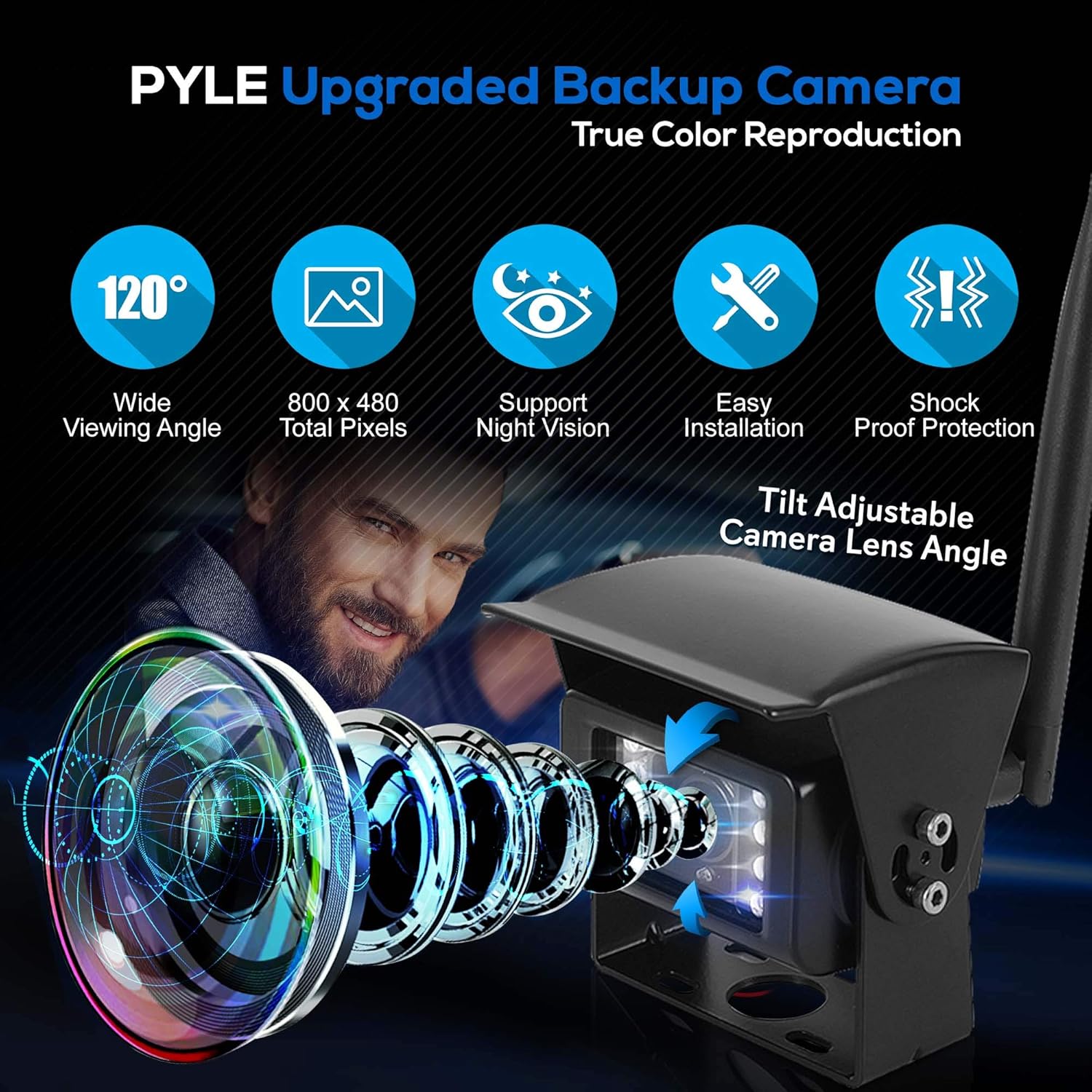
Image: An infographic detailing the advanced features of the Pyle camera, including its wide viewing angle, resolution, night vision, ease of installation, and robust shock-proof design.

Image: This image demonstrates the camera's waterproof and weather-resistant capabilities, showing it enduring water splashes while mounted on a truck, ensuring reliable operation in harsh conditions.
5. నిర్వహణ
- మానిటర్ శుభ్రం చేయడం: Use a soft, dry cloth to clean the monitor screen. For stubborn smudges, slightly dampనీటితో లేదా స్క్రీన్-సేఫ్ క్లీనర్తో వస్త్రాన్ని తుడవండి. రాపిడి పదార్థాలు లేదా కఠినమైన రసాయనాలను నివారించండి.
- Cleaning the Cameras: Periodically check and clean the camera lenses to ensure clear vision. Use a soft cloth and mild cleaning solution if necessary. Remove any dirt, mud, or snow accumulation.
- కనెక్షన్లను తనిఖీ చేయండి: Regularly inspect all power and antenna connections for tightness and corrosion. Ensure cables are not pinched or damaged.
- సాఫ్ట్వేర్ అప్డేట్లు: పైల్ను తనిఖీ చేయండి website periodically for any available firmware updates for your system.
6. ట్రబుల్షూటింగ్
| సమస్య | సాధ్యమైన కారణం | పరిష్కారం |
|---|---|---|
| మానిటర్లో చిత్రం లేదు |
|
|
| చిత్రం అస్పష్టంగా లేదా వక్రీకరించబడింది |
|
|
| రిమోట్ కంట్రోల్ పనిచేయడం లేదు |
|
|
| DVR recording issues |
|
|
7. స్పెసిఫికేషన్లు
| ఫీచర్ | వివరాలు |
|---|---|
| మోడల్ సంఖ్య | PLCMTR83QIR |
| స్క్రీన్ పరిమాణం | 7 అంగుళాలు |
| డిస్ప్లే రిజల్యూషన్ | 800 x 480 పిక్సెల్లు |
| వీడియో సిస్టమ్ | NTSC/PAL auto switching |
| కనెక్టివిటీ | Wireless (2.4Ghz) |
| వైర్లెస్ రేంజ్ | Up to 330+ ft. (line of sight) |
| కెమెరా సెన్సార్ | 1/4'' Color CMD OV7725 |
| కెమెరా Viewing యాంగిల్ | 120 డిగ్రీలు |
| కనిష్ట ప్రకాశం | 0.1 Lux (Night Vision) |
| జలనిరోధిత రేటింగ్ | IP-68 Marine Grade |
| DVR రికార్డింగ్ | Yes, via SD Card Slot (SD card not included) |
| విద్యుత్ సరఫరా | 12 వోల్ట్స్ DC |
| ఉత్పత్తి కొలతలు (మానిటర్) | 0.48"లీ x 4.73"వా x 7.09"హ |
| వస్తువు బరువు | 4 పౌండ్లు (మొత్తం వ్యవస్థ) |
8. వారంటీ మరియు మద్దతు
పైల్ ఉత్పత్తులు అత్యున్నత నాణ్యత ప్రమాణాలకు అనుగుణంగా రూపొందించబడ్డాయి మరియు తయారు చేయబడ్డాయి. నిర్దిష్ట వారంటీ సమాచారం కోసం, దయచేసి మీ ఉత్పత్తితో చేర్చబడిన వారంటీ కార్డును చూడండి లేదా అధికారిక పైల్ను సందర్శించండి. webసైట్.
For technical support, troubleshooting assistance, or replacement parts, please contact Pyle Customer Service:
- Webసైట్: www.pyleusa.com
- ఇమెయిల్: సూచించండి website for support contact form or email address.
- ఫోన్: సూచించండి webప్రస్తుత కస్టమర్ సర్వీస్ ఫోన్ నంబర్ల కోసం సైట్.
Please have your model number (PLCMTR83QIR) and purchase date ready when contacting support.


