1. పరిచయం
This manual provides detailed instructions for the installation, operation, and maintenance of your Lowrance AUTO-STBY Button Metal. Please read this manual thoroughly before use to ensure proper function and longevity of the product. This button is designed to integrate with compatible Lowrance marine electronic devices, enabling a convenient way to manage their standby state.
2. భద్రతా సమాచారం
Always observe the following safety precautions to prevent injury or damage to the product or other equipment:
- పవర్ డిస్కనెక్ట్ చేయండి: Always disconnect power to the marine electronic system before attempting any installation, wiring, or maintenance.
- సరైన వైరింగ్: Ensure all wiring connections are secure and correctly polarized (positive to positive, negative to negative/ground) to prevent electrical shorts or damage.
- పర్యావరణ పరిరక్షణ: While designed for marine environments, ensure the button is installed in a location that minimizes exposure to direct water spray or submersion unless explicitly rated for such conditions.
- వృత్తిపరమైన సంస్థాపన: If you are unsure about any part of the installation process, consult a qualified marine electronics technician.
3. ఉత్పత్తి ముగిసిందిview
The Lowrance AUTO-STBY Button Metal is a robust, momentary push-button switch designed for integration with Lowrance marine electronics. It features a durable metal construction and pre-attached wiring for straightforward connection to your device's AUTO-STBY input.

మూర్తి 3.1: ముందు view of the Lowrance AUTO-STBY Button Metal, showing the polished metal button and its attached black cable, terminating in red and black spade connectors.
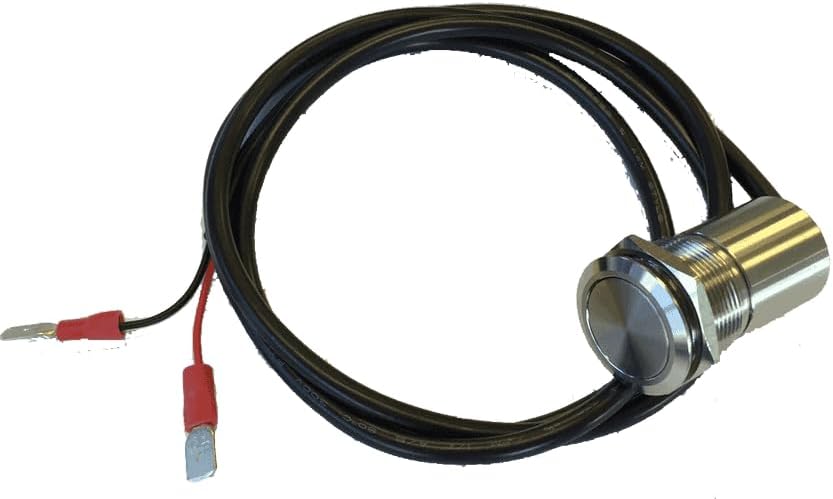
చిత్రం 3.2: కోణీయ view of the Lowrance AUTO-STBY Button Metal, highlighting the threaded body and securing nut, indicating its panel-mount design.
4. సెటప్ & ఇన్స్టాలేషన్
Follow these steps for proper installation of your AUTO-STBY Button Metal:
- మౌంటు స్థానాన్ని ఎంచుకోండి: Select a suitable location on your boat's dashboard or panel that is easily accessible and provides adequate protection from direct water exposure. Ensure there is sufficient space behind the panel for the button's body and wiring.
- మౌంటు రంధ్రం సిద్ధం చేయండి: Drill a hole of the appropriate diameter (refer to specifications for exact size) in the chosen mounting surface. Deburr the edges of the hole to prevent damage to the wiring.
- బటన్ను మౌంట్ చేయండి: Insert the threaded body of the button through the drilled hole. Secure it in place using the provided nut on the backside of the panel. Tighten firmly but do not overtighten.
- వైరింగ్ కనెక్షన్లు:
- Identify the AUTO-STBY input on your Lowrance marine electronic device. Consult your device's specific user manual for the correct wiring diagram and pinout.
- కనెక్ట్ చేయండి ఎరుపు తీగ from the AUTO-STBY button to the positive (+) input terminal designated for the AUTO-STBY function on your Lowrance device.
- కనెక్ట్ చేయండి నల్ల వైర్ from the AUTO-STBY button to the negative (-) or ground terminal designated for the AUTO-STBY function on your Lowrance device.
- షార్ట్ సర్క్యూట్లను నివారించడానికి అన్ని కనెక్షన్లు సురక్షితంగా ఉన్నాయని మరియు ఇన్సులేట్ చేయబడిందని నిర్ధారించుకోండి.
- పరీక్ష కార్యాచరణ: Once installed and wired, reconnect power to your marine electronic system. Test the button by pressing it and observing if your Lowrance device enters or exits standby mode as expected.
5. ఆపరేటింగ్ సూచనలు
The AUTO-STBY Button Metal functions as a momentary switch. Its primary purpose is to toggle the standby mode of compatible Lowrance marine electronic devices. The exact behavior (e.g., whether it puts the device into standby or wakes it up) depends on the specific Lowrance device it is connected to and its current state.
- To Activate/Deactivate Standby: Simply press and release the AUTO-STBY button.
- Device Specific Behavior: Refer to the user manual of your specific Lowrance fish finder, chartplotter, or other marine electronic device for detailed information on how it interprets the AUTO-STBY input and what functions are associated with it.
6. నిర్వహణ
The AUTO-STBY Button Metal is designed for durability and requires minimal maintenance. However, regular inspection and cleaning will ensure its longevity and reliable operation:
- శుభ్రపరచడం: Wipe the button surface with a soft, damp cloth to remove salt residue, dirt, or grime. Do not use abrasive cleaners, solvents, or harsh chemicals, as these may damage the metal finish or internal components.
- తనిఖీ: Periodically inspect the button and its wiring for any signs of wear, corrosion, fraying, or damage. Pay close attention to the connections at the back of the panel.
- తుప్పు నివారణ: In highly corrosive marine environments, consider applying a thin layer of dielectric grease to exposed electrical connections to prevent corrosion.
7. ట్రబుల్షూటింగ్
If your AUTO-STBY Button Metal is not functioning as expected, consider the following:
| సమస్య | సాధ్యమైన కారణం | పరిష్కారం |
|---|---|---|
| బటన్ స్పందించడం లేదు. | No power to the connected device. సరికాని వైరింగ్. వదులుగా లేదా తుప్పుపట్టిన కనెక్షన్లు. అననుకూల పరికరం. | Ensure the Lowrance device is powered on. Verify wiring against your device's manual. Check all connections for tightness and cleanliness. Confirm your Lowrance device supports an AUTO-STBY input. |
| Button feels sticky or sluggish. | Dirt or salt buildup around the button mechanism. | Clean the button surface and edges with a damp cloth. Avoid forcing the button. |
| Intermittent function. | వదులుగా ఉండే వైరింగ్ కనెక్షన్. Partial corrosion. | Inspect and re-secure all wiring connections. Clean any signs of corrosion. |
If the problem persists after attempting these solutions, it may indicate an internal fault with the button or the connected device. In such cases, it is recommended to contact Lowrance customer support or a qualified marine electronics technician.
8. స్పెసిఫికేషన్లు
| గుణం | వివరాలు |
|---|---|
| బ్రాండ్ పేరు | లోరెన్స్ |
| మోడల్ పేరు | AUTO-STBY BUTTON METAL |
| పార్ట్ నంబర్ | 000-13703-001 |
| మెటీరియల్ | Metal (specific alloy not specified) |
| తయారీదారు | Navico |
| మొదటి తేదీ అందుబాటులో ఉంది | జనవరి 14, 2019 |
| చేర్చబడిన భాగాలు | C-MAP MAX-N+ L: LIVERPOOL TO SWANSEA (Note: This component listing appears to be an error in the original product data and is not physically included with the button.) |
9. వారంటీ & సపోర్ట్
Warranty information for the Lowrance AUTO-STBY Button Metal is currently unknown. For product support, technical assistance, or to inquire about warranty details, please contact Lowrance customer service directly or visit their official store.
You can find more information and contact options by visiting the అమెజాన్లో లోరెన్స్ స్టోర్.


