1. పరిచయం
ధన్యవాదాలు, ధన్యవాదాలు.asing the Promate Silox True Wireless Stereo Speaker. This manual provides detailed instructions for setting up, operating, and maintaining your speaker. Please read this manual thoroughly before use to ensure optimal performance and safety.

Image 1.1: Promate Silox True Wireless Stereo Speaker. This image displays the cylindrical blue speaker from a front-side angle, highlighting its mesh fabric exterior and rubberized ends.
2. భద్రతా సమాచారం
- స్పీకర్ను తీవ్రమైన ఉష్ణోగ్రతలకు లేదా ప్రత్యక్ష సూర్యకాంతికి గురిచేయవద్దు.
- స్పీకర్ను వదలివేయడం లేదా బలమైన ప్రభావాలకు గురిచేయడం మానుకోండి.
- IPX6 రేటింగ్ ఉన్నప్పటికీ, అంతర్గత భాగాలకు నష్టం జరగకుండా ఉండటానికి స్పీకర్ను నీరు మరియు ద్రవాలకు దూరంగా ఉంచండి.
- Do not attempt to disassemble or repair the speaker yourself. Contact authorized service personnel.
- అందించిన ఛార్జింగ్ కేబుల్ మరియు అడాప్టర్ను మాత్రమే ఉపయోగించండి.
- పిల్లలకు దూరంగా ఉంచండి.
3. ప్యాకేజీ విషయాలు
దయచేసి ఈ క్రింది అంశాల కోసం ప్యాకేజీని తనిఖీ చేయండి:
- Promate Silox True Wireless Stereo Speaker
- ఛార్జింగ్ కేబుల్ (USB)
- సహాయక ఆడియో కేబుల్
- వినియోగదారు మాన్యువల్

Image 3.1: Promate Silox Speaker Packaging. This image shows the retail box of the Promate Silox speaker, illustrating the speaker itself and icons representing its key features like Bluetooth, TWS, IPX6 water resistance, and multiple connectivity options.
4. ఉత్పత్తి ముగిసిందిview
4.1 నియంత్రణలు మరియు సూచికలు

Image 4.1: Promate Silox Speaker Controls. This image shows the top panel of the speaker with clearly labeled buttons for power, play/pause, volume up/next track, volume down/previous track, mode, and EQ.
- పవర్ బటన్: పవర్ ఆన్/ఆఫ్ చేయడానికి నొక్కి పట్టుకోండి.
- ప్లే/పాజ్ బటన్: సంగీతాన్ని ప్లే చేయడానికి లేదా పాజ్ చేయడానికి నొక్కండి.
- వాల్యూమ్ పెంచు / తదుపరి ట్రాక్ బటన్: వాల్యూమ్ పెంచడానికి నొక్కండి. తదుపరి ట్రాక్కి వెళ్లడానికి పట్టుకోండి.
- వాల్యూమ్ డౌన్ / మునుపటి ట్రాక్ బటన్: Press to decrease volume. Hold to go to the previous track.
- మోడ్ (M) బటన్: Press to switch between Bluetooth, FM Radio, Micro SD, USB, and AUX modes.
- EQ బటన్: Press to cycle through equalizer presets.
- కాల్ బటన్: Press to answer/end calls. Hold to reject calls.
- LED సూచిక: పవర్ స్థితి, ఛార్జింగ్ స్థితి మరియు బ్లూటూత్ జత చేసే స్థితిని చూపుతుంది.
4.2 పోర్టులు

Image 4.2: Promate Silox Speaker Connectivity Ports. This image highlights the various input ports on the speaker, including Bluetooth, 3.5mm Audio Jack (AUX), Micro SD Card Slot, and USB Slot, all protected under a rubber flap.
- మైక్రో USB ఛార్జింగ్ పోర్ట్: స్పీకర్ను ఛార్జ్ చేసినందుకు.
- AUX ఇన్పుట్ (3.5mm): For connecting external audio devices via an audio cable.
- మైక్రో SD కార్డ్ స్లాట్: మైక్రో SD కార్డ్ నుండి నేరుగా సంగీతాన్ని ప్లే చేయడానికి.
- USB పోర్ట్: USB ఫ్లాష్ డ్రైవ్ నుండి నేరుగా సంగీతాన్ని ప్లే చేయడానికి.
5. సెటప్
5.1 స్పీకర్ను ఛార్జ్ చేయడం
- ఛార్జింగ్ కేబుల్ యొక్క మైక్రో USB చివరను స్పీకర్ ఛార్జింగ్ పోర్ట్కి కనెక్ట్ చేయండి.
- Connect the USB-A end to a USB power adapter (not included) or a computer's USB port.
- The LED indicator will illuminate to show charging status. It will turn off or change color when fully charged.
- పూర్తిగా ఛార్జ్ చేస్తే దాదాపు 7 గంటల ప్లేబ్యాక్ సమయం లభిస్తుంది.

Image 5.1: Promate Silox Speaker Long Playback Time. This image illustrates the speaker's 7-hour playback capability, showing the speaker with a clock icon indicating extended battery life.
5.2 పవర్ చేయడం ఆన్/ఆఫ్
- పవర్ ఆన్ చేయడానికి, LED సూచిక వెలిగే వరకు పవర్ బటన్ను నొక్కి పట్టుకోండి.
- పవర్ ఆఫ్ చేయడానికి, LED సూచిక ఆఫ్ అయ్యే వరకు పవర్ బటన్ను మళ్లీ నొక్కి పట్టుకోండి.
5.3 బ్లూటూత్ జత చేయడం
- Ensure the speaker is powered on and in Bluetooth mode (the LED indicator will flash, indicating it's ready for pairing). If not, press the 'M' button to switch to Bluetooth mode.
- మీ స్మార్ట్ఫోన్, టాబ్లెట్ లేదా ఇతర బ్లూటూత్-ప్రారంభించబడిన పరికరంలో బ్లూటూత్ను ప్రారంభించండి.
- కోసం వెతకండి "Promate Silox" in the list of available devices.
- Select "Promate Silox" to connect. Once connected, the LED indicator will stop flashing and remain solid.
- మీరు ఇప్పుడు మీ పరికరం నుండి స్పీకర్ ద్వారా ఆడియోను ప్లే చేయవచ్చు.
5.4 ట్రూ వైర్లెస్ స్టీరియో (TWS) జత చేయడం
TWS allows you to pair two Promate Silox speakers together for a true stereo sound experience.
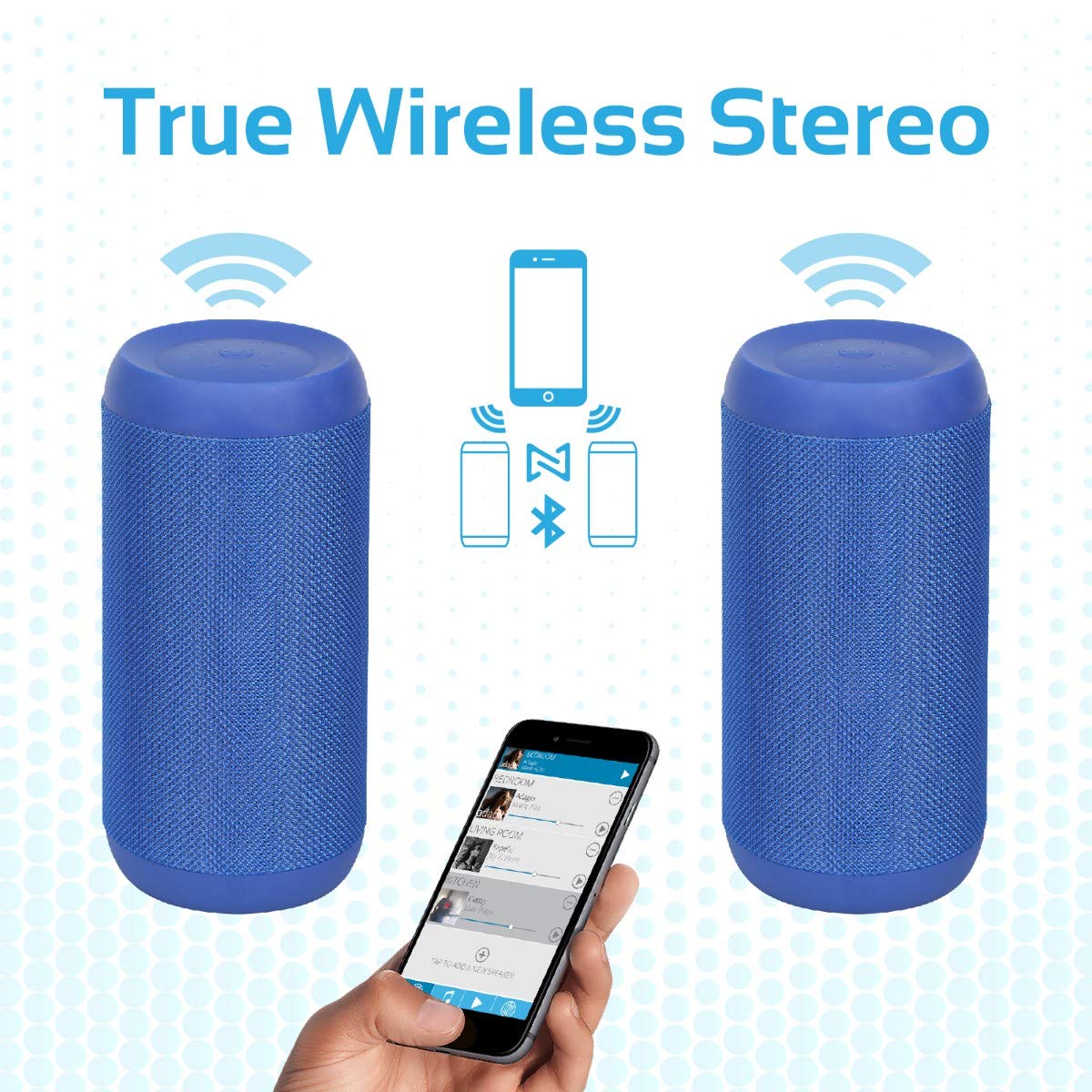
Image 5.2: Promate Silox True Wireless Stereo Pairing. This image visually explains the TWS function, showing two Promate Silox speakers wirelessly connected to a single smartphone, creating a stereo sound setup.
- Ensure both Promate Silox speakers are powered on and in Bluetooth pairing mode (LED flashing).
- On one of the speakers (this will be the primary speaker), double-press the Power button. The speaker will emit a sound indicating it's searching for another TWS speaker.
- The two speakers will automatically connect to each other. Once connected, the primary speaker's LED will flash slowly, and the secondary speaker's LED will remain solid.
- Now, connect your Bluetooth device to the primary speaker as described in "5.3 Bluetooth Pairing".
- ఆడియో ఇప్పుడు రెండు స్పీకర్ల ద్వారా స్టీరియోలో ప్లే అవుతుంది.
6. ఆపరేటింగ్ సూచనలు
6.1 బ్లూటూత్ మోడ్
- After successful pairing (see 5.3), play music from your connected device.
- ప్లేబ్యాక్ను నియంత్రించడానికి స్పీకర్లోని ప్లే/పాజ్ బటన్ను ఉపయోగించండి.
- Press Volume Up/Down buttons to adjust volume.
- Hold Volume Up/Down buttons to skip tracks.

Image 6.1: Promate Silox Speaker Music Amplified. This image shows the speaker placed on a sofa armrest, playing music from a tablet, illustrating its use in a home environment.
6.2 FM రేడియో మోడ్
- Press the 'M' (Mode) button repeatedly until you hear the FM radio prompt.
- అందుబాటులో ఉన్న FM స్టేషన్లను ఆటో-స్కాన్ చేయడానికి మరియు సేవ్ చేయడానికి ప్లే/పాజ్ బటన్ను ఒకసారి నొక్కండి.
- Use the Volume Up/Down buttons to navigate between saved stations.
- Press and hold Volume Up/Down buttons to fine-tune the frequency.
6.3 మైక్రో SD కార్డ్ ప్లేబ్యాక్
- Insert a Micro SD card (with MP3/WMV audio files) into the Micro SD card slot.
- The speaker will automatically switch to Micro SD mode and begin playing music. If not, press the 'M' button to select Micro SD mode.
- Use the Play/Pause, Volume Up/Down, and track skip buttons as in Bluetooth mode.
6.4 USB ప్లేబ్యాక్
- Insert a USB flash drive (with MP3/WMV audio files) USB పోర్టులోకి.
- The speaker will automatically switch to USB mode and begin playing music. If not, press the 'M' button to select USB mode.
- Use the Play/Pause, Volume Up/Down, and track skip buttons as in Bluetooth mode.
6.5 AUX ఇన్పుట్
- Connect one end of the 3.5mm audio cable to the speaker's AUX input port.
- మరొక చివరను మీ బాహ్య పరికరం (ఉదా. MP3 ప్లేయర్, ల్యాప్టాప్) యొక్క ఆడియో అవుట్పుట్ జాక్కి కనెక్ట్ చేయండి.
- Press the 'M' button to switch to AUX mode.
- మీ బాహ్య పరికరం నుండి ప్లేబ్యాక్ మరియు వాల్యూమ్ను నియంత్రించండి.
6.6 హ్యాండ్స్-ఫ్రీ కాలింగ్
- బ్లూటూత్ ద్వారా కనెక్ట్ అయినప్పుడు కాల్ వచ్చినప్పుడు, సంగీతం పాజ్ అవుతుంది.
- Press the Call button once to answer the call.
- కాల్ ముగించడానికి కాల్ బటన్ను మళ్ళీ నొక్కండి.
- ఇన్కమింగ్ కాల్ను తిరస్కరించడానికి కాల్ బటన్ను నొక్కి పట్టుకోండి.
- అంతర్నిర్మిత మైక్రోఫోన్ స్పష్టమైన కమ్యూనికేషన్ కోసం అనుమతిస్తుంది.
7. నిర్వహణ
- శుభ్రపరచడం: స్పీకర్ను మృదువైన, పొడి గుడ్డతో తుడవండి. రాపిడి క్లీనర్లను లేదా ద్రావకాలను ఉపయోగించవద్దు.
- నిల్వ: ఎక్కువసేపు ఉపయోగంలో లేనప్పుడు స్పీకర్ను చల్లని, పొడి ప్రదేశంలో నిల్వ చేయండి.
- బ్యాటరీ సంరక్షణ: To prolong battery life, charge the speaker fully before storing it for a long time and recharge it every 3-6 months.
- నీటి నిరోధకత: The speaker is IPX6 water-resistant, meaning it can resist gentle water spray and splashes. Do not submerge it in water. Ensure the port cover is securely closed to maintain water resistance.

Image 7.1: Promate Silox Speaker IPX6 Water-Resistant. This image shows the speaker with water splashing on it, accompanied by an IPX6 water-resistant logo, demonstrating its durability against splashes.
8. ట్రబుల్షూటింగ్
| సమస్య | సాధ్యమైన కారణం | పరిష్కారం |
|---|---|---|
| స్పీకర్ పవర్ ఆన్ చేయదు. | తక్కువ బ్యాటరీ. | స్పీకర్ను పూర్తిగా ఛార్జ్ చేయండి. |
| బ్లూటూత్ ద్వారా జత చేయడం సాధ్యం కాదు. | స్పీకర్ జత చేసే మోడ్లో లేదు; పరికరం బ్లూటూత్ ఆఫ్లో ఉంది; చాలా దూరంగా ఉంది. | Ensure speaker is in Bluetooth pairing mode (flashing LED). Turn on Bluetooth on your device. Move device closer to speaker (within 10 meters). |
| శబ్దం లేదు. | వాల్యూమ్ చాలా తక్కువగా ఉంది; తప్పు మోడ్ ఎంచుకోబడింది; పరికరం ప్లే కావడం లేదు. | Increase speaker and device volume. Ensure correct mode (Bluetooth, AUX, SD, USB) is selected. Check if music is playing on the source device. |
| FM రేడియో స్పందన సరిగా లేదు. | బలహీనమైన సిగ్నల్; పర్యావరణ జోక్యం. | Move the speaker to a different location. Perform auto-scan again. |
| TWS జత చేయడం విఫలమైంది. | స్పీకర్లు చాలా దూరంగా ఉన్నాయి; ఒక స్పీకర్ ఇప్పటికే పరికరానికి కనెక్ట్ చేయబడింది. | Ensure both speakers are in pairing mode and close to each other. Disconnect any Bluetooth devices from both speakers before initiating TWS pairing. |
9. స్పెసిఫికేషన్లు
- మోడల్: Silox
- స్పీకర్ రకం: అవుట్డోర్, పోర్టబుల్
- కనెక్టివిటీ టెక్నాలజీ: Bluetooth 4.2, Auxiliary (3.5mm), USB, Micro SD Card
- స్పీకర్ గరిష్ట అవుట్పుట్ పవర్: 20 వాట్స్
- ఆడియో అవుట్పుట్ మోడ్: స్టీరియో (TWS తో)
- నీటి నిరోధకత: IPX6
- బ్యాటరీ లైఫ్: Approximately 7 hours (playback time)
- నియంత్రణ పద్ధతి: టచ్ బటన్లు
- అంతర్నిర్మిత మైక్రోఫోన్: Yes (for hands-free calls)
- FM రేడియో: అవును
- అనుకూల పరికరాలు: Laptop, Smartphone, Tablet, Music Players
- ఉత్పత్తి కొలతలు: 11.9 x 15.4 x 26.7 సెం.మీ
- వస్తువు బరువు: 1 కిలోలు
- రంగు: నీలం

Image 9.1: Promate Silox Speaker 20W Output. This image emphasizes the speaker's powerful 20-watt audio output, showing the speaker with visual effects representing sound waves and a "20 Watt Hi-Definition Stereo Quality Sound" label.
10. వారంటీ మరియు మద్దతు
The Promate Silox True Wireless Stereo Speaker comes with a 2 సంవత్సరాల వారంటీ కొనుగోలు చేసిన తేదీ నుండి. ఈ వారంటీ సాధారణ ఉపయోగంలో తయారీ లోపాలు మరియు పనితనాన్ని కవర్ చేస్తుంది.
For technical support, warranty claims, or further assistance, please visit the official Promate website or contact your local Promate customer service.
You can visit the Promate Store for more information: Promate Store on Amazon


