పరిచయం
This manual provides detailed instructions for the installation, operation, and maintenance of your CP PLUS CP-UNC-C13L1-VMW 1.3 MP HD WiFi IR Cube Camera. Please read this manual thoroughly before using the product to ensure correct usage and optimal performance.
The CP-UNC-C13L1-VMW is a versatile 1.3 Megapixel HD camera designed for both indoor and outdoor surveillance, featuring Wi-Fi connectivity and infrared (IR) night vision for comprehensive monitoring.
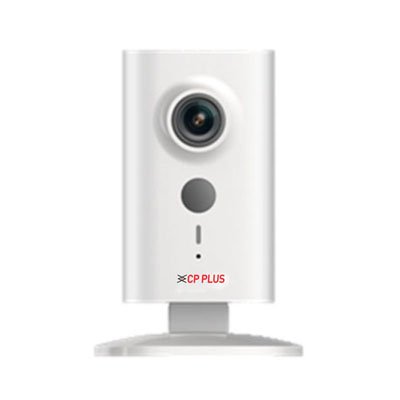
చిత్రం: ముందు భాగం view of the CP PLUS CP-UNC-C13L1-VMW 1.3 MP HD WiFi IR Cube Camera. The camera is white, rectangular, with a lens at the top, a grey button below it, and an indicator light and 'CP PLUS' logo at the bottom. It stands on a clear, flat base.
ప్యాకేజీ విషయాలు
- CP PLUS CP-UNC-C13L1-VMW Camera
- పవర్ అడాప్టర్
- మౌంటింగ్ కిట్ (స్క్రూలు, వాల్ ప్లగ్లు)
- త్వరిత ప్రారంభ గైడ్
సెటప్
1. భౌతిక సంస్థాపన
- ఒక స్థానాన్ని ఎంచుకోండి: Select a suitable indoor or outdoor location for the camera. Ensure it is within range of your Wi-Fi network and a power outlet. The camera supports surface mounting.
- కెమెరాను మౌంట్ చేయండి: Use the provided mounting kit to securely attach the camera to a wall or ceiling. Ensure the camera is positioned to cover the desired surveillance area.
- పవర్ కనెక్ట్ చేయండి: Plug the power adapter into the camera's power input port and then into a standard electrical outlet. The camera's indicator light should illuminate.
2. నెట్వర్క్ కనెక్షన్ (వై-ఫై)
- అనువర్తనాన్ని డౌన్లోడ్ చేయండి: కోసం వెతకండి the official CP PLUS mobile application on your Android device's app store. Install the application.
- ఖాతాను సృష్టించండి: కొత్త యూజర్ ఖాతాను సృష్టించడానికి లేదా మీకు ఇప్పటికే ఒకటి ఉంటే లాగిన్ అవ్వడానికి యాప్ను తెరిచి, స్క్రీన్పై ఉన్న సూచనలను అనుసరించండి.
- పరికరాన్ని జోడించండి: In the app, select the option to 'Add Device' or 'Add Camera'.
- Scan QR Code/Manual Input: Follow the app's instructions to either scan a QR code on the camera (if available) or manually input the device ID.
- Wi-Fiకి కనెక్ట్ చేయండి: The app will guide you through connecting the camera to your home Wi-Fi network. Ensure your mobile device is connected to the same 2.4GHz Wi-Fi network you intend to use for the camera.
- పూర్తి సెటప్: Once connected, you can name your camera and complete the initial setup process.
కెమెరాను ఆపరేట్ చేస్తోంది
1. లైవ్ View
- Open the CP PLUS app on your mobile device.
- పరికర జాబితా నుండి మీ కెమెరాను ఎంచుకోండి view ప్రత్యక్ష ఫీడ్.
- You can switch between standard definition (SD) and high definition (HD) video quality within the live view ఇంటర్ఫేస్.
2. రికార్డింగ్ మరియు ప్లేబ్యాక్
- The camera supports continuous recording or event-triggered recording (e.g., motion detection).
- రికార్డ్ చేసిన fooని యాక్సెస్ చేయడానికిtage, navigate to the 'Playback' section within the app.
- Select the date and time to review రికార్డ్ చేయబడిన సంఘటనలు.
3 మోషన్ డిటెక్షన్
- Enable motion detection in the camera settings within the app.
- తప్పుడు అలారాలను తగ్గించడానికి సున్నితత్వ స్థాయిలను సర్దుబాటు చేయండి.
- Configure notification settings to receive alerts on your mobile device when motion is detected.
4. నైట్ విజన్
- The camera automatically switches to infrared (IR) night vision mode in low-light conditions.
- This provides clear black and white video footage up to 10 meters in complete darkness.
నిర్వహణ
1. శుభ్రపరచడం
- కెమెరా శుభ్రం చేయడానికి ముందు పవర్ ఆఫ్ చేయబడిందని నిర్ధారించుకోండి.
- కెమెరా బాడీని తుడవడానికి మృదువైన, పొడి వస్త్రాన్ని ఉపయోగించండి.
- లెన్స్ కోసం, గీతలు పడకుండా ఉండటానికి ప్రత్యేకమైన లెన్స్ క్లీనింగ్ క్లాత్ మరియు ద్రావణాన్ని ఉపయోగించండి.
- కఠినమైన రసాయనాలు లేదా రాపిడి క్లీనర్లను ఉపయోగించవద్దు.
2. ఫర్మ్వేర్ నవీకరణలు
- Regularly check for firmware updates through the CP PLUS mobile application.
- Firmware updates can improve performance, add new features, and enhance security.
- Follow the in-app instructions carefully during the update process. Do not power off the camera during an update.
3. నిల్వ నిర్వహణ
- If using a local storage card (not included), ensure it is formatted periodically to maintain optimal recording performance.
- Manage cloud storage settings (if subscribed) through the mobile application.
ట్రబుల్షూటింగ్
| సమస్య | సాధ్యమైన కారణం | పరిష్కారం |
|---|---|---|
| కెమెరా పవర్ ఆన్ చేయడం లేదు | No power supply; faulty adapter | Check power connection; try a different outlet; ensure adapter is working. |
| Wi-Fiకి కనెక్ట్ చేయడం సాధ్యపడలేదు | Incorrect Wi-Fi password; camera too far from router; 5GHz network used | Verify password; move camera closer to router; ensure router is broadcasting 2.4GHz Wi-Fi. |
| పేలవమైన వీడియో నాణ్యత | Weak Wi-Fi signal; dirty lens | Improve Wi-Fi signal strength; clean the camera lens. |
| మోషన్ డిటెక్షన్ పని చేయడం లేదు | Feature disabled; incorrect sensitivity settings | Enable motion detection in app; adjust sensitivity. |
స్పెసిఫికేషన్లు
| ఫీచర్ | వివరాలు |
|---|---|
| మోడల్ | CP-UNC-C13L1-VMW |
| బ్రాండ్ | CP ప్లస్ |
| రిజల్యూషన్ | 1.3 MP HD (Video Capture Resolution: 720p) |
| కనెక్టివిటీ టెక్నాలజీ | వైర్లెస్ (Wi-Fi) |
| ఇండోర్/అవుట్డోర్ వినియోగం | ఇండోర్, అవుట్డోర్ |
| శక్తి మూలం | కార్డెడ్ ఎలక్ట్రిక్ |
| కంట్రోలర్ రకం | Android (via mobile application) |
| మౌంటు రకం | ఉపరితల మౌంట్ |
| వస్తువు బరువు | 240 గ్రా |
| ప్యాకేజీ కొలతలు | 18.8 x 10.2 x 9.2 సెం.మీ |
వారంటీ మరియు మద్దతు
For warranty information, please refer to the warranty card included with your product or visit the official CP PLUS webసైట్. కొనుగోలు రుజువుగా మీ కొనుగోలు రసీదుని ఉంచండి.
If you encounter any issues not covered in this manual or require technical assistance, please contact CP PLUS customer support. Contact details can typically be found on the product packaging, the official website, or within the mobile application.


